
Okwu mmalite
This manual provides detailed instructions for the setup, operation, and maintenance of your AcuRite Iris (5-in-1) Wireless Weather Station and Add-On Display. This system is designed to monitor various environmental conditions, including indoor and outdoor temperature, humidity, wind speed, wind direction, and rainfall.
Ngwaahịa gafereview
The AcuRite Iris (5-in-1) Weather Station combines multiple sensors into a single outdoor unit, transmitting data wirelessly to an indoor display. The add-on display allows for monitoring conditions from additional locations within your home or office.
Atụmatụ igodo
- Comprehensive weather information with over 55 data points, including historical data, heat index, dew point, 'feels like' temperature, and pressure trends.
- Real-time monitoring of indoor/outdoor temperature and humidity, wind speed/direction, barometric pressure, and rainfall.
- Compatibility with any AcuRite 5-in-1 Weather Sensor, enabling observation of conditions from multiple rooms with additional displays.
- Illuminated color display with manual and auto-dimming brightness, providing a 12 to 24-hour weather forecast.
- Includes mounting hardware for easy setup and features a 2-year battery life for the outdoor sensor (batteries not included).

Image: The AcuRite Iris 5-in-1 Weather Station, showing the outdoor sensor and the indoor display unit. Callouts indicate its ability to accurately measure indoor and outdoor temperature and humidity, monitor wind speed and direction, provide a visual readout of current weather conditions, and offer a real-time weather ticker for straightforward information.
Kedu ihe dị na Igbe ahụ
Nyochaa na akụrụngwa niile dị tupu ịmalite ntọlite a.
- AcuRite Iris (5-in-1) Outdoor Sensor
- Ngalaba Ngosipụta Dijitalụ
- Power Adapter for Display
- Mounting Hardware (for outdoor sensor)
- Akwụkwọ ntuziaka (akwụkwọ a)
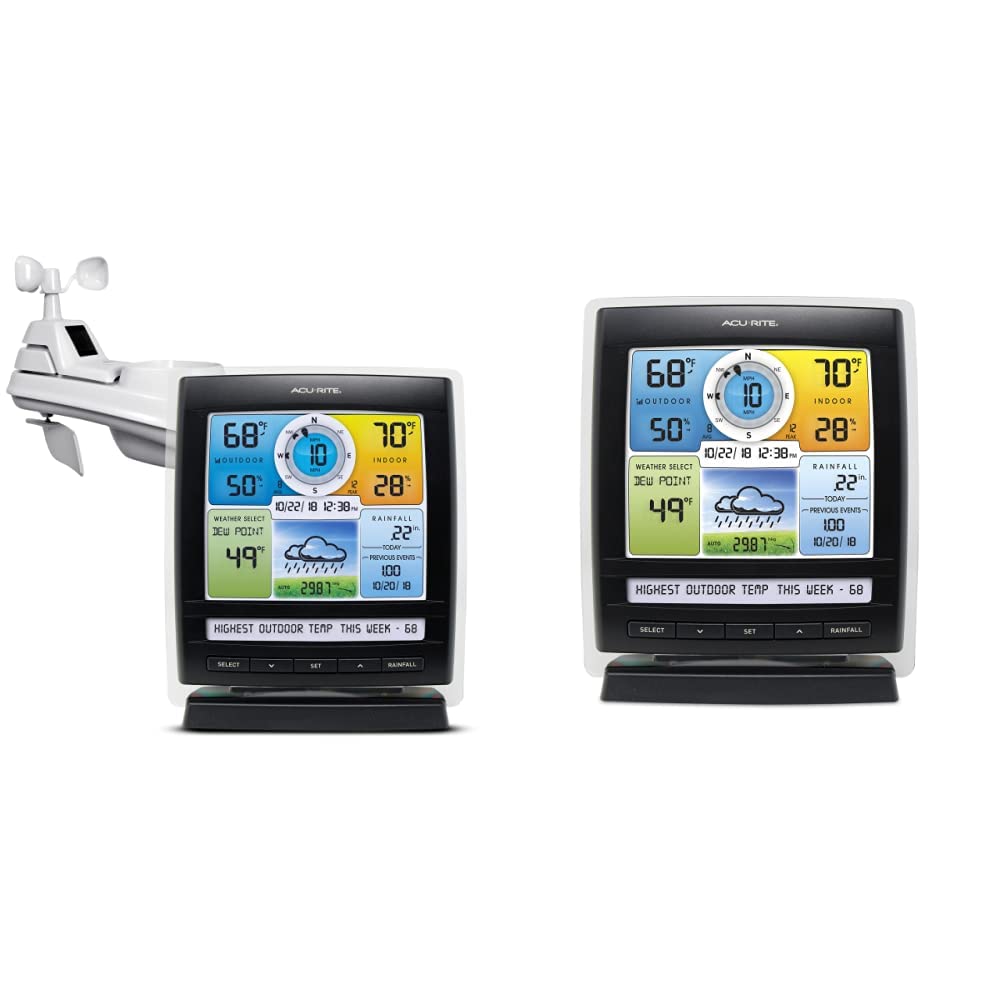
Image: The main components of the AcuRite Iris 5-in-1 Weather Station, featuring the outdoor sensor and the indoor digital display unit.
Melite
Iwepu ngwongwo
Carefully remove all components from the packaging. Retain packaging materials for future storage or transport if needed.
Na-akwado Ngosipụta
- Plug the included power adapter into the display unit and then into a standard electrical outlet.
- Optional: For backup power, insert 6 AA alkaline batteries (not included) into the battery compartment on the back of the display.
Mmetụta ihe mmetụta
Proper placement of the 5-in-1 outdoor sensor is crucial for accurate readings. Choose a location that is:
- Dịkarịa ala 5 ụkwụ (1.5 mita) site n'ala.
- Away from direct heat sources (e.g., exhaust vents, air conditioners).
- Free from obstructions that could block wind or rain (e.g., tall buildings, trees).
- Within 330 feet (100 meters) of the display unit for optimal wireless signal.
Ịtinye ihe mmetụta
Use the included mounting hardware to securely attach the 5-in-1 sensor to a post or pole. Ensure the sensor is level for accurate rainfall measurements.
Ntuziaka ọrụ
Gosipụtaview
The illuminated color LCD display presents various weather data in an organized manner. Familiarize yourself with the different sections:
- Ngalaba Mpụga: Displays outdoor temperature, humidity, and trend indicators.
- Wind Section: Shows current wind speed, average wind speed, peak wind speed, and wind direction.
- Ngalaba dị n'ime ụlọ: Na-egosi okpomọkụ na iru mmiri dị n'ime ụlọ.
- Weather Select: na-enye ohere viewing of dew point, heat index, or 'feels like' temperature.
- Rainfall Section: Shows current day's rainfall and historical rainfall data.
- Amụma ihu igwe: Provides a 12 to 24-hour forecast based on barometric pressure changes.

Image: The AcuRite Iris display unit, highlighting sections for weather, humidity, and wind information with trend indicators; dew point, weather forecast, and rainfall visuals; and the date and time.
Nsoro ụzọ
Use the buttons located below the display to navigate through settings and view different data points:
- Họrọ: Cycles through various weather data points in the 'Weather Select' area.
- WEP :TARA: Enters setup mode for time, date, and other preferences.
- Akụ Elu/Ada: Adjusts values during setup or navigates through historical data.
- RAINFALL: Displays daily, weekly, monthly, or yearly rainfall totals.

Foto: ihu doro anya view of the AcuRite Iris digital display, showing the color screen with various weather readings and the control buttons at the bottom.
Understanding Readings
The display provides real-time data. Trend arrows indicate whether temperature, humidity, or pressure are rising, falling, or steady. The self-calibrating forecasting feature improves accuracy over time by analyzing barometric pressure changes.
Akara ihu igwe
The 'Weather Ticker' at the bottom of the display streams useful environmental information, such as 'feels like' temperature, number of days since last rainfall, and other relevant alerts or data points.
Nlekọta
Ngbanwe batrị
The outdoor 5-in-1 sensor requires 4 AA batteries (not included) and has an estimated battery life of 2 years. Replace batteries when the low battery indicator appears on the display. Ensure to use fresh, high-quality alkaline or lithium batteries (lithium recommended for temperatures below -4°F / -20°C).
Sensọ nhicha
Periodically inspect the outdoor sensor for debris, especially in the rain collector funnel and around the wind cups. Clean gently with a damp cloth. Ensure the rain gauge tipping bucket mechanism moves freely.
Nchọpụta nsogbu
If you encounter issues with your AcuRite Iris Weather Station, consider the following common solutions:
- No Outdoor Sensor Data: Ensure the sensor is within range of the display (max 330 ft / 100 m) and has fresh batteries. Try relocating the display or sensor to reduce interference.
- Inaccurate Temperature/Humidity: Verify the sensor is not exposed to direct sunlight or heat sources. Allow up to 30 minutes for readings to stabilize after setup or relocation.
- Inaccurate Rainfall: Check that the sensor is level and the rain collector funnel is clear of debris.
- Ngosipụta Anaghị Agbanwu: Confirm the power adapter is securely connected and the electrical outlet is functional. If using batteries, ensure they are correctly inserted and fresh.
For more detailed troubleshooting guides and support, please visit the official AcuRite websaịtị.
Nkọwapụta
| Ụdị | AcuRite |
| Isi Iyi Ike (Sensọ) | Battery Powered (4 AA, not included) |
| Isi Iyi Ike (Ngosipụta) | 4.5V Power Adapter (included) or 6 AA batteries (not included) |
| Teknụzụ Njikọta | Ikuku |
| Okpomọkụ ziri ezi | ±1 Celsius C |
| Nleba okpomọkụ | 45 Ogo Celsius |
| Ụdị ngosi | Ngosipụta Agba LCD |
| Ngwa gụnyere | Power Adapter, Stand, Mounting Hardware |
Akwụkwọ ikike na nkwado
AcuRite products are designed for reliability and performance. For information regarding product warranty, technical support, or to register your product, please visit the official AcuRite websaịtị ma ọ bụ kpọtụrụ ngalaba ọrụ ndị ahịa ha. Debe nnata nzụta gị ka ihe akaebe nke ịzụrụ.
Websaịtị: www.acurite.com