
1. Ngwaahịa gafereview
The NC GBS-8100 is a versatile video converter board designed for arcade game systems. It facilitates the conversion of VGA/SVGA/XGA/SXGA signals to CGA, RGBS, CVBS, or S-Video outputs, making it compatible with a wide range of display devices, including older arcade monitors and standard definition televisions. This board features true digital 24-bit A/D conversion for accurate color reproduction and offers user controls for image adjustment.
Akụkụ ndị bụ isi:
- Ntinye ike: DC 5V/2A via 6.3mm connector.
- Input Signal Support: VGA/SVGA/XGA/SXGA resolutions (640x480, 800x600, 1024x768, 1280x1024).
- Nhọrọ mmepụta: CGA (15K), VGA bypass, Video (CVBS), S-Video.
- Njikwa onyonyo: Supports position and zoom adjustments.
- Omimi agba: True digital 24-bit A/D converter for 16.7-million color conversion.
- OSD menu: English On-Screen Display for adjustments.
- Njikwa njikwa: Dedicated keys for Output Switch, Image Zoom, Image Position, and Output Adjust.
- ndakọrịta: Supports NTSC and PAL video standards.
Ọdịnaya ngwugwu:
- 1x Video Output Converter Board (GBS-8100)
- 1x Power supply wire

Figure 1: The GBS-8100 converter board along with the included power supply wire and a multi-color signal cable.
2. Ntọala na nwụnye
This section provides instructions for connecting and setting up your GBS-8100 converter board.
2.1. Njirimara akụrụngwa
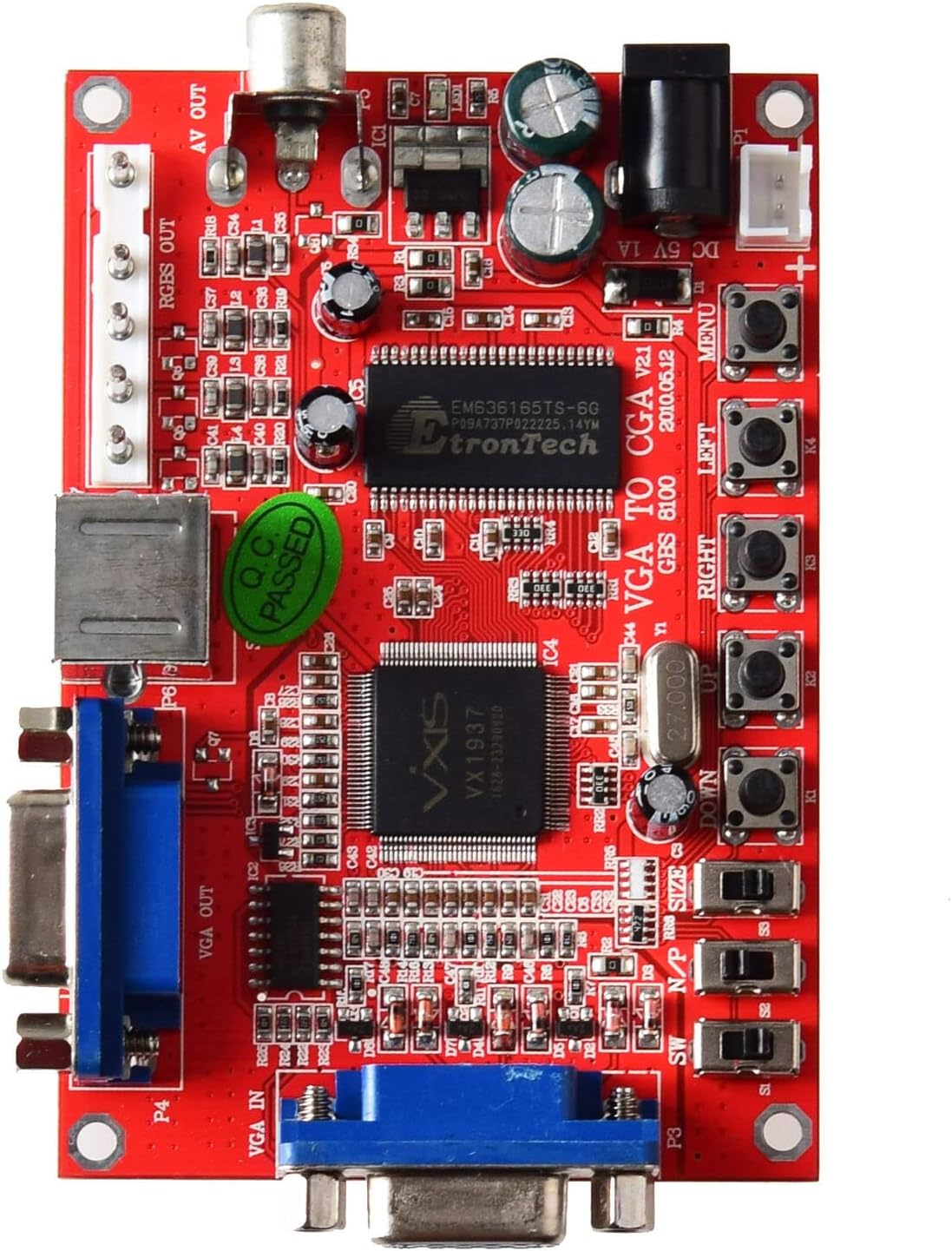
Foto 2: Top view of the GBS-8100 board, highlighting VGA IN, VGA OUT, AV OUT, RGBS OUT, S-Video port, DC 5V input, and control buttons.
- VGA IN (P3): Connect your source device (e.g., PC, game console) with a VGA output here.
- VGA OUT (P4): For VGA bypass, connect a VGA monitor here.
- RGBS/CGA OUT (P7): Connect to an arcade monitor or display that accepts RGBS or CGA signals.
- AV OUT (P5): Connect to a standard definition TV using a composite video cable.
- S-Video OUT (P6): Connect to a TV or display using an S-Video cable.
- DC 5V/2A Input: Connect the included power supply wire here. Ensure the power supply provides 5V DC at 2A.
- bọtịnụ njikwa: Buttons for MENU, UP, DOWN, LEFT, RIGHT, Output Switch, Image Zoom, Image Position, Output Adjust.
2.2. Nzọụkwụ Njikọ
- Njikọ ike: Connect the provided power supply wire to the DC 5V/2A input on the GBS-8100 board. Connect the other end to a suitable 5V DC power source (not included, typically a power adapter).
- Isi mmalite ntinye: Connect your VGA source (e.g., PC, arcade JAMMA board with VGA output) to the VGA IN (P3) port on the converter board.
- Ngosipụta mmepụta:
- Maka CGA/RGBS output: Connect your arcade monitor or display to the RGBS/CGA OUT (P7) ọdụ ụgbọ mmiri.
- Maka Composite Video (AV) output: Connect your TV to the AV OUT (P5) ọdụ ụgbọ mmiri.
- Maka S-Video output: Connect your TV to the S-Video OUT (P6) ọdụ ụgbọ mmiri.
- Maka VGA Bypass: Connect a VGA monitor to the VGA OUT (P4) ọdụ ụgbọ mmiri.
- Audio (Nhọrọ): If your source provides audio via VGA, ensure your display setup can handle it, or use a separate audio solution as this board primarily handles video.

Ọgụgụ 3: nso nso view of the VGA IN, VGA OUT, and S-Video ports on the GBS-8100 board.
3. Ntuziaka ọrụ
Once connected, power on the GBS-8100 board and your display. The board will automatically detect the input signal. Use the onboard buttons to navigate the OSD menu and adjust settings.
3.1. Ngosipụta ihuenyo (OSD) NchNhr
Pịa MENU button to access the OSD. Use the UP na N'ala buttons to navigate through menu options, and Ụkwụ na OKWU buttons to change values or select sub-menus.
3.2. Njikwa onye ọrụ
- Mgbanwe mmepụta: Cycles through available output modes (CGA, Video, S-Video, VGA Bypass).
- Mbugharị foto: Adjusts the zoom level of the displayed image.
- Image Position: Adjusts the horizontal and vertical position of the image on the screen.
- Mmezi mmepụta: Fine-tunes specific output parameters.
3.3. Supported Input/Output Resolutions
| Otu | Nkọwa |
|---|---|
| Input Signal (Auto Scan) |
|
| Mgbama ngosi mmepụta |
|
4. Nlekọta
The GBS-8100 converter board is designed for durability and requires minimal maintenance.
- Nhicha: Use a soft, dry cloth to gently wipe the surface of the board. Avoid using liquid cleaners or solvents, as they may damage the electronic components.
- gburugburu: Operate the board in a clean, dry environment, away from excessive dust, moisture, and extreme temperatures.
- Ijikwa: Handle the board by its edges to avoid touching components, especially when powered on.
- Gbanyụọ: Always disconnect power before making or changing any connections.
5. Nchọpụta nsogbu
If you encounter issues with your GBS-8100 converter board, refer to the following common problems and solutions:
| Nsogbu | Ihe kpatara/ Ngwọta nwere ike ime |
|---|---|
| Enweghị onyonyo na-egosi. |
|
| Ihe onyonyo agbagọ ma ọ bụ na-amagharị. |
|
| OSD menu not appearing or unresponsive. |
|
| Agba ezighi ezi. |
|
6. Nkọwapụta
Detailed technical specifications for the GBS-8100 converter board.
| Oke | Uru |
|---|---|
| Nọmba nlereanya | GBS-8100 |
| Ntinye ntinye ike | DC 5V/2A (6.3mm connector) |
| Input Signal Support | VGA/SVGA/XGA/SXGA (640x480, 800x600, 1024x768, 1280x1024) |
| Input Signal Frequencies |
|
| Ụdị nrịbama mmepụta | CGA (15K), VGA (Bypass), Video (CVBS), S-Video |
| Output Signal Resolutions |
|
| Ntughari agba | True digital 24-bit A/D converter (16.7 million colors) |
| Asụsụ OSD | Bekee |
| Akụkụ (Ihe dị ka) | 3.94 x 3.15 x 1.18 inch (akụkụ ngwugwu) |
| Ibu Ibu | 3.52 ounces (0.1 Kilogram) |
7. Akwụkwọ ikike na nkwado
This section provides information regarding product warranty and customer support.
7.1. Akwụkwọ ikike Ozi
Specific warranty details for the NC GBS-8100 converter board are typically provided at the point of purchase or within the product packaging. Please refer to your purchase receipt or contact the seller for precise warranty terms and conditions. Generally, electronic components may come with a limited manufacturer's warranty covering defects in materials and workmanship.
7.2. Nkwado ndị ahịa
For technical assistance, troubleshooting beyond this manual, or inquiries regarding your product, please contact the seller or manufacturer directly. Contact information can often be found on the product packaging, the seller's websaịtị, ma ọ bụ akwụkwọ ịzụrụ ihe gị.
Maka ajụjụ izugbe, ị nwere ike ịga na NC Store on Amazon.