
1. Okwu mmalite
Thank you for choosing the AstroAI Digital Tire Inflator and 12V Extension Cord. This manual provides important information regarding the safe operation, maintenance, and troubleshooting of your new device. Please read this manual thoroughly before use and retain it for future reference.

Image: AstroAI Digital Tire Inflator and 12V Extension Cord.
2. Akụrụngwa Ngwaahịa
- Efficient and Durable Design: Features a metal gear and cylinder structure for enhanced performance and extended service life compared to plastic alternatives. Capable of continuous operation for up to 20 minutes, allowing inflation of four 195/55/R15 car tires (0-35 PSI) without requiring a cooling period.
- Clear LCD Screen and LED Light: The LCD screen displays air pressure in KPA, PSI, and BAR units for easy reading. An integrated LED light assists in inflating or checking tires in low-light conditions.
- Ọrụ enyi na enyi: Simple to use by plugging into a vehicle's 12V cigarette lighter and connecting the hose to the tire valve. Suitable for vehicles, SUVs, motorcycles, and bicycles. Note: Not compatible with high-pressure or large-flow inflatables.
- Robust 12V Extension Cord: The included 12-foot heavy-duty 16 AWG wire extension cord is designed for durability and everyday use. Its highly efficient wire ensures low impedance and flexibility.
- Universal Compatibility (Extension Cord): The extension cord integrates with various 12V car accessories, including tire inflators, air compressors, heated blankets, AC to DC converters, car fans, portable refrigerators, dash cams, inverters, and vacuum cleaners.
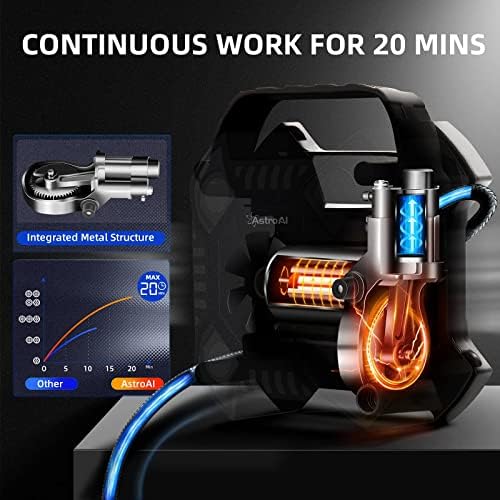
Foto: Ime view of the inflator highlighting the integrated metal structure for durability and continuous operation.

Image: The inflator's compact design and integrated storage for accessories, demonstrating portability.

Image: The inflator's high-quality construction, indicating heat resistance up to 158°F and freezing tolerance down to -4°F.
3. Ngwa ngwaahịa
Familiarize yourself with the parts of your AstroAI Digital Tire Inflator:

Image: Labeled diagram of the AstroAI Digital Tire Inflator components.
- Air Pressure Gauge: Digital display for current tire pressure.
- Aka na-ebu: For easy transport of the unit.
- Ọkụ LED: Illuminates the work area in low light.
- Inflation Tube: Connects to the tire valve for inflation.
- Bọtịnụ ọrụ ọtụtụ: Used for setting pressure units and adjusting target pressure.
- eriri ike: Connects the inflator to the 12V power source.
- 12V Cigarette Lighter Plug: Power connector for vehicle's 12V outlet.
- Ngwa ngwa njikọ: Attaches the inflation tube to the tire valve.
12V Cigarette Lighter Extension Cord Components:
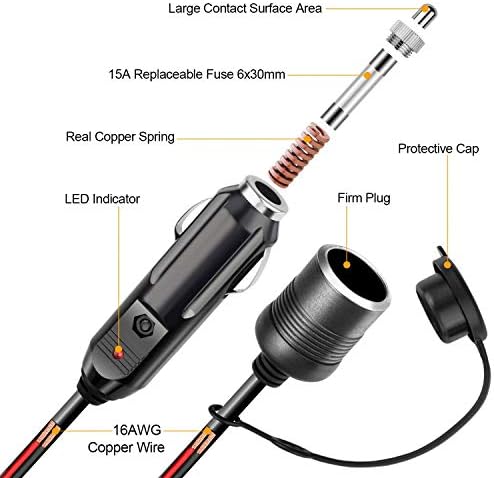
Foto: Zuru ezu view of the 12V Cigarette Lighter Extension Cord's internal components, including the 15A replaceable fuse, copper spring, and 16AWG copper wire.
- Large Contact Surface Area: Ensures stable power connection.
- 15A Replaceable Fuse (6x30mm): Na-enye nchebe gabigara ókè.
- Real Copper Spring: Enhances conductivity and durability.
- 16AWG Copper Wire: Heavy-duty wire for efficient power transmission.
- Ihe ngosi LED: Na-egosi ọkwa ike.
- Okpu mkpuchi: Covers the female socket when not in use.
- Firm Plug: Ensures a secure connection to the vehicle's 12V outlet.
4. Nhazi
Before operating the tire inflator, ensure your vehicle is parked safely and the engine is running to provide stable power.
- Jikọọ na Ike: Insert the 12V cigarette lighter plug of the inflator directly into your vehicle's 12V accessory outlet. If additional reach is needed, connect the inflator's plug to the female end of the provided 12V extension cord, then plug the extension cord's male end into the vehicle's 12V outlet.
- Kwadebe Taya: Remove the valve cap from the tire you wish to inflate.
5. Ntuziaka ọrụ
Follow these steps to inflate your tires:
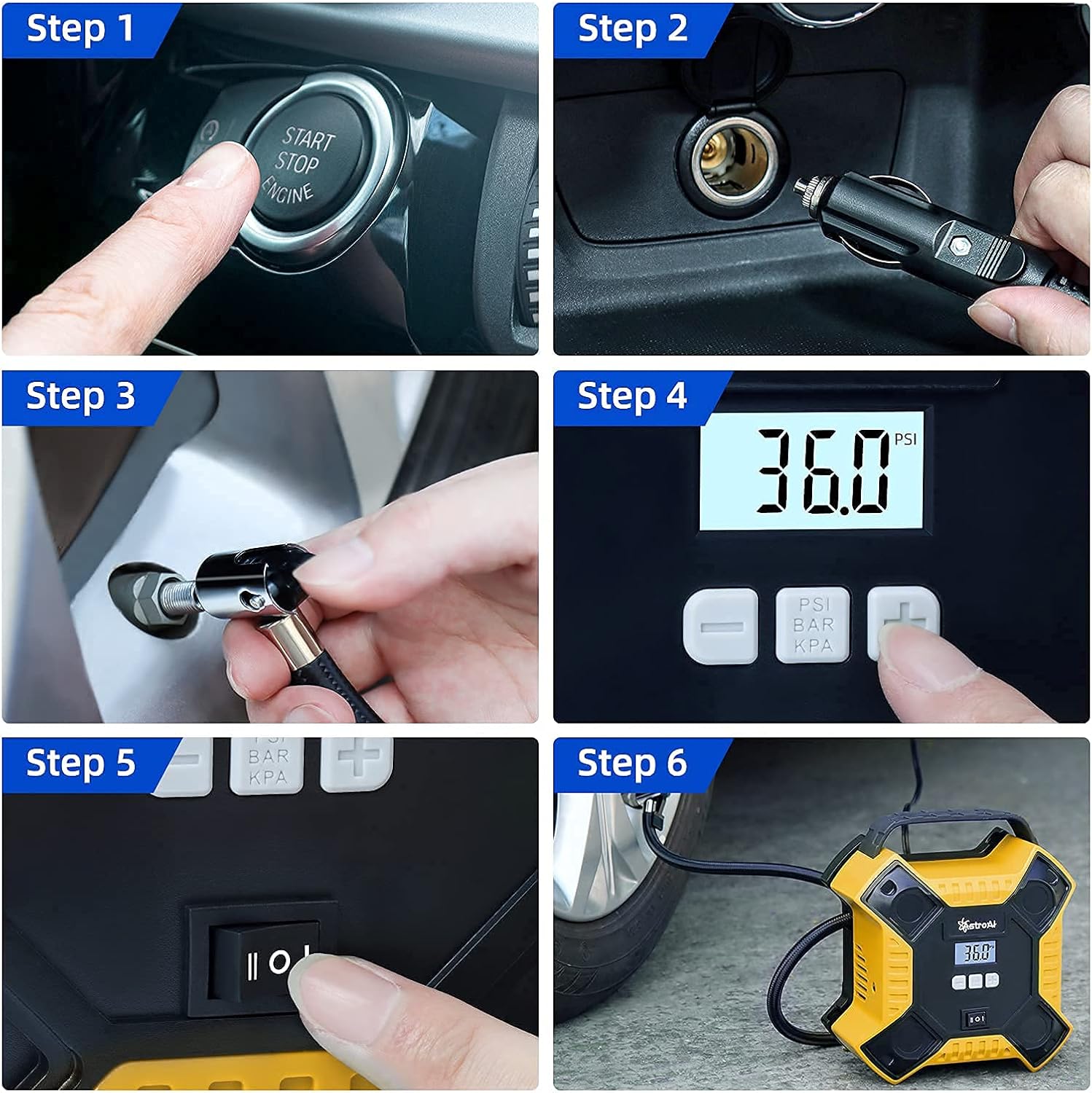
Image: Visual step-by-step instructions for operating the tire inflator.
- Start Vehicle Engine: Ensure your car engine is running to provide sufficient power (Step 1).
- Njikọ Ike: Plug the 12V cigarette lighter plug into your vehicle's 12V power outlet (Step 2).
- Tinye na Taya Valve: Securely screw the quick connector of the inflation tube onto the tire valve stem (Step 3). The digital display will show the current tire pressure.
- Tọọ nrụgide achọrọ: Use the multi-function buttons (+ na -) to set your desired tire pressure. Press the unit button (PSI/BAR/KPA) to cycle through the pressure units (Step 4). Refer to your vehicle's owner's manual or door jamb sticker for recommended tire pressure.
- Malite onu oriri: Flip the power switch to the "ON" position to begin inflation (Step 5). The inflator will automatically stop once the preset pressure is reached.
- Kwụpụ: Once inflation is complete and the unit has stopped, turn off the power switch, then unscrew the quick connector from the tire valve. Replace the tire valve cap. (Step 6 shows the inflator in use).
Ihe ndetu ndị dị mkpa:
- Do not exceed the maximum continuous operating time of 20 minutes. Allow the unit to cool down for at least 10 minutes after 20 minutes of continuous use.
- Always ensure the vehicle engine is running during operation to prevent draining the car battery.
- Check tire pressure regularly, especially before long trips.
6. Nlekọta
Proper maintenance ensures the longevity and optimal performance of your tire inflator:
- Nhicha: Jiri mgbasa ozi hichapụ otu ahụamp cloth. Do not use harsh chemicals or abrasive cleaners. Ensure the unit is completely dry before storage.
- Nchekwa: Store the inflator in a cool, dry place, away from direct sunlight and extreme temperatures. Ensure the power cord and inflation tube are neatly coiled to prevent damage. Utilize the integrated accessories storage for nozzles.
- Fuse Replacement (Extension Cord): If the 12V extension cord stops working, check the 15A fuse located within the male plug. To replace, unscrew the tip of the plug, remove the old fuse, and insert a new 15A (6x30mm) fuse.
7. Nchọpụta nsogbu
| Nsogbu | Ihe nwere ike ime | Ngwọta |
|---|---|---|
| Inflator anaghị agba ọkụ. |
|
|
| Inflator na-agba ọsọ mana ọ naghị ebufe. |
|
|
| Inflọta na-akwụsị n'oge. |
|
|
8. Nkọwapụta
| Njirimara | Nkọwa |
|---|---|
| Ụdị | Astro AI |
| Aha Nlereanya | Digital Taya Inflator |
| ASIN | B09LMBMPSD |
| Agba | Odo |
| Ihe onwunwe | Ọla |
| Isi Iyi Ike | Corded Electric (12V DC) |
| Oke nrụgide | 35 PSI (paụnd kwa square inch) |
| Voltage | 12 volts |
| Ụdị njikọ | Ihe nkwụnye ọkụ sịga 12V |
| Ogologo eriri | 12 Feet (Power Cord) |
| Oge Ọrụ Na-aga n'ihu | Ruo nkeji iri abụọ |
9. Akwụkwọ ikike Ozi
AstroAI products are designed and manufactured to high-quality standards. For specific warranty details regarding your Digital Tire Inflator, please refer to the warranty card included with your purchase or visit the official AstroAI websaịtị. Debe nnata nzụta gị dị ka ihe akaebe nke ịzụrụ maka nkwupụta ikike.
10. Nkwado ndị ahịa
If you have any questions, concerns, or require assistance with your AstroAI Digital Tire Inflator, please contact AstroAI customer support. Contact information can typically be found on the product packaging or on the official AstroAI website. Please have your product model and ASIN (B09LMBMPSD) ready when contacting support.