
Okwu mmalite
Thank you for choosing the UrbanX Q63 Wireless Earbuds. This manual provides essential information for setting up, operating, and maintaining your earbuds to ensure optimal performance. The Q63 earbuds feature Bluetooth 5.3 connectivity, IPX7 waterproofing, touch controls, and an ergonomic design with ear hooks for a secure fit.
Kedu ihe dị na Igbe ahụ
- UrbanX Q63 Wireless Earbuds (Left and Right)
- Nchaji case
- USB-C Charging Cable (not explicitly listed but implied for USB-C charging)
- Ear Tips (Multiple Sizes)

Image: UrbanX Q63 Wireless Earbuds placed inside their charging case, illustrating the product components.
Ngwaahịa gafereview
Earbud Components and Controls
Each earbud is equipped with a multi-function button and an ergonomic ear hook for stability.

Image: Diagram showing the location of controls on the UrbanX Q63 earbuds, detailing functions for calls and music playback.
- Call/Hang Up: Otu pịa
- Jụ oku: Twice click
- Play Music/Pause Music: Otu pịa
- Abụ gara aga: Long press (2 seconds) on left earbud
- Abụ na-esote: Long press (2 seconds) on right earbud
- Ike Na: Pịa ogologo (sekọnd ise)
- Gbanyụọ: Pịa ogologo (sekọnd ise)
Ngosipụta Ngosipụta nke ikpe LED
The charging case features a dual LED digital display to indicate battery levels.
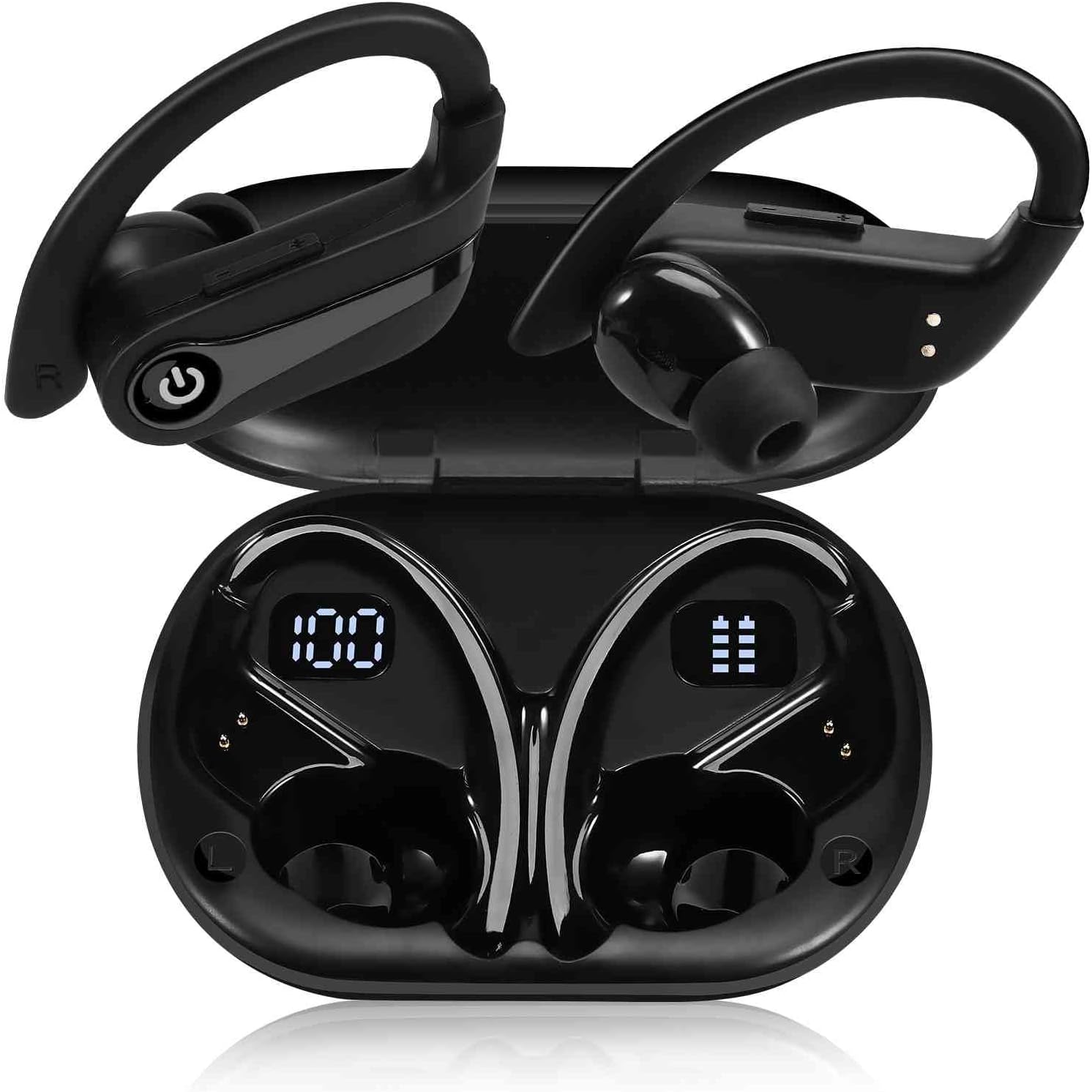
Image: The UrbanX Q63 charging case open, displaying digital readouts for both the charging case battery capacity and the individual earbud power levels.
- Nchaji ikike ikike: Na-egosiputa pasenti batrị fọdụrụnụtage nke akpa nchaji.
- Earbud Power Display: Shows the individual battery level of each earbud.
Melite
1. Ịchaji ihe ntị na akpa
Tupu ojiji nke mbụ, chajie nke ọma ekwe ntị na akpa nchaji.
- Ịchaji ekwe ntị: Tinye ntị ntị n'ime akpa nchaji. Ha ga-amalite ịchaji ozugbo.
- Ịchaji ikpe ahụ: Connect the USB-C charging cable to the charging port on the case and to a power source. The LED display will show the charging progress. The case also supports wireless charging.
- Oge nchaji: Ihe dị ka nkeji iri itoolu maka ịchaji zuru oke.

Image: The UrbanX Q63 charging case connected via a USB-C cable, indicating the charging process and highlighting the extended playback time.
2. Ijikọ na ngwaọrụ gị
The UrbanX Q63 earbuds feature one-step pairing for convenience.
- Gbaa mbọ hụ na agbanyere Bluetooth ngwaọrụ gị.
- Mepee igbe nchaji wee wepụ ntị abụọ ntị. Ha ga-abanye na ọnọdụ njikọta na-akpaghị aka.
- On your device, search for Bluetooth devices and select "YYK-Q63" from the list.
- Ozugbo ejikọtara ya, ị ga-anụ olu nkwenye, ekweisi ndị ahụ ga-adịkwa njikere maka ojiji.

Image: A hand holding a smartphone displaying Bluetooth settings, with "YYK-Q63" visible in the list of available devices, demonstrating the one-step pairing process.
Ntuziaka ọrụ
Egwu Egwu
- Gwuo/kwụsịtụ: One click on either earbud.
- Track na-esote: Pịa ogologo ntị ekwe ntị aka nri maka sekọnd 2.
- Gara aga Track: Pịa aka ekpe ruo ogologo oge maka sekọnd abụọ.
Njikwa Oku
- Azịza/Kwụsị Oku: One click on either earbud.
- Jụ oku: Double click on either earbud.
Gbanyụọ/ Gbanyụọ
- Ike Na: Long press the earbud button for 3 seconds.
- Gbanyụọ: Long press the earbud button for 5 seconds.

Image: A person wearing UrbanX Q63 earbuds, illustrating comfortable use during music listening.
Nlekọta
Nhicha
- Jiri nwayọ hichaa ntị ntị na chaja na akwa dị nro, kpọrọ nkụ, enweghị akwa.
- Ejila kemịkalụ siri ike, ihe mgbaze, ma ọ bụ ncha siri ike.
- Jiri mgbasa ozi hichaa ndụmọdụ ntị mgbe niileamp ákwà na ncha dị nro, wee kpoo ya nke ọma tupu ị tinye ya ọzọ.
Nchekwa
- Debe ekweisi ntị gị mgbe niile n'ime akpa chaja ha mgbe ị na-ejighị ya iji chebe ha ma mee ka ha nwee ike chaja.
- Debe n'ebe dị jụụ ma kpọọ nkụ, ebe okpomọkụ na anwụ na-anaghị apụta oke.
Mmiri Nguzogide
The earbuds are IPX7 waterproof, meaning they are protected against immersion in water up to 1 meter for up to 30 minutes. They are suitable for workouts and light rain. However, they are not designed for swimming or prolonged submersion. Ensure earbuds are dry before placing them back in the charging case to prevent damage.
Nchọpụta nsogbu
- Igwe ntị anaghị ejikọta: Ensure both earbuds are out of the case and fully charged. Turn off and on your device's Bluetooth, then try pairing again.
- Naanị otu earbud na-arụ ọrụ: Place both earbuds back into the charging case, close the lid, wait a few seconds, then take them out again to re-establish the connection.
- Enweghị ụda: Check the volume level on your connected device. Ensure the earbuds are properly paired and selected as the audio output.
- Nsogbu ịchaji: Verify the charging cable is securely connected to both the case and the power source. Ensure the charging contacts on the earbuds and inside the case are clean and free of debris.
Nkọwapụta
| Njirimara | Nkọwapụta |
|---|---|
| Aha Nlereanya | Q63 (TWS530) |
| Ụdị | UrbanX |
| Teknụzụ Njikọta | Ikuku (Bluetooth 5.3) |
| Oke Bluetooth | Ruo mita 18.29 (ụkwụ 60) |
| Oge egwuregwu ihe ntị (otu ụgwọ) | Ruo awa 20 |
| Ngụkọta oge egwuregwu (ya na igbe nchaji) | Ruo awa 200 |
| Oge Nchaji | Ihe dị ka nkeji iri |
| Ọkwa Nguzogide mmiri | IPX7 (ihe mgbochi mmiri) |
| Njikwa mkpọtụ | Active Noise Cancellation, CVC Noise Reduction (for calls) |
| Ụdị ọkwọ ụgbọ ala ọdịyo | Dynamic Driver (13mm speakers) |
| Usoro njikwa | Touch/Button Control |
| Ngwa dakọtara | Mobile Phone, Tablet, Laptop, Smartphone, Home and other Bluetooth enabled devices |
| Ibu Ibu | 6.3 ounces |
| Akụkụ ngwaahịa | 3 x 2 x 2 sentimita asatọ |
| Ngwa gụnyere | Nchaji case |
Akwụkwọ ikike na nkwado
For warranty information, please refer to the documentation provided with your purchase or contact the retailer. Specific warranty terms may vary by region and point of purchase.
If you encounter any issues or require further assistance, please contact the seller or visit the official UrbanX store on Amazon for support and additional product information. You can typically find seller contact details on your order page.
Visit the UrbanX Store: UrbanX Amazon Store