
1. Okwu mmalite
This manual provides essential information for the safe and efficient operation, maintenance, and troubleshooting of your Profile GE Automatic Espresso Machine + Milk Frother. Please read these instructions thoroughly before first use and retain for future reference.

Image 1.1: The Profile GE Automatic Espresso Machine with a prepared espresso and a latte.
2. Ozi nchekwa
Na-agbaso usoro nchekwa nchekwa mgbe niile mgbe ị na-eji ngwa eletriki iji belata ihe egwu nke ọkụ, ujo eletrik na mmerụ ahụ mmadụ.
- Ensure the appliance is connected to a grounded outlet.
- Ejila igwe, eriri, ma ọ bụ nkwụnye n'ime mmiri ma ọ bụ mmiri mmiri ndị ọzọ.
- Kpupu na ntinye mgbe ejighị ya na tupu ihicha.
- Ejila eriri ma ọ bụ plọg mebiri emebi arụ ọrụ ọ bụla.
- Keep hands and cords away from hot surfaces.
- Jiri naanị mgbakwunye ndị nrụpụta kwadoro.
3. Ngwaahịa gafereview
Ihe Profile GE Automatic Espresso Machine is designed for convenience and quality, featuring an integrated grinder, milk frother, and smart connectivity.
3.1 Akụkụ
- Ogwe njikwa: Touch-sensitive buttons for various drink selections and functions.
- Bean Hopper: Stores whole coffee beans for grinding.
- Mmiri mmiri: Tankị a na-ewepụ ewepụ maka inye mmiri.
- Mpempe kọfị: Na-enye kọfị a mịrị amị.
- Ụdị Steam: Maka mmiri ara ehi na-esi ísì.
- Ntapu atịpị: Collects excess liquids.
- Ebube ala: Na-anakọta ebe e ji kọfị mee ihe.

Image 3.1: The top control panel with buttons for Espresso, Americano, My Brew, Steam, and Hot Water.

Image 3.2: The integrated bean hopper with whole coffee beans and grind size adjustment knob.

Image 3.3: The removable water reservoir being lifted from the machine.
4. Nhazi
4.1 Mwepu na ntinye mbụ
- Jiri nlezianya wepụ ihe niile nkwakọ ngwaahịa.
- Place the machine on a stable, level surface away from heat sources and direct sunlight.
- Hụ na e nwere oghere zuru oke gburugburu igwe ahụ maka ikuku na ohere ịnweta ihe ndị dị na ya.
4.2 Nhicha mbụ
Before first use, clean all removable parts with warm water and mild detergent. Rinse thoroughly and dry. Wipe the exterior of the machine with a damp akwa .
4.3 Ijupụta Ebe Nchekwa Mmiri
- Remove the water reservoir from the machine (refer to Image 3.3).
- Fill with fresh, cold drinking water up to the MAX line.
- Replace the reservoir securely into the machine.
4.4 Ịtinye Agwa Kọfị
- Open the lid of the bean hopper (refer to Image 3.2).
- Pour whole coffee beans into the hopper. Do not overfill.
- Mechie mkpuchi ahụ nke ọma.
4.5 Powering On and Initial Rinse
- Tinye eriri ọkụ n'ime oghere eletrik gbadoro ụkwụ.
- Press the power button on the control panel. The machine will perform an initial rinse cycle.
- Place a container under the coffee spout to collect the rinse water.
4.6 SmartHQ App Connection
For enhanced customization and software updates, connect your espresso machine to the SmartHQ app.
- Download the SmartHQ app from your device's app store.
- Follow the in-app instructions to pair your espresso machine.
- Customize drink preferences, volume, and strength through the app.

Image 4.1: Using the SmartHQ app to control and customize the espresso machine.
5. Ntuziaka ọrụ
5.1 Ịkụ kọfị
The machine offers Espresso, Americano, Lungo, and Hot Water options. The 'My Cup' setting is pre-set to Ristretto and can be adjusted via the SmartHQ app.
- Ensure the water reservoir is filled and the bean hopper contains coffee beans.
- Tinye otu iko n'okpuru kọfị kọfị.
- Select your desired drink (Espresso, Americano, Lungo, My Cup) from the control panel.
- Igwe ahụ ga-egweri agwa ahụ, mee ya, ma nye ya kọfị gị ozugbo.

Image 5.1: The espresso machine dispensing a fresh shot of espresso.
5.2 Ịgbanwe Nha Ncha
The integrated conical burr grinder allows for 5 levels of grind size adjustment, from coarsest to finest, to optimize flavor extraction.
- Locate the grind size adjustment knob inside the bean hopper (refer to Image 3.2).
- Turn the knob to select your desired grind setting. Finer grinds are suitable for espresso, while coarser grinds are better for longer coffee types.
5.3 Using the Steam Frother
The steam frother creates various milk textures for cappuccinos, lattes, and more.
- Fill the included stainless steel frothing pitcher with cold milk.
- Debe uzuoku uzuoku n'ime mmiri ara ehi.
- Press the 'Steam' button on the control panel.
- Move the pitcher to achieve desired foam texture.
- Once finished, press the 'Steam' button again to stop.
- Immediately clean the steam wand after each use to prevent milk residue buildup.
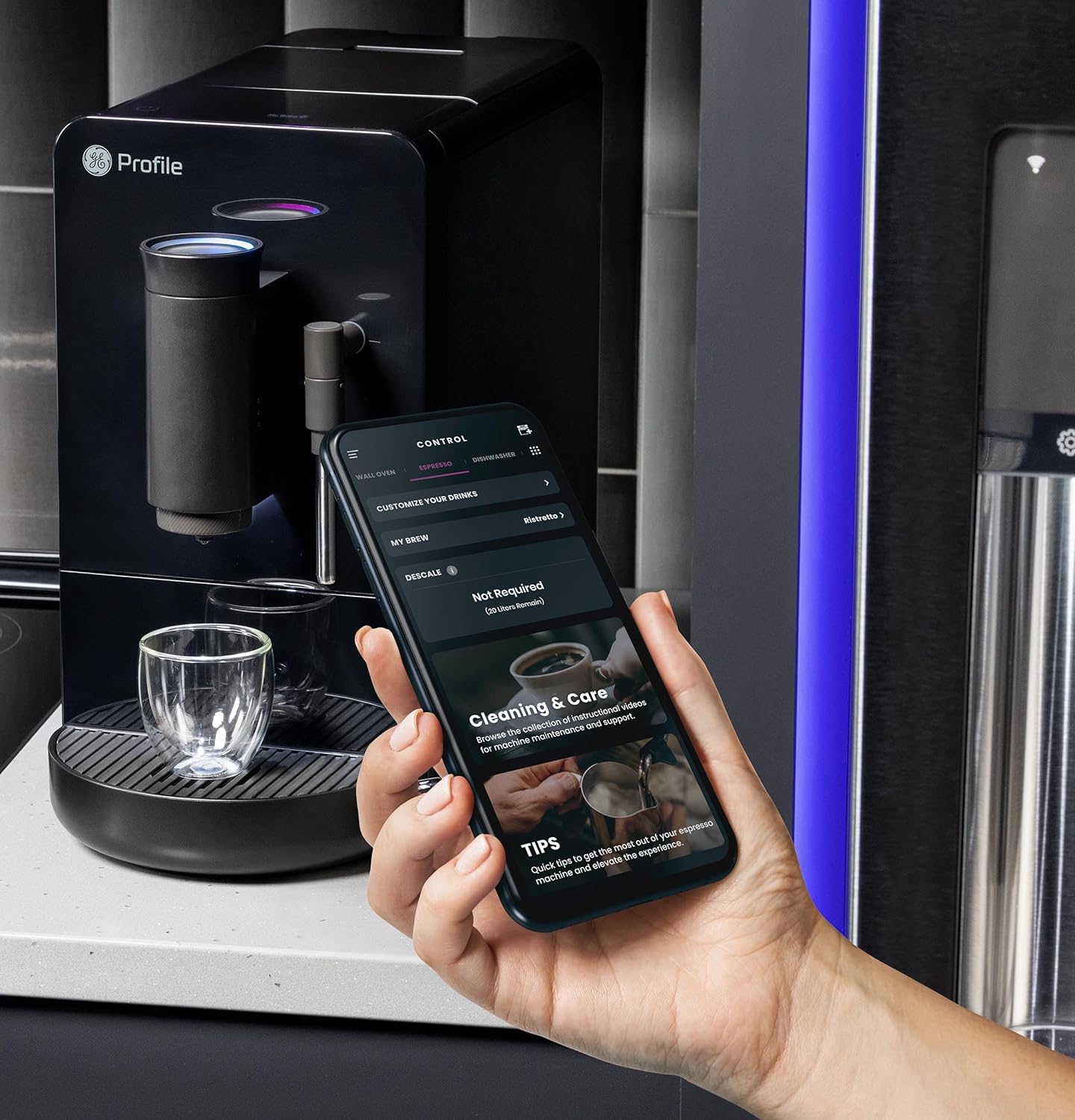
Image 5.2: A hand using the steam wand to froth milk in a stainless steel pitcher.
6. Nlekọta
Ịsacha na idozi ya mgbe niile na-eme ka igwe espresso gị rụọ ọrụ nke ọma ma na-adịte aka.
6.1 Nhicha kwa ụbọchị
- Ụdị Steam: Mgbe ejichara nke ọ bụla, jiri mgbasa ozi hichaa wand uzuokuamp cloth. Purge steam briefly to clear any milk residue from the nozzle.
- Tray na ihe eji etinye ala: Empty and rinse daily. The machine will indicate when the grounds container needs emptying.
- Mmiri mmiri: Sachaa kwa ụbọchị ma tinye mmiri ọhụrụ n'ime ya.
6.2 Nhicha kwa izu
- Ngalaba ime biya: The brew unit is typically removable for rinsing under running water. Refer to the included cleaning kit instructions for detailed steps.
- Bean Hopper: Periodically clean out any oil residue or old beans.
6.3 calhapụ ịda
The machine will prompt you when descaling is required. Use a descaling solution specifically designed for espresso machines and follow the instructions provided with the descaling agent or in the SmartHQ app.
7. Nchọpụta nsogbu
Nkebi a na-eleba anya na nsogbu ndị ị na-enwekarị na igwe espresso gị.
| Nsogbu | Ihe nwere ike ime | Ngwọta |
|---|---|---|
| No coffee dispensed / "Add Beans" message | Bean hopper empty or beans not feeding correctly. | Refill bean hopper. Gently stir beans to ensure they feed into the grinder. |
| Kọfị adịghị ike ma ọ bụ mmiri mmiri | Grind size too coarse, insufficient coffee dose, or descaling needed. | Adjust grind size to a finer setting. Check SmartHQ app for strength settings. Perform descaling if prompted. |
| Mmiri ara ehi adịghị apụta nke ọma | Steam wand clogged, milk type unsuitable, or insufficient steam pressure. | Clean steam wand thoroughly. Use fresh, cold milk. Ensure machine is heated to steam temperature. |
| Igwe anaghị agbanwu | Ekwunyeghị gị, nye gị iketage, or circuit breaker tripped. | Check power connection. Verify power outlet functionality. Reset circuit breaker if necessary. |
| SmartHQ app connectivity issues | Incorrect Wi-Fi password, network interference, or app bug. | Verify Wi-Fi credentials. Ensure machine is within Wi-Fi range. Restart app and machine. Check for app updates. |
8. Nkọwapụta
- Akara: Profile
- Aha nlereanya: GE Profile Automatic Espresso Machine + Frother
- Nọmba Nlereanya ihe: P7CEBBS6RBB
- Agba: Nwa
- Akụkụ ngwaahịa: 7"D x 16"W x 12.5"H
- Ibu ihe: 16 pound
- Voltage: 120V
- Ụdị ọrụ: Akpaaka zuru oke
- Atụmatụ pụrụ iche: Built-In Bean Hopper, Built-In Conical Burr Grinder & Adjustable Grind Size, Programmable My Brew Setting, Steam Frother & Frothing Pitcher, WiFi Connected
- Ngwa gụnyere: Cleaning Kit, Coffee Bean Container, Espresso Machine, Steam Wand, Milk Pitcher, Water Tank
- Ụdị ntinye kọfị: Agwa zuru oke
- Ntinye interface mmadụ: Ihuenyo mmetụ aka

Image 8.1: Product dimensions of the espresso machine.
9. Akwụkwọ ikike na nkwado
This product is covered by a manufacturer's warranty. For specific warranty details, registration, or technical support, please refer to the warranty card included with your product or visit the official GE Profile website. You may also contact customer service through the SmartHQ app for assistance.