
1. Okwu mmalite
Thank you for choosing the Simfer Built-in Oven and Ceramic Hob. This manual provides essential information for the safe and efficient installation, operation, and maintenance of your appliance. Please read these instructions carefully before use and keep them for future reference.
2. Ntuziaka nchekwa
Nchekwa gị na nchekwa nke ndị ọzọ bụ ihe kacha mkpa. Biko debe ihe nchekwa nchekwa ndị a:
- Nchekwa Eletriki: Gbaa mbọ hụ na akụrụngwa agbachaala nke ọma wee jikọọ ya na ọkụ ọkụ dabara adaba. Ejila ihe nkwụnye ọkụ ma ọ bụ eriri ndọtị.
- Nwụnye: A ga-arụrịrị nrụnye site n'aka onye ọkachamara tozuru etozu dịka iwu obodo siri dị.
- Ụmụaka na ndị na-adịghị ike: Enwere ike iji ngwa a ụmụaka ndị gbara afọ 8 na karịa yana ndị nwere ike anụ ahụ, mmetụta uche ma ọ bụ nke uche ma ọ bụ enweghị ahụmahụ na ihe ọmụma ma ọ bụrụ na enyerela ha nlekọta ma ọ bụ ntụziaka gbasara iji ngwa ahụ n'ụzọ dị nchebe ma ghọta ihe egwu dị na ya. . Ụmụaka agaghị eji ngwa eji egwu egwu egwu. Ụmụaka agaghị eme nhicha na nlekọta onye ọrụ na-enweghị nlekọta.
- Ebe na-ekpo ọkụ: The oven and hob surfaces become hot during operation. Use oven mitts and avoid direct contact.
- Ngwa ndị na-ere ọkụ: Debe ihe ndị na-ere ọkụ na ngwa ngwa.
- Nhicha: Kpupu ngwa ngwa na ọkụ ọkụ mgbe niile tupu ihicha.
- Nlekọta: Do not attempt to repair the appliance yourself. Contact authorized service personnel for repairs.
3. Ngwaahịa gafereview
Your Simfer appliance combines a 60-liter built-in oven with a 4-zone ceramic hob, offering versatile cooking options.
Njirimara oven:
- Ike: 60 lita
- Ọrụ: 9 cooking functions including Light, Top Heat, Bottom Heat, Top/Bottom Heat, Grill, Grill with Circulation, Top/Bottom Heat with Convection, Hot Air, and Circulation Air.
- Njikwa: Programmable timer with touch control.
- Ọnụ ụzọ: Double-glazed oven door for improved insulation and safety. Easily removable inner glass for cleaning.
- Ime: Interior lighting for clear visibility. Telescopic rail for easy access to dishes.
- Nhicha: Steam cleaning function for effortless maintenance.
- arụmọrụ: Energy efficiency class A.

Nyocha 3.1: N'eluview of the Simfer Built-in Oven and Ceramic Hob.

Figure 3.2: Oven display highlighting 8 heating functions, interior lighting, and circulation fan.

Figure 3.3: Illustration of the oven's double glazing and the mechanism for easily removing the inner door glass for cleaning.

Foto 3.4: View of the oven interior showing the telescopic rail for trays and the steam cleaning function.
Ceramic Hob Features:
- Mpaghara: 4 radiant cooking zones.
- Ike: Two 1.2 kW zones (14 cm diameter) and two 1.8 kW zones (18 cm diameter).
- Njikwa: Touch control with 9 heat settings.
- Nchekwa: Residual heat indicator for each zone. Child lock function.
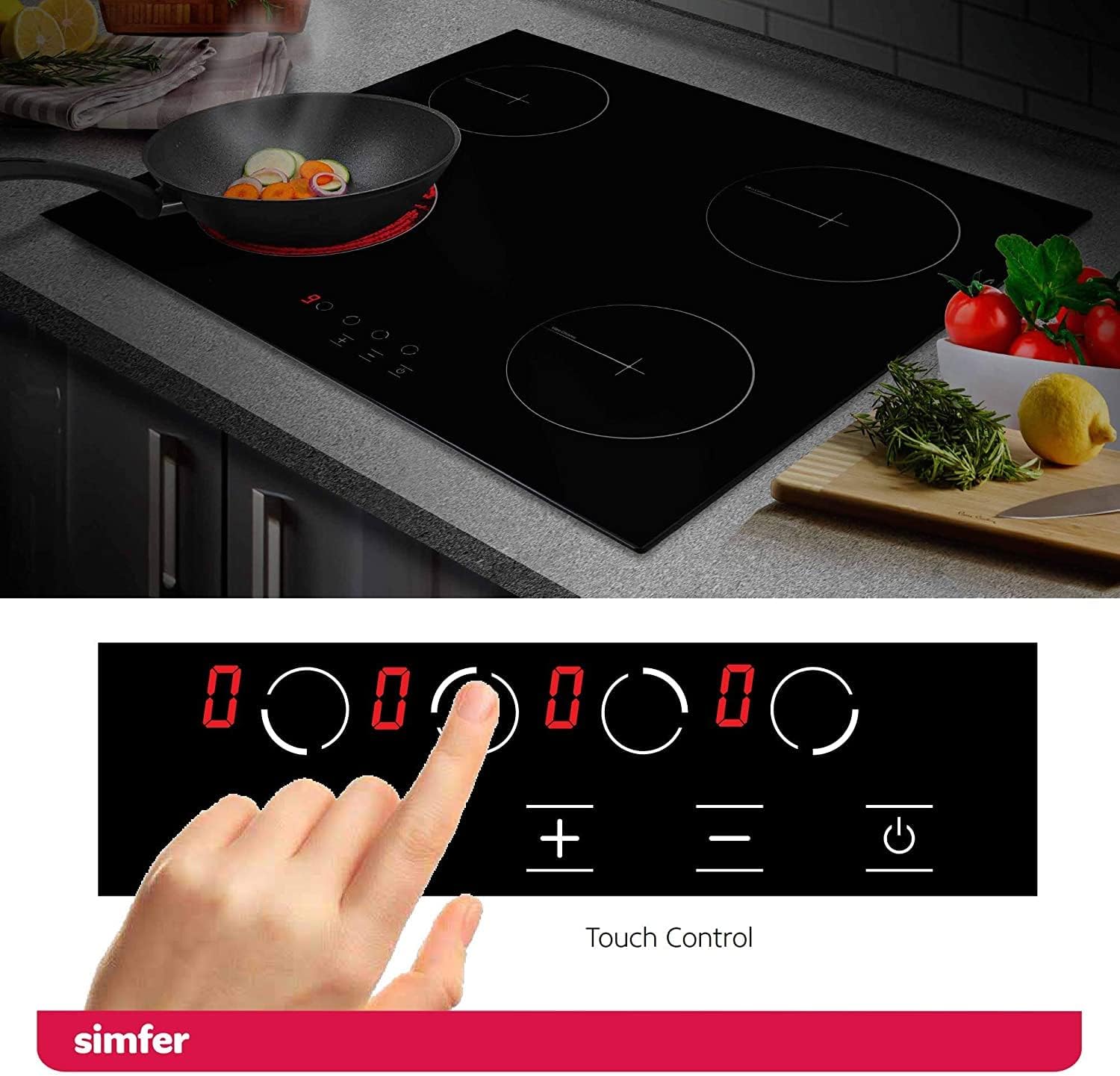
Figure 3.5: Ceramic hob surface with integrated touch controls for heat settings.

Ọgụgụ 3.6: Zuru ezu view of the ceramic hob cooking zones, indicating their diameters and power ratings, along with the 9 heat settings on the touch control panel.
4. Nwụnye na Ntọala
Proper installation is crucial for the safe and efficient operation of your appliance. It is strongly recommended that installation be performed by a qualified professional.
4.1. Iwepu ngwongwo
Carefully unpack the appliance and check for any damage. Report any damage to your retailer immediately. Keep packaging materials away from children.
4.2. Ntinye
Ensure the installation area is well-ventilated and meets the required clearances from walls and other appliances. The appliance is designed for built-in installation.
4.3. Njikọ Ọdụdọ
The appliance must be connected to the mains electricity supply by a qualified electrician. Ensure the voltage and frequency ratings on the appliance's rating plate match your household supply. The appliance must be correctly earthed.
4.4. Akụkụ
Refer to the diagrams below for precise installation dimensions for both the oven and the ceramic hob.

Figure 4.1: Oven installation dimensions (in mm) and included accessories (baking tray, deep tray, grill rack).

Figure 4.2: Ceramic hob product and cutout dimensions (in mm) for installation.
5. Na-arụ ọrụ oven
Familiarize yourself with the oven controls and functions before first use.
5.1. Mbụ Jiri
Before cooking food, heat the empty oven for approximately 30 minutes at 200°C to burn off any manufacturing residues. Ensure the kitchen is well-ventilated during this process.
5.2. Nhọrọ ọrụ
Use the function selector knob to choose one of the 9 available cooking functions:
- Ìhè: Illuminates the oven interior.
- Okpomọkụ kacha Heat from the upper element.
- Okpomọkụ dị n'okpuru: Heat from the lower element.
- Okpomọkụ dị n'elu/n'ala: Conventional cooking with heat from both elements.
- Grill: Maka grilling na browning.
- Achịcha na Mgbasa: Combines grill with fan for even browning.
- Top/Bottom Heat with Convection: Conventional heat with fan assistance for even cooking.
- Hot Air (True Fan): Heat from a circular element around the fan for multi-level cooking.
- Circulation Air: Fan only, for defrosting or cooling.

Figure 5.1: Illustration of the convection fan distributing heat evenly within the oven.
5.3. Ntọala okpomọkụ
Turn the temperature control knob to select the desired cooking temperature.
5.4. Ọrụ ngụ oge
The oven features a programmable timer with touch control. Consult the detailed instructions in the full manual for setting cooking duration, delayed start, and alarm functions.
5.5. Using the Telescopic Rail
The telescopic rail allows you to pull out hot dishes safely and easily for checking or basting without reaching deep into the oven.

Figure 5.2: The telescopic rail extending from the oven, allowing easy access to the baking tray.
6. Operating the Ceramic Hob
The ceramic hob provides fast and efficient heating with precise touch controls.
6.1. Ịgbanye / gbanyụọ
Press the power symbol on the touch control panel to switch the hob on or off.
6.2. Selecting a Cooking Zone
Select the desired cooking zone by touching its corresponding control. The display will show '0'.
6.3. Na-edozi Ntọala okpomọkụ
Use the '+' and '-' symbols to adjust the heat level from 1 to 9. Level 9 is the highest heat setting.

Figure 6.1: Close-up of the ceramic hob's touch control panel, showing the 9 heat settings.
6.4. Residual Heat Indicator
After switching off a cooking zone, an 'H' will appear on the display if the zone is still hot. Do not touch the surface while 'H' is displayed.
6.5. Mkpọchi nwa
To activate the child lock, press and hold the designated lock symbol on the control panel. This prevents accidental operation. Repeat the process to deactivate.

Figure 6.2: The child lock indicator on the ceramic hob's touch control panel.
7. Nhicha na mmezi
Nhicha na mmezi mgbe niile ga-eme ka ọ dịrị ogologo ndụ na arụmọrụ kacha mma nke ngwa gị.
7.1. Oven Cleaning
- Nhicha Steam: Pour a small amount of water into the oven cavity and select the steam cleaning function. The steam will loosen food residues, making them easier to wipe away.
- Iko Ọnụ Ụzọ ewepụ: The inner glass panel of the oven door can be easily removed for thorough cleaning. Refer to the full manual for detailed instructions on removal and reinstallation.
- Nchacha izugbe: For stubborn stains, use a non-abrasive oven cleaner. Always follow the cleaner manufacturer's instructions.

Figure 7.1: A hand wiping the interior of the oven after using the steam cleaning function.
7.2. Ceramic Hob Cleaning
- Nhicha kwa ụbọchị: Jiri d. hichapụ elu hob ahụamp cloth and mild detergent after each use, once it has cooled down.
- Unyi isi ike: Use a specialized ceramic hob cleaner and a scraper for burnt-on food. Avoid abrasive sponges or harsh chemicals.

Figure 7.2: A hand cleaning the ceramic hob surface with a soft cloth, demonstrating easy cleaning.
8. Nchọpụta nsogbu
Tupu ịkpọtụrụ ọrụ ndị ahịa, biko rụtụ aka n'okwu ndị a na-ahụkarị yana ngwọta ha:
| Nsogbu | Ihe nwere ike ime | Ngwọta |
|---|---|---|
| Igwe ọkụ anaghị ekpo ọkụ | No power supply; incorrect function/temperature setting; door not closed properly. | Check power connection and circuit breaker; verify function and temperature settings; ensure oven door is fully closed. |
| Hob not turning on | Enweghị ọkụ ọkụ; agbanyere mkpọchi nwa. | Lelee njikọ ike; gbanyụọ mkpọchi nwa. |
| Isi nri na-adịghị mma n'ime oven | Incorrect rack position; overloaded oven; fan not working. | Use recommended rack positions; avoid overcrowding; check for fan operation. |
| Hob displays 'H' constantly | Residual heat is still present. | This is normal. Wait for the zone to cool down. |
If the problem persists after attempting these solutions, please contact Simfer customer service.
9. Nka na ụzụ nkọwa
| Njirimara | Nkọwapụta |
|---|---|
| Nọmba nlereanya | Oven: SMF-BO 6813 / Hob: SMF-BIH 5114 |
| Ike oven | 60 lita |
| Ọrụ oven | 9 (Light, Top Heat, Bottom Heat, Top/Bottom Heat, Grill, Grill with Circulation, Top/Bottom Heat with Convection, Hot Air, Circulation Air) |
| Klas arụmọrụ ike | A |
| Ụdị hob | Glass Ceramic, Radiant |
| Number of Hob Zones | 4 |
| Hob Zone Power | 2 x 1.2 kW (14 cm), 2 x 1.8 kW (18 cm) |
| Ụdị njikwa | Njikwa aka |
| Product Dimensions (Oven) | 68 x 66 x 81 cm (H x W x D) |
| Product Dimensions (Hob) | 520 x 590 mm (W x D) |
| Cutout Dimensions (Hob) | 560 x 490 mm (W x D) |
| Ibu | 38 n'arọ |
| Ihe onwunwe | Aluminium, Glass Ceramic |
| GTIN / UPC | 730691706188 |
10. Akwụkwọ ikike na nkwado
Your Simfer appliance comes with a manufacturer's warranty. Please refer to the warranty card included with your product for specific terms and conditions. For technical support, spare parts, or service requests, please contact Simfer customer service or your authorized dealer.
Ozi mkpọtụrụ: Please visit the official Simfer website or refer to your purchase documentation for the most up-to-date contact details.