
Pipishell PIXSF2
Ntuziaka maka ihe mkpuchi mgbidi nke Pipihell zuru oke maka TV ngagharị zuru oke
Model: PIXSF2
Okwu mmalite
This manual provides detailed instructions for the installation, operation, and maintenance of your Pipishell Full Motion TV Wall Mount. Please read this manual thoroughly before installation to ensure safe and correct usage. Keep this manual for future reference.

Image: The Pipishell Full Motion TV Wall Mount, showcasing its articulating arm and VESA plate.
Ozi nchekwa
Ntinye ma ọ bụ ojiji na-ezighi ezi nke ngwaahịa a nwere ike ibute nnukwu mmerụ ahụ ma ọ bụ mmebi. Biko gbasoo ntuziaka nchekwa ndị a:
- Hụ na elu ihe e ji etinye ihe nwere ike ịkwado ibu nke ihe e ji etinye ihe na TV n'enweghị nsogbu.
- Do not mount on drywall alone. This mount requires installation into a single wood stud, concrete wall, or block wall.
- Use all provided hardware and do not substitute parts.
- Ọ bụrụ na ị maghị maka akụkụ ọ bụla nke usoro nrụnye, kpọtụrụ ọkachamara tozuru etozu.
- Debe ụmụaka na anụ ụlọ n'oge echichi.

Image: Illustration showing compatible wall types: concrete wall, single wood stud, and block wall. A warning indicates not to mount on drywall alone.
Ihe ngwugwu
Verify that all components are present and undamaged before beginning installation. If any parts are missing or defective, contact Pipishell customer support.
| Akụkụ | Ọnụọgụ |
|---|---|
| Mgbakọ Mgbidi Efere | 1 |
| TV mgbodo | 1 |
| Ngwa mgbakwunye (skru, arịlịka, washers) | Ụdị dị iche iche |
| Akwụkwọ ntuziaka | 1 |
Ntọala & Nwụnye
Follow these steps carefully for a secure installation:
- Nyochaa ndakọrịta: Before starting, ensure your TV's VESA pattern (Max: 100x100mm, Min: 75x75mm) and weight (Max: 33 lbs) are compatible with this mount.
- Chọta ebe a na-etinye ya: Choose a suitable location on a single wood stud, concrete, or block wall. Use a stud finder to accurately locate the center of the wood stud if applicable.
- Mount Wall Plate: Secure the wall plate to the chosen wall type using the appropriate anchor bolts and hardware. Ensure it is level and firmly attached.
- Attach TV Bracket: Fasten the TV bracket to the back of your television using the provided screws that match your TV's VESA pattern.
- Hang Display: Carefully lift the television with the attached bracket and hook it onto the wall plate assembly. Ensure it is securely seated.
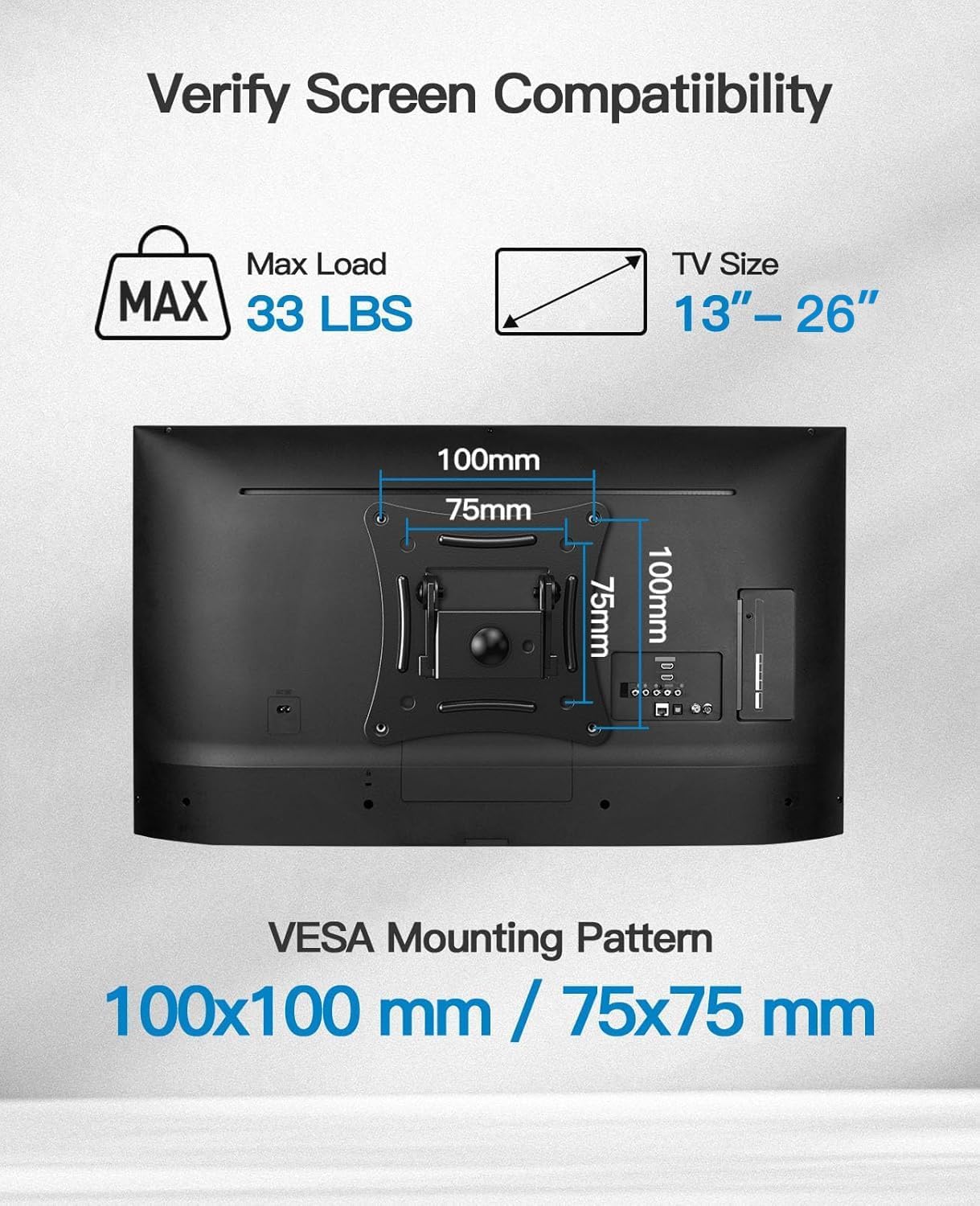
Image: Diagram illustrating VESA mounting patterns (100x100mm, 75x75mm) and maximum load capacity of 33 lbs for TV sizes 13-26 inches.

Image: Visual guide showing three steps: 1) Mount Wall Plate, 2) Attach TV Bracket, 3) Hang Display.
Ntuziaka ọrụ
Your Pipishell Full Motion TV Wall Mount offers versatile adjustments for optimal viewing:
- Swivel: The mount allows for a swivel range of up to ±90° (depending on TV size and wall distance) to adjust the horizontal viewakụkụ n'akuku.
- Gbaa: Adjust the vertical tilt from -15° to +5° to reduce glare and find the perfect viewakụkụ n'akuku.
- Extension & Retraction: Extend the TV up to 10.6 inches from the wall for flexible positioning or retract it to a mere 2.9 inches for a low-profile lee anya.
- Ntughari: The VESA plate can rotate 360° allowing for landscape or portrait orientation of your display.

Image: A TV mounted on the wall, illustrating the swivel motion of ±90° and the extension/retraction range of 2.9 to 10.6 inches, along with tilt angles of -15° to +5°.

Image: A diagram showing the TV mount's full motion flexibility, including 360° rotation of the VESA plate.
Nlekọta
To ensure the longevity and proper function of your TV wall mount:
- Na-elele skru na njikọ niile mgbe niile iji hụ na ha siri ike ma dịkwa nchebe.
- Jiri ákwà dị nro ma kpọọ nkụ hichaa ebe a na-etinye ihe n'elu ya. Zere ihe nhicha ma ọ bụ ihe mgbaze.
- Do not hang anything from the mount other than the intended television.
Nchọpụta nsogbu
| Nsogbu | Ihe nwere ike ime | Ngwọta |
|---|---|---|
| Mount feels unstable after installation. | Loose mounting screws or incorrect wall anchors. | Re-check all wall plate screws and ensure they are tightened into a solid stud or appropriate anchors. Refer to installation steps. |
| Difficulty adjusting swivel/tilt. | Joints may be too tight or need lubrication. | Apply a small amount of silicone-based lubricant to the moving joints. Do not over-tighten joint bolts. |
| TV not level. | Wall plate installed unevenly. | Adjust the leveling screws on the VESA plate if available, or re-install the wall plate ensuring it is perfectly level. |
Nkọwapụta
- Ụdị: PIXSF2
- Akara: Pipishell
- Ihe: Alloy Steel
- Agba: Nwa
- Nha TV dakọtara: 13-26 sentimita asatọ
- Oke ibu kacha: 33 lbs (15 n'arọ)
- Ndakọrịta VESA: 75x75mm, 100x100mm
- Ụdị mmegharị: Swivel, Rotate, Tilt, Full Motion, Articulating
- Tilt n'akuku: -15° ruo +5°
- Akụkụ Swivel: ±90° (max, depends on TV size)
- Mgbatị sitere na Wall: 2.9 sentimita (a gbapụrụ agbapụ) ruo 10.6 sentimita (a gbatịpụrụ agbatị)
- Akụkụ ngwaahịa: 38.98 x 12.6 x 5.12 inches (mount only)
- Ibu ihe: 1.39 pound
Akwụkwọ ikike & Nkwado
Pipishell products are designed for durability and performance. For specific warranty details, please refer to the warranty card included with your product or visit the official Pipishell websaịtị.
For technical support, installation assistance, or any questions regarding your product, please contact Pipishell customer service:
- Email: support@pipishell.com
- Websaịtị: www.pipishell.com
You can also find additional resources and FAQs on our websaịtị.
Ask a question about this manual
Ask about setup, troubleshooting, compatibility, parts, safety, or missing instructions. Manuals+ will review the question and use this page’s manual context to help answer it.