
Okwu mmalite
Thank you for choosing the Audizio SB85 Soundbar with Subwoofer. This manual provides essential information for the safe and correct operation of your new audio system. Please read it thoroughly before use and retain it for future reference. The SB85 is designed to enhance your television's audio, providing a rich, immersive sound experience for movies, games, and music, complete with a dedicated subwoofer for powerful bass.
Ntuziaka nchekwa
- Gụọ ntuziaka niile nke ọma tupu ị rụọ ọrụ ngwaọrụ.
- Keep the unit away from water, moisture, and heat sources.
- Akwụsịla oghere ikuku ikuku ọ bụla.
- Jiri naanị mgbakwunye / ngwa ndị nrụpụta akọwapụtara.
- Kwupu ngwa ahụ n'oge oke mmiri ozuzo ma ọ bụ mgbe ejighi ya ogologo oge.
- Tụtụ aka n'aka ndị ọrụ ruru eru.
- Do not expose the battery (if applicable) to excessive heat such as sunshine, fire, or the like.
Ihe ngwugwu
Hụ na ihe niile dị n'ime igbe ahụ:
- Audizio SB85 Soundbar
- Subwoofer wired
- Njikwa anya
- Optical Cable (Toslink)
- eriri AUX
- Ihe nkwụnye ọkụ
- Akwụkwọ ntuziaka onye ọrụ
Ngwaahịa gafereview
The Audizio SB85 system consists of a soundbar and a separate wired subwoofer, designed to deliver a powerful and clear audio experience.
Njirimara ụda ụda
- Integrated 150W speaker system with 4 speakers (2x 2cm range, 2x 2cm tweeter).
- Front LED display for status indication.
- Control buttons on the side panel.
- Multiple input options: HDMI (ARC), USB, Line In (AUX), Coaxial, Optical.
- Bluetooth 5.0 maka nkwanye ụda ikuku ikuku.

Image: Close-up of the Audizio SB85 Soundbar's control panel and its remote control, highlighting Bluetooth 5.0 and ease of use.

Foto: Ime view of the Audizio SB85 Soundbar's full-range speaker, emphasizing its 150W speaker system for an immersive audio experience.
Njirimara Subwoofer
- 5.25-inch wired subwoofer for enhanced bass response.

Image: Close-up of the Audizio SB85 wired subwoofer, designed to amplify bass frequencies.
Melite
1. Ntinye
Place the soundbar centrally below your television. The subwoofer can be placed on the floor near the soundbar, ideally in a corner for optimal bass reflection, but ensure it is not obstructed.

Image: Audizio SB85 Soundbar and Subwoofer setup in a living room, demonstrating room-filling sound and clean design.

Image: Audizio SB85 Soundbar placed below a television, illustrating its universal compatibility with any TV.
2. Ijikọ na Ike
Connect the power adapter to the DC IN port on the soundbar and then plug it into a wall outlet (230 Vac/50 Hz).
3. Ijikọ Subwoofer
Connect the wired subwoofer to the dedicated subwoofer output port on the soundbar.
4. Connecting to Audio Sources
The SB85 offers several connection options:
- HDMI (ARC): For the best audio quality and control, connect an HDMI cable from the HDMI (ARC) port on the soundbar to the HDMI ARC port on your TV. This allows the TV to send audio to the soundbar and often enables TV remote control of the soundbar's volume.
- Ngwa anya (Toslink): Connect the included optical cable from the OPTICAL port on the soundbar to the Optical Digital Audio Out port on your TV or other audio source.
- Line In (AUX): Use the included AUX cable to connect the LINE IN port on the soundbar to the headphone jack or audio output of your device (e.g., smartphone, MP3 player).
- Coaxial: Connect a coaxial cable (not included) from the COAXIAL port on the soundbar to the Coaxial Digital Audio Out port on your TV or other audio source.
- USB: Insert a USB flash drive into the USB port for MP3 playback.
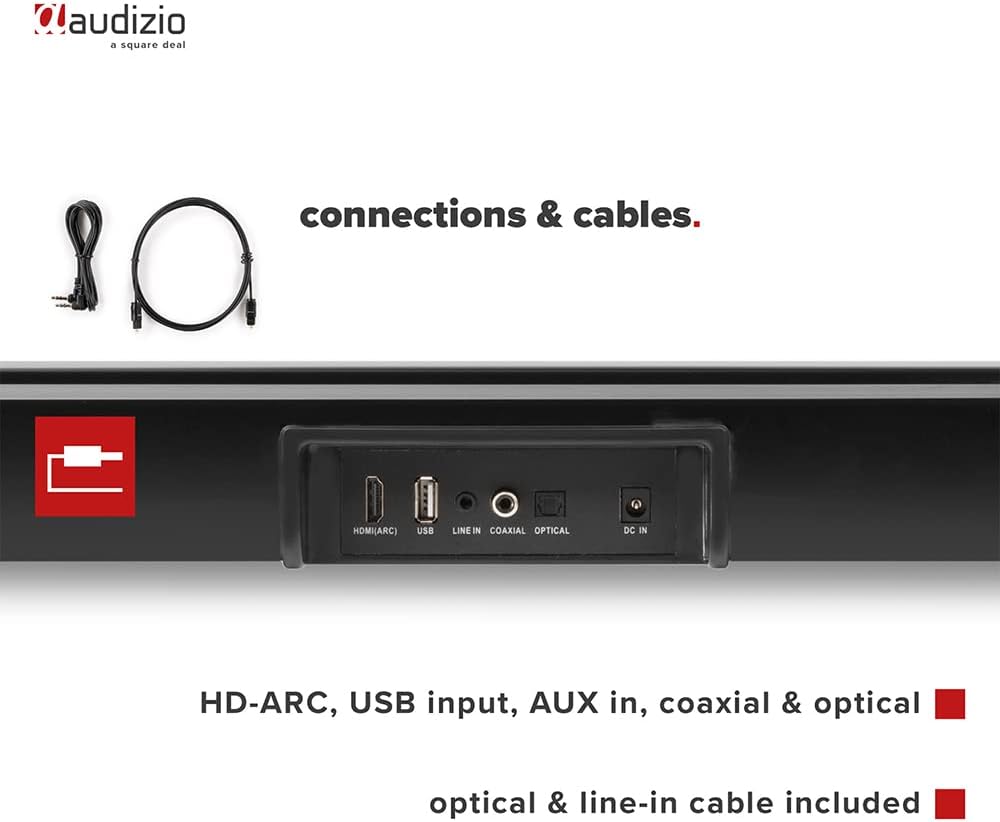
Foto: N'azụ view of the Audizio SB85 Soundbar showing various connection ports: HDMI (ARC), USB, Line In, Coaxial, and Optical. Includes optical and line-in cables.
Ntuziaka ọrụ
1. Gbanyụọ / gbanyụọ
Pịa bọtịnụ ike dị na ụda ụda ma ọ bụ njikwa ime ka ịgbanwuo ma ọ bụ gbanyụọ unit ahụ.
2. Nhọrọ Isi mmalite ntinye
Press the 'MODE' button on the soundbar or the remote control repeatedly to cycle through the available input sources: HDMI (ARC), Optical, Coaxial, AUX, USB, and Bluetooth. The selected input will be shown on the front LED display.
3. Njikwa olu
Use the 'VOL+' and 'VOL-' buttons on the soundbar or the remote control to adjust the volume. The 'MUTE' button on the remote control will temporarily silence the audio.
4. Njikọ Bluetooth
- Switch the soundbar to Bluetooth mode using the 'MODE' button. The LED display will show 'BT'.
- Na ama ma ọ bụ mbadamba gị, gbanye Bluetooth wee chọọ ngwaọrụ dịnụ.
- Select 'Audizio SB85' from the list of devices.
- Once paired, the soundbar will indicate a successful connection, and you can stream audio wirelessly.
5. USB playback
Fanye draịva USB nwere ọdịyo MP3 files into the USB port. The soundbar will automatically switch to USB mode and begin playing the music. Use the remote control to navigate tracks (play/pause, next/previous).
6. Ọrụ njikwa anya
The remote control provides full functionality for the soundbar, including power, mode selection, volume, mute, and playback controls for USB and Bluetooth modes.
Nlekọta
Nhicha
Wipe the soundbar and subwoofer surfaces with a soft, dry cloth. Do not use abrasive cleaners, waxes, or solvents as they may damage the finish. Ensure the device is unplugged before cleaning.
Nchekwa
Ọ bụrụ na ị na-echekwa unit ahụ ruo ogologo oge, wepụ ya na oghere ọkụ ma chekwaa ya n'ebe dị jụụ na ebe kpọrọ nkụ, na-anọghị na ìhè anyanwụ kpọmkwem na oke okpomọkụ.
Nchọpụta nsogbu
| Nsogbu | Ihe nwere ike ime | Ngwọta |
|---|---|---|
| Enweghị ike | Ejikọghị eriri ọkụ eletrik; Ọkpọ ọkụ eletrik nwere nsogbu | Lelee njikọ eriri ọkụ; Gbalịa ụzọ ọpụpụ dị iche. |
| Enweghị ụda | Incorrect input selected; Volume too low; Mute activated; Cable connection loose | Select correct input source; Increase volume; Deactivate mute; Check all audio cable connections. |
| Bluetooth anaghị ejikọ | Soundbar not in Bluetooth mode; Device too far; Device already connected to another unit | Switch soundbar to BT mode; Move device closer; Disconnect from other devices and try again. |
| Njikwa anya anaghị arụ ọrụ | Batrị agwụla; Ihe mgbochi dị n'etiti remote na soundbar | Dochie batrị; Wepu ihe mgbochi ọ bụla. |
Nkọwapụta
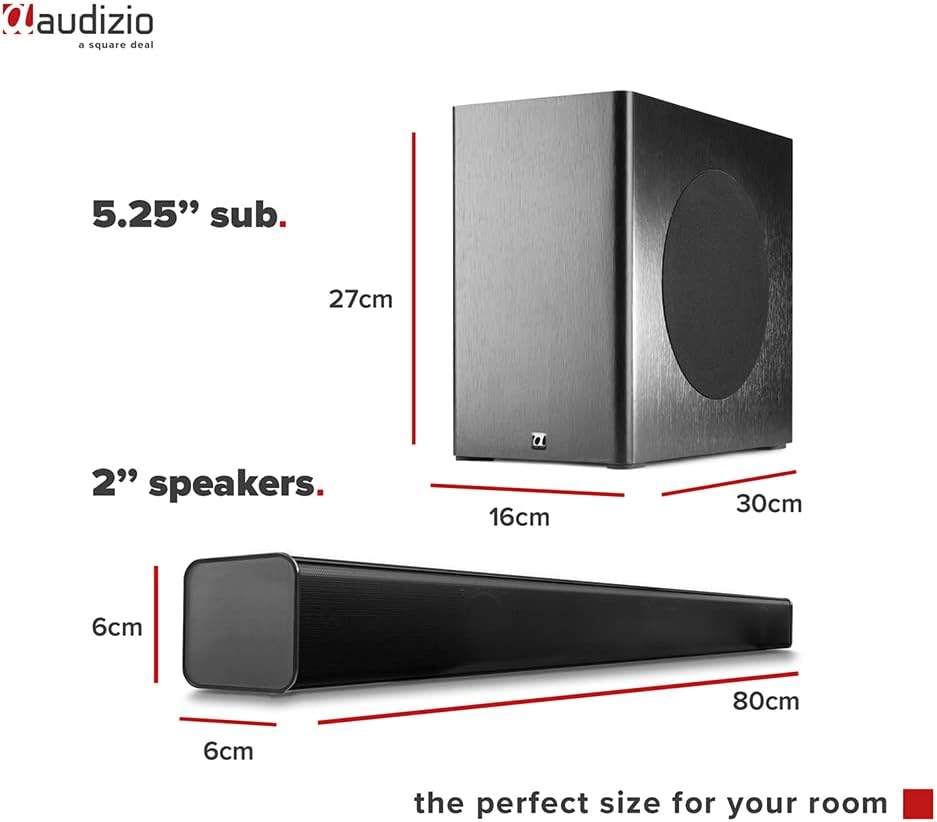
Image: Diagram showing the dimensions of the Audizio SB85 Soundbar and its subwoofer.
- Mpụta ike: 150W (Max)
- Nhazi Ọkà Okwu: 4 speakers (2x 2cm range, 2x 2cm tweeter)
- Size subwoofer: 5.25 sentimita asatọ
- Oke ugboro: 50 Hz - 16,000 Hz
- Oke SPL: 125 dB
- Njikọta: Bluetooth 5.0, HDMI (ARC), USB, Line In (AUX), Coaxial, Optical
- Ụkpụrụ mmepụta ụda: Stereo
- Ngwa dakọtara: MP3 Player, Smartphone, TV
- Isi mmalite ike: 230 Vac/50 Hz (via electric cable)
- Soundbar Dimensions (L x W x H): 80 x 6 x 6 cm
- Subwoofer Dimensions (L x W x H): 16 x 30 x 27 cm
- Mkpokọta ibu: 3.9 n'arọ
- Nọmba nlereanya: 100.292
Akwụkwọ ikike na nkwado
For warranty information or technical support, please refer to the documentation provided at the time of purchase or contact your retailer. Keep your proof of purchase for any warranty claims.