

1. Okwu mmalite
Thank you for choosing the CREATE FRYER AIR PRO 3.5L Air Fryer. This appliance uses advanced hot air technology to cook your favorite foods with little to no oil, offering a healthier alternative to traditional frying. It features a 3.5-liter capacity, a digital LCD screen, and 8 pre-installed programs for convenient cooking. Please read this manual thoroughly before first use to ensure safe and optimal performance.
2. Ntuziaka nchekwa dị mkpa
Na-agbaso usoro nchekwa nchekwa mgbe niile mgbe ị na-eji ngwa eletriki iji belata ihe egwu nke ọkụ, ujo eletrik na mmerụ ahụ.
- Gụọ ntuziaka niile tupu ojiji.
- Etinyela isi ihe dị na ya, eriri, ma ọ bụ tinyela mmiri ma ọ bụ mmiri mmiri ndị ọzọ n'ime ya.
- Gbaa mbọ hụ na voltage gosiri na ngwa ngwa kwekọrọ na mains mpaghara gị voltage.
- Nleba anya dị mkpa mgbe ụmụaka na-eji ngwa ọ bụla ma ọ bụ nso.
- Kpupu na ntinye mgbe ejighị ya na tupu ihicha. Kwe ka ọ dị jụụ tupu ịtinye ma ọ bụ wepụ akụkụ.
- Ejila ngwa ọ bụla nwere eriri ma ọ bụ plọg mebiri emebi rụọ ọrụ, ma ọ bụ mgbe ngwa ahụ dara ma ọ bụ mebie n'ụzọ ọ bụla.
- Ejila ngwa mgbakwunye nke onye nrụpụta ngwa akwadoghị.
- Do not place the appliance against a wall or against other appliances. Leave at least 10 cm free space on the back and sides and 10 cm free space above the appliance.
- Edokwala ihe ọ bụla n'elu ngwa.
- Ejila ngwa ahụ maka ebumnuche ọ bụla karịa akọwara n'akwụkwọ ntuziaka a.
- Hot air is released through the air outlet openings during hot air frying. Keep your hands and face at a safe distance from the steam and from the air outlet openings.
- The outer surfaces may become hot during use. Do not touch hot surfaces. Use handles or knobs.
- Always ensure the basket is properly inserted before operating.
3. Ngwaahịa gafereview na akụrụngwa
Familiarize yourself with the main parts of your CREATE FRYER AIR PRO:
- Isi ngalaba nwere Ogwe njikwa
- Ngosipụta LCD dijitalụ
- Temperature/Time Control Dial
- Basket Fryer Air
- Crisper Plate (removable)
- Jikwaa
- Ntinye ikuku
- Air tinyekwa Vents

Image: A composite image displaying the CREATE FRYER AIR PRO air fryer unit alongside its separate basket and crisper plate components.
4. Ntọala na ojiji mbụ
4.1 Nwepu
Carefully remove all packaging materials, stickers, and labels from the appliance. Keep packaging for future storage or disposal.
4.2 Nhicha mbụ
- Jiri mgbasa ozi hichapụ mpụta ngwa ahụamp akwa .
- Clean the basket and crisper plate with hot water, dish soap, and a non-abrasive sponge. These parts are dishwasher safe.
- Gbaa mbọ hụ na akụkụ niile akpọọla nkụ tupu ejiri ya.
4.3 Ntinye
Place the appliance on a stable, horizontal, and heat-resistant surface. Ensure there is adequate air circulation around the unit (at least 10 cm clearance on all sides and top).
4.4 First Use (Burn-in Cycle)
It is recommended to run the air fryer empty for about 10-15 minutes at 180°C before cooking food for the first time. This helps to burn off any manufacturing residues and odors. A slight odor may be present during this process; this is normal.
5. Ntuziaka ọrụ
5.1 Basic Arụmọrụ
- Tinye eriri ọkụ n'ime oghere mgbidi gbadoro ụkwụ. Ngwa ahụ ga-ada ụda, ihe ngosi ahụ ga-enwukwa obere oge.
- Pull the basket out of the air fryer. Place your ingredients into the basket, ensuring not to overfill (do not exceed the MAX line).
- Slide the basket back into the air fryer until it clicks into place.
- The display will show the default temperature and time. Use the control dial to adjust the temperature (80°C to 200°C) and time (1 to 60 minutes). Press the dial to switch between temperature and time settings.
- Press the Start/Pause button (usually a play/pause icon) to begin cooking.
- N'oge esi nri, ị nwere ike ịdọpụta nkata ahụ iji maa jijiji ma ọ bụ tụgharịa ihe ndị e ji mee ya. Igwe e ji esi nri ikuku ga-akwụsị ozugbo ma maliteghachi ya mgbe e tinyere ya ọzọ.
- Ozugbo ihe na-eme ka oge ruo efu, ihe na-esi nri ikuku ga-ada ụda, nke na-egosi na esi nri agwụla.
- Carefully pull out the basket and empty the cooked food. Use heat-resistant tongs or gloves.

Foto: nkọwa zuru ezu view of the CREATE FRYER AIR PRO's digital control panel, highlighting the temperature display and various cooking program icons.
5.2 Pre-installed Programs
The FRYER AIR PRO comes with 8 pre-installed programs for common dishes. To use them:
- After placing food in the basket, press the Menu button (often represented by multiple icons or a 'P' symbol) to cycle through the programs.
- Each program has a preset temperature and time. You can adjust these settings manually after selecting a program if desired.
- Pịa bọtịnụ Malite/kwụsịtụ ka ịmalite mmemme ahọpụtara.
The 8 programs include:
- Pommes Frites (Fries)
- Revben (Ribs)
- Fisk (Fish)
- Räkor (Shrimp)
- Kyckling (Chicken)
- Pajer (Pies)
- Kycklingben (Chicken Legs)
- Bröd (Bread)
5.3 Atụmatụ nri
- Maka nsonaazụ kacha mma, kpochaa fryer ikuku maka nkeji 3-5 tupu ịtinye nri.
- Mafee nkata ahụ n'etiti nri ahụ ruo mgbe ọ ga-acha aja aja, ọkachasị maka obere ihe dịka fries ma ọ bụ nuggets.
- Lightly brush or spray food with oil for extra crispiness, though many foods require no added oil.
- Do not overcrowd the basket. Cook in batches if necessary to ensure proper air circulation and even cooking.
- For foods that typically require baking, the air fryer can often achieve similar results with a crispy exterior.
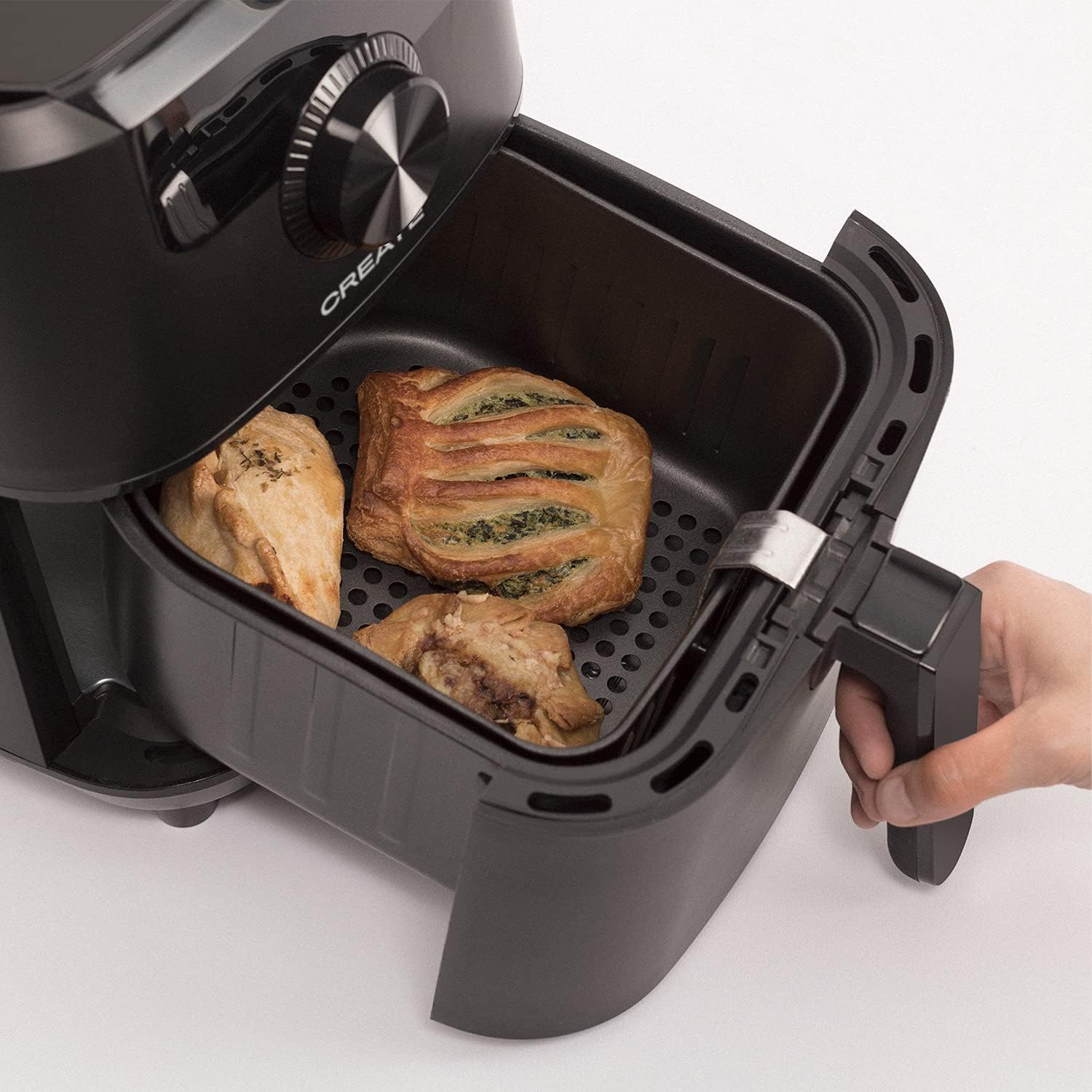
Image: The air fryer basket, pulled out from the main unit, containing cooked pastries and chicken pieces, demonstrating the cooking capacity.
6. Nlekọta na nhicha
Hichaa fryer ikuku mgbe ejirichara ya.
- Unplug the appliance from the wall outlet and allow it to cool down completely before cleaning.
- Jiri mgbasa ozi hichaa mpụta nke ngalaba isiamp akwa . Ejila ihe nhicha abrasive.
- Remove the basket and crisper plate. Wash them with hot water, dish soap, and a non-abrasive sponge. The non-stick coating makes cleaning easy. These parts are also dishwasher safe.
- For stubborn food residues, soak the basket and crisper plate in hot water with dish soap for about 10 minutes before cleaning.
- Hụ na akụkụ niile kpọrọ nkụ nke ọma tupu ị tinyegharịa ma ọ bụ chekwaa ngwa ahụ.
- Chekwaa fryer ikuku n’ebe dị jụụ, kpọrọ nkụ.

Image: The air fryer basket, with its crisper plate, fully removed from the main unit, illustrating its readiness for cleaning.
7. Nchọpụta nsogbu
| Nsogbu | Ihe nwere ike ime | Ngwọta |
|---|---|---|
| Fryer ikuku anaghị agbanwuo. | Ejinyeghị ngwa. | Gbaa mbọ hụ na etinyere eriri ọkụ ahụ n'ime oghere gbadoro ụkwụ. |
| A naghị esi nri nke ọma. | Basket is overcrowded. Food not shaken. | Cook in smaller batches. Shake the basket halfway through cooking. |
| Anwụrụ ọkụ na-acha ọcha na-esi na ngwa ahụ pụta. | Mfọda griiz sitere na ojiji gara aga. | Hichaa nkata na efere crisper nke ọma mgbe ejiri ya ọ bụla. |
| Nri adịghị crispy. | Too much moisture in food. Not enough oil (if desired). | Pat food dry before cooking. Lightly spray or brush with oil for extra crispiness. |
8. Nkọwapụta
- Aha nlereanya: FRYER AIR PRO
- Nọmba nlereanya: 52025_186434
- Akara: Mepụta
- Ike: 3.5 lita
- Wattage: 1500 Watt
- Voltage: 240V
- Oke okpomọkụ: 80°C - 200°C
- Usoro njikwa: Metụ aka, pịa oku
- Atụmatụ pụrụ iche: Programmable, Temperature Control, Digital Display
- Ihe: Plastic
- Agba: Nwa
- Akụkụ (D x W x H): 37.8 cm x 26.5 cm x 33.7 cm
- Mkpuchi na-adịghị mma: Ee
9. Akwụkwọ ikike na nkwado
For warranty information, please refer to the warranty card included with your product or visit the official CREATE website. If you encounter any issues not covered in this manual, please contact CREATE customer support for assistance.
Websaịtị: www.create.com (Ọpụample link, please refer to actual manufacturer's websaịtị)