
Okwu mmalite
Thank you for choosing the CHOETECH 38W Dual Port Fast Charger, Model PD5002. This charger is designed to provide efficient and rapid charging for your mobile devices, featuring both a USB Type-C port with Power Delivery (PD) and a USB Type-A port with Quick Charge (QC) technology. Please read this manual carefully to ensure proper use and optimal performance of your charger.
Ozi nchekwa
- Use this charger indoors only. Avoid exposure to rain, moisture, or extreme temperatures.
- Do not disassemble, modify, or repair the product yourself. This may cause electric shock, fire, or damage to the product.
- Debe chaja n'ebe ụmụaka nọ na anụ ụlọ.
- Ensure the charger is fully inserted into the power outlet. Loose connections can cause overheating.
- Unplug the charger from the power outlet when not in use or during lightning storms.
- Ejila aka mmiri arụ ọrụ chaja.
- Use only compatible charging cables with your devices.
Ihe ngwugwu
- 1 x CHOETECH 38W Dual Port Fast Charger (Model PD5002)
Ngwaahịa gafereview
The CHOETECH PD5002 charger features a compact and lightweight design, making it ideal for travel and everyday use. It includes two charging ports for simultaneous charging.

Foto: N'ihu view of the CHOETECH PD5002 38W Dual Port Fast Charger, showing the USB-C and USB-A ports and the CHOETECH logo.
Nhazi Port:
- USB Type-C Port (PD 3.0): Delivers up to 20W of power for fast charging compatible devices.
- USB Type-A Port (QC 3.0): Delivers up to 18W of power for quick charging compatible devices.
Melite
Setting up your CHOETECH PD5002 charger is straightforward:
- Tinye n'ime oghere ọkụ: Insert the charger's prongs firmly into a standard wall power outlet (AC 100-240V).
- Jikọọ eriri nchaji: Connect one end of your device's charging cable to the appropriate port on the charger (USB-C for Power Delivery or USB-A for Quick Charge).
- Jikọọ na ngwaọrụ: Connect the other end of the charging cable to your mobile phone, tablet, or other compatible device.
Ntuziaka ọrụ
Nchaji Ngwaọrụ Otu:
When charging a single device, the charger will deliver the maximum power supported by the port and your device. For example, a compatible device connected to the USB-C port can receive up to 20W, while a device connected to the USB-A port can receive up to 18W.
Simultaneous Dual Device Charging:
The CHOETECH PD5002 allows you to charge two devices simultaneously with a combined total output of 38W. When both ports are in use, the power is intelligently distributed:
- The USB-C port can deliver up to 20W.
- The USB-A port can deliver up to 18W.
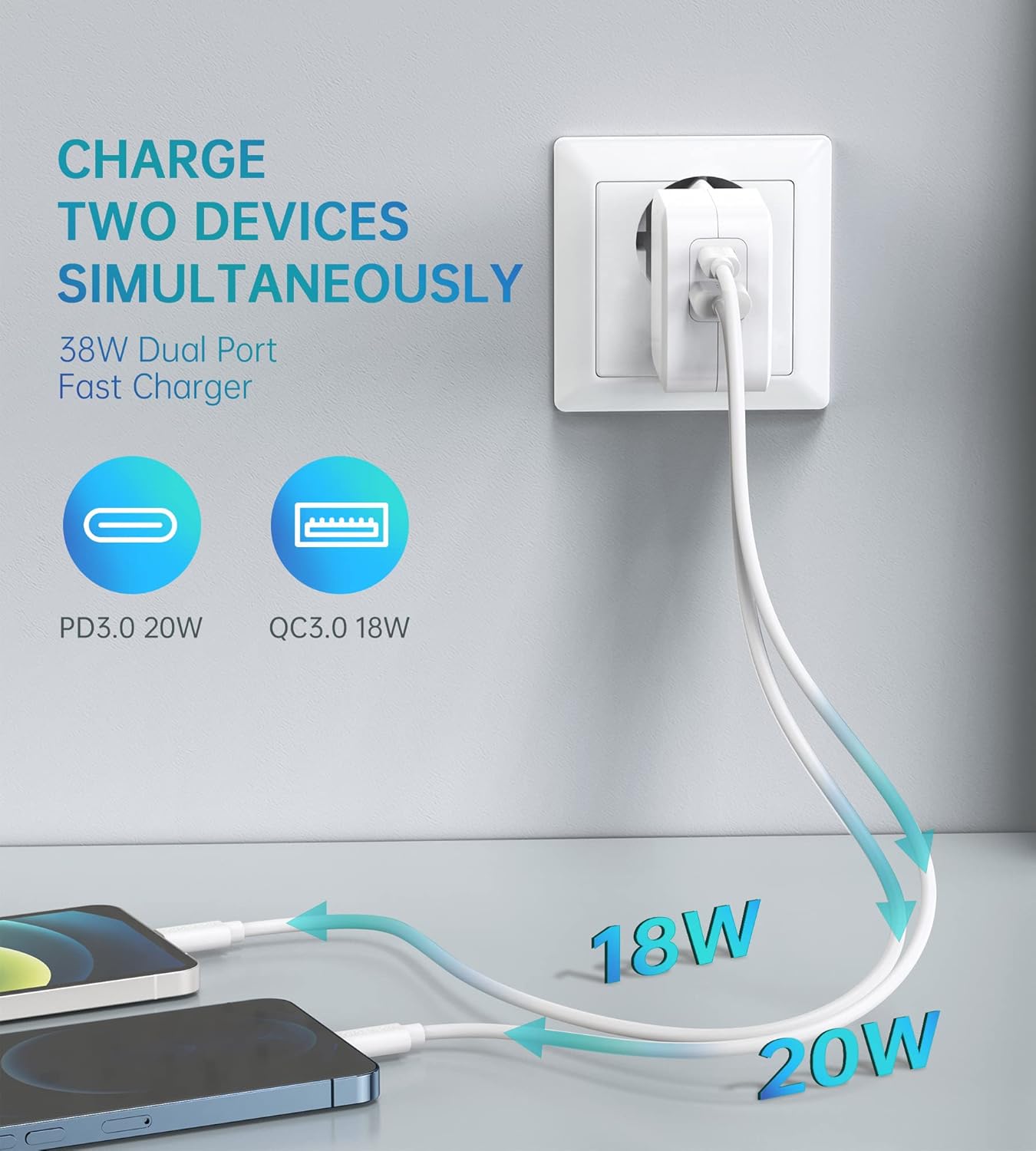
Image: Illustration showing the CHOETECH PD5002 charger plugged into a wall, with two cables extending to charge two smartphones. One cable is labeled 20W (USB-C) and the other 18W (USB-A), demonstrating simultaneous charging.
Ike Nchaji ngwa ngwa:
This charger supports Power Delivery (PD) 3.0 via the USB-C port and Quick Charge (QC) 3.0 via the USB-A port, enabling significantly faster charging speeds for compatible devices compared to standard chargers.

Image: The CHOETECH PD5002 charger plugged into a wall outlet, connected to an iPhone 12 via a USB-C to Lightning cable. Text highlights "20W Power Delivery for the new iPhone 12 series" and "4X FASTER Than Original 5W Chargers."

Image: The CHOETECH PD5002 charger plugged into a wall outlet, connected to a Samsung smartphone via a USB-A to USB-C cable. Text highlights "18W QUICK CHARGE 3.0" and "3X Faster Than Standard Chargers."
Nlekọta
- Nhicha: Kwụpụ chaja ahụ na ebe a na-esi enweta ọkụ eletrik tupu ị sachaa ya. Jiri ákwà dị nro ma kpọọ nkụ hichaa elu ya. Ejila ihe nhicha mmiri ma ọ bụ ihe na-eme ka ọ dị ọcha.
- Nchekwa: Store the charger in a cool, dry place when not in use. Avoid storing it in areas with high humidity or extreme temperatures.
- Ijikwa: Avoid dropping or subjecting the charger to strong impacts, as this can damage internal components.
Nchọpụta nsogbu
Ngwaọrụ anaghị akwụ ụgwọ:
- Lelee njikọ: Ensure the charger is securely plugged into the wall outlet and the charging cable is firmly connected to both the charger and your device.
- Gbalịa ụzọ ọpụpụ dị iche: Test the charger with a different wall outlet to rule out a faulty power source.
- Nyochaa eriri: Try using a different charging cable. Damaged cables can prevent charging.
- Ndakọrịta ngwaọrụ: Confirm that your device is compatible with USB charging and that the cable matches the device's port type.
Nchaji nwayọ:
- Ogo USB: Ensure you are using a high-quality charging cable that supports fast charging protocols (PD or QC). Generic or old cables may limit charging speed.
- Nkwado ngwaọrụ: Verify that your device supports Power Delivery (PD) or Quick Charge (QC) for optimal fast charging.
- Ngwa ndabere: Mechie ngwa ọ bụla nwere ike dị ukwuu nke na-arụ ọrụ n'azụ na ngwaọrụ gị.
- Ihe na-akpata gburugburu: Extreme temperatures can affect charging efficiency. Charge in a moderate environment.
Nkọwapụta
| Nọmba nlereanya | PD5002 |
| Ntinye AC | 100-240V, 50/60Hz, 1.0A (Max) |
| USB Type-C Output (PD 3.0) | 5V-3A, 9V-2.22A, 12V-1.67A (20W Max) |
| USB Type-A Output (QC 3.0) | 5V-3A, 9V-2A, 12V-1.5A (18W Max) |
| Nwee ikike zuru ezu | 38W (Max) |
| Teknụzụ Njikọta | USB |
| Atụmatụ pụrụ iche | Lightweight design, Fast charging |
| Agba | Ọcha |
| Akụkụ ngwaahịa | 4 x 11 x 10 cm |
| Ibu Ibu | 5 grams |
| Ngwa dakọtara | Mobile phones, tablets, and other USB-powered devices |
Akwụkwọ ikike na nkwado
CHOETECH products are designed and manufactured to the highest quality standards. For information regarding warranty coverage or technical support, please refer to the warranty card included with your purchase or visit the official CHOETECH website. If you encounter any issues not covered in this manual, please contact CHOETECH customer service for assistance.