
LAMA LX02 (A13-Nero)
LAMA Bluetooth Sport Headphones User Manual
Model: LX02 (A13-Nero)
Brand: LAMA
1. Okwu mmalite
Thank you for choosing LAMA Bluetooth Sport Headphones. This manual provides essential information for setting up, operating, and maintaining your new headphones. Please read it carefully before use to ensure optimal performance and longevity of the product.

Image 1.1: LAMA Bluetooth Sport Headphones (Model LX02, A13-Nero).
2. Ihe ngwugwu
Biko lelee ngwungwu maka ihe ndị a:
- LAMA Bluetooth Sport Headphones
- USB USB USB (Ụdị-C)
- Multiple pairs of interchangeable ear tips (S/M/L)
- Akwụkwọ ntuziaka onye ọrụ
3. Ngwaahịa gafereview
The LAMA Bluetooth Sport Headphones feature an ergonomic neckband design with in-ear earbuds, integrated controls, and a Type-C charging port.

Image 3.1: Control Panel Layout and Functions.
- Mgbanwe bọtịnụ: Ike On / Gbanyụọ.
- 'C' Key: Game/Music Mode Switch, Sound Effect Switch, Voice Assistant activation.
- Igodo ọrụ: Play/Pause, Answer/Hang Up Call, Redial, Reject Call.
- Igodo olu: Volume Up/Down, Previous/Next Song.

Image 3.2: Magnetic Earbud Design for secure storage.
4. Nhazi
4.1 Nchaji izizi
Before first use, fully charge the headphones. Connect the provided USB Type-C charging cable to the charging port on the control panel and a suitable USB power source. The battery indicator lights will show the charging status.
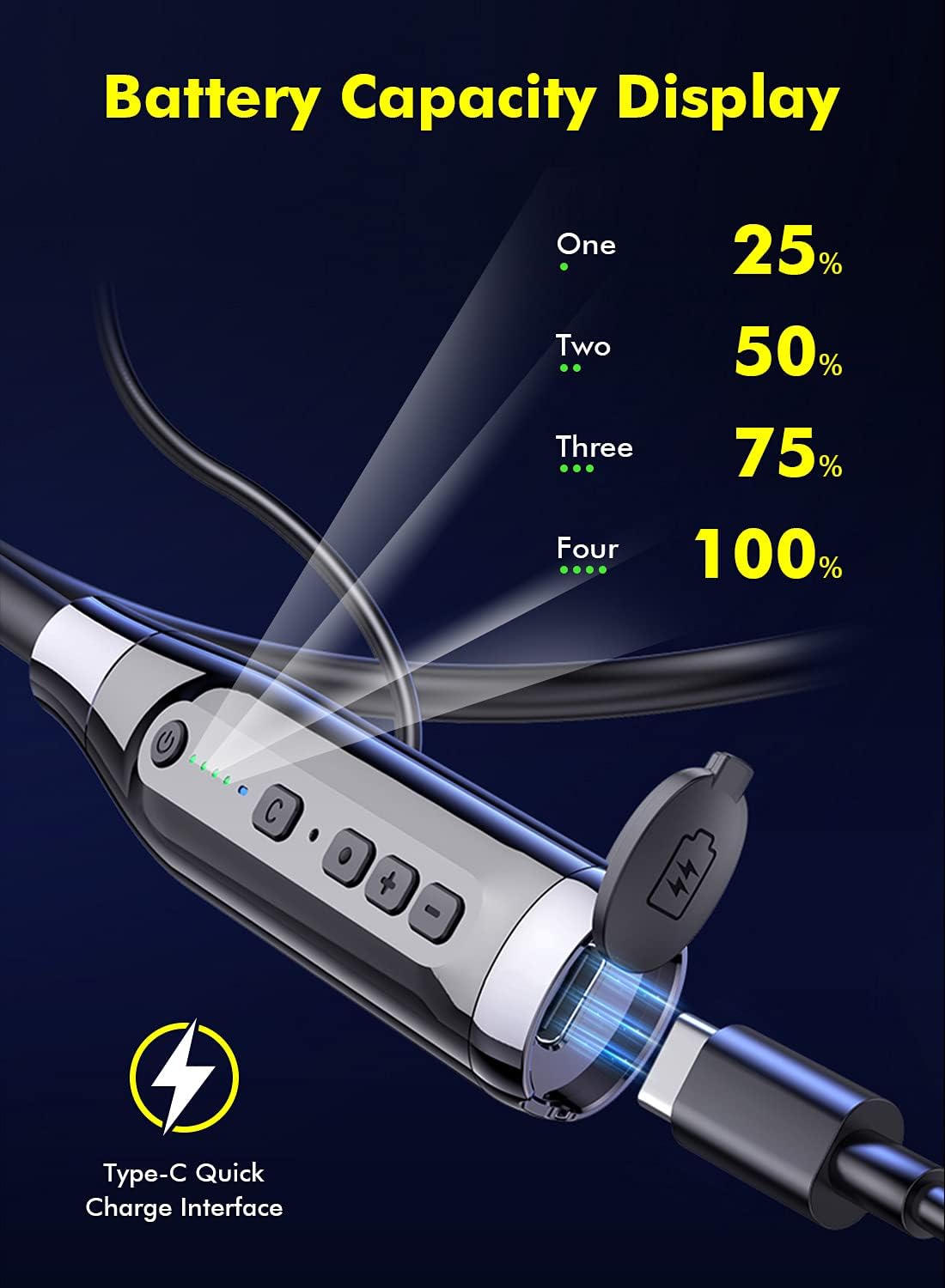
Image 4.1: Battery Capacity Display and Type-C Charging Port.
- Oge Nchaji: Ihe dị ka awa 2 maka ụgwọ zuru ezu.
- Battery Life: Up to 100 hours of continuous play time on a full charge.
4.2 Gbanyụọ/ gbanyụọ
- Ike Na: Long press the Switch Button (1) for 2 seconds.
- Gbanyụọ: Long press the Switch Button (1) for 3 seconds.
4.3 Njikọ Bluetooth
- Gbaa mbọ hụ na agbanyụrụ ekweisi.
- Long press the Switch Button (1) for 2 seconds to power on. The LED indicator will flash, indicating pairing mode.
- Na ngwaọrụ gị (smartphone, tabletị, wdg), gbanye Bluetooth wee chọọ ngwaọrụ dịnụ.
- Select "LAMA LX02" (or similar name) from the list of found devices.
- Ozugbo ejikọrọ, ihe ngosi LED ga-akwụsị ịcha ọkụ ma nọgide na-acha anụnụ anụnụ.
5. Ntuziaka ọrụ
5.1 Nghaghachi egwu
- Gwuo/kwụsịtụ: Single click the Function Key (3).
- Olu elu: Click the "+" Volume Key (4).
- Olu ala: Click the "-" Volume Key (4).
- Abụ na-esote: Long press the "-" Volume Key (4).
- Abụ gara aga: Long press the "+" Volume Key (4).
5.2 Njikwa oku
- Azịza/Kwụsị Oku: Single click the Function Key (3).
- Jụ oku: Long press the Function Key (3) for 1 second.
- Nọmba Ikpeazụ emegharịgharịrị: Double click the Function Key (3).
5.3 Sound Effect and Mode Switching

Image 5.1: Three Sound Effect Switches (Bass, Voice, 3D Balance).
- Switch Sound Effect (Bass/Voice/3D Balance): Double click the 'C' Key (2).
- Switch Game/Music Mode: Single click the 'C' Key (2).

Image 5.2: Game/Music Mode with Low Latency Feature.
5.4 Onye enyemaka olu
- Mee ka Onye Enyemaka Olu Mee Ọrụ (Siri, Google Assistant, wdg.): Long press the 'C' Key (2) for 1 second.
6. Nlekọta
6.1 Nhicha
- Jiri akwa dị nro hichaa ekweisi.
- Ejila ihe nchacha abrasive ma ọ bụ ihe mgbaze.
- Regularly clean ear tips to prevent wax buildup, which can affect sound quality.
6.2 Nchekwa
- Chekwaa ekweisi n'ebe dị jụụ, kpọrọ nkụ na-adịghị na ìhè anyanwụ kpọmkwem na oke okpomọkụ.
- The magnetic earbuds help prevent tangling and secure the headphones when not in use.
6.3 Mgbochi mmiri (IPX5)
The headphones are rated IPX5 water-resistant, meaning they can withstand splashes and sweat. They are suitable for sports and outdoor activities.

Image 6.1: IPX5 Water Resistance for active use.
Ihe dị mkpa: IPX5 rating does not mean the headphones are waterproof for submersion. Do not immerse them in water.
7. Nchọpụta nsogbu
| Nsogbu | Ihe nwere ike ime | Ngwọta |
|---|---|---|
| Igwe ekweisi anaghị agba ọkụ. | Batrị dị ala. | Chajie ekweisi nke ọma. |
| Enweghị ike ijikọ na ngwaọrụ. | Bluetooth is off on device; headphones not in pairing mode; too far from device. | Ensure Bluetooth is enabled on your device. Put headphones in pairing mode. Move closer to the device (within 10 meters). |
| Enweghị ụda ma ọ bụ obere olu. | Volume too low; headphones not connected; ear tips blocked. | Adjust volume on headphones and device. Reconnect headphones. Clean ear tips. |
| Ogo ụda adịghị mma. | Poor connection; incorrect sound effect mode. | Ensure stable Bluetooth connection. Try switching sound effect modes (Bass, Voice, 3D Balance). |
| Igwe okwu anaghị arụ ọrụ. | Akpọchiela igwe okwu; ntọala ngwaọrụ. | Ensure microphone is not covered. Check device's audio input settings. |
8. Nkọwapụta
- Ụdị: LX02
- Akara: LAMA
- Njikọta: Bluetooth 5.0
- Ike batrị: 1000 mAh
- Oge nchaji: Ihe dị ka awa 2
- Oge egwuregwu na-aga n'ihu: Ruo awa iri abụọ
- Nchaji ọdụ ụgbọ mmiri: USB Type-C (supports QC 3.0, QC2.0, QC1.0 fast charging protocols)
- Nguzogide mmiri: IPX5
- Usoro njikwa: Olu, bọtịnụ
- Igwe okwu: Integrated, Stereo technology
- Ihe: Plastic
- Arọ: 200 g
- Atụmatụ ndị ọzọ: Noise Cancellation, Lightweight, Magnetic Design, Multiple Sound Effects (Bass, Voice, 3D Balance), Game/Music Low Latency Mode.
9. Ozi nchekwa
- Ewepụla ma ọ bụ gbanwee ngwaahịa a.
- Keep away from extreme temperatures, humidity, and corrosive substances.
- Zere ige ntị ruo ogologo oge n'olu dị elu iji gbochie mmebi ntị.
- Do not use headphones while driving or in situations where you need to be aware of your surroundings.
- Tụfuo batrị na akụrụngwa eletrọnịkị nke ọma dịka iwu obodo siri dị.
10. Akwụkwọ ikike na nkwado
LAMA products come with a standard manufacturer's warranty. For detailed warranty information, product support, or service inquiries, please refer to the warranty card included in your package or visit the official LAMA websaịtị.
For customer service, please contact your retailer or the LAMA support team.
Ask a question about this manual
Ask about setup, troubleshooting, compatibility, parts, safety, or missing instructions. Manuals+ will review the question and use this page’s manual context to help answer it.