
1. Okwu mmalite
The Temtop LKC-1000S+ is a versatile 10-in-1 air quality detector designed to monitor various environmental parameters. This device provides accurate measurements for PM2.5, PM10, particle count, HCHO (Formaldehyde), TVOC, AQI (Air Quality Index), temperature, and humidity. It features a clear TFT screen for easy readability, data export capabilities, and a histogram display for historical data. This manual will guide you through the proper use and maintenance of your LKC-1000S+ detector.
2. Akụrụngwa Ngwaahịa
- 10-in-1 Monitoring: Measures PM2.5, PM10, Particles, HCHO, TVOC, AQI, Temperature, and Humidity.
- Teknụzụ ihe mmetụta dị elu: Equipped with a 3rd generation Temtop laser particle sensor and optimized PSO algorithm for accurate and stable particle measurements, with a sensor life of up to 20,000 hours.
- High-Precision Formaldehyde Detection: Features a pre-calibrated electrochemical sensor for precise capture of formaldehyde molecules.
- Ngosipụta Enyi na Enyi: Large TFT screen with rich display options and a battery indicator light for clear readability.
- Historical Data Analysis: New histogram function displays concentration changes of tested objects over the past 12 hours.
- Mbupu data: Supports data export for detailed analysis and record-keeping.

Image: The Temtop LKC-1000S+ detector highlighting its 10-in-1 air quality monitoring functions, including PM2.5, PM10, Particles, HCHO, TVOC, AQI, Temperature, Humidity, and Data Export.
3. Ihe ngwugwu
Biko chọpụta na ihe niile dị na ngwugwu:
- Temtop LKC-1000S+ Air Quality Monitor
- USB Charging Cable (Micro USB)
- Akwụkwọ ntuziaka
- Igbe nchekwa
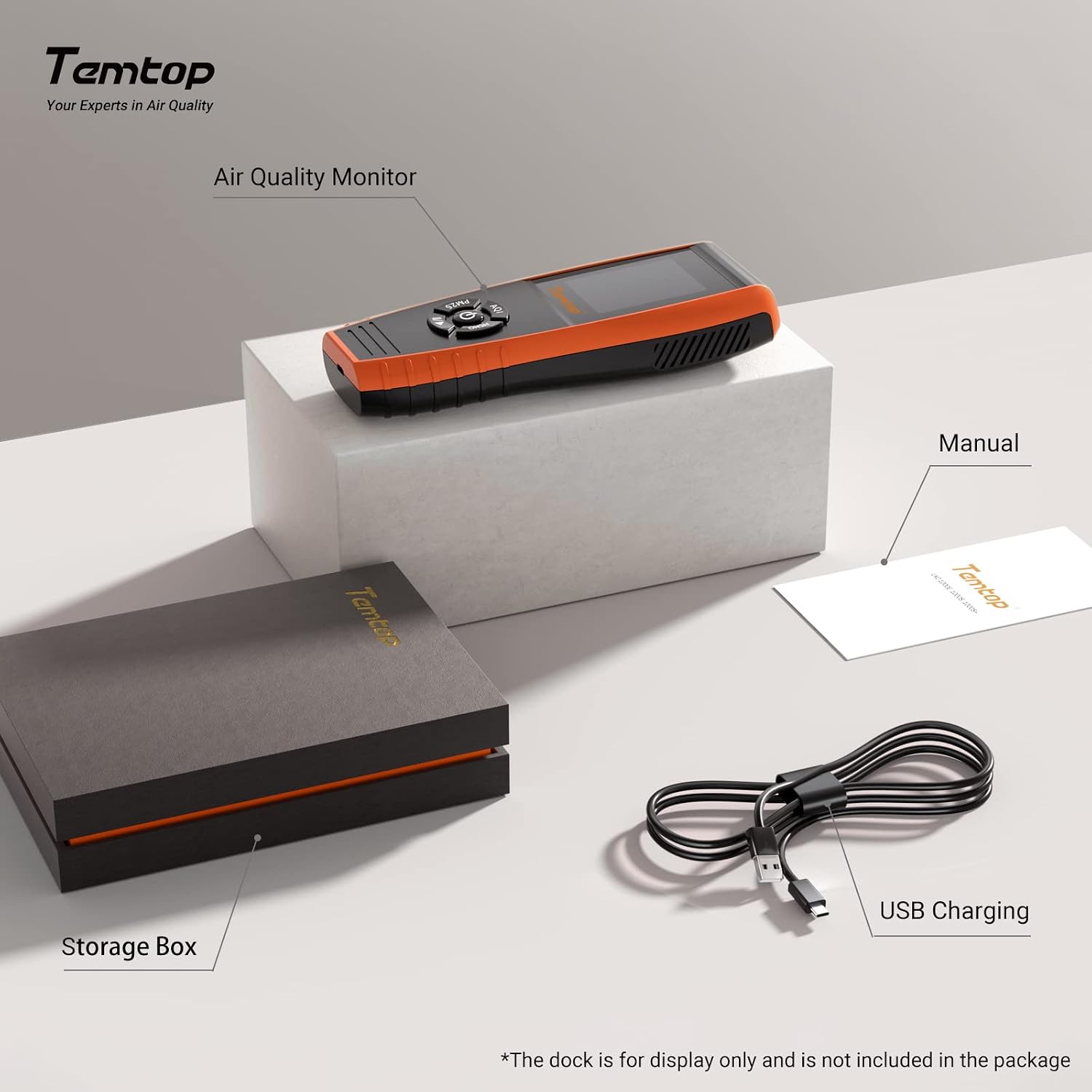
Image: The Temtop LKC-1000S+ air quality monitor, its storage box, the instruction manual, and the USB charging cable.
4. Ngwaọrụ gafereview
Familiarize yourself with the components and controls of your LKC-1000S+ detector:

Image: Labeled diagram of the Temtop LKC-1000S+ device, indicating the Air Outlet, Air Inlet, LCD Screen, AQI/Temp & Humi button, PM2.5/PM10/Particles button, HCHO/TVOC button, and USB Port.
- Ọpụpụ ikuku: Where processed air exits the device.
- Ikuku ụgbọ mmiri: Where ambient air enters the device for sampegbu oge.
- Ihuenyo LCD: Displays all measurement readings and device status.
- AQI / Temp & Humi Button: Press to cycle through Air Quality Index, Temperature, and Humidity displays. Double-click for histogram.
- PM2.5 / PM10 / Particles Button: Press to cycle through PM2.5, PM10, and Particle count displays. Double-click for histogram.
- HCHO / TVOC Button: Press to cycle through Formaldehyde and TVOC displays. Double-click for histogram.
- Ọdụ ụgbọ mmiri USB: Micro USB port for charging and data export.

Foto: Ihe gbawara view illustrating the internal components of the Temtop LKC-1000S+, detailing the Dart electrochemical HCHO sensor, Sensirion temperature and humidity sensor, and the 3rd Generation Temtop Laser PM2.5 Sensor.
5. Nhazi
- Ebube mbụ: Before first use, fully charge the device using the provided USB cable and a standard USB power adapter (not included). The battery indicator on the screen will show charging status.
- Ike Na: Press and hold the power button (usually located in the center of the control panel) for a few seconds until the screen illuminates.
- Nhazi izizi: For optimal accuracy, allow the device to run for at least 5-10 minutes in a well-ventilated area after powering on, especially for HCHO and TVOC readings. This allows the sensors to stabilize.
6. Ọrụ
6.1 Taking Readings
Once powered on, the device will automatically begin monitoring. The main screen displays real-time readings for various parameters.
- Use the dedicated buttons (AQI / Temp & Humi, PM2.5 / PM10 / Particles, HCHO / TVOC) to switch between different measurement displays.
- The screen will show the current concentration or value for the selected parameter.
6.2 Ịghọta ihe ngosi
The large TFT screen provides clear information:
- Running Status: Indicates the device is actively monitoring.
- Ihe ngosi batrị: Na-egosi ndụ batrị fọdụrụ.
- Ngalaba nha: Clearly displayed (e.g., ug/m³ for PM2.5/PM10, mg/m³ for HCHO/TVOC).
- AQI Level: Provides an overall air quality assessment (e.g., Good, Moderate, Unhealthy).
6.3 Histogram Function
Iji view the historical data histogram for a specific parameter:
- Double-click the corresponding button (AQI / Temp & Humi, PM2.5 / PM10 / Particles, or HCHO / TVOC).
- The screen will display a graph showing the concentration changes over the past 12 hours.
7. Parameter Comparison
The LKC-1000S+ offers a comprehensive set of monitoring capabilities compared to other models:

Image: A comparison table detailing the monitoring parameters available across different Temtop air quality monitor models, including PM2.5, PM10, HCHO, Particle Count, AQI, TVOC, Temperature & Humidity, Histogram, and Data Export.
| Oke | LKC-1000S+ | LKC-1000S | LKC-1000E | P600 |
|---|---|---|---|---|
| PM2.5 | ✓ | ✓ | ✓ | ✓ |
| PM10 | ✓ | ✓ | ✓ | ✓ |
| Udo | ✓ | ✓ | ||
| Ọnụọgụ urughuru | ✓ | ✓ | ✓ | |
| AQI | ✓ | ✓ | ✓ | |
| TVOC | ✓ | ✓ | ||
| Temp & Humi | ✓ | ✓ | ✓ | |
| Histogram | ✓ | ✓ | ||
| Mbupu data | ✓ |
8. Air Quality Index Interpretation
The device provides an Air Quality Index (AQI) and specific parameter levels based on EPA & WHO Air Quality Standards. Refer to the tables below for interpretation:

Image: Detailed tables outlining the Air Quality Index (AQI) categories and corresponding concentration ranges for PM2.5, PM10, HCHO, and TVOC, based on EPA and WHO standards.
| PM2.5 (ug/m³) | PM10 (ug/m³) | AQI* | Index |
|---|---|---|---|
| 0-12 | 0-54 | 0-50 | Ọ dị mma |
| 12.1-35.4 | 55-154 | 51-100 | Na-agafeghị oke |
| 35.5-55.4 | 155-254 | 101-150 | Adịghị mma maka otu ndị nwere mmetụta |
| 55.5-150.4 | 255-354 | 151-200 | Adịghị mma |
| 150.5-250.4 | 355-424 | 201-300 | Ahụ adịchaghị mma |
| ≥250.5 | ≥425 | ≥301 | Dị ize ndụ |
| HCHO (mg/m³) | Ọkwa | TVOC (mg/m³) | Ọkwa |
|---|---|---|---|
| 0-0.1 | Ọ dị mma | 0-0.5 | Ọ dị mma |
| >0.1 | Ogbenye | >0.5 | Ogbenye |
9. Data Storage & Export
The LKC-1000S+ is equipped with internal memory and a data export function:

Image: The Temtop LKC-1000S+ monitor next to a laptop screen showing exported data in a spreadsheet format, illustrating the device's data storage and export capabilities.
- Ebe nchekwa: The device's memory allows for at least 3 months of continuous data recording.
- Mbupu data: Connect the device to a computer using the provided USB cable to export recorded data. Specific software or drivers may be required, refer to the official Temtop websaịtị maka nkọwa.
10. Nlekọta
To ensure the longevity and accuracy of your air quality detector, follow these maintenance guidelines:
- Nhicha: Use a soft, dry cloth to clean the exterior of the device. Do not use abrasive cleaners or solvents.
- Nlekọta ihe mmetụta: Avoid exposing the air inlets and outlets to dust, lint, or liquids, as this can affect sensor performance. Do not attempt to clean the internal sensors.
- Nchekwa: When not in use for extended periods, store the device in its original storage box in a cool, dry place away from direct sunlight and extreme temperatures.
- Ịchaji: Recharge the battery regularly, even if not in frequent use, to maintain battery health.
11. Nchọpụta nsogbu
If you encounter issues with your Temtop LKC-1000S+, consider the following:
- Ọgụgụ na-ezighi ezi: Ensure the device has been allowed sufficient time to stabilize after power-on. Move the device to a different location to rule out localized anomalies. Avoid placing it near strong air currents, heat sources, or chemical fumes.
- Ngwaọrụ anaghị agba ọkụ: Check if the battery is charged. Connect the device to a power source using the USB cable and try again.
- Ihuenyo anaghị aza: Try restarting the device by holding the power button. If unresponsive, allow the battery to fully discharge and then recharge before attempting to power on again.
- Data Export Issues: Ensure the USB cable is securely connected to both the device and the computer. Verify that any necessary drivers or software are installed on your computer.
For persistent issues, please contact Temtop customer support.
12. Nkọwapụta
| Njirimara | Nkọwa |
|---|---|
| Batrị | 1 batrị lithium ion |
| Asụsụ | Bekee |
| Akụkụ ngwaahịa | 17.7 x 3.2 x 6.5 cm |
| Ibu Ibu | 0.47 kilogram |
| Onye nrụpụta | Temptop |
| Nọmba nlereanya | LKC-1000S+ |
| Mba onye si | China |
| Isi Iyi Ike | Akwanyere batrị |
| Agba | Orange, Black |
| Oti mkpu | Anya |
| Ụdị ihe mmetụta | Nlekpo |
| Ọnụọgụ nke nkeji | 1.0 Ọnụ |
| Ọnụọgụ nke ihe | 1 |
13. Akwụkwọ ikike na nkwado
Temtop provides the following support for your LKC-1000S+ Air Quality Detector:
- Akwụkwọ ikike: A 12-month warranty is available from the date of purchase.
- Nlaghachi na mgbanwe: Free returns and exchanges are available within 3 months of purchase.
For technical support, warranty claims, or further assistance, please refer to the contact information provided on the official Temtop websaịtị ma ọ bụ akwụkwọ ịzụrụ ihe.