
Okwu mmalite
The Poly DA75 is a versatile USB-A/USB-C digital adapter designed to connect Poly Quick Disconnect (QD) headsets to computers. It ensures clear audio quality for call center environments, supporting both USB-A and USB-C connections for compatibility with various systems. This adapter is engineered to work seamlessly with platforms such as Avaya, Genesys, and Cisco, providing a reliable audio solution for professionals.
Atụmatụ gụnyere:
- Njikọ zuru ụwa ọnụ: Equipped with both USB-A and USB-C connectors on the cable for broad compatibility with new and legacy equipment.
- Intelligent Headset Recognition: Automatically adjusts audio performance to the specific Poly Quick Disconnect headset for optimized call quality.
- Acoustic Protection: Incorporates features to manage safe volume levels, protecting user hearing.
- Platform Integration: Fully compatible with leading call center platforms including Avaya, Genesys, and Cisco.
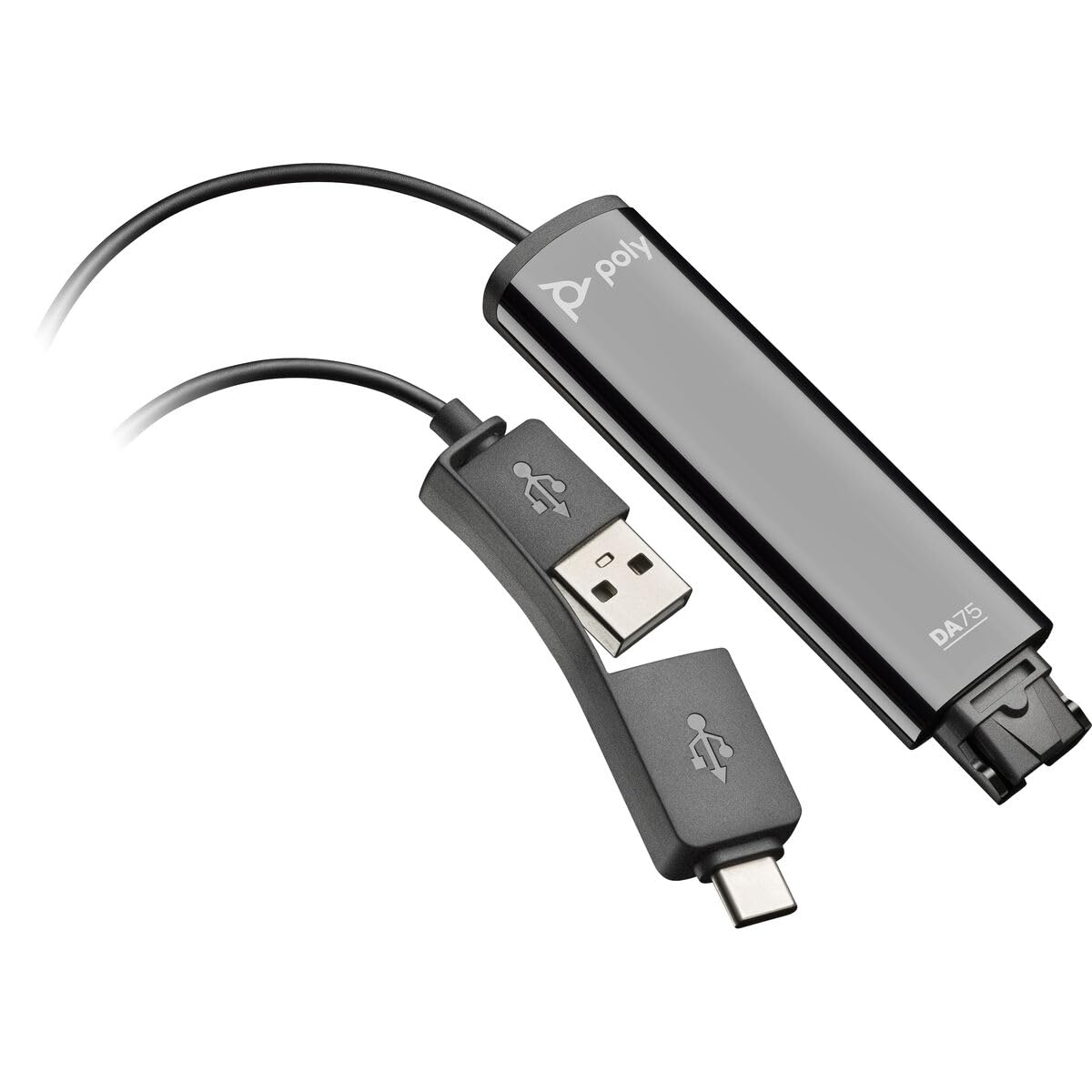
Image: The Poly DA75 USB-A/USB-C Digital Adapter, showing its dual USB-A and USB-C connectors and the Quick Disconnect port for headsets.
Kedu ihe dị na Igbe ahụ
The Poly DA75 package typically includes the following items:
- Poly DA75 USB-A/USB-C Digital Adapter
- Akwụkwọ (Nduzi mmalite ngwa ngwa, ozi nchekwa)
Note: Headsets are sold separately and are not included with the DA75 adapter.
Melite
Follow these steps to set up your Poly DA75 Digital Adapter:
- Jikọọ ekweisi: Connect your Poly Quick Disconnect (QD) headset to the QD port on the Poly DA75 adapter. Ensure the connection is secure.
- Jikọọ na Kọmputa:
- If your computer has a USB-A port, use the USB-A connector on the DA75 cable.
- If your computer has a USB-C port, use the USB-C connector on the DA75 cable.
Plug the appropriate USB connector into an available USB port on your computer.
- Nwụnye ọkwọ ụgbọala: The DA75 is a plug-and-play device. Your operating system (Windows, macOS) should automatically detect the device and install the necessary drivers. This process may take a few moments.
- Nyochaa njirimara ngwaọrụ:
- Windows: Gaa na Settings > System > Sound or Ogwe njikwa > ụda. The Poly DA75 should appear as an audio input and output device.
- MacOS: Gaa na System Settings > Sound. The Poly DA75 should appear as an input and output device.
Select the Poly DA75 as your default communication device for both playback and recording.
- Nhazi ngwanrọ: If you are using communication software (e.g., Avaya, Genesys, Cisco, Microsoft Teams, Zoom), ensure that the Poly DA75 is selected as the audio device within the application's settings.
Ntuziaka ọrụ
The Poly DA75 adapter facilitates audio communication through your connected Poly QD headset. Its operation is primarily managed through your computer's operating system and communication software.
- Ịkpọ/nata oku: Use your communication software to initiate or answer calls. The audio will be routed through your connected Poly QD headset via the DA75 adapter.
- Njikwa olu: Adjust the listening volume using your computer's system volume controls or the volume controls within your communication application.
- Mechie igwe okwu: Mute and unmute your microphone using the controls provided by your communication software.
- Audio Optimization: The DA75 automatically optimizes audio for your specific Poly QD headset. No manual adjustments are typically required for audio profiles.
Nlekọta
To ensure the longevity and optimal performance of your Poly DA75 Digital Adapter, follow these maintenance guidelines:
- Nhicha: Gently wipe the adapter with a soft, dry, anti-static cloth. Do not use liquid cleaners or abrasive materials.
- Nchekwa: Chekwaa ihe nkwụnye ọkụ n'ebe dị jụụ, kpọrọ nkụ pụọ na ìhè anyanwụ kpọmkwem na oke okpomọkụ.
- Ijikwa: Avoid bending or twisting the cable excessively, especially near the connectors, to prevent internal damage.
- Njikọta: Ensure the Quick Disconnect (QD) connection and USB connections are clean and free of debris before connecting.
Nchọpụta nsogbu
If you encounter issues with your Poly DA75 Digital Adapter, refer to the following troubleshooting steps:
| Nsogbu | Ihe nwere ike ime | Ngwọta |
|---|---|---|
| Enweghị ọdịyo sitere na ekweisi |
|
|
| Igwe okwu anaghị arụ ọrụ |
|
|
| Adapter not recognized by computer |
|
|
Nkọwapụta
| Njirimara | Nkọwa |
|---|---|
| Nọmba nlereanya | 218266-01 |
| Ụdị | POLY |
| Ụdị njikọ | USB-A, USB-C (dual connector) |
| Ngwa dakọtara | Poly Quick Disconnect (QD) Headsets |
| Ojiji akọwapụtara | PC, Call Center Platforms (Avaya, Genesys, Cisco) |
| Agba | Nwa |
| Akụkụ ihe (L x W x H) | 0.98 x 0.39 x 2.95 sentimita asatọ |
| Ibu Ibu | 30 grams |
| Ọnụọgụ nke ọdụ ụgbọ mmiri | 2 (USB-A/USB-C to QD) |
| UPC | 197029650054, 017229175112 |
Akwụkwọ ikike na nkwado
Ozi akwụkwọ ikike: The Poly DA75 Digital Adapter comes with a Akwụkwọ ikike nke onye nrụpụta afọ abụọ nwere oke. Akwụkwọ ikike a na-ekpuchi ntụpọ dị na ngwa na arụ ọrụ n'okpuru ojiji nkịtị. Biko dowe ihe akaebe nke ịzụrụ ihe maka akwụkwọ ikike.
Nkwado ndị teknuzu: For technical assistance, product inquiries, or warranty service, please contact Poly customer support. Visit the official Poly website for the most up-to-date support contact information, FAQs, and additional resources.
Akụrụngwa dị n'ịntanetị: Nkwado Poly Websaịtị