
1. Okwu mmalite
1.1 Ngwaahịa gafereview
The Retevis RB21 is a versatile 4G LTE network radio designed for extensive communication. It combines the functionality of a walkie-talkie with essential smartphone features, offering unlimited communication range across 2G/3G/4G networks. This device is suitable for various professional and outdoor activities, ensuring reliable connectivity.
1.2 Atụmatụ
- Unlimited Range Communication: Utilizes 2G/3G/4G networks for nationwide coverage.
- Nkwado kaadị SIM: Compatible with major network operators (Vodafone, T-Mobile, Telefonica, O2, e-Plus).
- Wi-Fi na Njikọ Bluetooth: Allows communication via Wi-Fi without a SIM card, and supports Bluetooth accessories.
- Ndokwa GPS: Integrated GPS function for location tracking and navigation.
- Zello Application Support: Facilitates communication with companions using Zello and similar PTT applications.
- Ebe nchekwa & Nchekwa: Equipped with 1GB RAM and 8GB internal storage.
- Ngosipụta: Features a 2.4-inch touchscreen for easy navigation.
- Ogologo oge: IP54 water and dust resistance for robust performance in various environments.
- Batrị na-adịte aka: Powered by a 2800mAh rechargeable Li-ion battery with USB charging.
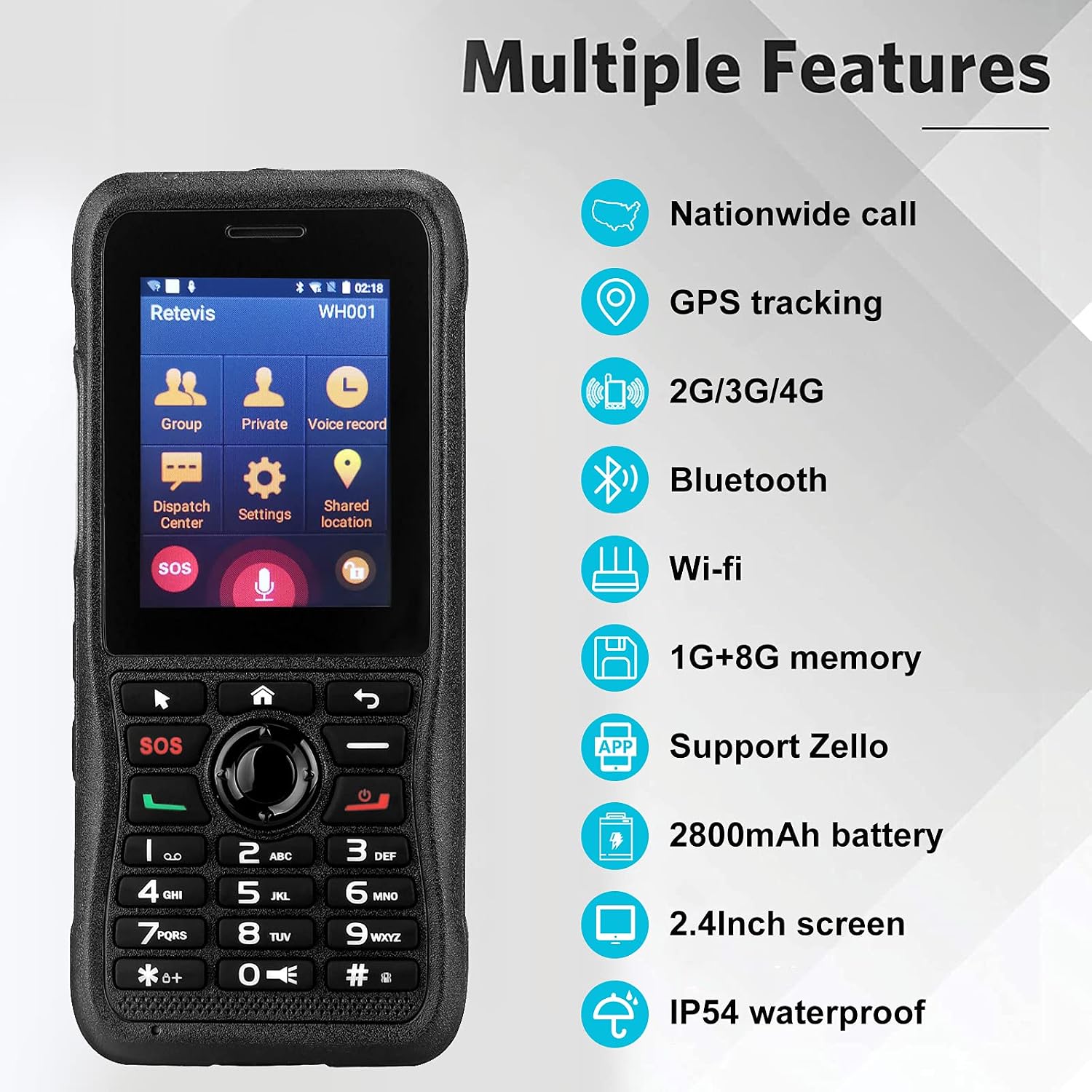
This image highlights the comprehensive features of the Retevis RB21, such as its ability for nationwide calls, GPS tracking, multi-network support (2G/3G/4G), wireless connectivity (Bluetooth, Wi-Fi), ample memory (1GB RAM + 8GB storage), Zello application compatibility, a powerful 2800mAh battery, a clear 2.4-inch screen, and IP54 water resistance.
2. Ihe ngwugwu
Biko lelee igbe maka ihe ndị a:
- Retevis RB21 Network Radio Unit
- Batrị Li-ion a na-akwụghachi ụgwọ (2800mAh)
- Igwe nchaji USB
- Ihe nkwụnye ọkụ (ọ bụrụ na etinyere ya)
- Mpempe eriri eriri
- Akwụkwọ ntuziaka onye ọrụ

This image provides a detailed look at the Retevis RB21 device from various angles, illustrating its physical components including the screen, keypad, side buttons, charging port, and the detachable belt clip, which are typically included in the package.
3. Ntuziaka Nhazi
3.1 Ịwụnye kaadị SIM na batrị
- Wepu mkpuchi azụ: Jiri nwayọ mepee mkpuchi azụ nke ngwaọrụ ahụ.
- Fanye SIM kaadị: Locate the SIM card slot. Insert your single SIM card into the designated slot with the gold contacts facing down, ensuring it is properly seated.
- Fanye batrị: Place the 2800mAh Li-ion battery into the battery compartment, aligning the contacts.
- Dochie mkpuchi azụ: Securely attach the back cover until it clicks into place.
3.2 Ịchaji ngwaọrụ
- Connect the USB charging cable to the device's charging port.
- Connect the other end of the USB cable to a power adapter or a computer's USB port.
- The charging indicator will illuminate. Allow the device to charge fully before first use.

This image shows the Retevis RB21 powered on, displaying its user interface. This is relevant for the setup section as it indicates the device is ready for initial configuration after battery and SIM installation.
4. Ntuziaka ọrụ
4.1 Gbanyụọ ma ọ bụ gbanyụọ
To power on the device, press and hold the Power button until the screen illuminates. To power off, press and hold the Power button, then select 'Power Off' from the options.
4.2 Nzikọrịta ozi (PTT)
The Retevis RB21 functions as a Push-To-Talk (PTT) device. Once configured with a network or Wi-Fi connection and a compatible application like Zello:
- Select your desired contact or group from the main menu.
- Press and hold the dedicated PTT button on the side of the device to transmit your voice.
- Release the PTT button to listen for incoming messages.
4.3 Using Zello and GPS Features
The device supports the Zello application for instant communication. The integrated GPS function allows for location tracking and sharing, which can be utilized within compatible applications for enhanced coordination.

This image demonstrates the Retevis RB21's utility for communication in mobile environments, such as logistics or transportation, highlighting its GPS and 4G capabilities for maintaining contact with teams anytime, anywhere.
5. Nlekọta
5.1 Nhicha
Regularly clean the device with a soft, dry cloth. Avoid using harsh chemicals or abrasive cleaners. For stubborn dirt, a slightly damp cloth can be used, ensuring no moisture enters ports or openings.
5.2 Mgbochi mmiri na uzuzu
The Retevis RB21 has an IP54 rating, meaning it is protected against dust ingress and splashing water from any direction. While it offers good protection, it is not fully waterproof. Avoid submerging the device in water or exposing it to heavy rain.

This image visually represents the IP54 rating of the Retevis RB21, showing its resilience against dust and water splashes, which is important for understanding its maintenance and usage in challenging environments.
6. Nchọpụta nsogbu
6.1 Okwu nkịtị na Ngwọta
- Ngwaọrụ anaghị agbanye:
- Ensure the battery is correctly installed and fully charged. Connect the device to a charger to confirm if it's a battery issue.
- Enweghị akara netwọk:
- Check if the SIM card is properly inserted and activated. Verify that you are within a 2G/3G/4G network coverage area. If using Wi-Fi, ensure the Wi-Fi network is active and you have the correct password.
- Cannot transmit or receive messages:
- Confirm that your device is connected to the internet (via SIM data or Wi-Fi). Ensure the Zello or other PTT application is running and you are logged in. Check your selected contact or group for communication.
- GPS anaghị arụ ọrụ:
- Ensure GPS is enabled in the device settings. Move to an open area with a clear view nke eluigwe maka mma satịlaịtị nnabata.
7. Nka na ụzụ nkọwa
| Njirimara | Nkọwapụta |
|---|---|
| Nọmba nlereanya | RB21 |
| Sistemụ nrụọrụ | Android 7.1 |
| RAM | 1 GB |
| Ike nchekwa | 8 GB |
| Nha ihuenyo | 2.4 sentimita asatọ |
| Ngosipụta mkpebi | 320 x240 |
| Teknụzụ ekwentị | 4G (2G, 3G, 4G, LTE) |
| Teknụzụ ikuku | GSM, LTE, UMTS |
| Nkwado Onye Na-ebuga Ikuku | O2, T-Mobile, Vodafone |
| Arụ ọrụ GPS | Ee |
| Ogo Nguzogide Mmiri | IP54 (anaghị egbochi mmiri) |
| Ike batrị | 2800mAh lithium-ion |
| Ibu Ibu | 60 grams |
| Akụkụ | 6 x 2.1 x 13.5 cm |
| Ngwa dakọtara | Retevis RB21 devices, PoC devices on the same network, Bluetooth devices, Wi-Fi networks |
8. Akwụkwọ ikike na nkwado
8.1 Ozi akwụkwọ ikike
Retevis offers a 2-year warranty for the radio body and a 1-year warranty for accessories. Additionally, a 30-day no-reason return policy is provided. Beyond the warranty period, maintenance services are available, with buyers responsible for associated costs.
8.2 Nkwado ndị ahịa
Maka ajụjụ ọ bụla ma ọ bụ mkpa nkwado, biko kpọtụrụ ndị ahịa Retevis site na Amazon. A na-enyekarị azịza n'ime awa iri na abụọ.