
Okwu mmalite
Thank you for choosing the PHEANOO D6 Sound Bar System. This 2.1 channel soundbar with a dedicated wired subwoofer is designed to enhance your audio experience, providing clear dialogue, powerful bass, and immersive sound for your home entertainment. This manual provides detailed instructions for setup, operation, maintenance, and troubleshooting to ensure optimal performance and longevity of your device.
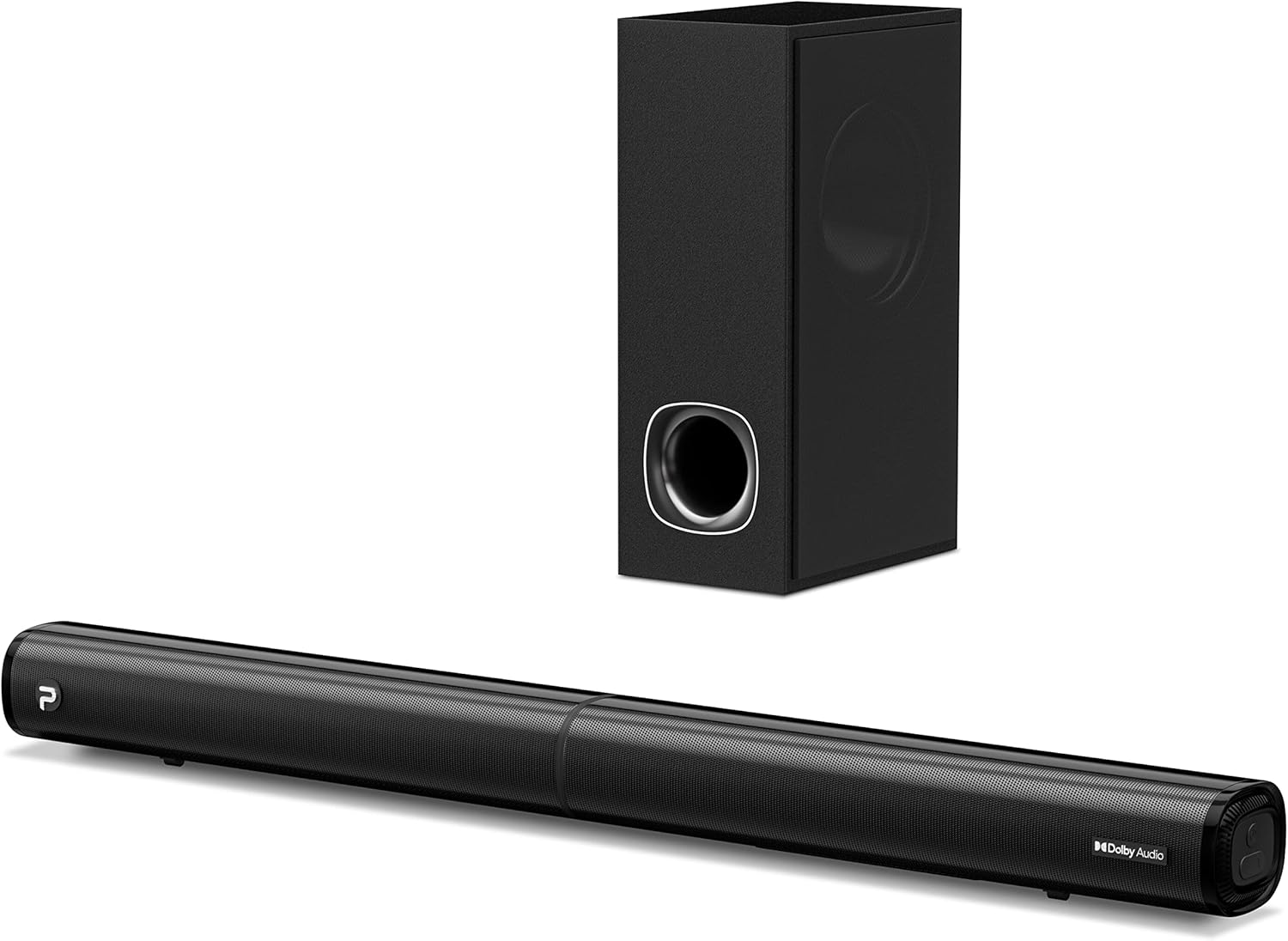
Image: The PHEANOO D6 Sound Bar and its accompanying wired subwoofer, showcasinimewe ojii ha mara mma.
Kedu ihe dị na Igbe ahụ
Biko lelee ihe dị n'ime ngwugwu ahụ nke ọma. Ọ bụrụ na ihe ọ bụla efuo ma ọ bụ mebie, kpọtụrụ ndị ọrụ nkwado ndị ahịa.
- Soundbar and Wired Subwoofer
- HDMI eriri
- RCA ọdịyo USB
- Ngwa Mgbidi Maka Mgbidi (skru na arịlịka)
- Njikwa anya (batrị etinyeghị)
- Ihe nkwụnye ọkụ

Image: All components included in the PHEANOO D6 Sound Bar package, laid out for clear identification, including the soundbar, subwoofer, cables, remote, and wall mount kit.
Melite
1. Assembling the Soundbar (Detachable Design)
The PHEANOO D6 soundbar features a unique detachable design for flexible placement. Follow these steps to assemble it:
- Align the audio connector from one half of the soundbar with the corresponding port on the other half.
- Gently push the two halves together until they click into place.
- Twist the two halves to secure the connection, ensuring the soundbar is firmly assembled.

Image: A three-step visual guide demonstrating how to connect the two halves of the detachable soundbar, ensuring proper alignment and secure locking.
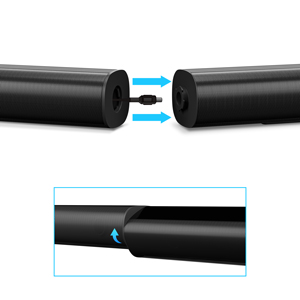
Foto: A nso nso view of the soundbar's detachable connection point, showing the male and female connectors.
2. Ijikọ Subwoofer
Jikọọ subwoofer wired na ụda ụda site na iji eriri subwoofer raara onwe ya nye. Gbaa mbọ hụ na njikọ ahụ echekwabara.
3. Nhọrọ Ntinye
You can place the soundbar on a tabletop or mount it on a wall.
- Ndokwa tebụl: Place the soundbar directly in front of your TV, ensuring it does not obstruct the TV's remote sensor.
- Ịkwanye mgbidi: Use the included wall mount kit. It is recommended to measure and mark the drilling points accurately, rather than relying solely on the paper stencil, to ensure a level installation.
4. Njikọ ọdịyo
The PHEANOO D6 offers multiple connectivity options. Choose the best one for your device:
- HDMI (ARC): For the best audio quality and control, connect an HDMI cable from the soundbar's HDMI (ARC) port to your TV's HDMI (ARC) port. This allows your TV remote to control the soundbar's volume.
- Ngwa anya: Connect an optical cable from the soundbar's Optical port to your TV's Optical Digital Audio Out port.
- AUX: Use the 3.5mm AUX cable to connect to devices with a 3.5mm audio output.
- Bluetooth Bluetooth: For wireless connection, pair your device via Bluetooth.

Image: The rear panel of the PHEANOO D6 Sound Bar, highlighting the HDMI (ARC), Bluetooth, Optical, and AUX input ports with corresponding icons.

Foto: nkọwa zuru ezu view of the soundbar's input panel, showing the AUX, Optical, and HDMI (ARC) ports clearly labeled.
5. Njikọ ike
Connect the power adapter to the soundbar and then plug it into a wall outlet.
Ntuziaka ọrụ
Njikwa anya
The included remote control allows you to manage all functions of the soundbar. Insert two AAA batteries (not included) into the remote before use.

Image: The remote control for the PHEANOO D6 Sound Bar, showing its buttons and an indicator light.
Gbanyụọ/ Gbanyụọ
Press the power button on the remote or the soundbar to turn the unit on or off.
Nhọrọ ntinye
Press the "Input" button on the remote to cycle through available input sources: HDMI (ARC), Optical, AUX, and Bluetooth.
Njikọ Bluetooth
Ijikọ ngwaọrụ Bluetooth:
- Select Bluetooth input on the soundbar. The indicator light will flash.
- Enable Bluetooth on your device (smartphone, tablet, etc.) and search for "PHEANOO D6".
- Select the soundbar from the list to pair. Once connected, the indicator light will be solid.

Image: A smartphone displaying a music app, wirelessly connected to the PHEANOO D6 Sound Bar via Bluetooth, indicated by a Wi-Fi like symbol.
Ụdị ụda
The soundbar offers various sound modes to optimize your listening experience:
- Ụdị mkparịta ụka: Enhances vocal clarity, making speech easier to understand.
- Ụdị egwu: Optimized for music playback, providing balanced audio.
- Ọnọdụ ihe nkiri: Delivers an immersive cinematic experience with enhanced effects.
- Ụdị 3D: Creates a wider, more enveloping soundstage.

Image: Icons representing different sound modes: Dialogue, Music, Movie, and 3D, indicating the soundbar's versatility.
Ndozi Bass
Use the dedicated bass control buttons on the remote to increase or decrease the subwoofer's output level to your preference.

Image: A close-up of the subwoofer, with a visual effect suggesting powerful bass emanating from it.
Dolby Digital Support
The PHEANOO D6 Sound Bar supports Dolby Digital decoding, providing a rich and dynamic audio experience for compatible content.

Image: A living room setup with the soundbar and TV, overlaid with a grid pattern indicating premium 3D surround sound powered by Dolby Audio.

Image: The Dolby Audio logo accompanied by visual representations of sound waves, emphasizing the enhanced audio quality.
Roku TV dị njikere
This soundbar is certified to work seamlessly with your Roku TV. Enjoy smooth setup, easy access to sound settings, and compatibility with any Roku TV remote.

Image: A television screen displaying the "Roku TV Ready" setup interface, with the PHEANOO Soundbar and subwoofer positioned below it, illustrating seamless integration.
Nlekọta
- Nhicha: Jiri akwa dị nro ma kpọọ nkụ hichaa elu igwe ụda na subwoofer. Ejila ihe nhicha mmiri ma ọ bụ ikuku ikuku.
- Igwe ikuku: Gbaa mbọ hụ na ikuku ikuku dị na gburugburu igwe ụda na subwoofer iji gbochie ikpo oke ọkụ. Akwụsịla oghere ikuku ikuku ọ bụla.
- Nchekwa: Ọ bụrụ na ị na-echekwa unit ahụ ruo ogologo oge, kwụpụ ya na ike ma chekwaa ya n'ebe dị jụụ na nkụ.
Nchọpụta nsogbu
| Nsogbu | Ihe nwere ike ime | Ngwọta |
|---|---|---|
| Enweghị ike | Ejikọghị eriri ọkụ; Igwe ọkụ anaghị arụ ọrụ. | Gbaa mbọ hụ na ejikọrọ eriri ọkụ na nchekwa. Gbalịa nweta ike dị iche. |
| Enweghị ụda | Incorrect input selected; Volume too low; Cables not connected properly. | Select the correct input source. Increase volume. Check all audio cable connections. |
| Njikọ Bluetooth adaghị | Ogwe ụda adịghị na ọnọdụ njikọta; Ngwaọrụ dị anya; Ntinye aka. | Ensure soundbar is in Bluetooth input and indicator is flashing. Move device closer. Turn off other Bluetooth devices. |
| Ogo ụda adịghị mma | Incorrect sound mode; Source audio quality is low. | Try different sound modes (Music, Movie, Dialogue). Ensure the audio source is high quality. |
| Njikwa anya anaghị arụ ọrụ | Batteries dead or incorrectly inserted; Obstruction between remote and soundbar. | Dochie batrị ahụ, hụ na ọ dị mma. Wepụ ihe mgbochi ọ bụla. |
For more detailed troubleshooting, refer to the official Troubleshooting Guide PDF available on the product page or contact PHEANOO customer support.
Nkọwapụta
| Njirimara | Nkọwa |
|---|---|
| Nlereanya | D6 |
| Ụdị | PHEANOO |
| Ụdị Ọkà Okwu | Igwe ụda ụda nwere Wired Subwoofer |
| Nhazi ọwa | 2.1 CH |
| Teknụzụ Njikọta | HDMI (ARC), Bluetooth 5.0, Optical, AUX |
| Oke Bluetooth | Up to 100 Meters (approx. 328 feet) |
| Ike Nwepu kacha elu | 240 Watt |
| Akụkụ ngwaahịa (Ogwe ụda) | 29.5"W x 2.4"H x 2.8"D |
| Ibu Ibu | 11.57 pound |
| Ụdị njikwa | Njikwa anya |
| Atụmatụ pụrụ iche | Dolby Digital Decoding, Dialogue Enhancement, Bass Adjustable, Detachable Design, Roku TV Ready |
Akwụkwọ ikike na nkwado
The PHEANOO D6 Sound Bar System comes with a Akwụkwọ ikike nwere okeBiko lee kaadị akwụkwọ ikike dị na ngwugwu gị maka usoro na ọnọdụ akọwapụtara.
For technical support, warranty claims, or further assistance, please visit the official PHEANOO website or contact their customer service department. You can also find additional resources like the Ntuziaka onye ọrụ (PDF) na Ntuziaka nchọpụta nsogbu (PDF) online.