
NC M10
NC TWS Bluetooth 5.1 Earphones User Manual
Ụdị: M10
Ozi nchekwa dị mkpa
Please read this manual carefully before using the product and retain it for future reference. Improper use may result in product damage or personal injury.
- Ewepụla ngwaọrụ ahụ na oke okpomọkụ, iru mmiri, ma ọ bụ gburugburu na-emebi emebi.
- Zere ịda, ime ka ihe ghara ịdị mma, ma ọ bụ ịgbasa ngwaọrụ ahụ.
- Debe ngwaọrụ ahụ n'ebe ụmụaka nọ na anụ ụlọ.
- Use only the provided or certified charging cable and power adapter.
- Do not use the earbuds at excessively high volumes for extended periods to prevent hearing damage.
- Exercise caution when using the earbuds in situations requiring awareness of surroundings, such as driving or walking in traffic.
Ngwaahịa gafereview
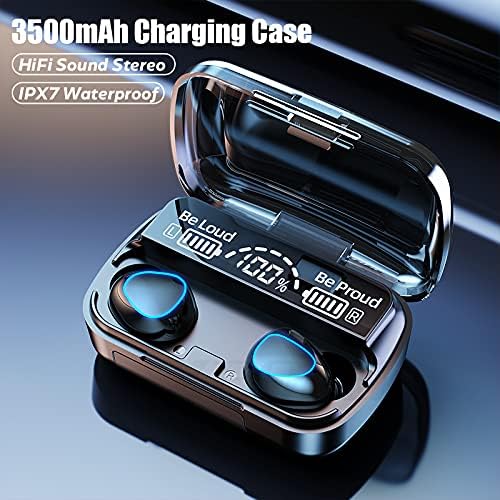
The NC TWS Bluetooth 5.1 Earphones are designed for high-fidelity audio and convenient wireless use. They feature a portable charging case that also functions as a power bank.
Ihe ngwugwu
- 2 x ekwe ntị Bluetooth (aka ekpe na aka nri)
- 1 x Akpa nchaji
- 1 x eriri USB
- 1 x Akwụkwọ ntuziaka onye ọrụ (Akwụkwọ a)
- 2 x Pairs of Earphone Cups (L, M Size)
Ngwa



Melite
Ịchaji ihe ntị na akpa
Tupu ojiji nke mbụ, chajie nke ọma ekwe ntị na akpa nchaji.
- Place both earbuds into the charging case. Ensure they are properly seated; the earbuds will light up to indicate charging.
- Connect the USB charging cable to the charging case's port and the other end to a compatible USB power source (e.g., computer USB port, wall adapter).
- Ngosipụta dijitalụ dị na igbe nchaji ga-egosi pasentị batrịtage. A full charge for the case takes approximately 1.5 hours.
- When the earbuds are fully charged, the indicator lights on the earbuds will turn off. The charging case can fully charge the earbuds approximately 8 times.

Ijikọ na ngwaọrụ
Ekwe ntị ndị a nwere njikọ otu nzọụkwụ maka ịdị mfe.
- Open the charging case and remove both earbuds. They will automatically power on and enter pairing mode, indicated by flashing lights.
- Na ngwaọrụ Bluetooth gị (smartphone, tabletị, laptọọpụ), gaa na ntọala Bluetooth.
- Chọọ maka available devices and select "M10" (or similar name) from the list.
- Ozugbo ejikọtara ya, ọkụ ntị ga-akwụsị ịgbawa, ị ga-anụkwa olu nkwenye.
- After the initial pairing, the earbuds will automatically connect to the last-paired device when removed from the case.

Ntuziaka ọrụ
The earbuds feature touch controls for various functions.
| Omume | Ọrụ |
|---|---|
| Light touch (Left or Right earbud) once | Kpọọ/kwụsịtụ egwu |
| Light touch (Left or Right earbud) once | Zaa/Kwuo oku ekwentị |
| Long press (Left or Right earbud) for 1 second | Summon Siri / Voice Assistant |
| Touch (Left earbud) triple in a row | Mbelata olu |
| Touch (Right earbud) triple in a row | Mmụba olu |
| Touch (Left earbud) for 2 seconds | Banye na egwu gara aga |
| Touch (Right earbud) for 2 seconds | Banye na egwu na-esote |
| Long press (Left or Right earbud) for 5 seconds | Gbanwuo/ Gbanyụọ |
For optimal fit and sound quality, try the different sizes of earphone cups included in the package. A comfortable and stable fit is crucial for the best audio experience and during physical activity.

Nlekọta
- Nhicha: Regularly clean the earbuds and charging case with a soft, dry, lint-free cloth. Do not use abrasive cleaners or solvents. For earwax buildup, gently clean the earbud mesh with a small, soft brush.
- Nchekwa: When not in use, store the earbuds in their charging case to protect them and keep them charged. Store the device in a cool, dry place away from direct sunlight.
- Nguzogide mmiri: The earbuds are IPX7 waterproof, meaning they can withstand submersion in up to 1 meter of water for 30 minutes. However, they are not designed for swimming or showering. Ensure the earbuds are dry before placing them back in the charging case to prevent damage.
Nchọpụta nsogbu
| Nsogbu | Ihe nwere ike ime | Ngwọta |
|---|---|---|
| Igwe ntị anaghị ejikọta ya na ngwaọrụ. | Earbuds not in pairing mode; Bluetooth off on device; previously paired with another device. | Ensure earbuds are removed from case and flashing. Turn Bluetooth off and on again on your device. Forget previous pairings on your device and re-pair. |
| Naanị otu earbud na-arụ ọrụ. | Earbuds not properly connected to each other (TWS mode). | Place both earbuds back into the charging case, close the lid, wait a few seconds, then remove them simultaneously to re-establish TWS connection. |
| Igwe ntị anaghị akwụ ụgwọ. | Poor contact with charging pins; charging cable or adapter faulty; case battery depleted. | Ensure earbuds are correctly seated in the case. Check charging cable and adapter. Charge the charging case. |
| Obere olu ma ọ bụ ogo ụda adịghị mma. | Earbuds not properly seated in ear; earwax buildup; device volume too low. | Adjust earbud position or try different size ear tips. Clean earbud mesh. Increase volume on both earbuds and connected device. |
| Njikọ na-adịte aka. | N'ebe dị anya site na ngwaọrụ; ntinye aka; obere batrị. | Stay within 15 meters of your device. Avoid strong electromagnetic interference. Charge earbuds and case. |
Nkọwapụta
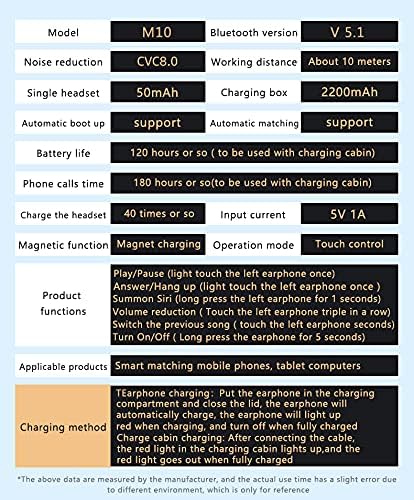
Below are the technical specifications for the NC TWS Bluetooth 5.1 Earphones (Model M10).
| Njirimara | Nkọwa |
|---|---|
| Nlereanya | M10 |
| Ụdị Bluetooth | 5.1 |
| Ikuku iche | Ruo mita 15 (ụkwụ 49) |
| Nkagbu mkpọtụ | CVC 8.0 Noise Cancelling |
| Ike batrị earbud | 50mAh (ekwe ntị nke ọ bụla) |
| Ịchaji Ike batrị Case | 3500mAh |
| Oge egwu ntị | 5-6 awa na otu ụgwọ |
| Oge Egwuregwu Nile (nwere igbe chaja) | Ruo awa iri abụọ |
| Oge Nchaji Okwu | Ihe ruru. awa 1.5 (USB-C) |
| Ogo Nguzogide Mmiri | IPX7 |
| Usoro njikwa | Njikwa aka |
| Ngwa dakọtara | Smartphones, Laptops, Tablets, Smart Speakers |
Akwụkwọ ikike na nkwado
For warranty information and technical support, please refer to the official NC product websaịtị ma ọ bụ kpọtụrụ ndị ahịa ha ozugbo. Debe nnata nzụta gị dị ka ihe akaebe nke ịzụrụ maka nkwupụta ikike.
Nkwado n'ịntanetị: Gaa leta NC Store on Amazon maka ozi ngwaahịa na mmelite.
Ask a question about this manual
Ask about setup, troubleshooting, compatibility, parts, safety, or missing instructions. Manuals+ will review the question and use this page’s manual context to help answer it.