
Okwu mmalite
This manual provides detailed instructions for the safe and efficient operation of your DIGITNOW M513 Record Player. Please read this manual thoroughly before using the product and retain it for future reference. This record player features a belt-drive turntable, external stereo speakers, Bluetooth connectivity, and Vinyl-to-MP3 recording capabilities.
Ngwaahịa gafereview
Familiarize yourself with the components and controls of your record player.
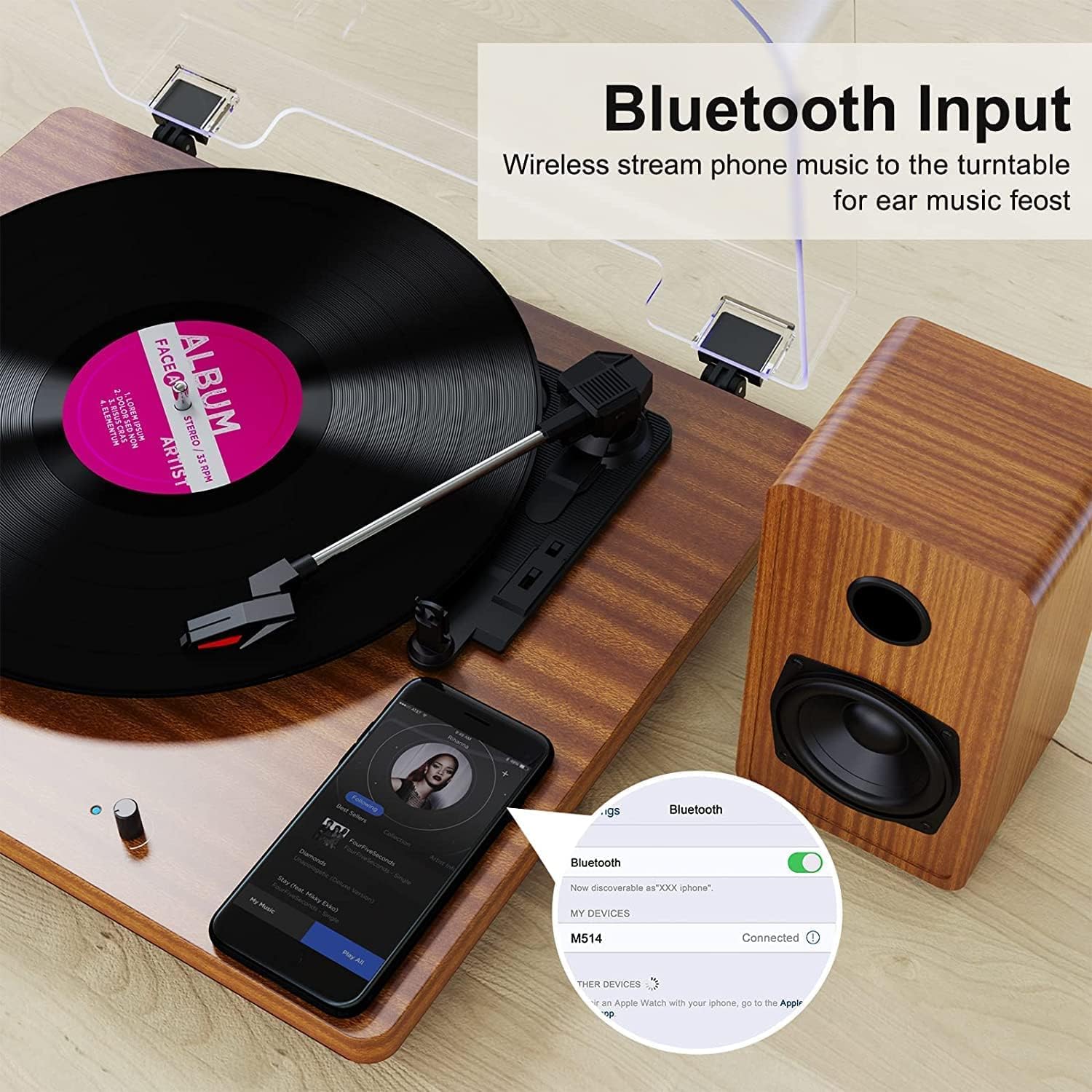
Figure 1: DIGITNOW M513 Record Player with external speakers and Bluetooth connectivity.
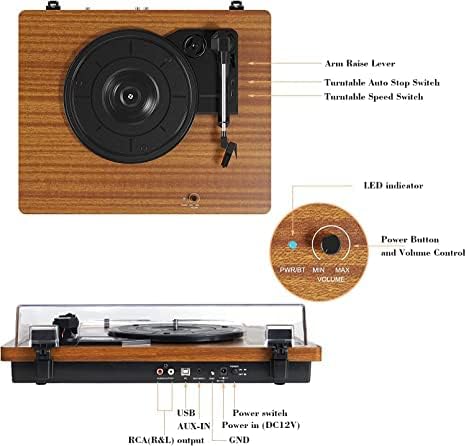
Figure 2: Top and rear panel controls including arm raise lever, auto stop switch, speed switch, power button, volume control, USB, AUX-IN, RCA(R&L) output, power input, and ground.
Isi ihe:
- Platter na-atụgharị: Ebe a na-etinye ihe ndekọ vinyl.
- Ụda olu: Na-ejide stylus ahụ ma na-esochi oghere ndekọ ahụ.
- Stịlọs (agịga): Reads the audio information from the record.
- External Stereo Speakers: Nye mmepụta ọdịyo.
- Mkpuchi uzuzu: Na-echebe turntable ahụ site na uzuzu.
- Ogwe njikwa: Includes power, volume, speed selection, and input/output ports.
Melite
- Iwepu: Carefully remove all components from the packaging. Ensure all accessories (dust cover, 45 RPM adapter, RCA output cables, ground wire, USB cable, user manual) are present.
- Nkwanye: Place the record player on a stable, level surface away from direct sunlight, heat sources, and excessive vibration. Position the external speakers for optimal sound distribution.
- Jikọọ ndị ọkà okwu: Connect the provided external stereo speakers to the RCA output ports on the rear of the record player using the RCA cables. Ensure correct left (L) and right (R) connections.
- Njikọ ike: Connect the DC 12V power adapter to the power input port on the rear of the unit, then plug the adapter into a wall outlet.
- Dust Cover Installation: Attach the dust cover to the hinges at the back of the turntable.
Ntuziaka ọrụ
Ịkpọ ndekọ
- Ike Na: Turn the Power/Volume knob clockwise to power on the unit. The LED indicator will illuminate.
- Họrọ Ọsọ: Choose the appropriate speed (33, 45, or 78 RPM) using the speed switch located on the top panel. Use the 45 RPM adapter for 7-inch records with large center holes.
- Ebe Ndekọ: Carefully place your vinyl record on the turntable platter.
- Ogwe aka ebuli: Use the arm raise lever to gently lift the tonearm.
- Ogwe aka ọnọdụ: Move the tonearm over the desired starting track of the record.
- Ogwe aka dị ala: Slowly lower the tonearm using the arm raise lever. The stylus will make contact with the record, and playback will begin.
- Gbanwee olu: Jiri aka Power/Volume gbanwee olu ahụ.
- Nkwụsị akpaaka: The record player features an auto-stop function. When enabled via the Auto Stop switch, the platter will stop spinning automatically when the record finishes. If disabled, the platter will continue to spin.
- End Playback: At the end of the record, or when you wish to stop, use the arm raise lever to lift the tonearm, return it to the tonearm rest, and then lower the lever. Turn the Power/Volume knob counter-clockwise to power off the unit.

Ọgụgụ 3: Zuru ezu view of the stylus, belt-driven design for smooth music, and 33/45/78 RPM speed options for various record sizes.
Njikọ Bluetooth
The record player can receive audio wirelessly from your Bluetooth-enabled devices.
- Mee ka ọnọdụ Bluetooth rụọ ọrụ: Ensure the record player is powered on. The unit will automatically enter Bluetooth receiving mode if no record is playing or AUX input is not connected. The LED indicator may change color or blink to indicate Bluetooth mode.
- Mee ka Bluetooth rụọ ọrụ na ngwaọrụ gị: On your smartphone or other Bluetooth device, enable Bluetooth and search for available devices.
- Jikọọ ngwaọrụ: Select "DIGITNOW" or a similar name from the list of available devices to pair. Once connected, you will hear a confirmation sound.
- Kpọọ ọdịyo: Play music from your device, and it will stream through the record player's speakers.
Video 1: Demonstrates the setup and Bluetooth connection process for the DIGITNOW M513 Record Player, including placing a record and pairing with a smartphone.
Vinyl-to-MP3 ndekọ
Convert your vinyl records to digital MP3 files via a USB connection to your computer.
- Jikọọ na Kọmputa: Use the provided USB cable to connect the record player's USB port (PC OUT) to a USB port on your Mac or PC.
- Wụnye ngwanrọ: Refer to the detailed instructions in the included user manual for information on compatible recording software and installation.
- Malite ndekọ: Follow the software's instructions to begin recording audio from your vinyl record to your computer.

Figure 4: Connection diagram illustrating USB for PC recording, AUX-IN for external audio sources like CD players, and RCA OUT for external speakers.
External Audio Connections
- Ntinye AUX: Connect external audio sources (e.g., CD player, smartphone, digital media player) to the AUX-IN port on the rear panel using a 3.5mm audio cable. The record player will play audio from the connected device through its speakers.
- Mpụta RCA: For enhanced or louder sound, connect the RCA(R&L) output ports to an external ampigwe okwu nwere ike iji eriri RCA ma ọ bụ igwe okwu nwere ike iji.
Nlekọta
- Cleaning the Stylus: Gently clean the stylus regularly with a soft brush designed for stylus cleaning, brushing from back to front. Avoid touching the stylus with your fingers.
- Na-ehicha Ngalaba: Wipe the record player and dust cover with a soft, dry cloth. Do not use abrasive cleaners or solvents.
- Belt Maintenance: The belt-drive system is designed for durability. If the platter does not spin or spins inconsistently, the drive belt may have slipped during shipping or use. Refer to the full user manual for instructions on how to re-seat or replace the drive belt.
- Record Care: Keep your records clean and free of dust to ensure optimal sound quality and prolong stylus life. Store records vertically in their sleeves.
Nchọpụta nsogbu
| Nsogbu | Ihe nwere ike ime | Ngwọta |
|---|---|---|
| Enweghị ike | Njikọghị ihe nkwụnye ike ma ọ bụ oghere anaghị arụ ọrụ. | Ensure power adapter is securely plugged into the unit and a working wall outlet. Check the power switch. |
| Enweghị ụda | Volume too low; speakers not connected; incorrect input mode. | Increase volume. Verify speaker connections. Ensure correct input mode (Phono, Bluetooth, AUX). |
| Ụda na-awụli elu ma ọ bụ na-agbagọ agbagọ | Akwụkwọ ndekọ ruru unyi ma ọ bụ mebiri emebi; stylus emebiela ma ọ bụ ruru unyi; nkeji anaghị adị larịị. | Clean record. Clean or replace stylus. Place unit on a level surface. |
| Record plays too fast/slow | Ntọala ọsọ na-ezighi ezi. | Adjust the speed switch to 33, 45, or 78 RPM as appropriate for the record. |
| mkpọtụ mkpọtụ | Ground wire not connected; interference from other electronics. | Ensure the ground wire is properly connected (if applicable). Move the unit away from other electronic devices. |
Nkọwapụta
- Ụdị: M513
- Akara: DIGITNOW
- Akụkụ ngwaahịa: 15 x 12.87 x 6.22 sentimita asatọ
- Ibu ihe: 11.77 pound
- Ọsọ ọsọ: 33 1/3, 45, 78 RPM
- Ụdị ụgbọala: Belt-Drive
- Ụdị moto: moto DC
- Njikọta: Bluetooth, AUX-IN, RCA Output, USB (for Vinyl-to-MP3 recording)
- Ngwa gụnyere: Dust cover, 45 RPM adapter, RCA output cables, ground wire, USB cable, user manual
- Ihe: Plastic, Osisi
- Atụmatụ pụrụ iche: Bluetooth Function, RCA Output, Vinyl-to-MP3 Recording, Auto Stop
Akwụkwọ ikike na nkwado
For warranty information, technical support, or service inquiries, please refer to the contact details provided in the original product packaging or visit the official DIGITNOW websaịtị. Debe nnata nzụta gị dị ka ihe akaebe nke ịzụrụ maka nkwupụta ikike.