
Okwu mmalite
The VEDINDUST HDMI Audio Extractor is designed to separate audio from an HDMI signal, allowing it to be outputted to various audio devices via optical, coaxial, L/R stereo, or 3.5mm auxiliary connections. This device supports 4K@60Hz video passthrough and advanced EDID management for flexible audio and video configurations.
Njirimara ngwaahịa
- HDMI Audio Extraction: Extracts audio from an HDMI source to optical, coaxial, L/R stereo, or 3.5mm auxiliary outputs.
- Njikwa EDID: Features 8 working modes for easy configuration via a red DIP switch, allowing automatic EDID comparison or fixed EDID settings to ensure compatibility.
- Nkwado 4K Ultra HD: Compatible with HDMI 1.4V, supporting up to 10.2G bandwidth, HDCP1.4, 4K@60Hz (YUV4:2:0), and 4K@30Hz RGB/YUV4:4:4.
- Nkwado usoro ọdịyo: Optical and coaxial outputs support Dolby DTS 5.1. The 3.5mm and L/R outputs support PCM2.0.
- Oriri ike dị ala: Often operates without external power when connected to most source devices. A USB 5V power connection is available for devices requiring additional power.
- Ndakọrịta sara mbara: Suitable for various HDMI source devices such as Roku, Fire TV, Blu-ray/DVD/HD players, cable/satellite boxes, PS4, PS5, Xbox, and PCs/laptops.
Mara: This device does not support ARC (Audio Return Channel) or eARC. A TV is not supported as an input source. 4K HDR and 7.1 channel audio are not supported. Some devices like PS4/PS5 may only support up to 1080p through this extractor.
Ntuziaka nhazi
Ihe ngwugwu
- HDMI Audio Extractor Unit
- Igwe ọkụ USB Micro
- Akwụkwọ ntuziaka (akwụkwọ a)
Eserese njikọ

Step-by-Step Connection
- Jikọọ HDMI Isi mmalite: Use an HDMI cable to connect your HDMI source device (e.g., PS5, Blu-ray player, Roku) to the HDMI n'ime ọdụ ụgbọ mmiri na extractor.
- Jikọọ HDMI ngosi: Use another HDMI cable to connect your HDMI display (e.g., TV, monitor, projector) to the HDMI pụọ ọdụ ụgbọ mmiri na extractor.
- Jikọọ mmepụta ọdịyo: Choose your desired audio output and connect it to your audio receiver, soundbar, speakers, or headphones:
- For 5.1 channel audio (Dolby DTS 5.1), connect an optical cable to the Ngwa anya port or a coaxial cable to the Coaxial ọdụ ụgbọ mmiri.
- For 2.0 channel stereo audio (PCM2.0), connect RCA cables to the L/R ports or a 3.5mm audio cable to the AUX ọdụ ụgbọ mmiri.
- Njikọ Ike: Connect the provided Micro USB power cable to the USB 5V port on the extractor. Connect the other end to a USB power source (e.g., a USB port on your TV, a USB wall adapter, or a power bank). While many source devices provide sufficient power, external power may be required for stable operation.

Ntuziaka ọrụ
Njikwa EDID
The HDMI Audio Extractor features an EDID (Extended Display Identification Data) management switch, allowing you to configure the audio and video output behavior. Use the red DIP switch on the unit to select one of the 8 available modes.
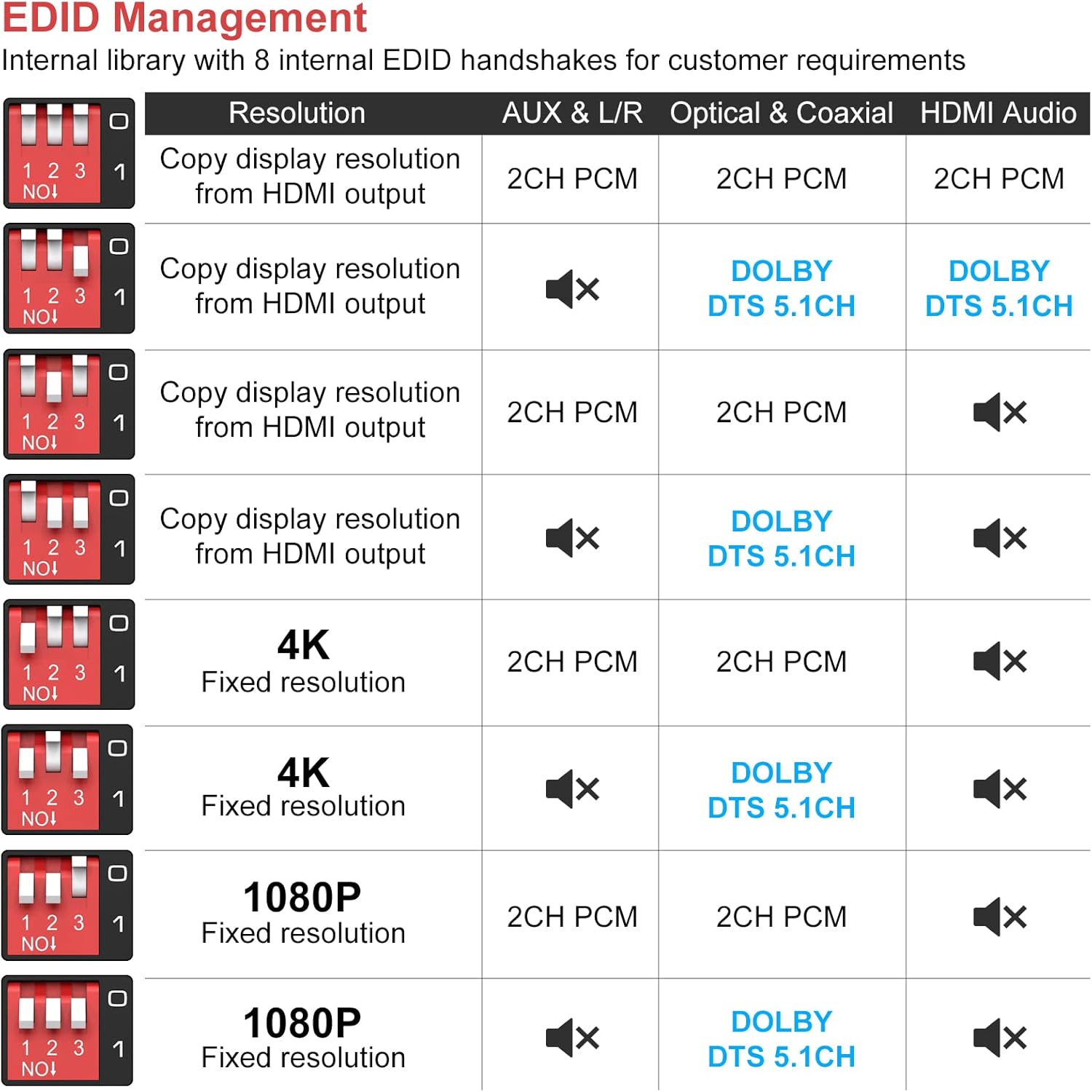
Each switch position (1, 2, 3) can be set to ON or OFF to achieve different configurations. Refer to the table above to select the appropriate mode for your setup. For exampLe:
- To copy display resolution and output 2CH PCM audio on all outputs, set switches to a specific configuration (e.g., 1-OFF, 2-OFF, 3-OFF).
- To force 4K resolution and output Dolby DTS 5.1CH on Optical/Coaxial, set switches accordingly.
Audio Sync and TV Mute Functionality
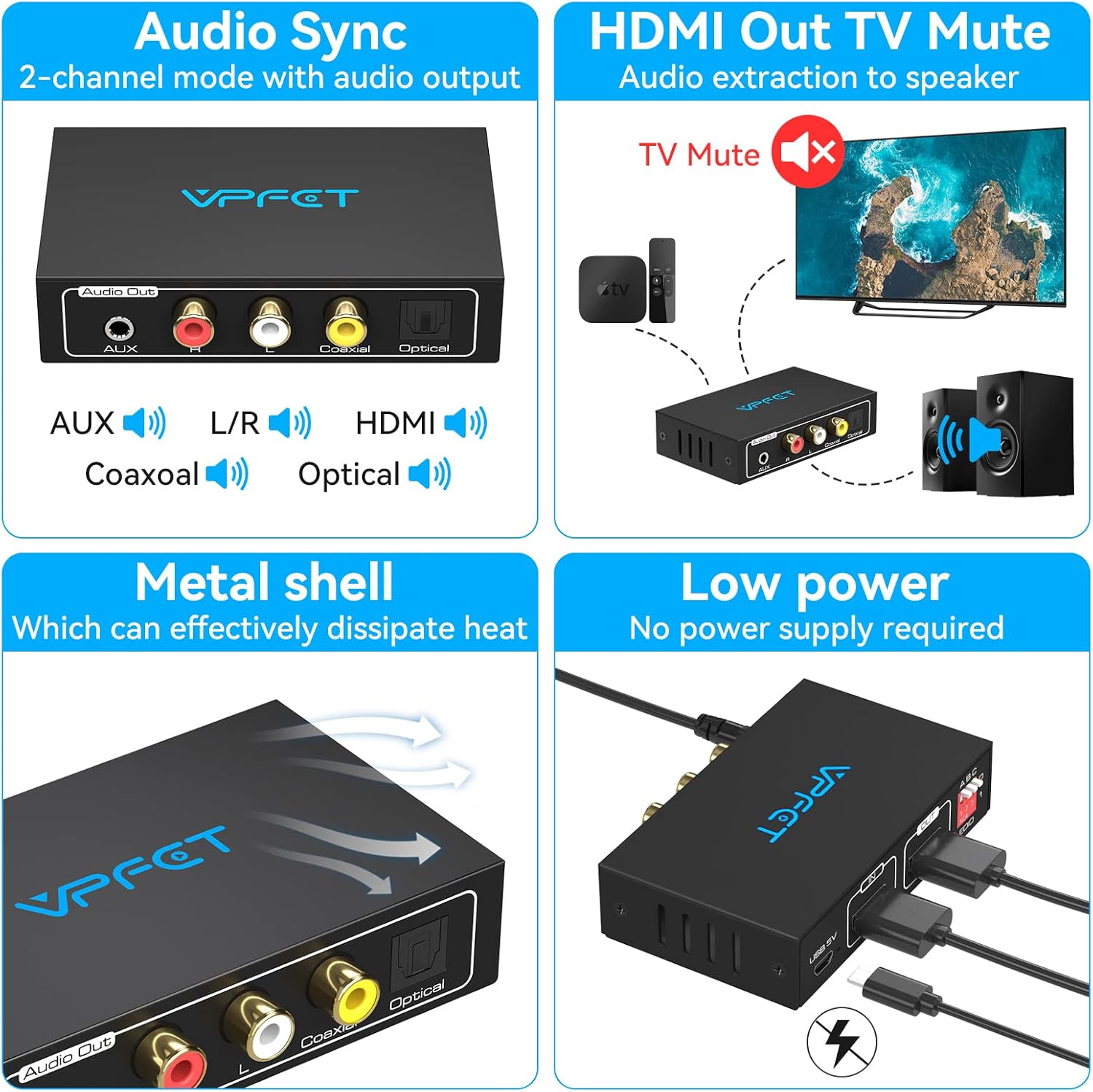
- Mmekọrịta ọdịyo: In 2-channel mode, the device ensures synchronized audio output across all enabled audio ports (AUX, L/R, Coaxial, Optical, HDMI).
- HDMI Out TV Mute: When audio is extracted to external speakers via the extractor's audio outputs, the HDMI output to the TV can be configured to mute its audio, preventing duplicate sound. This is managed through the EDID settings.
Nlekọta
To ensure the longevity and optimal performance of your VEDINDUST HDMI Audio Extractor, follow these maintenance guidelines:
- Nhicha: Use a soft, dry cloth to clean the unit. Avoid using liquid cleaners or abrasive materials, which can damage the surface or internal components.
- gburugburu: Keep the device in a dry, well-ventilated area. Avoid exposure to extreme temperatures, direct sunlight, or high humidity.
- Mgbasa ọkụ: The metal shell of the extractor is designed for effective heat dissipation. Ensure that the ventilation slots are not blocked to allow proper airflow.
- Nlekọta USB: Handle HDMI and audio cables carefully. Avoid bending them sharply or placing heavy objects on them, which can cause damage.
Nchọpụta nsogbu
If you encounter issues with your HDMI Audio Extractor, please refer to the following common problems and solutions:
| Nsogbu | Ihe nwere ike ime | Ngwọta |
|---|---|---|
| Enweghị mmepụta ọdịyo |
|
|
| Enweghị mpụta vidiyo |
|
|
| Intermittent Audio/Video |
|
|
| No 5.1 Channel Audio |
|
|
Nkọwapụta

| Njirimara | Nkọwa |
|---|---|
| Nọmba nlereanya | SW2121314 |
| Onye nrụpụta | VEDINDUST |
| Ụdị HDMI | HDMI 1.4V |
| Cdị HDCP | HDCP 1.4 |
| Oke bandwit | 10.2 Gbps |
| Mkpebi akwadoro | 4K@60Hz (YUV4:2:0), 4K@30Hz (RGB/YUV4:4:4), 1080p, 720p, etc. |
| ọdụ ụgbọ mmiri mmepụta ihe | Optical (Toslink), Coaxial, L/R RCA, 3.5mm AUX |
| Ụdị ọdịyo akwadoro | Optical/Coaxial: Dolby Digital 5.1, DTS 5.1 L/R, 3.5mm AUX: PCM 2.0 Stereo |
| Ịnye ọkụ | Micro USB 5V (Min 5 Volts DC, Max 5 Volts) |
| Okpomọkụ na-arụ ọrụ | N'ihe dị ka 45 Celsius |
| Ibu | 70 grams |
| Akụkụ (L x W x H) | 90mm x 54mm x 21mm (approximate, based on image) |
| Ọnụọgụ nke ntụtụ | 21 (HDMI connector) |
| Ngwa dakọtara | Projectors, Televisions (as display), various HDMI sources |
Akwụkwọ ikike na nkwado
Ozi akwụkwọ ikike
A na-ekpuchi ngwaahịa a one-year replacement warranty from the date of purchase. During this period, if the product experiences any manufacturing defects or malfunctions, it will be replaced. Please note that this warranty covers replacement only and does not include repair services.
Nkwado ndị teknuzu
Should you have any questions or require technical assistance during the use of this equipment, please contact our technical support team. We are committed to providing technical support within 12 hours of your inquiry.
For support, please refer to the contact information provided with your purchase or on the VEDINDUST official websaịtị.