
1. Okwu mmalite
Thank you for choosing the Qlima PH635 Portable Reversible Air Conditioner. This manual provides essential information for the safe and efficient operation, maintenance, and troubleshooting of your appliance. Please read it thoroughly before use and keep it for future reference.
The Qlima PH635 is a versatile unit designed to provide comfort in various conditions, offering cooling, heating, dehumidification, and fan functions. It features automatic stop, programming backup in case of power interruption, and adjustable ventilation.
2. Ntuziaka nchekwa
Iji gbochie mmerụ ahụ onye ọrụ ma ọ bụ ndị ọzọ na mbibi ihe onwunwe, a ga -emerịrị ntuziaka ndị a. Ịrụ ọrụ na -ezighi ezi n'ihi ileghara ntuziaka anya nwere ike bute mmerụ ahụ ma ọ bụ mmebi.
- Hụ na e tinyere ihe ahụ n'elu ebe dị larịị ma kwụsie ike iji gbochie ya ịda.
- Do not operate the unit with a damaged power cord or plug. If the supply cord is damaged, it must be replaced by the manufacturer, its service agent, or similarly qualified persons to avoid a hazard.
- Etinyekwala mkpịsị aka ma ọ bụ ihe ndị mba ọzọ n'ime oghere ikuku ma ọ bụ mpụta.
- Keep the unit away from flammable materials and open flames.
- Ensure proper ventilation around the unit; do not block air vents.
- Kwupu ngwa ahụ tupu ihicha ma ọ bụ ịrụ ọrụ ọ bụla.
- Enwere ike iji ngwa a ụmụaka ndị gbara afọ 8 na karịa yana ndị nwere ike anụ ahụ, mmetụta uche ma ọ bụ nke uche ma ọ bụ enweghị ahụmahụ na ihe ọmụma ma ọ bụrụ na enyerela ha nlekọta ma ọ bụ ntụziaka gbasara iji ngwa ahụ n'ụzọ dị nchebe ma ghọta ihe egwu dị na ya. .
- Ekwesịrị ilekọta ụmụaka ka ha hụ na ha ejighi ngwa eji egwu egwu egwu.
3. Ihe ngwugwu
Biko lelee ma ihe niile dị mgbe ị na-ewepụ ihe ndị a:
- Qlima PH635 Portable Air Conditioner Unit
- Ọkpụkpọ mkpofu
- Window Sealing Kit (adaptor, window slide bar)
- Njikwa anya
- Akwụkwọ ntuziaka (akwụkwọ a)
4. Ngwaahịa gafereview
4.1 Akụkụ
Familiarize yourself with the main parts of your Qlima PH635 unit:
- Control Panel (top of unit)
- Air Outlet (front, adjustable louvers)
- Air Inlet (rear/sides, with air filter)
- Exhaust Air Outlet (rear, for hose connection)
- Continuous Drainage Port (rear, for dehumidification)
- Casters (bottom, for mobility)
- Ụdọ ọkụ
4.2 Foto ngwaahịa
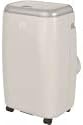
Image showing the Qlima PH635 portable reversible air conditioner from a slight angle, highlighting its compact, rectangular design with a light-colored casing and top control panel. The unit is equipped with casters for easy movement.
5. Nhazi
5.1 Nwepu
- Jiri nlezianya wepụ unit ahụ na nkwakọ ngwaahịa ya.
- Wepu ihe niile nkwakọ ngwaahịa ma tụfuo ha nke ọma.
- Ensure no parts are missing or damaged.
5.2 Ntinye
- Place the air conditioner on a firm, level surface in a location that allows for proper air circulation.
- Maintain a minimum distance of 30 cm (12 inches) from walls or other objects to ensure adequate airflow.
- Zere itinye ngwaọrụ ahụ n'ebe anwụ na-acha kpọmkwem ma ọ bụ n'ebe okpomọkụ dị nso.
5.3 Nwụnye Hose Exhaust
- Attach one end of the exhaust hose to the exhaust air outlet on the rear of the unit. Twist clockwise until secure.
- Extend the exhaust hose to the nearest window or vent opening. Keep the hose as short and straight as possible to maximize efficiency.
5.4 Ntinye windo ngwa
For optimal performance, use the provided window sealing kit to prevent hot air from re-entering the room.
- Adjust the window slide bar to fit your window opening.
- Secure the slide bar in the window.
- Connect the other end of the exhaust hose to the adaptor on the window kit.
- Ensure all connections are sealed to prevent air leakage.
5.5 Drainage Setup (Dehumidification Mode)
When using the dehumidification function, continuous drainage is recommended. Connect a drainage hose (not supplied) to the continuous drainage port on the rear of the unit and lead it to a suitable drain or container.
6. Ntuziaka ọrụ
6.1 Ogwe njikwa na njikwa anya
The unit can be operated via the control panel on top of the unit or the supplied remote control. The functions are generally identical.
6.2 Gbanyụọ ma ọ bụ gbanyụọ
Pịa IKE bọtịnụ iji gbanye ma ọ bụ gbanyụọ unit ahụ.
6.3 Nhọrọ ọnọdụ
Pịa MODE bọtịnụ ka ịgbagharị site na ụdịdị dị:
- Ụdị oyi: Maka ime ka ụlọ ahụ dị jụụ. Tọọ okpomọkụ achọrọ.
- Ụdị ikpo oku: Maka ikpo ọkụ ụlọ. Tọọ okpomọkụ achọrọ.
- Ụdị ihicha mmiri: Removes moisture from the air. Fan speed is typically fixed in this mode.
- Fan Ọnọdụ: Na-ekesa ikuku na-enweghị jụrụ oyi ma ọ bụ kpo oku.
6.4 Mgbanwe okpomọkụ
Na ọnọdụ oyi ma ọ bụ okpomọkụ, jiri UP na N'ala arrow buttons to set your desired temperature. The temperature range is typically 16°C to 30°C (61°F to 86°F).
6.5 Ọsọ fan
Pịa FAN ọsọ button to select between Low, Medium, or High fan speeds. This function is available in Cooling, Heating, and Fan modes.
6.6 Ọrụ ngụ oge
The timer allows you to set a specific time for the unit to turn on or off automatically.
- Pịa TIMER bọtịnụ.
- Jiri ihe UP na N'ala arrow buttons to set the desired time (in hours).
- Pịa TIMER ọzọ iji gosi.
6.7 Ụdị ụra
Activate Sleep Mode for quieter operation and gradual temperature adjustment during sleep. Press the Ụra bọtịnụ.
6.8 Automatic Stop and Programming Backup
The Qlima PH635 features an automatic stop function when the desired temperature is reached or the water tank is full (in dehumidification mode). In case of a power cut, the unit will automatically resume operation with the last settings once power is restored, thanks to its programming backup feature.
7. Nlekọta
Nlekọta anya mgbe niile na-eme ka arụmọrụ dị mma ma gbasaa ogologo ndụ nke ikuku ikuku gị.
7.1 Na-ehicha ngalaba ahụ
- Kwupuo unit ahụ mgbe niile tupu ihicha ya.
- Jiri nwayọ hichaa mpụta, damp akwa . Ejila kemịkalụ siri ike ma ọ bụ ihe mkpocha abrasive.
- Gbaa mbọ hụ na ọ dịghị mmiri na-abanye n'ime ihe ọkụ eletrik.
7.2 Cleaning Air Filters
A ga-ehicha ihe nzacha ikuku kwa izu abụọ ma ọ bụ karịa ugboro ugboro dabere na ojiji na ịdị mma nke ikuku.
- Gbanyụọ ma wepụ unit ahụ.
- Locate and remove the air filters from the rear/sides of the unit.
- Wash the filters under running water (warm, not hot) or use a vacuum cleaner to remove dust.
- Kwe ka nzacha ndị ahụ kpoo kpamkpam tupu ịwụnye ha.
7.3 Nchekwa oge
Ọ bụrụ na a gaghị eji unit ahụ ruo ogologo oge:
- Wụpụ mmiri ọ bụla a chịkọtara na ngwaọrụ ahụ.
- Clean the air filters and the exterior.
- Store the unit in a dry, cool place, covered to protect it from dust.
8. Nchọpụta nsogbu
Tupu ịkpọtụrụ nkwado ndị ahịa, biko rụtụ aka na tebụl na-esonụ maka okwu nkịtị na ngwọta ha.
| Nsogbu | Ihe nwere ike ime | Ngwọta |
|---|---|---|
| Unit anaghị agbanwuo | No power supply; Power cord not plugged in; Fuse blown; Water tank full (in dehumidification) | Check power outlet; Plug in power cord firmly; Replace fuse; Empty water tank. |
| Enweghị ntụ oyi/ọkụ | Air filter clogged; Exhaust hose blocked or disconnected; Room temperature already reached; Doors/windows open; Room too large | Clean air filter; Check exhaust hose connection and ensure it's not blocked; Adjust desired temperature; Close doors/windows; Consider room size limitations. |
| Mgbapu mmiri | Drainage plug loose; Unit not level; Continuous drainage hose blocked | Ensure drainage plug is secure; Place unit on a level surface; Check and clear continuous drainage hose. |
| Ọrụ mkpọtụ | Unit not on a level surface; Air filter clogged; Foreign object in fan | Ensure unit is on a level surface; Clean air filter; Turn off and unplug, then check for obstructions (if safe to do so). |
9. Nkọwapụta
Key technical specifications for the Qlima PH635 Portable Reversible Air Conditioner:
| Njirimara | Nkọwapụta |
|---|---|
| Ụdị | Qlima |
| Aha Nlereanya | PH635 |
| Akụkụ (L x W x H) | 71 x 33 x 44 cm |
| Ibu | 31 kilogram |
| Ike jụrụ oyi | 3200 Watts (approx. 12000 BTU) |
| Ike kpo oku | 3500 Watts (as per product title) |
| Ọkwa mkpọtụ | 55 decibel |
| Voltage | 240 volts |
| Atụmatụ pụrụ iche | Heating and Cooling Function, Programmable, Automatic Stop, Programming Backup |
| Oke arụmọrụ ike nke oge (SEER) | 6.1 |
| Ụdị nwụnye | Enwere ike ibugharị |
| Isi Iyi Ike | Igwe ọkụ eletrik |
10. Akwụkwọ ikike na nkwado
For warranty information and customer support, please refer to the documentation provided with your purchase or contact your retailer. Information regarding the availability of spare parts is currently unavailable.
When contacting support, please have your model number (PH635) and purchase details ready.