
1. Okwu mmalite
The Avidsen HomeCam Battery is a 100% wireless outdoor surveillance camera designed for easy installation and robust home protection. Featuring 1080P Full HD resolution, a solar panel for continuous power, night vision, and two-way audio, this camera allows you to monitor your property remotely via a smartphone application without any subscription fees. This manual provides detailed instructions for setting up, operating, and maintaining your camera.
2. Kedu ihe dị na Igbe ahụ
Please check that all components are present in the package:
- 1 x Avidsen HomeCam Battery IP WiFi Camera
- 1 x Solar Panel (PV module)
- 2 x 18650 batrị
- 1 x Camera Sealing Gasket
- Ihe mgbakwasị ụkwụ na ihe nkwụnye mgbidi

Image: The Avidsen HomeCam Battery camera and its accompanying solar panel, unmounted, showing the main components included in the box.
3. Ntuziaka Nhazi
3.1. Ntinye batrị
- Chọta ebe batrị dị na igwefoto.
- Insert the two 18650 batteries, ensuring correct polarity (+/-).
- Mechie oghere batrị ahụ nke ọma.
3.2. Ịwụnye Igwefoto na Panel Anyanwụ
The camera and solar panel are designed for outdoor use and can be mounted separately or together. Choose a location that provides optimal sunlight exposure for the solar panel and a clear view maka igwefoto.
- Ịkwanye igwefoto: The camera features an innovative magnetic mount for precise orientation. Secure the base of the mount to a wall using the provided screws and wall plugs. Attach the camera to the magnetic base and adjust its angle.
- Ịkwanye ogwe anyanwụ: Mount the solar panel in a location that receives direct sunlight for several hours a day. Connect the solar panel cable to the camera's charging port.
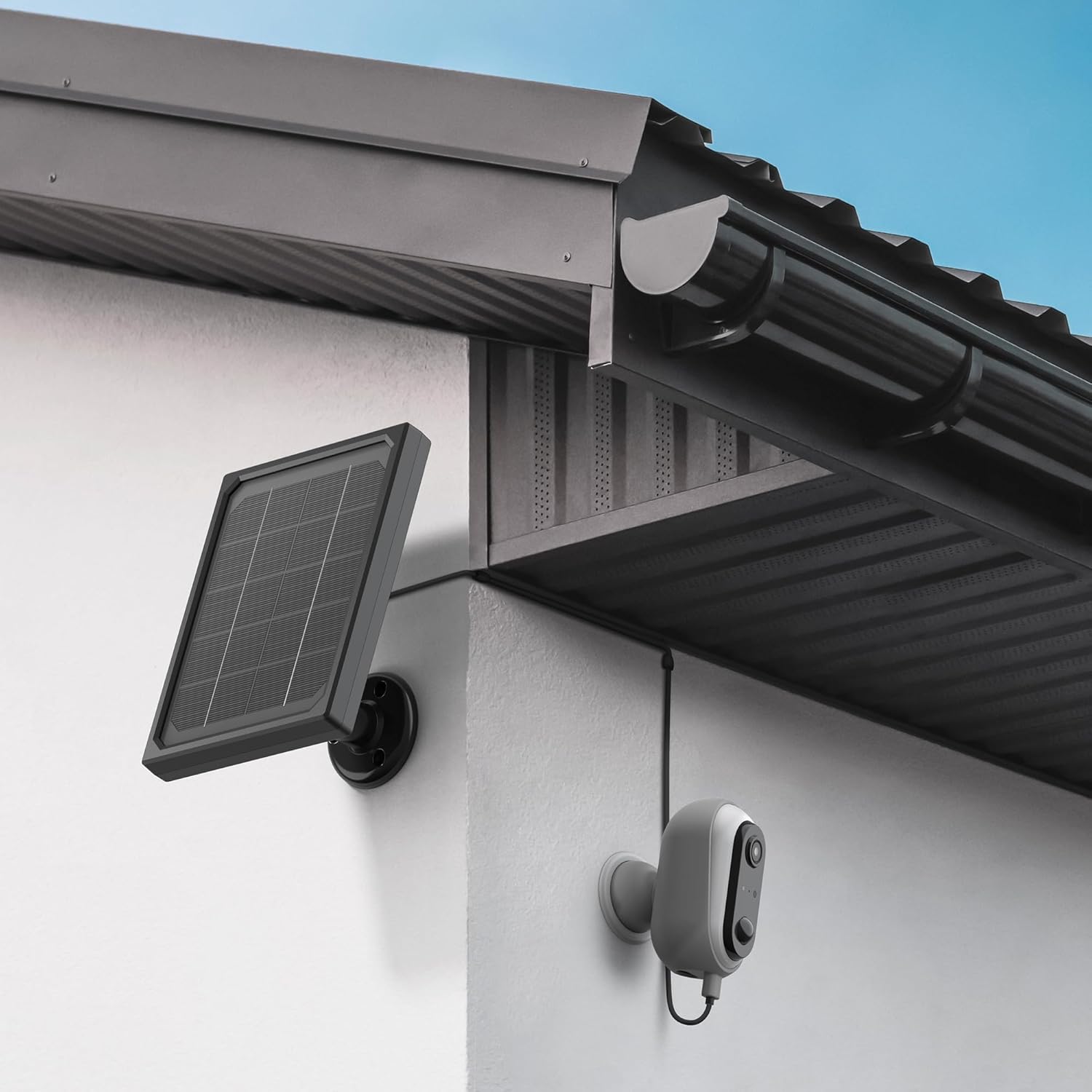
Image: The Avidsen HomeCam Battery camera and its solar panel are shown securely mounted on an exterior wall, positioned to capture sunlight and monitor the area.

Foto: A nso nso view of the Avidsen HomeCam Battery camera, highlighting its adjustable magnetic mount which allows for flexible positioning and angle adjustments.
3.3. App Download and Initial Pairing
- Download the "Avidsen Home" application from your smartphone's app store (available on Google Play and Apple App Store).
- Mepee ngwa ahụ wee mepụta akaụntụ ma ọ bụ banye ma ọ bụrụ na ịnweelarị otu.
- Follow the in-app instructions to add a new device. This typically involves scanning a QR code on the camera or manually selecting the device type.
- Jide n'aka na ekwentị gị ejikọrọ na netwọk Wi-Fi 2.4GHz n'oge usoro njikọta.
3.4. Njikọ Wi-Fi
During the app pairing process, you will be prompted to connect the camera to your home Wi-Fi network.
- Enter your Wi-Fi network name (SSID) and password when requested by the app.
- The camera supports 2.4GHz Wi-Fi networks only. Ensure your router is configured accordingly.
- Once connected, the camera's indicator light will change, and the app will confirm successful pairing.
4. Na-arụ ọrụ igwefoto
4.1. Ndụ View na njikwa
Once connected, open the Avidsen Home app to access the live feed from your camera.
- Vidiyo dị ndụ: Tap on the camera in the app to view vidiyo ahụ n'oge ahụ.
- Audio Ụzọ Abụọ: Use the microphone icon in the app to speak through the camera's speaker and the speaker icon to listen to audio from the camera's microphone.
- Edekọ: Manually record video or capture screenshots directly from the live view interface.
- Nkpọghachi: Nweta ndekọ footage stored on the MicroSD card (not included) via the app's playback feature.

Image: A smartphone screen showing the Avidsen Home app, with options for live view, screenshot, two-way talk, recording, playback, and photo album.
4.2. Nchọpụta na Ọkwa Mmegharị
The camera features motion detection to alert you to activity.
- Kwado/ Gbanyụọ: In the app settings for your camera, you can enable or disable motion detection.
- Mmetụta: Adjust the motion detection sensitivity to minimize false alarms.
- Amamọkwa: When motion is detected, you will receive a notification on your smartphone.
- Edekọ: Motion-triggered events are automatically recorded to the MicroSD card (if installed).
4.3. Ọhụụ abalị
The integrated infrared LEDs provide clear visibility up to 8 meters in total darkness.
- Night vision activates automatically in low-light conditions.
- The camera provides a clear black and white image in night vision mode.
4.4. Local Storage (MicroSD Card)
The camera supports local storage via a MicroSD card (up to 128GB, not included).
- Insert the MicroSD card into the designated slot on the camera.
- Ensure the card is formatted correctly (FAT32 recommended).
- All recordings, including motion-triggered events, will be saved to this card.
4.5. Smart Home Integration
The Avidsen HomeCam Battery is compatible with Amazon Alexa and Google Assistant.
- Link your Avidsen Home account with your Alexa or Google Assistant app.
- Jiri iwu olu mee ya view your camera feed on compatible smart displays.
5. Nlekọta
5.1. Nhicha
- Jiri ihe dị nro, d hichaa anya igwefoto na elu nke panel anyanwụ mgbe niile.amp akwa iji hụ na arụmọrụ kacha mma.
- Avoid using harsh chemicals or abrasive materials that could damage the surfaces.
5.2. Nlekọta batrị
- The solar panel is designed to keep the batteries charged. Ensure the panel is free from obstructions and receives adequate sunlight.
- If the camera's battery level drops significantly, consider repositioning the solar panel or manually charging the batteries if possible (refer to specific battery charging instructions if applicable).
5.3. Connection Check
- Periodically check the physical connection between the solar panel and the camera to ensure it is secure and free from corrosion.
- Verify the camera's Wi-Fi connection status in the Avidsen Home app.
6. Nchọpụta nsogbu
6.1. No Power / Camera Not Turning On
- Ensure the 18650 batteries are correctly inserted with the right polarity.
- Check if the batteries are charged. If not, ensure the solar panel is connected and receiving sunlight, or try charging the batteries externally if possible.
- Verify the power button (if any) is pressed.
6.2. Enweghị ike ijikọ na Wi-Fi
- Confirm your Wi-Fi network is 2.4GHz. The camera does not support 5GHz networks.
- Ensure the Wi-Fi password entered in the app is correct.
- Bugharịa igwefoto nso na rawụta Wi-Fi gị iji kwalite ike mgbaama.
- Malitegharịa ekwentị gị na igwefoto.
- If issues persist, try resetting the camera to factory settings (refer to the reset procedure in the app or device manual) and re-pairing.
6.3. Ọdịdị Foto Na-adịghị Mma
- Hichaa oghere igwefoto iji wepụ unyi ma ọ bụ ihe ọ bụla mebiri emebi.
- Gbaa mbọ hụ na enweghị ihe mgbochi n'ihu oghere.
- Check your Wi-Fi signal strength; a weak signal can affect video streaming quality.
6.4. Nchọpụta mmegharị anaghị arụ ọrụ ma ọ bụ ọtụtụ mkpu ụgha
- Verify motion detection is enabled in the Avidsen Home app.
- Adjust the motion detection sensitivity settings in the app. Lower sensitivity for fewer false alarms, higher for more sensitive detection.
- Gbaa mbọ hụ na mpaghara igwefoto nke view is clear and not obstructed by moving objects like tree branches.
7. Nkọwapụta
| Aha Nlereanya | HOME CAM BATTERY (127070) |
| Mkpebi | 1080p zuru oke |
| Njikọta | Igwe ikuku (Wi-Fi 2.4GHz) |
| Isi Iyi Ike | Solar Panel (5V 3W), 2x 18650 Batteries |
| Oke ọhụụ abalị | Ruo mita 8 |
| Ubi nke View | 130° |
| Ogo IP | IP65 (Outdoor use) |
| Nchekwa | Kaadị MicroSD (ruo 128GB, etinyeghị ya) |
| Atụmatụ pụrụ iche | Motion Detection, Two-Way Audio, Smart Home Compatibility (Alexa, Google Assistant) |
| Akụkụ | 31.5 x 21 x 8.5 cm |
| Ibu | 1100 grams |
8. Akwụkwọ ikike & Nkwado
8.1. Akwụkwọ ikike nke onye nrụpụta
This Avidsen product is covered by a Akwụkwọ ikike onye nrụpụta afọ 2 site na ụbọchị ịzụrụ. Biko dowe ihe akaebe nke ịzụrụ ihe maka akwụkwọ ikike. Akwụkwọ ikike ahụ na-ekpuchi ntụpọ dị na akụrụngwa yana arụ ọrụ n'okpuru ojiji nkịtị.
8.2. Nkwado nka na ụzụ
For technical assistance, troubleshooting, or further inquiries, please visit the official Avidsen website or contact their customer support. You can find contact information and FAQs on their websaịtị: