
ROIDMI X20
ROIDMI X20 Cordless Vacuum Cleaner Instruction Manual
Nlereanya: X20
1. Ntuziaka nchekwa dị mkpa
Please read this instruction manual carefully before using the ROIDMI X20 Cordless Vacuum Cleaner. Keep this manual for future reference.
- Ezubere ngwa a maka iji naanị ụlọ. Ejila ya maka ebumnuche azụmahịa ma ọ bụ ụlọ ọrụ mmepụta ihe.
- Do not use the vacuum cleaner to pick up water or other liquids, hot ashes, cigarette butts, sharp objects, or hazardous materials.
- Ensure the power adapter and charging dock are compatible with your local power supply.
- Ejila waya ma ọ bụ plọg mebiri emebi rụọ ọrụ igwe nhicha uzu ahụ. Ọ bụrụ na ngwa ahụ anaghị arụ ọrụ dịka o kwesịrị, ọ tụfuru, mebie, hapụ ya n'èzí, ma ọ bụ tụfuo ya n'ime mmiri, weghachite ya na ebe ọrụ.
- Debe ntutu isi, uwe na-adịghị mma, mkpịsị aka na akụkụ ahụ niile pụọ na oghere na akụkụ ndị na-akpụ akpụ.
- Ekwela ka ụmụntakịrị rụọ igwe nhicha ahụ. Nleba anya dị mkpa mgbe ejiri ya nso ụmụaka.
- Jiri naanị mgbakwunye na ngwa ndị nrụpụta kwadoro.
- Always turn off the appliance before connecting or disconnecting the motorized brush, extension rod, or other accessories.
- The battery pack must be removed from the appliance before it is scrapped. The appliance must be disconnected from the supply mains when removing the battery pack. The battery pack is to be disposed of safely.
2. Ngwaahịa gafereview na akụrụngwa
The ROIDMI X20 Cordless Vacuum Cleaner comes with several components designed for various cleaning tasks.

Image: The ROIDMI X20 main unit and various cleaning attachments, including different brush heads, a crevice tool, a dusting brush, and the magnetic charging dock.
Isi Components:
- Isi ngalaba: Nwere moto, uzuzu uzuzu na batrị.
- mkpanaka ndọtị: Connects the main unit to the floor brush or other attachments for extended reach.
- Ahịhịa Roller dị nro: Ideal for hard floors.
- Carbon Fiber Brush: Suitable for carpets.
- Mgbakwunye mop: For wet cleaning of hard floors.
- Ngwá Ọrụ Crevice: Maka oghere dị warara na nkuku.
- Ushjá ahịhịa: Maka ebe dị nro na ihe mkpuchi ụlọ.
- Magnetic Wireless Charging Dock: For convenient charging and storage.
- Ihe nkwụnye ọkụ: Maka ịchaji ngwaọrụ.
3. Ntọlite na mbido ojiji
Mgbakọ:
- Insert the extension rod into the main unit until it clicks securely.
- Attach the desired floor brush (soft roller or carbon fiber) to the other end of the extension rod until it clicks.
- Maka ojiji aka, tinye ihe mgbakwunye ozugbo na isi ngwaọrụ ahụ.
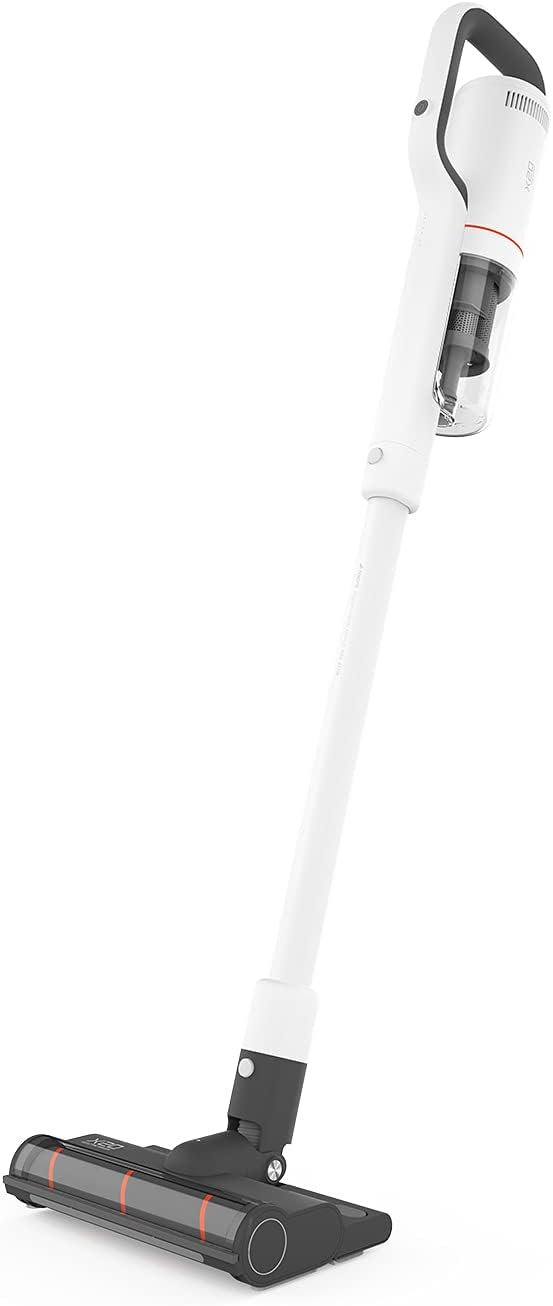
Image: The ROIDMI X20 Cordless Vacuum Cleaner fully assembled with the extension rod and floor brush attached, ready for use.
Ịchaji:
Before first use, fully charge the vacuum cleaner. The ROIDMI X20 features magnetic wireless charging.
- Mount the magnetic wireless charging dock to a wall in a convenient location, ensuring it is near a power outlet.
- Jikọọ ihe nkwụnye ọkụ na ọdụ ụgbọ mmiri na-ebunye ma gbanye ya n'ime oghere ọkụ.
- Place the vacuum cleaner onto the charging dock. The indicator light on the main unit will illuminate to show charging status.
- A full charge typically takes approximately 2.5 hours. The battery life is up to 65 minutes depending on the power mode used.
4. Ntuziaka ọrụ
Power On/Off and Suction Modes:
- Press the power button on the main unit to turn the vacuum cleaner on. It will start in the standard suction mode.
- Press the mode button to cycle through the three available power levels (Standard, Strong, Max).
- Pịa bọtịnụ ike ọzọ iji gbanyụọ ihe nhicha ikuku.
Ntupu:
The ROIDMI X20 is suitable for both hard floors and carpets.

Image: A person using the ROIDMI X20 Cordless Vacuum Cleaner to clean a grey carpet in a living room setting.
- Maka ala siri ike: Use the soft roller brush. Move the vacuum cleaner slowly over the surface to ensure thorough cleaning.
- For Carpets: Use the carbon fiber brush. For deeper cleaning, select a higher suction mode.

Image: A person using the ROIDMI X20 Cordless Vacuum Cleaner to clean a light wooden floor, demonstrating its maneuverability.
Ọrụ mopping:
The ROIDMI X20 integrates vacuuming and mopping for simultaneous cleaning.
- Fill the water tank of the mop attachment with clean water.
- Attach the mop cloth securely to the mop attachment.
- Attach the mop attachment to the floor brush.
- Proceed with vacuuming as usual. The mop attachment will simultaneously wipe the floor.
Iji Mgbakwụnye:
Detach the extension rod and attach the crevice tool or dusting brush directly to the main unit for cleaning furniture, car interiors, or hard-to-reach areas.
Njikwa ngwa:
The ROIDMI X20 can be connected to a smartphone app for additional control and monitoring features. Refer to the app's instructions for pairing and functionality.
5. Nlekọta
Regular maintenance ensures optimal performance and extends the lifespan of your ROIDMI X20.
Na-ekpochapụ Dustbin:
- Gbaa mbọ hụ na agbanyụrụ ihe mkpofu.
- Chọta bọtịnụ mwepụta nke ihe mkpofu ahụ na isi ngwaọrụ ahụ.
- Pịa bọtịnụ ahụ iji wepụ ihe mkpofu ahụ.
- Wepu ihe dị n'ime ya n'ime ebe a na-ekpofu ihe.
- Jikọtaghachi ihe mkpofu ahụ nke ọma.
Ihe nzacha ihicha:
The ROIDMI X20 uses a HEPA filter. Clean the filters regularly to maintain suction power.
- Wepu ihe mkpofu.
- Carefully remove the filter assembly from the dustbin.
- Tap the HEPA filter gently to remove loose dust.
- Rinse the filter under running water (ensure it is completely dry before reinstallation, which may take 24-48 hours).
- Reassemble the filters and dustbin once completely dry.
Cleaning Brush Rolls:
Hair and debris can get tangled in the brush rolls, affecting performance.

Image: A close-up of the ROIDMI X20 floor brush with a cleaning tool next to it, used for removing tangled hair and debris from the brush roll.
- Gbanyụọ ihe nhicha ikuku ma wepụ ahịhịa ala.
- Locate the brush roll release mechanism (usually a latch or screw).
- Wepu akwụkwọ mpịakọta ahịhịa.
- Jiri mkpa ma ọ bụ ihe e ji ehicha ihe e nyere gị bee ma wepụ ntutu isi ma ọ bụ eriri ọ bụla gbagọrọ agbagọ.
- Clean any debris from the brush roll housing.
- Reinsert the brush roll and secure it.
Cleaning Mop Attachment:
After each use, remove and clean the mop cloth. It can typically be hand-washed or machine-washed.
6. Nchọpụta nsogbu
If you encounter issues with your ROIDMI X20, refer to the following common problems and solutions:
| Nsogbu | Ihe nwere ike ime | Ngwọta |
|---|---|---|
| Vacuum anaghị agbanye | Batrị dị ala ma ọ bụ mebie ya Apịghị bọtịnụ ike nke ọma | Charge the vacuum cleaner fully Gbaa mbọ hụ na ịpịrị bọtịnụ ike nke ọma |
| Ike mmiri dị ala | Dustbin juru eju Akpọchiela ihe nzacha Mpịakọta ahịhịa agbagọọla agbagọ Obstruction in nozzle/hose | Wepụ ihe mkpofu ahụ Hichaa ma ọ bụ dochie ihe nzacha Hichaa mpịakọta ahịhịa Lelee ma wepụ ihe mgbochi ọ bụla |
| Mpempe akwụkwọ ahịhịa anaghị agbagharị | Mpịakọta ahịhịa agbagọọla agbagọ Obstruction in brush head Brush head not properly attached | Hichaa mpịakọta ahịhịa Wepụ ihe mgbochi ọ bụla Ensure brush head is securely attached |
| Vacuum stops during operation | Batrị agwụla Nchekwa ekpo oke ọkụ na-arụ ọrụ | Fanye batrị Turn off the vacuum and allow it to cool down for at least 30 minutes before resuming use |
7. Nkọwapụta
Key technical specifications for the ROIDMI X20 Cordless Vacuum Cleaner:
| Njirimara | Nkọwapụta |
|---|---|
| Ụdị | ROIDMI |
| Aha Nlereanya | X20 |
| Njirimara Pụrụ Iche | Bagless, Vacuum Mop Combo |
| Ụdị nzacha | EGO HEPA |
| Ngwa gụnyere | Battery, Mop, Various Brushes |
| Enweghị eriri | Ee |
| Ikike Dustbin | 500 milliliters |
| Eji akwadoro | Kapeeti, Ala siri ike |
| Ụdị Ihe | Mkpokọta |
| Agba | Ọcha |
| Ọkwa mkpọtụ | 72 dB |
| Ndụ batrị | Ruo nkeji iri abụọ |
| Usoro njikwa | Pịa bọtịnụ, ngwa |
| Ọnụọgụ nke ọkwa ike | 3 |
| Ibu Ibu | 13.2 pound |
| Akụkụ ngwugwu | 23.86 x 12.68 x 8.11 sentimita asatọ |
8. Akwụkwọ ikike na nkwado
The ROIDMI X20 Cordless Vacuum Cleaner comes with a manufacturer's warranty. Please refer to the warranty card included in your product packaging for specific terms and conditions, including warranty period and coverage details.
For technical support, troubleshooting assistance beyond this manual, or warranty claims, please contact ROIDMI customer service through their official websaịtị ma ọ bụ ozi kọntaktị enyere na akwụkwọ ngwaahịa gị.
Ask a question about this manual
Ask about setup, troubleshooting, compatibility, parts, safety, or missing instructions. Manuals+ will review the question and use this page’s manual context to help answer it.