
SPRT POS58 IVU
SPRT POS58 IVU Receipt Thermal Printer User Manual
Model: POS58 IVU
Okwu mmalite
This manual provides essential information for the proper setup, operation, and maintenance of your SPRT POS58 IVU Receipt Thermal Printer. Please read this manual thoroughly before using the printer to ensure optimal performance and longevity.
The SPRT POS58 IVU is a compact and efficient thermal receipt printer designed for various point-of-sale applications. It features USB connectivity and is compatible with 5.7 cm wide thermal paper.
Melite
1. Mwepu na nyocha
- Jiri nlezianya wepụ ihe nbipute na ngwa niile na nkwakọ ngwaahịa.
- Verify that all components are present: printer unit, power adapter, USB cable.
- Inspect the printer for any visible damage. If damaged, contact your supplier immediately.
2. Ijikọ ngwa nbipute
- Njikọ Ike: Insert the power adapter cable into the printer's power port and plug the other end into a suitable power outlet.
- Jikọọ USB: Jikọọ otu nsọtụ eriri USB na ọdụ ụgbọ USB nke ngwa nbipute na nsọtụ nke ọzọ na ọdụ ụgbọ USB dị na kọmputa gị ma ọ bụ sistemụ POS gị.
- Ike Na: Locate the power switch on the printer (typically on the side or front) and turn it to the 'ON' position.
3. Na-ebunye akwụkwọ ọkụ
The SPRT POS58 IVU printer uses standard 5.7 cm wide thermal paper rolls.
- Open the paper cover by pressing the release button or lifting the latch (location may vary slightly).
- Insert the thermal paper roll with the printing surface facing the thermal head. Ensure the roll is seated correctly in the paper compartment.
- Were obere mpempe akwụkwọ gafere n'obe ahụ.
- Mechie mkpuchi akwụkwọ ahụ nke ọma ruo mgbe ọ batara n'ime ya.
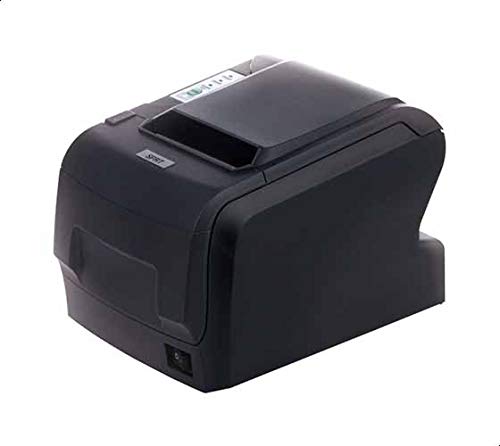
Figure 1: SPRT POS58 IVU Receipt Thermal Printer. This image displays the compact black thermal printer from an angled view, highlighting its paper output slot and the power switch located on the side.
Ntuziaka ọrụ
Ihe nbipute isi
- Ensure the printer is powered on and connected to your computer/POS system.
- Install the necessary printer drivers on your operating system if not already installed. Refer to the driver installation guide provided separately or available from the manufacturer's websaịtị.
- From your application (e.g., POS software, word processor), select the SPRT POS58 IVU as your printer.
- Initiate the print command. The printer will automatically feed and print the receipt.
- Tear off the receipt against the serrated edge of the paper output slot.
Ihe ngosi ọkụ
The printer typically has indicator lights to show its status:
- Ọkụ ọkụ: Na-egosi na ngwa nbipute ahụ na-agba ọkụ.
- Ìhè mperi: Illuminates or blinks to indicate an error condition (e.g., paper out, print head overheat).
- Paper Out Light: Indicates that the paper roll is empty or incorrectly loaded.
Nlekọta
Na-ehicha isi okpomọkụ
Regular cleaning of the thermal head ensures clear print quality and extends printer life. Clean the thermal head after every 50-100 km of printing or if print quality degrades.
- Gbanyụọ igwe nbipute ahụ wee gbanyụọ eriri ike ahụ.
- Mepee mkpuchi akwụkwọ.
- Wait a few minutes for the thermal head to cool down if the printer has been recently used.
- Gently wipe the thermal head surface with a cotton swab lightly moistened with absolute alcohol (ethanol).
- Allow the alcohol to evaporate completely before closing the cover and reconnecting power.
Na-ehicha Mpụga
Jiri nwayọ hichaa mpụta nke ngwa nbipute, damp cloth. Do not use strong solvents or abrasive cleaners.
Ijikwa akwụkwọ
- Use only high-quality thermal paper to prevent damage to the thermal head and ensure optimal print quality.
- Store thermal paper in a cool, dry place away from direct sunlight and heat.
Nchọpụta nsogbu
| Nsogbu | Ihe nwere ike ime | Ngwọta |
|---|---|---|
| Ngwa nbipute anaghị agbanwu ọkụ. | Power cable not connected; power outlet faulty; printer switch off. | Check power cable connection; try a different outlet; ensure power switch is ON. |
| No printing / Blank output. | Paper loaded incorrectly (upside down); paper out; driver not installed/configured; printer not selected. | Reload paper correctly (printing side facing thermal head); replace paper roll; install/reinstall drivers; select printer in application. |
| Ọdịmma ebipụta na-adịghị mma. | Thermal head dirty; low-quality paper; paper stored improperly. | Clean thermal head; use recommended thermal paper; store paper correctly. |
| Mpempe akwụkwọ. | Paper not loaded straight; foreign object in paper path. | Open cover, remove jammed paper carefully, reload paper straight; inspect for obstructions. |
Nkọwapụta
| Njirimara | Nkọwa |
|---|---|
| Ụdị | SPRT |
| Nọmba nlereanya | POS58 IVU |
| Ụdị Mbipụta | Ihe nbipute Thermal nnata |
| Teknụzụ Njikọta | USB |
| Mgbasa ozi bipute | Labels (commonly used for receipts) |
| Ogologo akwụkwọ | 5.7 cm |
| Agba | Nwa |
| Ibu Ibu | 1.82 kilogram |
| Akụkụ ngwugwu | 28 x 21.4 x 17.8 cm |
Akwụkwọ ikike na nkwado
Specific warranty terms and detailed support contact information are not provided within the available product data. For warranty claims, technical support, or service inquiries, please refer to the documentation included with your purchase or contact your point of sale or the manufacturer directly.
You may find additional resources and contact details on the official SPRT websaịtị.
Ask a question about this manual
Ask about setup, troubleshooting, compatibility, parts, safety, or missing instructions. Manuals+ will review the question and use this page’s manual context to help answer it.