
1. Okwu mmalite
Daalụ maka ịzụrụasing the Trevi CMP 588 DAB Portable Stereo System. This manual provides essential information for the safe and correct operation of your device. Please read it thoroughly before use and retain it for future reference.
The Trevi CMP 588 DAB is a versatile portable stereo system featuring DAB/DAB+ and FM radio with RDS, a CD/MP3 player, USB input, AUX-in, Bluetooth connectivity, and a headphone jack, all designed for an enhanced audio experience.
2. Ozi nchekwa
- Isi mmalite ike: Use only the specified power adapter or batteries. Ensure the voltage kwekọrọ na ihe achọrọ nke otu ahụ.
- Mmiri na mmiri: Do not expose the unit to rain, moisture, or immerse it in water. Avoid placing objects filled with liquids, such as vases, on the unit.
- Igwe ikuku: Hụ na ikuku na-abata nke ọma. Ekpuchila oghere ikuku.
- Okpomọkụ: Debe ngwaọrụ ahụ n'ebe dị anya site na isi iyi okpomọkụ dịka radiators, ndekọ okpomọkụ, stovu, ma ọ bụ ngwaọrụ ndị ọzọ (gụnyere amplifiers) nke na-emepụta okpomọkụ.
- Nhicha: Wepụ ihe mkpuchi ahụ na ihe mkpuchi mgbidi tupu ị hichaa ya. Jiri ákwà dị nro ma kpọọ nkụ. Ejila ihe nhicha mmiri ma ọ bụ ihe nhicha aerosol.
- Ije ozi: Anwala ịnye ngwaahịa a n'onwe gị. Tụtụ aka n'aka ndị ọrụ ruru eru.
- Ihe ọkpụkpọ CD: Elela anya ozugbo n'ime oghere laser.
3. Ihe ngwugwu
Chọpụta na ihe niile dị na ọ dị mma:
- Trevi CMP 588 DAB Portable Stereo System
- AC Power USB
- Njikwa anya
- Akwụkwọ ntuziaka (akwụkwọ a)
4. Akụrụngwa Ngwaahịa
- DAB/DAB+ and FM Radio with RDS
- High Readability Dot Matrix Display
- CD Player (supports CD-DA, MP3)
- USB Input for MP3 Playback
- AUX-in for external audio devices
- Njikọ Bluetooth
- Jack ekweisi
- Enwere ike ibugharị ya na njikwa ebu
- Eji njikwa anya gụnyere
5. Njikwa na Njikọ

Foto 1: N'ihu view of the Trevi CMP 588 DAB, showing speakers, display, and main controls.
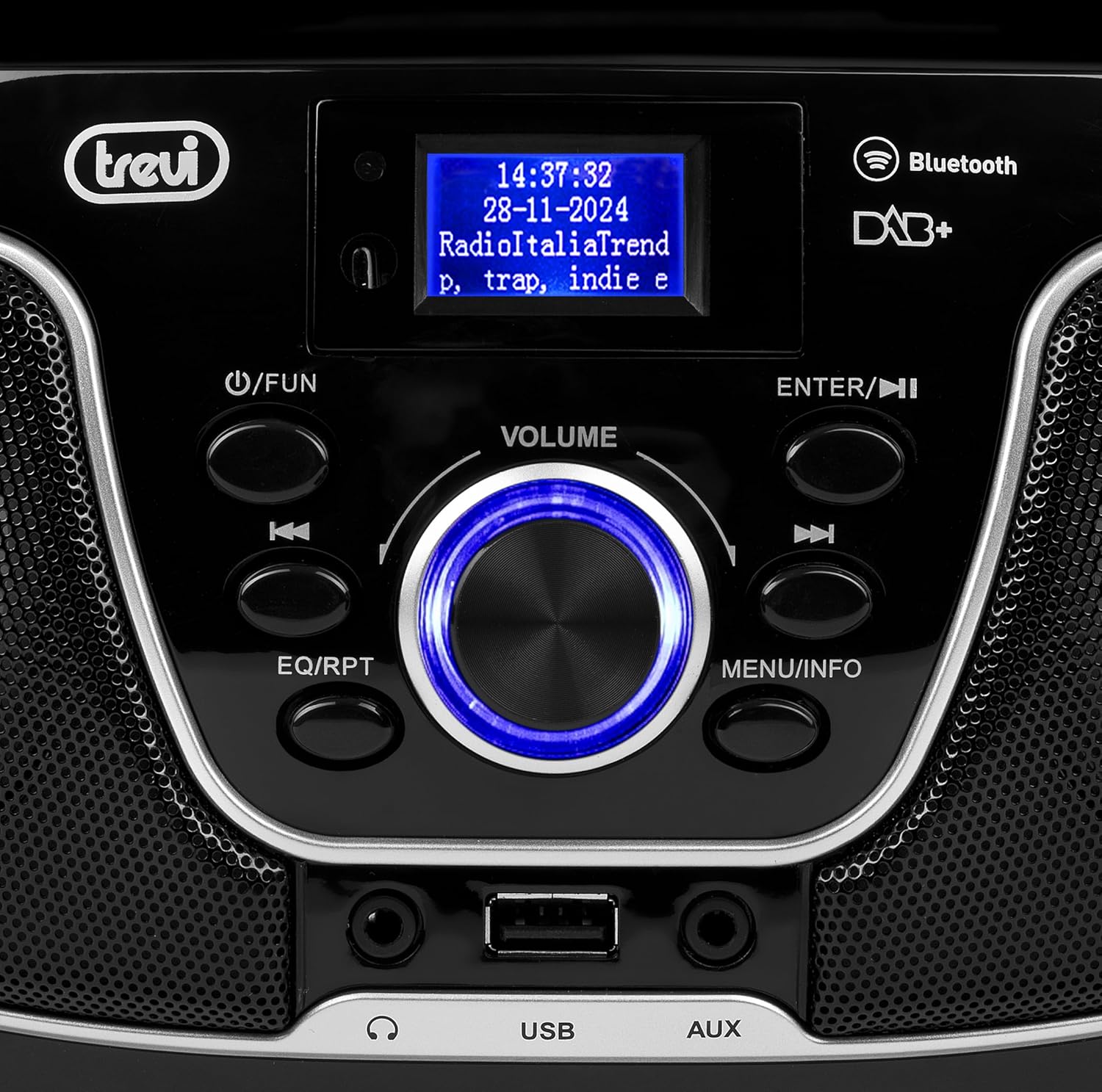
Ọgụgụ 2: Zuru ezu view of the control panel, including power, function, volume knob, and navigation buttons.
Njikwa akụkụ ihu:
- POWER / FUN button: Press to turn on/off, press to switch functions (CD/USB/DAB/FM/Bluetooth/AUX).
- Olu isi: Rotate to adjust volume. Press to confirm selections.
- ENTER / ►►I button: Confirm selection / Skip to next track/station.
- I▼▼ / EQ/RPT button: Skip to previous track/station / Equalizer settings / Repeat mode.
- MENU / INFO button: Access menu / Display information.
- Ọdụ ụgbọ mmiri USB: Connect USB storage devices for MP3 playback.
- Jack AUX: Jikọọ ngwaọrụ ọdịyo mpụga.
- Jack ekweisi: Jikọọ ekweisi maka ige ntị nkeonwe.

Ọgụgụ 3: N'azụ view of the Trevi CMP 588 DAB, showing the power input and telescopic antenna.
Njikọ azụ azụ:
- Ntinye ike AC: Jikọọ eriri ọkụ AC ewepụtara.
- Antenna telescopic: Mee ka redio dịkwuo mma.

Figure 4: Remote control for the Trevi CMP 588 DAB, showing various function buttons.
Ọrụ njikwa anya:
- KWỤRỤ N'ỤSỌ: Gbanyụọ/ gbanyụọ ike.
- FUNC: Switch between modes (CD, USB, DAB, FM, Bluetooth, AUX).
- IHE: Mechie/mechie ụda.
- RPT: Tinyegharịa ọnọdụ ịkpọghachi.
- Nyochaa: Auto scan for radio stations.
- F+/CH+, F-/CH-: Navigate folders/channels.
- EQ: Ntọala nha nhata.
- PLAY/PAUSE (►II): Kpọọ/ kwụsịtụ ịkpọghachi.
- PREV/TUN- (▼▼): Previous track/tune down.
- NEXT/TUN+ (►►): Next track/tune up.
- KWỤSỊ (■): Kwụghachi ọkpụkpọ.
- NchNhr: Nweta menu.
- Ozi: Gosipụta ozi.
- ProG: Program tracks/stations.
- VOL+/VOL-: Gbanwee olu.
6. Nhazi
6.1 Njikọ ike
- Ike AC: Connect the supplied AC power cable to the AC power input on the rear of the unit, then plug the other end into a wall outlet.
- Battery Operation (Optional): For portable use, insert 6 x C-size batteries (not included) into the battery compartment on the bottom of the unit. Ensure correct polarity.
6.2 Ike mbido
Pịa POWER / FUN bọtịnụ na unit ma ọ bụ KWỤRỤ N'ỤSỌ button on the remote control to turn on the system. The display will light up.
6.3 Setting Up the Antenna
For optimal radio reception, fully extend the telescopic antenna located at the rear of the unit. Adjust its position for the best signal.
7. Ntuziaka ọrụ
7.1 DAB/DAB+ Radio Operation
- Pịa POWER / FUN button repeatedly until "DAB" mode is selected.
- The unit will automatically scan for available DAB/DAB+ stations on first use. To perform a manual scan, press the MENU button, navigate to "Full Scan" and press Banye.
- Ozugbo nyochachara, jiri ya ▼▼ or ► buttons to browse through the available stations. Press Banye ịhọrọ ọdụ ọdụ.
- Pịa Ozi button to cycle through different information displays (e.g., program type, signal strength, time).
7.2 FM Redio arụ ọrụ
- Pịa POWER / FUN button repeatedly until "FM" mode is selected.
- To auto-scan and store stations, press the Nyochaa button on the remote. The unit will scan and save strong signals.
- Iji hazie aka gị, pịa ma jide ▼▼ or ► buttons to search for the next available station. Press briefly to fine-tune the frequency.
- The RDS function will display station information (if available).
7.3 CD/MP3 Playback

Foto 5: Top view of the Trevi CMP 588 DAB with the CD compartment open, ready for disc insertion.
- Mepee mkpuchi nke CD ahụ.
- Place a CD (CD-DA or MP3 CD) onto the spindle with the label side facing up.
- Mechie mkpuchi akụkụ CD.
- Pịa POWER / FUN pịa bọtịnụ ugboro ugboro ruo mgbe a họọrọ ọnọdụ "CD".
- The unit will read the disc. Press PLAY/PAUSE (►II) ibido playback.
- Jiri ▼▼ or ► to skip tracks. Press and hold to fast forward/rewind.
- Pịa Kwụsị (■) ịkwụsị ịkpọghachi.
7.4 USB playback
- Fanye draịva USB nwere MP3 files n'ọdụ ụgbọ mmiri USB.
- Pịa POWER / FUN bọtịnụ ugboro ugboro ruo mgbe a họpụtara ọnọdụ "USB".
- Ngwaọrụ ahụ ga-achọpụta ma malite ịkpọ MP3 na akpaghị aka files.
- Jiri ▼▼ or ► ịgafe egwu.
7.5 Bluetooth Pairing and Playback
- Pịa POWER / FUN button repeatedly until "Bluetooth" mode is selected. The display will show "BT" or "PAIRING".
- Kwado Bluetooth na ngwaọrụ mkpanaka gị (smartphone, tabletị, wdg).
- Chọọ maka available devices and select "TREVI CMP 588 DAB" from the list.
- Ozugbo ejikọtara ya, ị nwere ike ịkpọ egwu sitere na ngwaọrụ gị site na sistemụ stereo.
- Use the controls on your mobile device or the stereo system to manage playback.
7.6 AUX-in Operation
- Connect an external audio device (e.g., MP3 player, smartphone) to the AUX-in jack using a 3.5mm audio cable (not included).
- Pịa POWER / FUN pịa bọtịnụ ugboro ugboro ruo mgbe a họọrọ ọnọdụ "AUX".
- Play audio from your connected device. The volume can be controlled via both the stereo system and the external device.
8. Nlekọta
8.1 Na-ehicha ngalaba ahụ
Wipe the exterior of the unit with a soft, dry cloth. Do not use abrasive cleaners, waxes, or solvents as they may damage the finish. Ensure the unit is unplugged before cleaning.
8.2 Nlekọta Lensi CD
If the CD player experiences reading errors, the lens may be dirty. Use a commercially available CD lens cleaner to clean the lens. Do not touch the lens with your fingers.
8.3 Nchekwa
If the unit will not be used for an extended period, remove the batteries (if applicable) and unplug the power cable. Store the unit in a cool, dry place away from direct sunlight and extreme temperatures.
9. Nchọpụta nsogbu
| Nsogbu | Ihe nwere ike ime | Ngwọta |
|---|---|---|
| Enweghị ike | Power cable not connected; Batteries depleted or incorrectly inserted. | Check power cable connection; Replace batteries or ensure correct polarity. |
| Enweghị ụda | Volume too low; Mute function active; Incorrect source selected. | Increase volume; Deactivate mute; Select correct function (CD, USB, DAB, FM, BT, AUX). |
| Nnabata redio adịghị mma | Antenna not extended or positioned incorrectly; Weak signal area. | Gbatịa ma gbanwee antenna telescopic ahụ nke ọma; Gbalịa ibugharị ngwaọrụ ahụ gaa ebe ọzọ. |
| CD/USB adịghị egwu | Disc dirty/scratched; Incorrect file format on USB; USB drive not properly inserted. | Clean or replace disc; Ensure MP3 format for USB; Reinsert USB drive. |
| Njikọ Bluetooth adaghị | Device too far; Bluetooth not enabled on source device; Unit not in pairing mode. | Move devices closer; Enable Bluetooth on source device; Ensure unit is in Bluetooth mode and searching. |
10. Nkọwapụta
- Ụdị: CM 588 DAB
- Isi mmalite ike: AC 230V ~ 50Hz or 6 x C-size batteries (not included)
- Oriri ike: 15 Watt
- Ụdị ọkà okwu: Stereo (2 speakers)
- Njikọta: Bluetooth, USB, AUX-in
- Ụdị ọdịyo akwadoro: Ọdịyo CD (CD-DA), MP3
- Ugboro redio: DAB/DAB+, FM with RDS
- Akụkụ (L x W x H): 50 x 50 x 28 cm (ihe dị ka)
- Arọ: 1.5 Kilograms (approximate)
- Agba: Nwa
11. Akwụkwọ ikike na nkwado
This product is covered by a standard manufacturer's warranty. Please refer to the warranty card included in your package for specific terms and conditions, including the warranty period and coverage details.
For technical support, service, or warranty claims, please contact your retailer or the official Trevi customer service. Contact information can typically be found on the Trevi websaịtị ma ọ bụ na nkwakọ ngwaahịa.
Please retain your proof of purchase (receipt) for any warranty-related inquiries.