
Eurom 262845
Ntuziaka Onye Ọrụ nke Eurom Cool-Eco 120 A+ Mobile Air Conditioner
Ụdị: 262845
Okwu mmalite
Thank you for choosing the Eurom Cool-Eco 120 A+ Mobile Air Conditioner. This manual provides important information regarding the safe operation, installation, maintenance, and troubleshooting of your new appliance. Please read this manual thoroughly before using the air conditioner and keep it for future reference.
Ozi nchekwa dị mkpa
WARNING: To reduce the risk of fire, electric shock, or injury, always follow basic safety precautions when using this appliance.
- Gbaa mbọ hụ na ọkọnọ ike dabara na voltage akọwapụtara na akara ọkwa.
- Ejila eriri ma ọ bụ plọg mebiri emebi arụ ọrụ ikuku.
- Etinyekwala mkpịsị aka ma ọ bụ ihe mba ọzọ n'ime oghere ikuku ma ọ bụ mpụta.
- Debe ngwa ahụ pụọ na ihe ndị na-ere ọkụ na ọkụ mepere emepe.
- Kwupuo unit ahụ mgbe niile tupu ihicha ma ọ bụ rụọ ọrụ.
- Ezubere ngwa a maka iji ndị mmadụ (gụnyere ụmụaka) nwere ike anụ ahụ, mmetụta uche ma ọ bụ nke uche, ma ọ bụ enweghị ahụmịhe na ihe ọmụma, ma ọ bụrụ na enyereghị ha nlekọta ma ọ bụ ntụziaka gbasara iji ngwa ahụ site n'aka onye na-ahụ maka nchekwa ha.
- Ekwesịrị ilekọta ụmụaka ka ha hụ na ha ejighi ngwa eji egwu egwu egwu.
Ngwaahịa gafereview
Isi otu
The Eurom Cool-Eco 120 A+ is a compact and portable air conditioning unit designed for efficient cooling. It features a sleek white design with integrated wheels for easy mobility.

This image shows the front of the Eurom Cool-Eco 120 A+ mobile air conditioner, highlighting its clean, white design and the Eurom logo at the bottom.

Ihe onyonyo a na-egosiputa pro n'akụkụfile of the air conditioner, revealing the connection point for the exhaust hose and the unit's compact dimensions.
Ogwe njikwa
The control panel is located on the top of the unit, providing easy access to all functions and settings.

This image shows a close-up of the air conditioner's top control panel, featuring buttons for power, mode, fan speed, timer, sleep, and swing, along with LED indicators.

Ihe onyonyo a na-enye nkọwa zuru ezu view of the digital display on the unit, showing the current temperature setting.
Njikwa anya
A convenient remote control is included for operating the air conditioner from a distance.

This image displays the remote control, which includes a small screen and buttons for adjusting temperature, mode, fan speed, and other functions.
Ngwa ngwa
The package includes essential accessories for installation and operation.

This image shows the various accessories provided, such as the flexible exhaust hose, window slider kit, and a small drainage tube.
Melite
Iwepu ngwongwo
Jiri nlezianya wepụ ihe mkpuchi ikuku na ihe niile dị na ngwugwu ahụ. Debe ihe mkpuchi ahụ maka nchekwa ma ọ bụ ibuga ya n'ọdịnihu.
Ndokwa
Place the air conditioner on a flat, stable surface. Ensure there is at least 30 cm (12 inches) of space around the unit for proper airflow. Do not block the air inlets or outlets.
Nwụnye Hose Exhaust
- Screw one end of the exhaust hose onto the exhaust port on the back of the unit.
- Gbasaa paịpụ ahụ gaa na windo ma ọ bụ oghere kacha nso.
- Attach the window adapter to the other end of the exhaust hose.
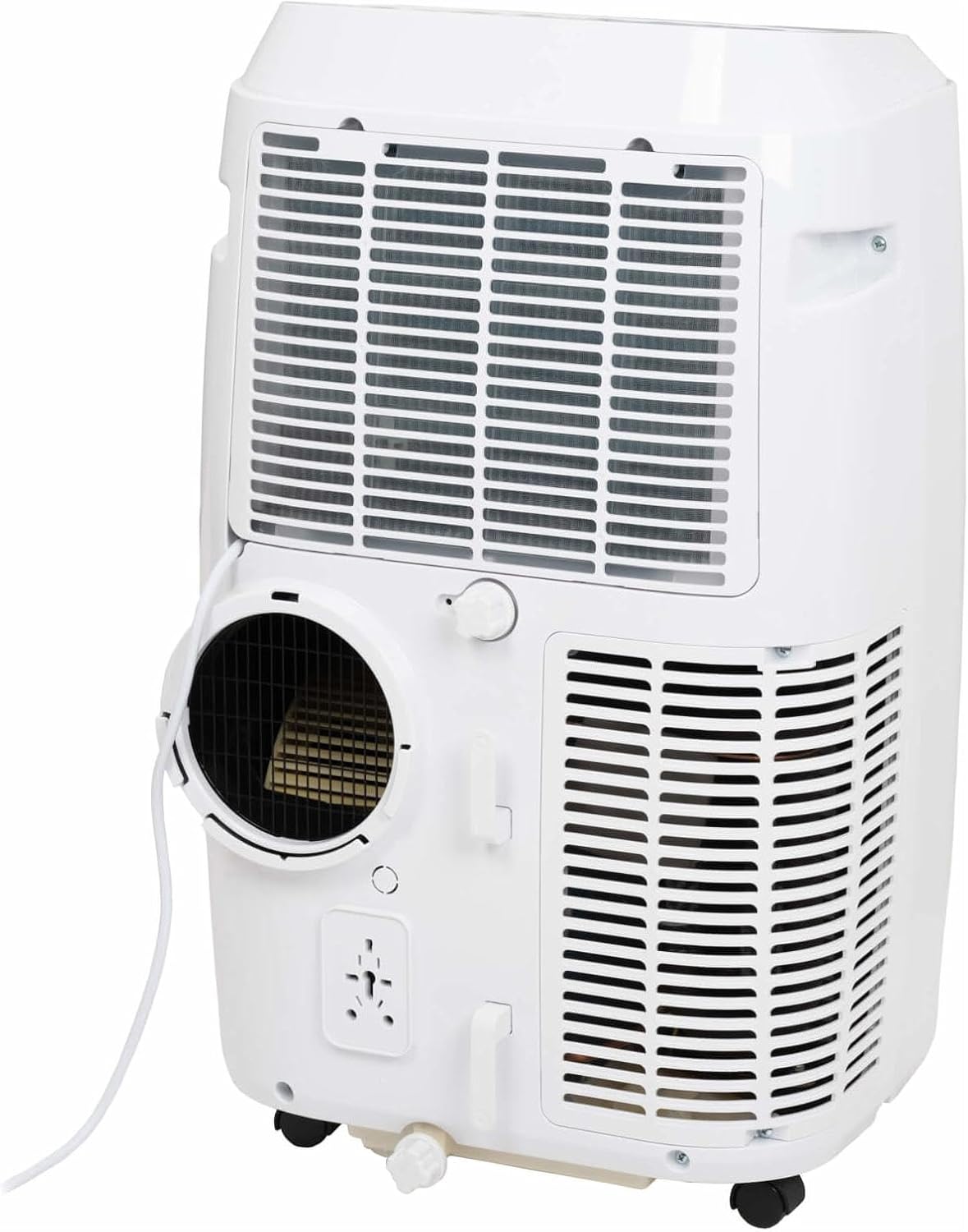
This image shows the rear of the air conditioner, illustrating where the exhaust hose connects to the unit.
Wụnye Window Kit
Use the provided window sealing kit to secure the exhaust hose in a window opening. Adjust the slider kit to fit your window, then place the window adapter into the opening.
Na-arụ ọrụ ikuku ntụ oyi gị
Ọrụ Ogwe njikwa
The control panel on top of the unit allows you to manage all settings. Press the IKE button to turn the unit on or off. Use the MODE button to cycle through cooling, fan, and dehumidification modes.
- IKE: Gbanyụọ ma ọ bụ gbanyụọ unit ahụ.
- Edị: Selects operating mode (Cool, Fan, Dry/Dehumidify).
- Akụ Elu/Ada: Adjusts temperature setting or timer.
- Ọsọ: Changes fan speed (Low, Medium, High).
- Oge: Na-edobe oge mgbanye akpaka ma ọ bụ oge mgbanyụ akpaka.
- Ịgbanwe: Na-eme ka ma ọ bụ gbanyụọ swing louver akpaka.
- Ụra: Na-eme ka ọnọdụ ụra rụọ ọrụ nke ọma ma na-agbanwe okpomọkụ nwayọ nwayọ.
Ọrụ njikwa anya
The remote control duplicates most functions available on the control panel, offering convenience. Ensure the remote control is pointed towards the unit's receiver when pressing buttons.
The remote control features a display showing the current settings and buttons for power, mode selection, temperature adjustment, fan speed, timer, and sleep mode.
Ụdị arụ ọrụ
- Ọnọdụ Cool: Provides cooling. Set your desired temperature using the UP/DOWN arrows.
- Fan Ọnọdụ: Na-ekesa ikuku n'enweghị oyi. Hazie ọsọ fan dịka ịchọrọ.
- Ụdị Akọrọ (Dehumidify): Reduces humidity in the room. The fan speed is fixed in this mode.
Njikwa ngwa Smart
This model supports Smart App Control. Refer to the separate Smart App manual or the manufacturer's website for detailed instructions on connecting and controlling your unit via the app.
Nlekọta na nlekọta
Na-ehicha ihe nzacha ikuku
The air filter should be cleaned every two weeks or more frequently depending on usage. A dirty filter can reduce efficiency and airflow.
- Kwupu igwe ntụ oyi n'ofe ọkụ.
- Chọta panel nzacha ikuku (ọ na-abụkarị n'azụ ma ọ bụ n'akụkụ nke unit ahụ).
- Wepu nzacha.
- Jiri mmiri ọkụ, ncha sachaa nzacha. Sachaa nke ọma ma hapụ ya ka ọ kpọọ nkụ kpamkpam tupu itinyeghachi ya.
Dragbapu Mmiri
During dehumidification or in very humid conditions, water will accumulate inside the unit. The unit has an internal water tank that will trigger a "Full" indicator when full. You will need to drain the water manually.
- Debe pan ma ọ bụ akpa na-emighị emi n'okpuru ọdụ ụgbọ mmiri na ala azụ nke unit ahụ.
- Wepu plọg mmiri ahụ.
- Allow all water to drain out.
- Dochie plọg mmiri ahụ nke ọma.
Nchekwa
Before storing the unit for an extended period, ensure the water tank is completely drained. Clean the air filter and store the unit in a dry, cool place, preferably in its original packaging.
Nchọpụta nsogbu nsogbu
| Nsogbu | Ihe nwere ike ime | Ngwọta |
|---|---|---|
| Unit anaghị agbanwuo. | Enweghị ike; eriri ọkụ eletrik agbanyụrụ; ihe mgbawa sekit agbanyụrụ. | Lelee njikọ ike; tọgharịa sekit breaker. |
| Otu anaghị ajụ oyi nke ọma. | Dirty air filter; exhaust hose not properly installed; room too large; windows/doors open. | Clean air filter; ensure hose is sealed; close windows/doors; check room size suitability. |
| A na-agbanahụ ihe ngosi zuru oke nke tank mmiri. | Tankị mmiri dị n'ime ejula. | Drain the water from the unit. |
| Ngalaba na-eme mkpọtụ. | Ngwaọrụ ahụ adịghị n'elu ala dị larịị; ihe mgbochi fan. | Debe ya n'elu ala dị larịị; lelee ihe mgbochi n'ebe fan. |
Nkọwa nka nka
| Njirimara | Nkọwapụta |
|---|---|
| Ụdị | Euro |
| Nọmba nlereanya | 262845 |
| Ike jụrụ oyi | 12000 BTU |
| Isi Iyi Ike | Igwe ọkụ eletrik |
| Water Capacity (Internal Tank) | 1.2 lita |
Akwụkwọ ikike na nkwado ndị ahịa
Ozi akwụkwọ ikike
This product comes with a manufacturer's warranty. Please refer to the warranty card included with your purchase or visit the official Eurom websaịtị maka usoro na ọnọdụ nkwa zuru ezu. Debe ihe akaebe ịzụrụ ihe gị maka nkwupụta nkwa.
Nkwado ndị ahịa
For technical assistance, spare parts, or service, please contact Eurom customer support. Contact details can typically be found on the Eurom website or in the product packaging. When contacting support, please have your model number (262845) and serial number ready.
Ask a question about this manual
Ask about setup, troubleshooting, compatibility, parts, safety, or missing instructions. Manuals+ will review the question and use this page’s manual context to help answer it.