
Bytech BY-AU-BS-152-BK
Bytech True Wireless Bluetooth Boost Link True Speaker User Manual
Model: BY-AU-BS-152-BK
Okwu mmalite
Daalụ maka ịzụrụasing the Bytech True Wireless Bluetooth Boost Link True Speaker. This manual provides essential information for setting up, operating, and maintaining your new speakers. Please read this manual thoroughly before use to ensure proper operation and to maximize your listening experience. These speakers feature True Wireless Stereo (TWS) functionality, Bluetooth connectivity, FM Radio, and Bass Boost for rich audio.
Ozi nchekwa
- Ekwela ka ndị na-ekwu okwu nọrọ n'ọnọdụ okpomọkụ dị oke elu, iru mmiri dị elu, ma ọ bụ anwụ kpọmkwem.
- Zere ịda ma ọ bụ itinye ndị na-ekwu okwu n'ọnọdụ dị egwu.
- Do not disassemble, repair, or modify the speakers yourself. Refer all servicing to qualified personnel.
- Keep the speakers away from water and other liquids.
- Jiri naanị eriri nchaji akọwapụtara yana nkwụnye ọkụ.
- Clean the speakers with a soft, dry cloth. Do not use abrasive cleaners or solvents.
- Listen at moderate volume levels to avoid hearing damage.
Ihe ngwugwu

Image: The Bytech Boost Link True Wireless Speakers shown in their retail packaging, highlighting the two speakers and the Bluetooth connectivity feature.
Biko lelee na ihe niile dị na ọ dịkwa mma:
- 2 x Bytech Boost Link True Wireless Speakers
- 1 x eriri chaja (USB)
- Akwụkwọ ntuziaka onye ọrụ 1 x (akwụkwọ a)
Ngwaahịa gafereview

Foto: Ihe dị nso n'ihu view of the two Bytech Boost Link True Wireless Speakers, showing the speaker grilles and control buttons at the bottom.
Mara ihe ndị dị na ya na njikwa ya:
- Grille ọkà okwu: Na-echebe onye ọkwọ ụgbọala okwu.
- bọtịnụ njikwa:
- Bọtịnụ ike: Power On/Off, Play/Pause.
- Bọtịnụ ụkpụrụ: Switch between Bluetooth, FM Radio, etc.
- Bọtịnụ ala Track/Mpịakọta gara aga: Pịa obere oge maka egwu gara aga, pịa ogologo oge maka mbelata olu.
- Bọtịnụ egwu/olu elu na-esote: Pịa obere oge maka egwu na-esote, pịa ogologo oge maka elu olu.
- Nchaji ọdụ ụgbọ mmiri: Maka ijikọ eriri USB chaja.
- Ihe ngosi LED: Shows power status, charging status, and pairing status.
Melite
Ịchaji ndị ọkà okwu
Before first use, fully charge both speakers. Connect the supplied USB charging cable to the charging port on each speaker and plug the other end into a USB power adapter (not included) or a computer's USB port. The LED indicator will show charging status and turn off or change color when fully charged.
Ịgbanyụ/ Gbanyụọ
- Iji gbanye: Press and hold the Power button on each speaker until the LED indicator lights up and you hear a power-on prompt.
- Iji gbanyụọ: Press and hold the Power button on each speaker until the LED indicator turns off and you hear a power-off prompt.
Ntuziaka ọrụ
Bluetooth Pairing (Single Speaker Mode)
- Gbaa mbọ hụ na agbanyere ọkà okwu yana na ọnọdụ njikọta Bluetooth (ihe ngosi ọkụ ga-enwu).
- Na ngwaọrụ gị (smartphone, tabletị, laptọọpụ), gbanye Bluetooth wee chọọ ngwaọrụ dị.
- Select "BYTECH BOOST LINK" (or similar name) from the list.
- Ozugbo ejikọtara ya, ihe ngosi LED ga-akwụsị ịgbawa ma nọgide na-adị ike, ị ga-anụkwa ụda nkwenye.
True Wireless Stereo (TWS) Pairing (Two Speakers)
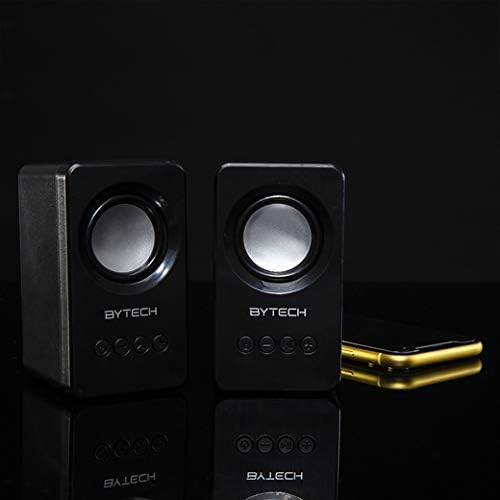
Image: The two Bytech Boost Link True Wireless Speakers positioned next to a smartphone, symbolizing their ability to connect wirelessly to each other and a device for stereo sound.
For a true stereo sound experience, you can pair both speakers together:
- Power on both Bytech Boost Link speakers. Do not connect them to your Bluetooth device yet.
- The speakers will automatically attempt to pair with each other. You will hear a confirmation sound when they are successfully linked for TWS. One speaker will become the master (left channel) and the other the slave (right channel).
- Once TWS paired, the master speaker will enter Bluetooth pairing mode (LED flashing).
- On your device, enable Bluetooth and search for "BYTECH BOOST LINK". Connect to this single entry.
- Ndị ọkà okwu abụọ a ga-akpọzi ọdịyo na stereo ugbu a.
- Mara: If the speakers do not automatically pair, try double-pressing the Mode button on one of the speakers to initiate TWS pairing.
FM Radio arụ ọrụ
- Power on the speaker(s).
- Pịa Ụdị button repeatedly until you hear the FM radio prompt.
- Iji nyochaa ma chekwaa ọdụ na akpaghị aka, pịa ma jide Gwuo/kwụsịtụ button. The speaker will scan and store available FM stations.
- Jiri ihe Egwu gara aga na Track na-esote bọtịnụ ka ịnyagharịa n'etiti ọdụ ndị echekwara.
Audio Playback and Volume Control
- Gwuo/kwụsịtụ: Obere pịa bọtịnụ Ike.
- Track na-esote: Short press the Next Track/Volume Up button.
- Gara aga Track: Short press the Previous Track/Volume Down button.
- Olu elu: Long press the Next Track/Volume Up button.
- Olu ala: Long press the Previous Track/Volume Down button.
Nlekọta
- Nhicha: Use a soft, dry, lint-free cloth to clean the surface of the speakers. Do not use liquid cleaners, aerosols, or solvents.
- Nchekwa: Mgbe a naghị eji ya ogologo oge, chekwaa ndị ọkà okwu n'ebe dị jụụ, kpọrọ nkụ na-adịghị na ìhè anyanwụ kpọmkwem na oke okpomọkụ.
- Nlekọta batrị: To prolong battery life, avoid fully discharging the battery frequently. Charge the speakers regularly, even if not in use.
Nchọpụta nsogbu
| Nsogbu | Ihe nwere ike ime | Ngwọta |
|---|---|---|
| Ọkà okwu anaghị agba ọkụ. | Batrị dị ala. | Chajie ọkà okwu zuru ezu. |
| Enweghị ike ijikọ site na Bluetooth. | Ọkà okwu adịghị n'ụdị njikọta; Bluetooth ngwaọrụ agbanyụrụ; Ọ dị oke anya site na ngwaọrụ. | Ensure speaker LED is flashing; Turn on Bluetooth on your device; Move speaker closer to device (within 10 meters). |
| Enweghị ụda. | Volume too low; Speaker not connected; Incorrect mode. | Increase volume on speaker and device; Re-pair Bluetooth; Ensure correct mode (Bluetooth/FM). |
| Njikota TWS ada ada. | Speakers already connected to a device; Speakers too far apart. | Disconnect speakers from any device; Power off and on both speakers, then try TWS pairing again; Ensure speakers are close to each other. |
| Nnabata redio FM na-adịghị mma. | Mgbama na-adịghị ike; Ntinye aka. | Relocate the speaker to an area with better reception; Extend the charging cable (can act as an antenna). |
Nkọwapụta
- Ụdị: BY-AU-BS-152-BK
- Akara: Bytech
- Teknụzụ Njikọta: Ikuku (Bluetooth)
- Ụkpụrụ mmepụta ụda: Gburugburu
- Ụdị ọkà okwu: Gburugburu ụda
- Atụmatụ pụrụ iche: Wireless Bluetooth, Bass Boost, FM Radio, True Wireless Stereo (TWS)
- Eji akwadoro: Maka ndị na-egwu egwu
- Ngwa dakọtara: Laptọọpụ, Mbadamba ụrọ, Smartphone
- Njikwa Type: Bọtịnụ ndị dị na ngwaọrụ
- Akụkụ ngwugwu: 20.7 x 16 x 9 cm
- Arọ: 560 g
Akwụkwọ ikike na nkwado
Bytech products are designed and manufactured to the highest quality standards. For information regarding warranty coverage, technical support, or service inquiries, please refer to the warranty card included with your purchase or visit the official Bytech websaịtị. Biko dowe ihe akaebe nke ịzụrụ ihe maka akwụkwọ ikike.
For further assistance, please contact Bytech customer support.
Ask a question about this manual
Ask about setup, troubleshooting, compatibility, parts, safety, or missing instructions. Manuals+ will review the question and use this page’s manual context to help answer it.