
1. Okwu mmalite
Daalụ maka ịzụrụasing the QFX E-B3 Bluetooth Professional High-Power Speaker. This manual provides essential information for the safe and efficient operation of your speaker. Please read it thoroughly before use and retain it for future reference.
The QFX E-B3 is designed to deliver powerful audio with features including Bluetooth connectivity, FM radio, USB/SD card playback, LED party lights, and a 250W power amplifier. It also supports True Wireless System (TWS) for stereo pairing with another compatible speaker.
2. Ozi nchekwa
- Isi mmalite ike: Connect the speaker only to the specified power supply as indicated on the unit.
- Igwe ikuku: Ensure adequate ventilation around the speaker. Do not block any ventilation openings.
- Mmiri na mmiri: This speaker is not waterproof. Do not expose it to rain, moisture, or any liquids to prevent electric shock or fire.
- Okpomọkụ: Keep the speaker away from heat sources such as radiators, heat registers, stoves, or other apparatus that produce heat.
- Nhicha: Unplug the speaker from the power outlet before cleaning. Use a dry cloth for cleaning. Do not use liquid cleaners or aerosol cleaners.
- Ije ozi: Anwala ịnye ngwaahịa a n'onwe gị. Tụtụ aka n'aka ndị ọrụ ruru eru.
- Nkwanye: Place the speaker on a stable, flat surface to prevent it from falling.
3. Ihe ngwugwu
Chọpụta na ihe niile dị na ngwugwu:
- QFX E-B3 High-Power Speaker
- Igwe okwu
- Njikwa anya
- AC Power USB
- Akwụkwọ ntuziaka (akwụkwọ a)
4. Ngwaahịa gafereview
The QFX E-B3 speaker features dual 15-inch woofers and a 1-inch tweeter, protected by a metal grill. It includes integrated handles and wheels for portability.

Foto 4.1: N'ihu view of the QFX E-B3 Speaker.
Rear Panel Controls and Ports
The rear panel houses all input/output connections and control knobs.
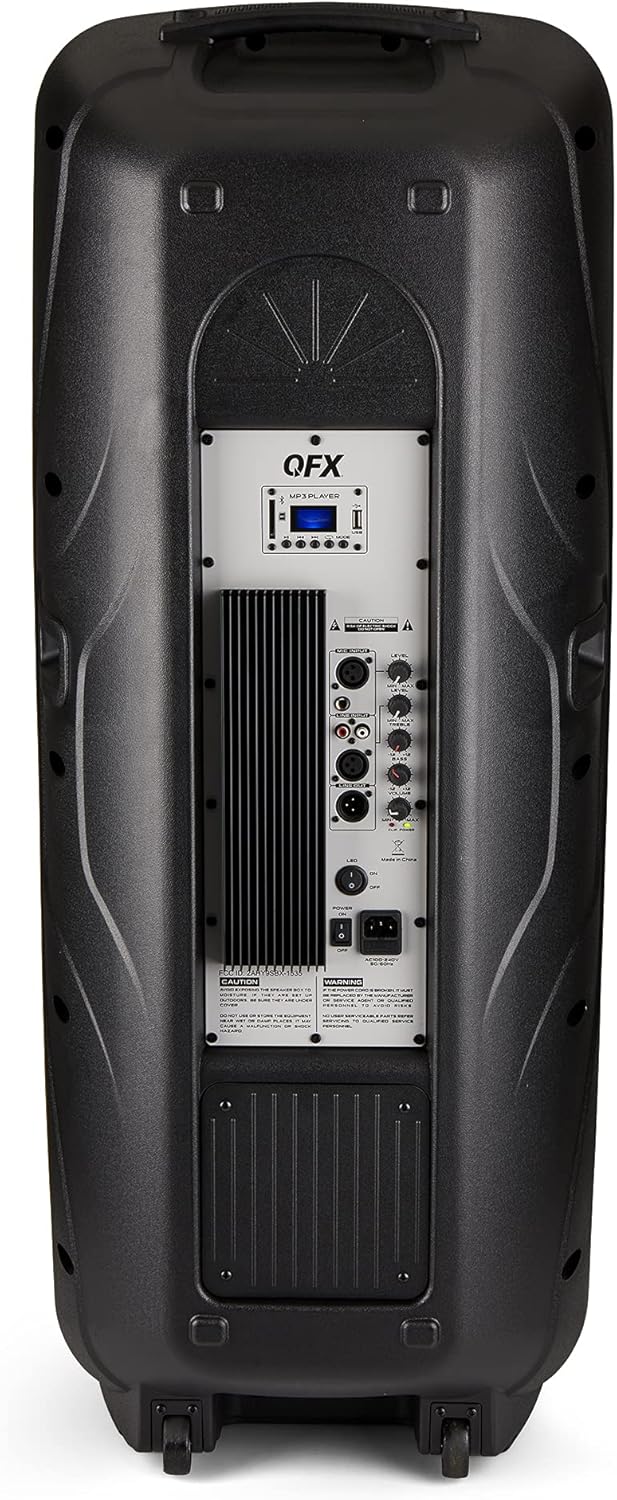
Figure 4.2: Rear panel with controls and ports.
- Ike mgba ọkụ: Na-agbanyụ/Gbanyụọ ọkà okwu.
- Ntinye AC: Connects the AC power cable.
- USB/SD Card Ports: Maka ịkpọ ụda files from USB drives or SD cards.
- Ngosipụta ihuenyo: Na-egosi ụdịdị dị ugbu a na ozi egwu.
- Bọtịnụ ụkpụrụ: Switches between input modes (Bluetooth, FM, USB, SD, RCA).
- Bọtịnụ Kwụsị/Kwụsị: Controls playback for USB/SD/Bluetooth.
- Bọtịnụ egwu gara aga/ na-esote: Navigates tracks or FM stations.
- Mpịakọta olu ukwu: Na-edozi olu n'ozuzu ya.
- Bass/Treble Control Knobs: Adjusts low and high frequencies.
- Ntinye igweokwu XLR: Connects a wired microphone.
- Microphone Volume/Echo Knobs: Adjusts microphone volume and echo effect.
- RCA Input (L/R): Connects external audio devices via RCA cables.
- XLR Line Input/Output: For connecting to other audio equipment.
5. Nhazi
Ntinye mbu
Place the speaker on a stable, flat surface. For optimal sound, position it in a central location within the listening area. The integrated wheels and handle allow for easy transport.

Figure 5.1: Speaker being moved with handle and wheels.
Njikọ Ike
- Ensure the speaker's power switch is in the OFF position.
- Connect the AC power cable to the AC input on the rear panel of the speaker.
- Tinye nsọtụ nke ọzọ nke eriri ike AC n'ime oghere mgbidi nkịtị.
- Flip the power switch to the ON position. The display screen will illuminate.
6. Ntuziaka ọrụ
Njikọ Bluetooth
- Turn on the QFX E-B3 speaker.
- Pịa MODE button on the speaker or remote control until "BLUE" appears on the display screen, indicating Bluetooth mode.
- Kwado Bluetooth na ngwaọrụ mkpanaka gị (smartphone, tabletị, wdg).
- Chọọ maka available Bluetooth devices and select "QFX E-B3" from the list.
- Once paired, the speaker will emit a confirmation sound. You can now play audio from your device through the speaker.
True Wireless System (TWS) Pairing
TWS allows two QFX E-B3 speakers to connect wirelessly for a stereo sound experience. This feature works only in Bluetooth mode.
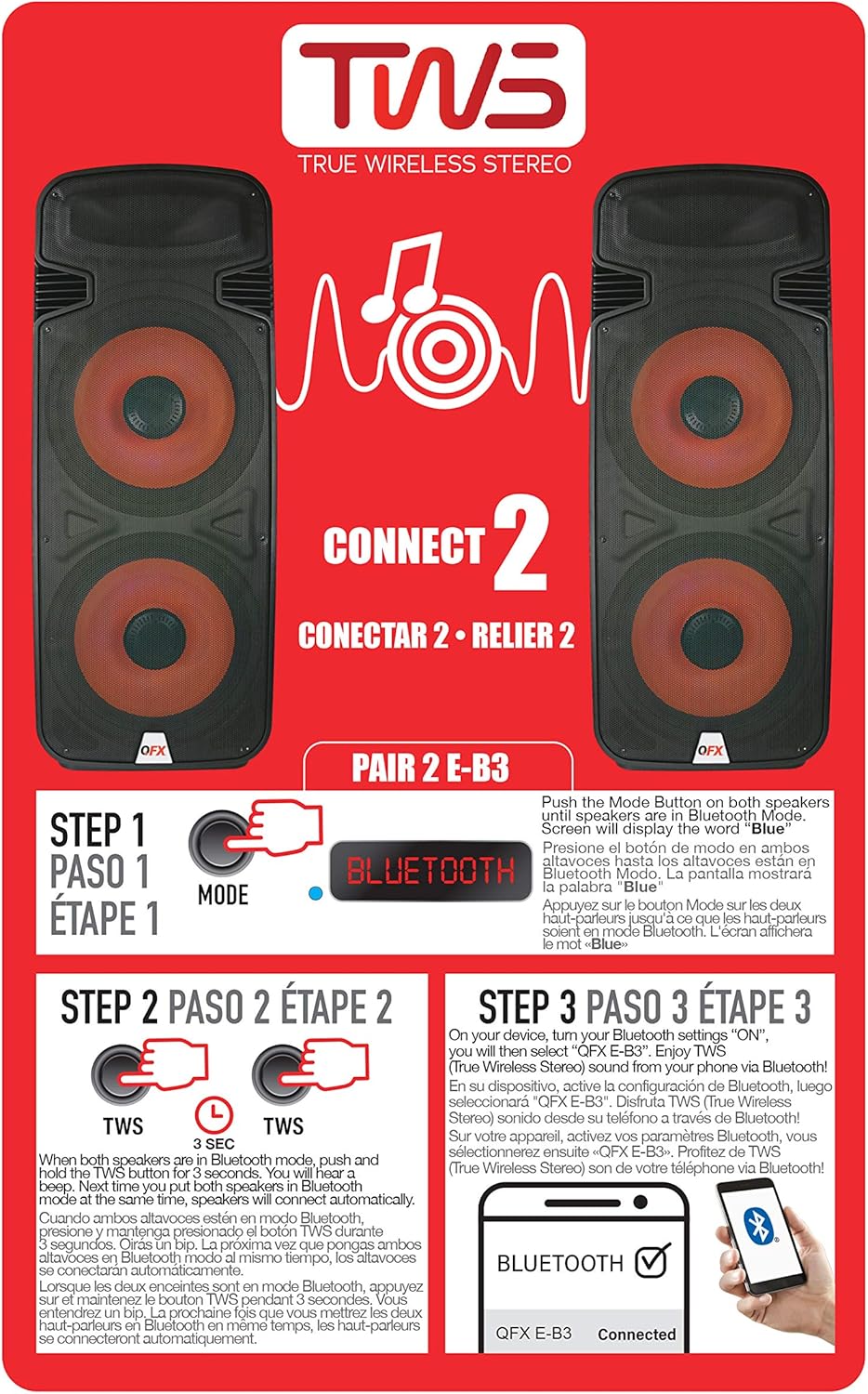
Figure 6.1: TWS Pairing Instructions.
- Ensure both QFX E-B3 speakers are powered on and in Bluetooth mode. The display on both speakers should show "BLUE".
- N'otu n'ime ndị ọkà okwu (nke a ga-abụ ọkà okwu mbụ gị), pịa ma jide TWS button for approximately 3 seconds. The speakers will attempt to connect to each other.
- Once successfully paired, you will hear a confirmation sound, and the display on the primary speaker will show "BLUE" while the secondary speaker will show "BLUE" as well.
- On your Bluetooth-enabled device, search for and select "QFX E-B3". The two speakers will now play audio in stereo.
FM Radio arụ ọrụ
- Pịa MODE button to switch to FM radio mode. The display will show the FM frequency.
- Pịa ma jide Gwuo/kwụsịtụ button to initiate an automatic scan for FM stations. The speaker will save all found stations.
- Jiri ihe Sochie nke gara aga/ọzọ bọtịnụ iji agagharị na ọdụ FM echekwara.
USB/SD Kaadị ịkpọghachi
- Insert a USB flash drive or SD card (with compatible audio files) into the respective port on the rear panel.
- Ọkà okwu ahụ ga-agbanwe na ọnọdụ USB/SD ozugbo wee malite ịkpọ ọdịyo ahụ files. Ọ bụrụ na ọ bụghị, pịa MODE button to select USB or SD mode.
- Jiri ihe Gwuo/kwụsịtụ na Sochie nke gara aga/ọzọ bọtịnụ iji jikwaa ịkpọghachi.
Ntinye igweokwu
- Connect a microphone to the XLR Microphone Input on the rear panel.
- Adjust the Microphone Volume and Echo knobs to achieve the desired sound.
Ntinye RCA
- Connect an external audio source (e.g., CD player, mixer) to the RCA Input (L/R) ports using appropriate RCA cables.
- Pịa MODE button to select RCA input mode.
- Adjust the master volume on the speaker and the volume on your external audio source.
ọkụ Party ọkụ
The speaker features integrated LED party lights that activate automatically when the speaker is powered on. There are no specific controls for the LED lights mentioned; they are designed to enhance the audio experience.
7. Nlekọta
Nhicha
- Always unplug the speaker before cleaning.
- Jiri ákwà dị nro ma kpọọ nkụ hichaa elu mpụta nke ọkà okwu ahụ.
- Ejila ihe nchacha, waxes, ma ọ bụ ihe mgbaze ka ha nwere ike imebi njedebe.
- Debe oghere ikuku ikuku na uzuzu na irighiri ihe.
Nchekwa
When not in use for extended periods, store the speaker in a cool, dry place, away from direct sunlight and extreme temperatures. Cover the speaker to protect it from dust.
8. Nchọpụta nsogbu
If you encounter issues with your QFX E-B3 speaker, refer to the following common problems and solutions:
| Nsogbu | Ihe nwere ike ime | Ngwọta |
|---|---|---|
| Enweghị ike | Power cable not connected; Power outlet not active; Speaker power switch off. | Ensure AC cable is securely connected to speaker and outlet. Check if outlet is working. Turn speaker power switch ON. |
| Enweghị ụda | Volume too low; Incorrect input mode selected; Audio source not playing. | Increase master volume. Press MODE button to select correct input. Ensure audio source is playing and its volume is up. |
| Bluetooth anaghị ejikọ | Speaker not in Bluetooth mode; Device Bluetooth off; Speaker already paired to another device; Device too far. | Ensure speaker is in Bluetooth mode ("BLUE" on display). Turn on device Bluetooth. Disconnect from other devices. Move device closer to speaker (within 30 feet). |
| Njikọ TWS dara | Speakers not in Bluetooth mode; TWS button not held long enough. | Ensure both speakers are in Bluetooth mode. Press and hold the TWS button on one speaker for 3 seconds. |
| Igwe egwu USB/SD anaghị arụ ọrụ | Ụdị na-ezighi ezi; Ekwekọghị file format; Corrupted USB/SD card. | Press MODE to select USB/SD. Ensure audio files are in a compatible format (e.g., MP3). Try a different USB/SD card. |
9. Nkọwapụta
| Njirimara | Nkọwapụta |
|---|---|
| Ụdị | QFX |
| Nọmba nlereanya | E-B3 |
| Ike Nwepu kacha elu | 250 Watt |
| Teknụzụ Njikọta | USB, Bluetooth |
| Ọnọdụ mmepụta ọdịyo | Stereo |
| Ụdị nkwụnye | Plug Mount, Wheel Mount |
| Ụdị Ọkà Okwu | Woofer (Dual 15 Inches) |
| Ụdị njikwa | Njikwa anya |
| Agba | Party LED |
| Enweghị mmiri | Ụgha |
| Usoro njikwa | Ime ime |
| Dayameta Woofer | 15 sentimita asatọ |
| Ọnụọgụ ọwa ọdịyo | 2.0 |
| Teknụzụ ikuku | Bluetooth |
| Protocol Njikọta | Bluetooth |
| Isi Iyi Ike | Igwe ọkụ eletrik |
| Ụdị ọkwọ ụgbọ ala ọdịyo | Ọkwọ ụgbọala dị ike |
| Nha ọkwọ ụgbọ ala ọdịyo | 15 sentimita asatọ |
| Akụkụ ihe (D x W x H) | 16.77"D x 13.98"W x 23.74"H |
| Ibu Ibu | 13.2 pound |
| Ngwa dakọtara | Laptop, MP3 Player, Smartphone, Tablet, Television |
| UPC | 606540039618 |
10. Akwụkwọ ikike Ozi
This product is covered by a limited warranty. For specific details regarding warranty coverage and terms, please refer to the warranty information provided at the point of purchase or contact QFX customer support directly. The warranty is typically per contract with the retailer.
11. Nkwado
For technical assistance, troubleshooting beyond this manual, or inquiries about your QFX E-B3 speaker, please contact QFX customer support or your retailer. Contact information can usually be found on the manufacturer's websaịtị ma ọ bụ na nnata ịzụrụ ihe.