
Naztech 15350
Naztech Xpods PRO True Wireless Noise Cancelling Earbuds
Ụdị: 15350
Brand: Naztech
Okwu mmalite
The Naztech Xpods PRO are advanced true wireless noise-cancelling earbuds designed for an immersive audio experience and clear communication. Featuring HD sound, touch controls, and IPX4 water resistance, these earbuds are suitable for various activities, including sports and daily use. They come with a wireless charging case for extended playtime and convenient recharging.

Image: Naztech Xpods PRO earbuds, charging case, and product packaging, highlighting key features like 25 hours play time and touch controls.
Melite
Kedu ihe dị na Igbe ahụ
- Akpa nchaji ikuku
- USB-C eriri USB
- 6 Sets of Silicone Ear Tips (3 sizes, 2 colors)
Ịchaji ihe ntị na akpa
Before first use, fully charge the Xpods PRO and their charging case. The case can be charged via the included USB-C cable or a Qi-compatible wireless charging pad.
- Nchaji USB-C: Connect the USB-C cable to the charging port on the case and to a power source.
- Nchaji ikuku: Place the charging case on a Qi-compatible wireless charging pad. Ensure the case is properly aligned for charging.
A 10-minute quick charge provides approximately 1 hour of playback. A full charge offers up to 5 hours of playtime for the earbuds, with the charging case providing an additional 20 hours, totaling 25 hours of playtime.
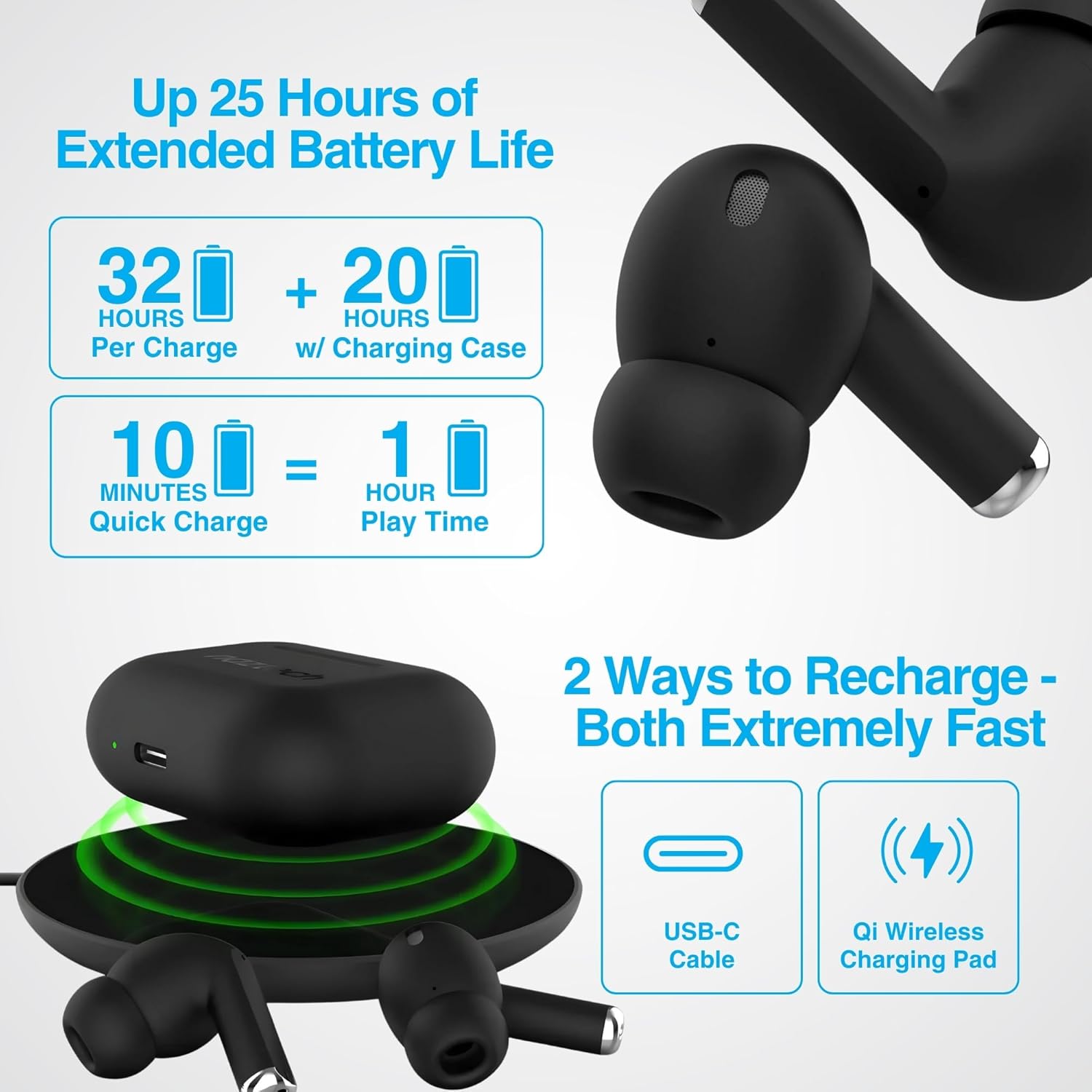
Image: Illustration showing USB-C and Qi wireless charging options for the Naztech Xpods PRO case, along with battery life indicators.
Ijikọ na Ngwaọrụ gị
- Gbaa mbọ hụ na ebubo na ekwe ntị.
- Mepee igbe nchaji. Igwe ntị ga-abanye na ọnọdụ njikọta na-akpaghị aka.
- Na ngwaọrụ gị (smartphone, tabletị, wdg), gaa na ntọala Bluetooth wee mee ka Bluetooth nwee ike.
- Select "NAZTECH Xpods PRO" from the list of available devices.
- Ozugbo ejikọrọ, ị ga-anụ nkwenye a na-anụ, na ntị ntị ga-adị njikere maka ojiji.
The Xpods PRO feature Bluetooth 5.0 for stable connectivity up to 33 feet (10 meters) and auto-pair technology for seamless re-connection with previously paired devices.

Image: A smartphone screen showing the "NAZTECH Xpods PRO" listed in Bluetooth settings, demonstrating universal compatibility with various devices.
Ntuziaka ọrụ
Njikwa mmetụ
The Xpods PRO feature intuitive touch sensor controls on each earbud for easy management of audio playback and calls.
| Omume | Njikwa |
|---|---|
| Kpọọ/kwụsịtụ egwu | Otu mgbata na ntị ntị |
| Track na-esote | Pịa bọtịnụ ntị aka nri ugboro abụọ |
| Egwu gara aga | Kpatụ ntị ugboro abụọ n'akụkụ aka ekpe |
| Zaa/Kwụsị Oku | Otu mgbata na ntị ntị |
| Jụ oku | Pịa ma jide otu ntị ntị maka sekọnd 2 |
| Mee ka onye enyemaka olu rụọ ọrụ | Pịa ugboro atọ na ntị ntị |

Image: Diagram illustrating the touch control functions on the Naztech Xpods PRO earbuds.
Yi akwa ntị
For optimal sound quality and a secure fit, choose the silicone ear tips that best suit your ear canal. The Xpods PRO come with 6 sets of silicone ear tips in 3 sizes and 2 colors to ensure a comfortable and noise-isolating fit.

Image: Naztech Xpods PRO earbuds shown with various silicone ear tip sizes, emphasizing customizable fit.
Nkagbu mkpọtụ
The Xpods PRO feature Passive Noise Cancellation through their closed-system design, which helps to immerse you in music by preserving low-frequency bass richness and reducing ambient noise. Dual microphones with advanced voice capture technology filter out wind and background noise for clear conversations.

Image: A person using Naztech Xpods PRO, illustrating the clear call quality and passive noise cancellation features.
Nlekọta
Nhicha
To maintain optimal performance and hygiene, regularly clean your Xpods PRO earbuds and charging case. Use a soft, dry, lint-free cloth to wipe down the surfaces. For ear tips, you may gently wipe them with a slightly damp akwa ma kwe ka ha kpoo kpamkpam tupu ha etinyeghachi ya.
Avoid using abrasive materials, solvents, or harsh chemicals, as these can damage the product.
Nguzogide mmiri (IPX4)
The Naztech Xpods PRO are rated IPX4 water-resistant, meaning they are protected against splashing water from any direction. This makes them suitable for workouts and light rain. However, they are not designed for submersion in water or exposure to pressurized water jets. Do not use them while swimming or showering.

Image: A person wiping sweat from their face, indicating the IPX4 water-resistant rating of the Naztech Xpods PRO for active use.
Nchekwa
When not in use, store your Xpods PRO in their charging case to protect them from dust, dirt, and physical damage. Store the case and earbuds in a cool, dry place away from extreme temperatures and direct sunlight.
Nchọpụta nsogbu
If you encounter issues with your Naztech Xpods PRO, refer to the following common solutions:
Earbuds Not Pairing or Connecting
- Lelee batrị: Gbaa mbọ hụ na ejirila earbuds na okwu ịchaji ụgwọ nke ọma.
- Tinyegharịa ụzọ: Turn off Bluetooth on your device, place earbuds back in the case, close and reopen the case. Then, re-enable Bluetooth on your device and try pairing again.
- Echefu Ngwaọrụ: On your device's Bluetooth settings, "forget" or "unpair" the "NAZTECH Xpods PRO" and then attempt to pair from scratch.
- Ogologo: Ensure your device is within the 33ft (10m) Bluetooth range.
- Ntinye aka: Wepụ na ngwaọrụ ikuku ndị ọzọ nwere ike ịkpata ndabichi.
Sound Quality Issues (e.g., Static, Low Volume)
- Eti ntị dị ọcha: Ensure the mesh filters and ear tips are clean and free of debris.
- Ndụmọdụ ntị dabara adaba: Experiment with different sized silicone ear tips to ensure a proper seal in your ear canal, which significantly impacts sound quality and bass response.
- Ogo isi mmalite: Ensure the audio source (music file, streaming service) is of high quality.
- Olu ngwaọrụ: Lelee ọkwa olu dị na ma ngwaọrụ gị ejikọtara ma ekweisi.
Ịchaji nsogbu
- Nyocha USB: Ensure the USB-C cable is securely connected to both the case and the power source. Try a different USB-C cable and power adapter if available.
- Ihe mkpuchi ikuku: Ọ bụrụ na ị na-eji chaja ikuku, hụ na e tinyere akpa ahụ n'ọnọdụ kwesịrị ekwesị na pad chaja ahụ ma gbanye pad ahụ.
- Earbud Placement: Ensure the earbuds are correctly seated in the charging case, making proper contact with the charging pins.
Nkọwapụta
| Njirimara | Nkọwa |
|---|---|
| Aha Nlereanya | NAZTECH Xpods PRO |
| Nọmba Nlereanya ihe | 15350 |
| Teknụzụ Njikọta | Ikuku (Bluetooth 5.0) |
| Ikuku iche | Ruo 33ft/10m |
| Ụdị njikwa | Touch (Media Control) |
| Njikwa mkpọtụ | Nkagbu mkpọtụ mkpọtụ |
| Ogo Nguzogide Mmiri | IPX4 |
| ngụkọta oge egwuregwu | Ruo awa 25 (ya na akpa chaja) |
| Earbud Playtime (per charge) | Ruo awa iri abụọ |
| Nchaji ngwa ngwa | 10 min charge for 1 hour playback |
| Nchaji Interface | USB-C, Qi Wireless Charging |
| Ngwa gụnyere | USB-C Charging Cable, 6 Sets of Silicone Ear Tips, Wireless Charging Case |
| Ihe onwunwe | Plastic |
| Akụkụ ngwaahịa | 2.39 x 1.81 x 0.91 sentimita asatọ |
| Ibu Ibu | 4.4 ounces |
Akwụkwọ ikike na nkwado
Naztech products are designed for quality and performance. While specific warranty details are not provided in this manual, Naztech generally backs its products with warranties. For detailed warranty information, product support, or technical assistance, please visit the official Naztech websaịtị ma ọ bụ kpọtụrụ ndị ahịa ha ozugbo.
Ị nwere ike ịchọta ozi ndị ọzọ na akụrụngwa nkwado site na ịga na Naztech Store on Amazon ma ọ bụ onye ọrụ ha websaịtị.
Ask a question about this manual
Ask about setup, troubleshooting, compatibility, parts, safety, or missing instructions. Manuals+ will review the question and use this page’s manual context to help answer it.