
Okwu mmalite
This manual provides detailed instructions for the safe and efficient operation of your WUBEN F5 Camping Lantern. Please read this manual thoroughly before using the product and retain it for future reference. The WUBEN F5 is a versatile, rechargeable LED lantern designed for various outdoor and indoor lighting needs, featuring multiple lighting modes, a power bank function, and robust construction.
Ngwaahịa gafereview
Atụmatụ igodo
- Okpomọkụ Agba nwere ike ịgbanwe: Offers 3 lighting modes (High 500LM, Med 140LM, Low 10LM) and 3 color temperatures (5700K, 4500K, 3000K), allowing for 9 unique lighting options.
- Dual-Way Charging: Equipped with a 5200mAh rechargeable battery, supporting Type-C fast charging and USB-A discharge for charging external devices.
- Ihe ngosi smart: Four blue LED indicators display real-time power and charging status.
- Nrịgo dị iche iche: Features a magnetic base, a hook design, and a 1/4 inch tripod thread hole for various placement options.
- Nhazi na-adịgide adịgide: IP64 water-resistant rating and 1.5M impact resistance.
Ngwa
The WUBEN F5 Camping Lantern package includes the following items:
- WUBEN F5 Lantern
- -Dị-C Nchaji USB
- Lanyard
- S- nko
- Akwụkwọ ntuziaka onye ọrụ

Image: Package contents of the WUBEN F5 Campnke Lantern.
Melite
Ebo mbụ
Before first use, fully charge the WUBEN F5 lantern. Connect the provided Type-C cable to the lantern's Type-C port and a compatible USB power adapter (not included). The blue indicator lights on the side will show the charging progress. All four lights will be solid blue when fully charged.

Image: The WUBEN F5 lantern connected via USB-A to charge a mobile phone, illustrating its power bank capability.
Ntuziaka ọrụ
Gbanyụọ/ Gbanyụọ
- Press and hold the power button (marked with a circle) for approximately 1 second to turn the lantern on or off.
Adjusting Brightness (Stepless Dimming)
- When the lantern is on, press and hold the '+' button to increase brightness.
- Press and hold the '-' button to decrease brightness.
- Enwere ike gbanwee ihie site na 1% ruo 100%.
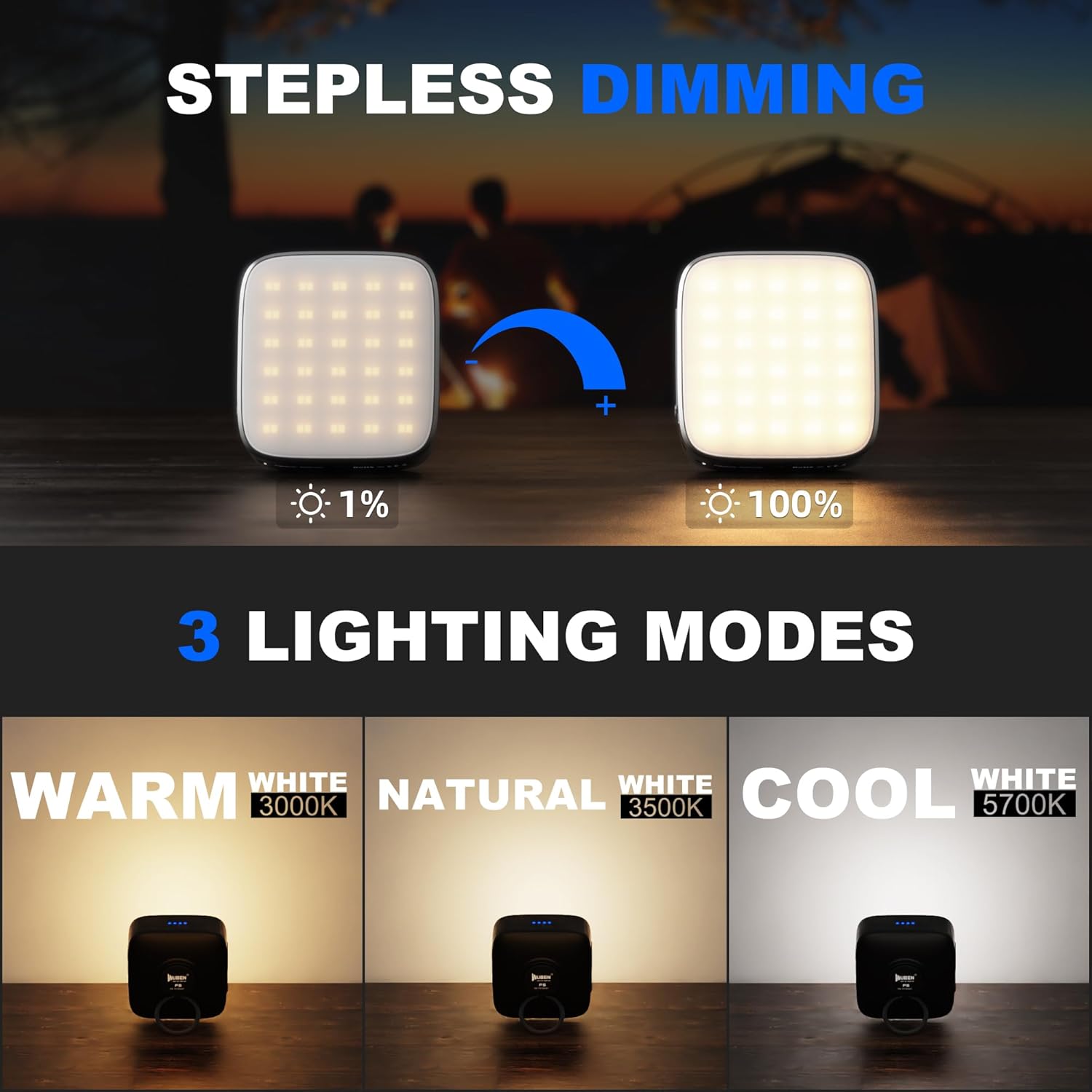
Image: Illustration of the stepless dimming feature, showing the lantern's brightness adjustable from 1% to 100%.
Na-agbanwe okpomoku agba
- Double-click the 'W' button to cycle through the three color temperature modes: Warm (3000K), Natural (4500K), and Cool White (5700K).
- Each color temperature can be combined with any brightness level.

Image: The WUBEN F5 lantern showcasing its three color temperature options: Warm (3000K), Natural (3500K), and Cool White (5700K).
Ọkụ egosi batrị
- The four blue indicator lights on the side of the lantern show the remaining battery level:
- One light: ≤25%
- Two lights: 25%~50%
- Three lights: 50%~75%
- Four lights: 75%~100%
- To turn the blue indicator light on or off when the lantern is off, triple-click the 'W' button.

Image: The WUBEN F5 lantern displaying its blue LED battery indicators, showing different charge levels and charging status.
Ịchaji na Ọrụ Bank Ike
Ịchaji oriọna
- Use the provided Type-C cable to charge the lantern. Connect the Type-C end to the lantern and the USB-A end to a power source (e.g., wall adapter, computer USB port).
- The blue indicator lights will flash during charging and remain solid when fully charged.
- The lantern can be used while charging.
Iji dị ka Power Bank
- The WUBEN F5 can charge other devices via its USB-A output port.
- Connect your device's charging cable to the USB-A port on the lantern.
- The lantern will automatically begin charging the connected device.
- The power bank function will stop when the lantern's battery level drops below 25% to preserve its own illumination capability.
Nhọrọ nkwụnye
The WUBEN F5 offers multiple ways to position it for optimal lighting:
- Ntọala Igwe Ọdụdọ: The built-in strong magnet allows attachment to metal surfaces, such as car hoods or refrigerators.
- Nko agbakwunyere: Use the foldable ring on the back or the included S-hook to hang the lantern inside a tent, from a branch, or other suitable points.
- Ugwu Tripod: A 1/4 inch tripod thread hole on the bottom allows mounting the lantern onto a standard camera tripod or stand for precise positioning.

Image: The WUBEN F5 lantern demonstrating its strong magnetic base by attaching to a metal range hood and illuminating a car engine bay.

Image: The WUBEN F5 lantern mounted on a small tripod, highlighting its 1/4 inch thread hole for photographic equipment compatibility.

Image: The WUBEN F5 lantern hanging from a hook inside a tent, providing overhead illumination.
Nlekọta
- Nhicha: Jiri nwayọ hichaa oriọna, damp akwa . Ejila ihe nchacha abrasive ma ọ bụ ihe mgbaze.
- Nchekwa: Store the lantern in a cool, dry place when not in use. For long-term storage, charge the battery to approximately 50% every 3-6 months to maintain battery health.
- Nguzogide mmiri: The lantern has an IP64 water-resistant rating, meaning it is protected from splashing water from any direction. It is not designed to be submerged in water.

Image: The WUBEN F5 lantern with water droplets on its surface, illustrating its IP64 water-resistant capability.
Nchọpụta nsogbu
| Nsogbu | Ihe nwere ike ime | Ngwọta |
|---|---|---|
| Lantern anaghị agbanwuo. | Batrị dị ala. | Charge the lantern using the Type-C cable. |
| Lantern anaghị akwụ ụgwọ. | Eriri ma ọ bụ ihe nkwụnye ọkụ adịghị mma. | Try a different Type-C cable and/or power adapter. Ensure connections are secure. |
| Device not charging from power bank function. | Lantern battery too low (below 25%). | Charge the WUBEN F5 lantern. |
| Mwepụta ọkụ adịghị ada. | Brightness set to low level. | Increase brightness using the '+' button. |
Nkọwapụta
| Njirimara | Nkọwa |
|---|---|
| Nlereanya | F5 |
| Icha ọkụ | Ihe ruru 500 lumens |
| Ike batrị | 5200mAh (Lithium-Ion) |
| Ndụ batrị | Up to 500 Hours (Low mode) |
| Okpomọkụ agba | 5700K (Cool White), 4500K (Natural), 3000K (Warm) |
| Nchaji ọdụ ụgbọ mmiri | Type-C (5V 2A input) |
| Mmepụta Port | USB-A (5V 2A output) |
| Mmiri Nguzogide | IP64 |
| Nguzogide mmetụta | 1.5 mita |
| Akụkụ | 4.8"L x 2.28"W x 83.46"H (ihe dị ka 84mm x 78mm x 28.5mm) |
| Ibu | 206 grams (7.3 ounces) |
| Ihe onwunwe | Acrylonitrile Butadiene Styrene (ABS) |
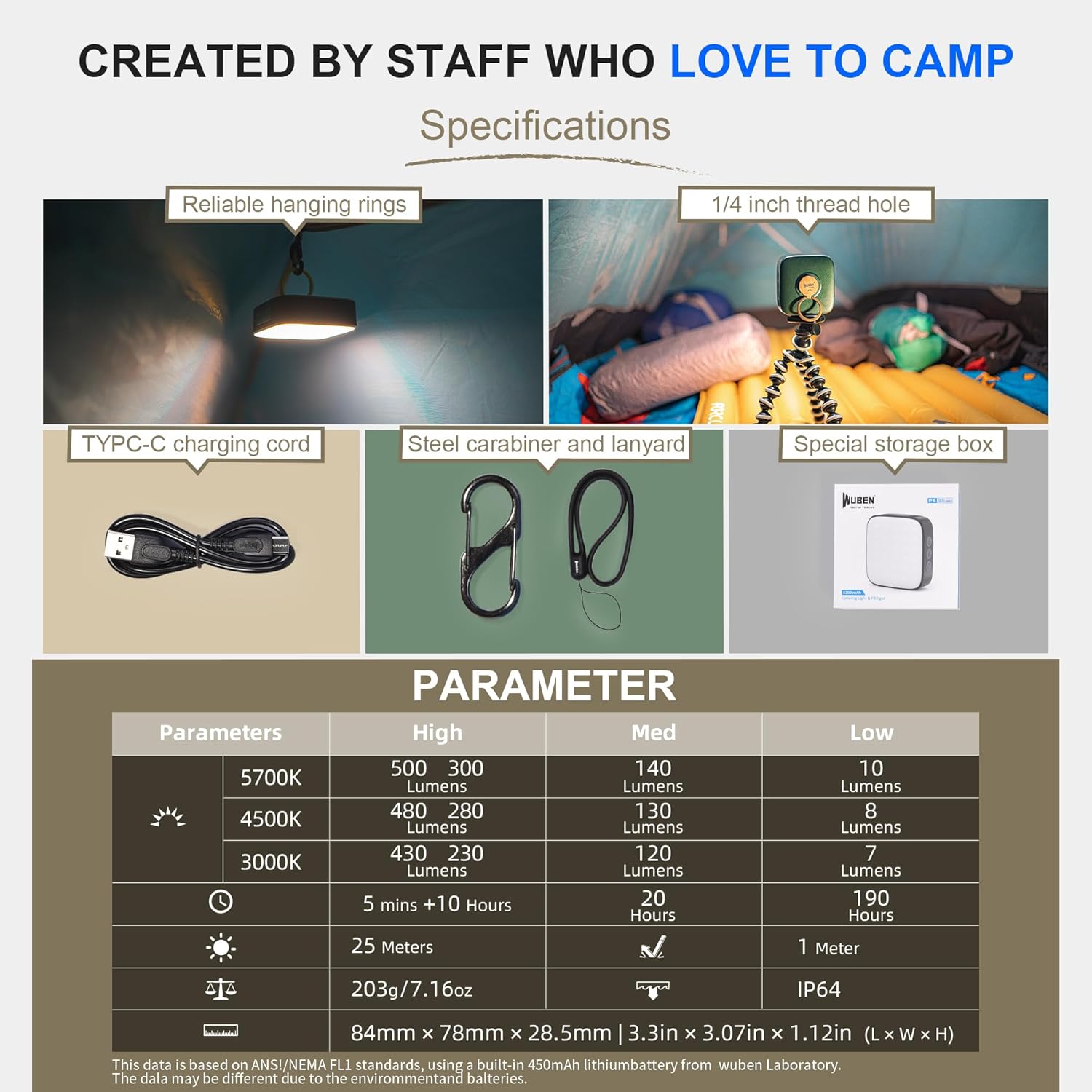
Image: A table summarizing the technical parameters and specifications of the WUBEN F5 lantern.
Akwụkwọ ikike na nkwado
WUBEN products are designed for durability and performance. For warranty information, product registration, or technical support, please refer to the official WUBEN websaịtị ma ọ bụ kpọtụrụ ndị ahịa ha ozugbo. Debe nnata nzụta gị ka ihe akaebe nke ịzụrụ.
Maka enyemaka ọzọ, gaa na WUBEN Store on Amazon.