
1. Okwu mmalite
The SkyAngel911 Mobile Medical Alert System is a personal emergency response device designed for individuals seeking security and independence. Utilizing 4G cellular technology, this device allows for direct two-way voice communication with 911 emergency services at the touch of a button, without the need for monthly service fees or a cellular contract. It is engineered to work both indoors and outdoors, providing peace of mind across various environments where cellular service is available.
Atụmatụ gụnyere:
- 4G cellular connectivity with no monthly fees or contract.
- Automatic fall detection capability.
- Waterproof design, allowing for temporary submersion.
- Always-on two-way speakerphone for direct communication with 911.
- Compact and portable design, suitable for carrying on a keychain.
2. Ihe ngwugwu
Biko chọpụta na agụnyere ihe niile edepụtara n'okpuru na ngwugwu gị:
- SkyAngel911FD Device
- Wall Plug (Power Adapter)
- Igwe Oji Magnetik
- Lanyard

Figure 2.1: Included components of the SkyAngel911FD package.
3. Nhazi
3.1 Nchaji izizi
Before first use, fully charge your SkyAngel911 device. Connect the magnetic charging cable to the device and plug the wall adapter into a standard electrical outlet. The device will indicate charging status (e.g., an LED light). A full charge typically takes a few hours.
3.2 Na-agbanye ike
The device is designed to be always on once charged. There is no manual power button. Ensure the device is charged to maintain readiness.
3.3 Cellular Activation
The SkyAngel911 device comes pre-activated with 4G cellular service. No additional setup or contract is required. The device will automatically connect to the strongest available cellular network in your area. Please note that cellular coverage is not available in all areas, similar to a standard cell phone.
4. Ntuziaka ọrụ
4.1 Making an Emergency Call
To initiate an emergency call, press and hold the prominent SOS button on the device. The device will connect directly to 911 emergency services. Once connected, speak clearly into the device to communicate your situation and location to the operator. The device operates in a two-way speakerphone mode.
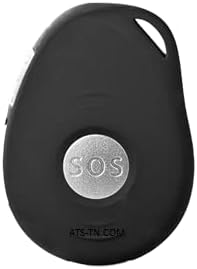
Figure 4.1: The SOS button on the SkyAngel911FD device.
4.2 Automatic Fall Detection
The SkyAngel911 device is equipped with automatic fall detection. If the device detects a fall, it will automatically initiate a call to 911. It is important to note that no fall detection system is 100% accurate, and users should always press the SOS button if they are able to do so after a fall.
Njirimara Mmiri 4.3
The device is designed to be waterproof. It can withstand temporary submersion, such as being dropped in a swimming pool, for up to 10 minutes. This feature allows for use in environments where exposure to water is possible, such as bathrooms or during light rain.

Figure 4.2: The SkyAngel911FD device is waterproof.
4.4 Ibu ibu
The compact size of the SkyAngel911 allows it to be easily carried, for example, on a keychain. This ensures the device is always accessible when needed.

Figure 4.3: The SkyAngel911FD device attached to a keychain for easy portability.

Figure 4.4: The SkyAngel911FD device provides security for active lifestyles.
4.5 Important Considerations
- You must be able to speak to the 911 operator to tell them your location, as the device does not automatically transmit GPS coordinates.
- Ensure the device is regularly charged to maintain functionality.
Video 4.5: A customer's experience with the SkyAngel911 device, demonstrating its practical application in an emergency scenario.
5. Nlekọta
5.1 Ịchaji
To ensure optimal performance, charge the device regularly. The battery life can vary based on usage and cellular signal strength. It is recommended to charge the device daily or as needed to maintain a full charge.
5.2 Nhicha
Jiri nwayọ hichaa ngwaọrụ ahụ, damp cloth. Do not use harsh chemicals or abrasive cleaners. Ensure the charging contacts are clean and dry before charging.
5.3 Mkpughe mmiri
While waterproof, prolonged submersion or exposure to high-pressure water jets should be avoided. The device is rated for temporary submersion up to 10 minutes.
6. Nchọpụta nsogbu
6.1 Ngwaọrụ anaghị aza
- Lelee batrị: Ensure the device is fully charged. Connect it to the charger and observe any charging indicators.
- Tọgharia: If applicable, refer to the manufacturer's website for instructions on how to perform a soft reset.
6.2 Cannot Connect to 911
- Check Cellular Signal: The device requires 4G cellular coverage to function. Move to an area with better signal strength.
- Test Call: If unsure about functionality, contact Assistive Technology Services support for guidance on performing a non-emergency test call. Do NOT call 911 for testing purposes.
6.3 Fall Detection Not Activating
- Usoro ngwaọrụ: Ensure the device is worn correctly and securely.
- Mkpu ụgha: Fall detection technology is not perfect and may not detect all falls or may trigger false alarms. Always press the SOS button if you are able.
7. Nkọwapụta
| Ụdị | Assistive Technology Services |
| Nọmba nlereanya | ats-az-sa911 |
| Teknụzụ Njikọta | 4G Cellular |
| Njirimara Pụrụ Iche | Waterproof, Automatic Fall Detection |
| Ngwa akwadoro | Emergency Alert (911) |
| Ihe onwunwe | Plastic |
| Nkezi Ndụ batrị | Varies with usage; up to 10 minutes during active call. Regular charging recommended. |
| Ngwa dakọtara | N/A (Standalone device) |
8. Akwụkwọ ikike na nkwado
For specific warranty information and customer support, please refer to the documentation provided with your purchase or contact Assistive Technology Services directly. Details regarding product registration, warranty claims, and technical assistance can typically be found on the manufacturer's official websaịtị ma ọ bụ site na ọwa ọrụ ndị ahịa ha.


