
PeakTech P 8005
PeakTech P 8005 Sound Level Meter User Manual
Model: P 8005 | Brand: PeakTech
1. Okwu mmalite
The PeakTech P 8005 is a high-precision Class 2 sound level meter designed for accurate noise measurement and data logging. It is suitable for a wide range of applications including noise projects, quality control, disease prevention, and environmental sound measurements in factories, schools, offices, traffic, and households. This device features a 4-digit 20mm LCD multi-function display with a bargraph and backlight, a USB interface for continuous measurements, and AC/DC outputs for connection to frequency analyzers or X-Y wave recorders. This manual provides detailed instructions for the proper use, maintenance, and troubleshooting of your PeakTech P 8005.
2. Ozi nchekwa
Please read all safety instructions carefully before operating the device. Failure to follow these instructions may result in damage to the device or personal injury.
- Ewepụla ngwaọrụ ahụ na oke okpomọkụ, iru mmiri, ma ọ bụ ìhè anyanwụ kpọmkwem.
- Zere ịma jijiji ma ọ bụ mmetụta siri ike.
- Do not attempt to open or modify the device. Repairs should only be performed by qualified personnel.
- Debe ngwaọrụ ahụ ka ọ ghara ịdị n'ọgba eletrik siri ike.
- Ensure proper ventilation when using the AC adapter for extended periods.
- Tụfuo batrị dịka iwu mpaghara siri dị.
3. Ihe ngwugwu
Nyochaa na etinyere ihe niile edepụtara n'okpuru na ngwugwu gị:
- PeakTech P 8005 Sound Level Meter
- Akpa na-ebu
- 3m Additional Microphone Cable
- USB Interface USB
- Software for Windows (on CD-ROM)
- Obere Tripod
- 9V AC Power Adapter
- 9V batrị
- Akwụkwọ ntuziaka onye ọrụ

4. Ngwaahịa gafereview
The PeakTech P 8005 is designed for user-friendly operation while providing professional-grade accuracy. Familiarize yourself with the main components and controls.
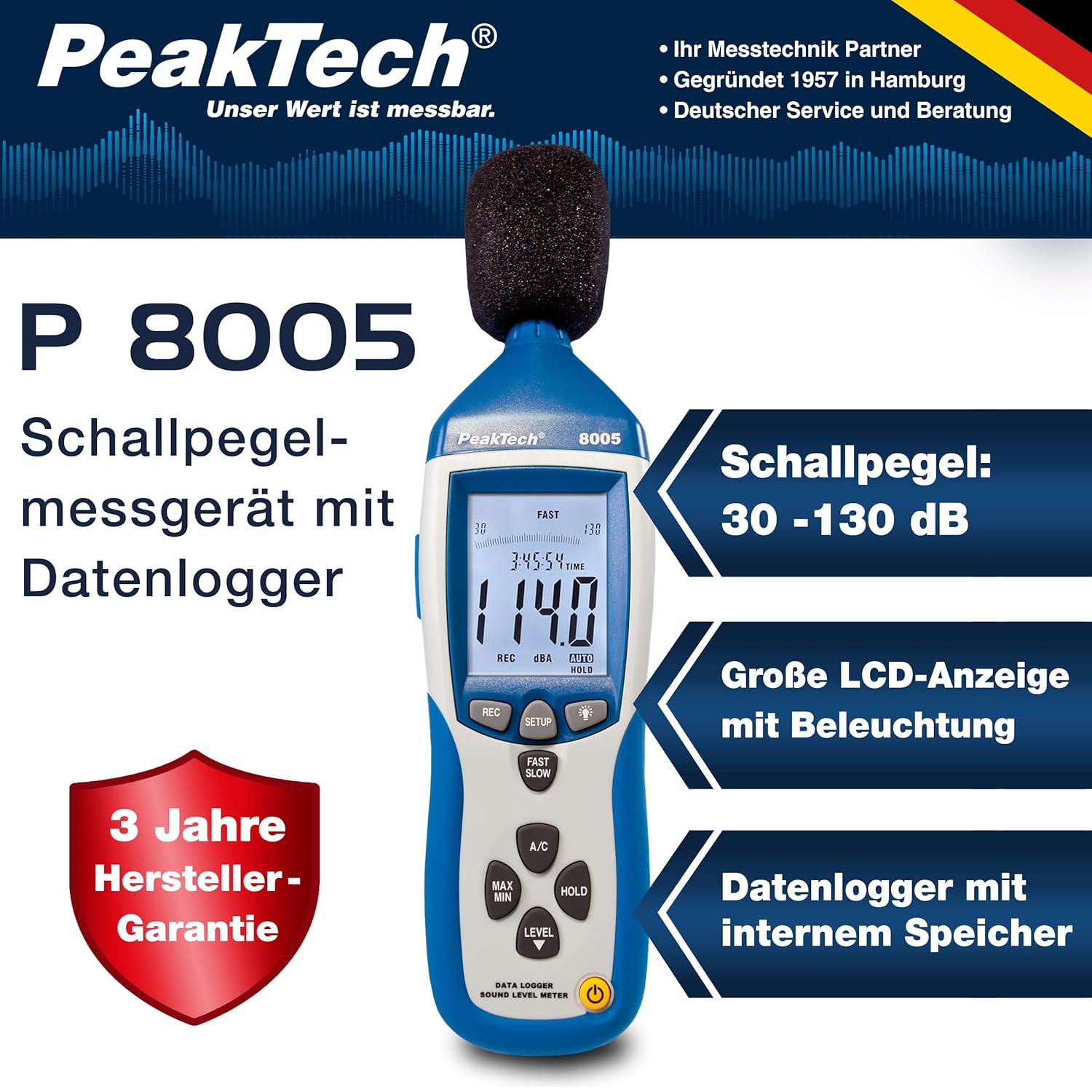
4.1. Isi atụmatụ
- Ntụle nkenke: Class 2 sound level meter (IEC-61672-1 compliant) for accurate readings even in noisy environments.
- Oke nha nha: 30 to 130 dB across 4 ranges with 0.1 dB resolution.
- Ndekọ data: Internal memory for up to 32,000 readings (1x/sec to 1x/min).
- Njikọta: USB 2.0 interface for PC connection and data transfer.
- Nsonaazụ Analog: AC/DC outputs for connecting to frequency analyzers or X-Y wave recorders.
- Ngosipụta: 4-digit 20mm LCD with bargraph and backlight.
- Ụdị nha: Fast (125 ms) and Slow (1 s) response times, A and C weighting.
- Ọrụ ndị ọzọ: MIN/MAX measurements, over-range/under-range indication.

5. Nhazi
5.1. Ntinye batrị
The PeakTech P 8005 operates on a 9V battery or via the included 9V AC power adapter.
- Chọta ebe batrị dị n'azụ ngwaọrụ.
- Mepee mkpuchi batrị.
- Insert the 9V battery, ensuring correct polarity.
- Mechie mkpuchi batrị nke ọma.
5.2. Ịkwanye ngwaọrụ
- Iji gbanye, pịa IKE bọtịnụ.
- Iji gbanyụọ, pịa ma jide IKE bọtịnụ ruo mgbe ngosi gbanyụọ.
- For continuous operation, connect the 9V AC power adapter to the DC 9V input port on the side of the device.
5.3. Njikọ igwe okwu
The device comes with a built-in microphone. For remote measurements or specific setups, you can use the included 3m additional microphone cable.
- Unscrew the microphone cap from the top of the device.
- Connect the 3m microphone cable to the microphone input.
- Attach the external microphone to the other end of the cable.
- For stable measurements, attach the device to the mini tripod using the threaded mount at the bottom.

Vidiyo nke 5.1: Mwepuview of the PeakTech 8005 Sound Level Meter, demonstrating its features and setup, including the use of the external microphone and power adapter.
6. Ntuziaka ọrụ
6.1. Nha Isi
After powering on, the device will immediately begin measuring sound levels.
- The current sound level in dB is displayed on the LCD.
- Jiri ihe Ọkwa button to cycle through the four measurement ranges (30-80 dB, 50-100 dB, 80-130 dB, Auto 30-130 dB).
- Pịa Ọsọ/obere to switch between fast (125 ms) and slow (1 s) response times. Fast is suitable for sudden noise changes, while slow is for average noise levels.
- Pịa A/C to select A-weighting (dBA) or C-weighting (dBC). A-weighting mimics human ear response, C-weighting is for mechanical noise.

6.2. Data Logging and PC Connection
The P 8005 can record up to 32,000 measurement values internally. To access and analyze this data, use the included Windows software.
- Install the software from the provided CD-ROM onto a Windows PC (Windows 95/98/NT/2000/XP/VISTA/7/8/10 supported).
- Connect the sound level meter to your PC using the USB interface cable.
- Open the software. The software allows for real-time data display, data import from the device's internal memory, and export to formats like Excel for further analysis.
- Refer to the software's help documentation for detailed instructions on data logging setup and analysis.

7. Nlekọta
7.1. Nhicha
Clean the device regularly to ensure optimal performance.
- Jiri akwa dị nro hichaa mpụta.
- Ejila ihe nchacha abrasive ma ọ bụ ihe mgbaze.
- Keep the microphone free from dust and debris.
7.2. Nchekwa
When not in use, store the device in its carrying case in a cool, dry place, away from direct sunlight and extreme temperatures.
7.3. nhazi nhazi
The PeakTech P 8005 is a precision instrument. Regular calibration is recommended to maintain accuracy, especially for professional applications. Refer to the included test report for the last calibration date. Contact PeakTech support for calibration services.
8. Nchọpụta nsogbu
| Nsogbu | Ihe nwere ike ime | Ngwọta |
|---|---|---|
| Ngwaọrụ anaghị agbanwu ọkụ. | Low or dead battery; AC adapter not connected or faulty. | Replace the 9V battery or connect the AC adapter. Ensure the adapter is working. |
| Ọgụgụ na-ezighi ezi. | Incorrect measurement range; microphone obstructed; device needs calibration. | Adjust the measurement range using the Ọkwa button. Clear any obstructions from the microphone. Consider professional calibration. |
| Software not recognizing device. | USB cable faulty; driver issue; software compatibility. | Try a different USB port or cable. Reinstall the software and drivers. Check software compatibility settings (e.g., Windows 98 compatibility mode for older systems). |
| Data logging issues. | Memory full; incorrect logging settings. | Download and clear data from the device. Review data logging settings in the software. |
9. Nkọwapụta
| Oke | Uru |
|---|---|
| Ụkpụrụ etinyere | IEC-61672-1 Type 2, ANSI S1.4 Type 2 |
| Accuracy (1 kHz Sine; A, C) | 1.4 dB |
| Izi ezi (Oghere Ugboro) | According to EN-61672-1 Class 2, max. ± 5.6 dB |
| Oke ugboro ugboro | 31.5 Hz - 8 kHz |
| Oke dị ike | 50 dB |
| Ogo ọkwa | Low: 30 dB ~ 80 dB, Med: 50 dB ~ 100 dB, High: 80 dB ~ 130 dB, Auto: 30 dB ~ 130 dB |
| Oge nzaghachi | Fast: 125 ms / Slow: 1 s |
| Igwe okwu | ½-inch Electret Condenser Microphone |
| Mkpebi | 0.1 dB |
| Mmelite ngosi | 2 ugboro / sk. |
| Mmepụta analog | AC/DC Outputs, AC: 1 Veff = 10 mV/dB |
| Nrụ ọrụ Voltage | 9V Battery or 9V AC Power Adapter |
| Akụkụ (WxHxD) | 80 x 280 x 50 mm |
| Ibu | 350 g |
| Data Logger Memory | Ruo 32,000 agụ |
10. Akwụkwọ ikike na nkwado
PeakTech products are designed for reliability and performance. For warranty information and technical support, please refer to the documentation included with your product or visit the official PeakTech websaịtị. Debe nnata nzụta gị dị ka ihe akaebe nke ịzụrụ maka nkwupụta ikike.
Onye nrụpụta: PeakTech
Websaịtị: PeakTech Official Store
Ask a question about this manual
Ask about setup, troubleshooting, compatibility, parts, safety, or missing instructions. Manuals+ will review the question and use this page’s manual context to help answer it.