
1. Okwu mmalite
This user manual provides essential information for the safe and efficient installation, operation, and maintenance of your TOA Electronics PC-1860 5-Inch Ceiling Mount Speaker. Please read this manual thoroughly before using the product and retain it for future reference.
The PC-1860 is designed for clear audio reproduction in various indoor environments, featuring a compact design suitable for ceiling installation.
2. Nchekwa nchekwa
Ịdọ aka ná ntị:
- Ensure all electrical connections are made by qualified personnel and comply with local electrical codes.
- Do not install the speaker in locations exposed to direct water spray or excessive humidity, as the product is not waterproof.
- Kwupu ike mgbe niile tupu ịme nrụnye, mmezi ma ọ bụ nchọpụta nsogbu.
- Use appropriate mounting hardware and ensure the ceiling structure can support the speaker's weight (approximately 10 pounds).
- Avoid placing heavy objects on the speaker or subjecting it to strong impacts.
kpachara anya:
- Do not attempt to modify or repair the speaker yourself. Refer all servicing to qualified service personnel.
- Keep the speaker away from heat sources and direct sunlight to prevent damage.
- Ensure proper ventilation around the speaker to prevent overheating.
3. Ihe ngwugwu
Nyochaa na etinyere ihe niile edepụtara n'okpuru na ngwugwu gị:
- 1 x TOA Electronics PC-1860 5-Inch Ceiling Mount Speaker
- 1 x Mesh Filter
- Akwụkwọ ntuziaka onye ọrụ a
4. Ntọala na nwụnye
Ntinye kwesịrị ekwesị dị oke mkpa maka arụmọrụ na nchekwa kacha mma. A na-atụ aro ka onye ọkachamara ruru eru rụọ nrụnye ahụ.
4.1 Nwepu
Carefully remove the speaker and all accessories from the packaging. Inspect for any signs of damage during transit. If damage is found, contact your supplier immediately.
4.2 Mounting Location Selection
Choose a suitable location in the ceiling that can structurally support the speaker's weight. Ensure there are no obstructions such as electrical conduits, water pipes, or structural beams in the chosen area. Maintain adequate clearance for wiring and ventilation.
4.3 Nzọụkwụ nwụnye
- Kwadebe mmeghe nke ụlọ: Cut a circular hole in the ceiling at the selected location, ensuring the diameter matches the speaker's mounting requirements. Refer to the speaker's physical dimensions for precise measurements.
- Jikọọ Wiring: Megharịa waya ọkà okwu site na gị amplifier or audio source to the ceiling opening. Connect the wires to the speaker terminals, observing correct polarity (+ to + and - to -). Ensure connections are secure.
- Insert Speaker into Opening: Carefully insert the speaker into the prepared ceiling opening. The mounting clips (visible in the image) are designed to secure the speaker in place.
- Chekwaa Ọkà Okwu: Engage the mounting clips by tightening the screws (if applicable) or by pushing them outwards until they firmly grip the ceiling material. Ensure the speaker is flush with the ceiling surface and securely held.
- Attach Mesh Filter: If not pre-installed, attach the included mesh filter to the speaker grille. This helps protect the speaker from dust and debris.
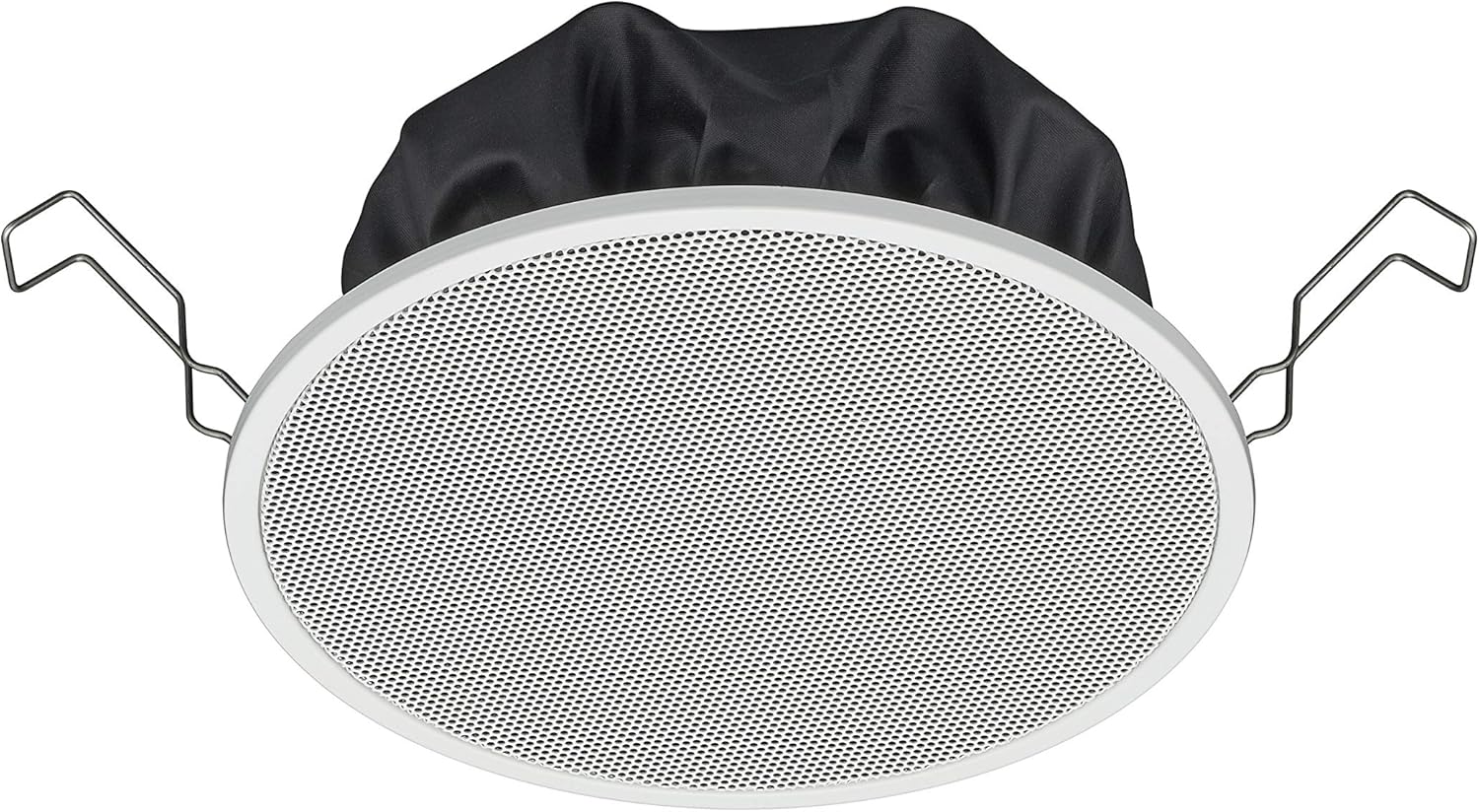
Figure 1: TOA Electronics PC-1860 5-Inch Ceiling Mount Speaker, showing the white grille, black rear enclosure, and metal mounting clips. This image illustrates the speaker's design for flush ceiling installation.
5. Ntuziaka ọrụ
The TOA Electronics PC-1860 is a passive speaker designed to reproduce audio from an external amplifier or audio source. It does not require direct power or complex controls.
5.1 Ndagharị ọdịyo bụ isi
- Gbanyụọ Ampntughari: Gbaa mbọ hụ na ọdịyo gị amplifier or receiver is powered on and connected to your audio source (e.g., MP3 player, desktop, projector, television).
- Gbanwee olu: Use the volume controls on your amplifier or audio source to set the desired listening level.
- Voice Control (if applicable): If your connected audio system supports voice control, you may be able to manage playback and volume through voice commands directed at your audio source device. The speaker itself does not have integrated voice control functionality but can reproduce audio from devices that do.
- Radio Functionality (if applicable): If your connected audio source is a radio receiver, the speaker will reproduce the radio broadcast. The speaker itself does not contain a radio tuner.
The PC-1860 is designed for straightforward audio output. All primary controls for audio source selection, volume, and equalization will be managed through your connected ampsistemu olu ma ọ bụ ọdịyo.
6. Nlekọta
Regular maintenance ensures the longevity and optimal performance of your speaker.
- Nhicha: Gently wipe the speaker grille and frame with a soft, dry cloth. For stubborn dirt, a slightly damp cloth can be used, followed by a dry cloth. Avoid using harsh chemicals, solvents, or abrasive cleaners.
- Mwepụ uzuzu: Periodically use a soft brush or a vacuum cleaner with a brush attachment to remove dust from the grille, especially the mesh filter.
- Nyocha: Occasionally inspect the speaker for any visible damage or loose connections. If any issues are found, refer to the troubleshooting section or contact support.
- gburugburu: Ensure the installation environment remains within recommended temperature and humidity levels.
7. Nchọpụta nsogbu
If you encounter issues with your PC-1860 speaker, refer to the following common problems and solutions:
| Nsogbu | Ihe nwere ike ime | Ngwọta |
|---|---|---|
| Enweghị ụda sitere na ọkà okwu |
|
|
| Ụda agbagọ ma ọ bụ edoghị anya |
|
|
| Speaker not securely mounted |
|
|
If the problem persists after attempting these solutions, please contact TOA Electronics customer support.
8. Nkọwapụta
Below are the key technical specifications for the TOA Electronics PC-1860 5-Inch Ceiling Mount Speaker:
| Njirimara | Nkọwa |
|---|---|
| Aha Nlereanya | PC-1860 |
| Ụdị | Ụlọ ọrụ TOA Electronics |
| Ụdị Ọkà Okwu | N'elu ụlọ |
| Ụdị nkwụnye | Ugwu elu ụlọ |
| Nha Ọkà Okwu | 5 sentimita asatọ |
| Ụdị ọkwọ ụgbọ ala ọdịyo | Ọkwọ ụgbọala dị ike |
| Ọnọdụ mmepụta ọdịyo | Stereo (when paired with another speaker) |
| Agba | Ọcha |
| Ngwa gụnyere | 1 x Mesh Filter |
| Enweghị mmiri | Ụgha |
| Ibu Ibu | 10 pound (ihe dị ka) |
| Isi Iyi Ike | Corded Electric (via amponye ndu) |
| Usoro njikwa | Voice (via compatible external devices) |
| Eji akwadoro | Construction, Industrial |
| Ngwa dakọtara | Desktop, MP3 Player, Projector, Television (via amponye ndu) |
9. Akwụkwọ ikike Ozi
The TOA Electronics PC-1860 speaker comes with a Limited Warranty. Specific terms and conditions of the warranty, including coverage period and claim procedures, are subject to the policies of TOA Electronics.
For detailed warranty information, please refer to the official TOA Electronics webGaa na saịtị ma ọ bụ kpọtụrụ ndị ọrụ ahịa ha ozugbo. Debe ihe akaebe nke ịzụrụ ihe gị maka nkwupụta nkwa.
10. Nkwado ndị ahịa
If you require further assistance, have questions not covered in this manual, or need technical support, please contact TOA Electronics customer service.
- Nkwado n'ịntanetị: Visit the official TOA Electronics website for FAQs, product documentation, and contact forms.
- Ozi mkpọtụrụ: Refer to the TOA Electronics website for current phone numbers and email addresses for your region.
When contacting support, please have your product model (PC-1860) and purchase information readily available.