
1. Okwu mmalite
Welcome to the user manual for your Oticon Hit Pro Power BTE Digital Hearing Aid. This guide provides essential information on how to set up, operate, maintain, and troubleshoot your device to ensure optimal hearing performance. Please read this manual carefully before using your hearing aid.
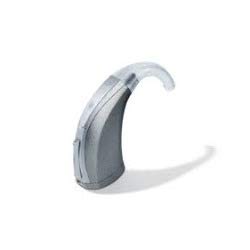
Image: Oticon Hit Pro Power BTE Digital Hearing Aid. This image displays the beige-colored, behind-the-ear hearing aid with its thin tube and ear dome.
2. Ozi nchekwa
Always follow these safety guidelines to prevent injury or damage to your hearing aid:
- Keep the hearing aid and batteries out of reach of children and pets. Swallowing batteries can be dangerous.
- Do not expose the hearing aid to extreme temperatures, humidity, or direct sunlight.
- Remove the hearing aid before showering, swimming, or using hairspray/perfume.
- If you experience discomfort or irritation, discontinue use and consult a hearing care professional.
- Use only batteries specified for this device (Type 13).
3. Ngwaahịa gafereview
The Oticon Hit Pro Power BTE is a Behind-The-Ear digital hearing aid designed for individuals with hearing loss requiring up to 105 dB fitting. It features 6 bands and 6 channels for precise sound processing.
Akụkụ ndị bụ isi:
- Power BTE Design: Sits comfortably behind the ear.
- Nhazi Dijitalụ: 6 Bands, 6 Channels for clear sound.
- Oke uru: Full On Gain 68 dB, Fitting up to 105 dB.
- Ụdị batrị: Uses Type 13 batteries (up to 215 hours life).
- Akụkụ dị elu: Automatic Directionality, Noise Management, Dynamic Feedback Cancellation 2 (DFC2), Wind Noise Protection.
- Njikọta: nEARcom Cordless Enabled, T-coil.
- Nkasi obi onye ọrụ: Front Focus, Open Ear Acoustics, Corda2 Thin Tube Solution.
4. Nhazi
4.1 Ntinye batrị
- Jiri nwayọ mepee ọnụ ụzọ nke batrị dị n'okpuru ihe enyemaka ntị.
- Insert a fresh Type 13 battery with the positive (+) side facing upwards (as indicated by the marking).
- Close the battery compartment door firmly until it clicks into place. The hearing aid will typically turn on automatically.
4.2 Initial Fitting
Your hearing care professional will have custom-fitted your hearing aid. Ensure the thin tube and ear dome are correctly positioned in your ear canal. If you are unsure, consult your professional.
5. .rụ ọrụ
5.1 Gbanyụọ / gbanyụọ
- Ka ịgbanwuo: Mechie ọnụ ụzọ batrị batrị.
- Ịgbanyụ: Open the battery compartment door slightly.
5.2 Nhọrọ mmemme
Your hearing aid may have multiple listening programs (e.g., for quiet environments, noisy environments, music). These programs are typically switched using a small button on the hearing aid. A sound indicator will confirm program shifts.
5.3 Mgbanwe olu
Volume adjustments can be made via a rocker switch or button on the hearing aid, or through a remote control/smartphone app if configured by your hearing care professional.
6. Nlekọta
6.1 Nhicha
- Wipe the hearing aid daily with a soft, dry cloth.
- Use the provided cleaning tools to remove wax from the ear dome and thin tube.
- Never use water, solvents, or alcohol to clean your hearing aid.
6.2 nnọchi batrị
When the battery low warning sounds, replace the Type 13 battery as described in Section 4.1. Dispose of used batteries responsibly.
6.3 Nchekwa
When not in use, store your hearing aid in its case in a cool, dry place. Remove the battery if storing for an extended period.
7. Nchọpụta nsogbu
| Nsogbu | Ihe nwere ike ime | Ngwọta |
|---|---|---|
| Enweghị ụda | Dead battery, clogged ear dome/tube, hearing aid off. | Replace battery, clean ear dome/tube, ensure battery door is closed. |
| Ụda adịghị ike | Low battery, partial clog, incorrect program/volume. | Replace battery, clean, adjust program/volume. |
| Whistling/Feedback | Improper fit, earwax buildup, hand near ear. | Re-insert hearing aid, check for earwax, move hand away. |
| Ụda na-adịte aka | Loose battery, moisture, damaged component. | Check battery, dry hearing aid, contact professional. |
Ọ bụrụ na nsogbu anọgide, kpọtụrụ ọkachamara n'ihe gbasara ntị gị maka enyemaka.
8. Nkọwapụta
| Njirimara | Nkọwa |
|---|---|
| Nlereanya | Hit Pro |
| Ụdị | Power BTE Digital Hearing Aid |
| Bands / Channels | 6 Bands / 6 Channels |
| Oke dabara adaba | Ruo 105 dB |
| Full On Gain | 68 dB |
| Ụdị batrị | Ụdị 13 |
| Ndụ batrị | Ruo awa iri abụọ |
| Ibu | 200 g (ihe dị ka) |
| Akụkụ | 10 x 10 x 10 cm (Ngwugwu) |
| Teknụzụ Key | Automatic Directionality, Noise Management, DFC2, T-coil |
9. Akwụkwọ ikike na nkwado
For warranty information, service, or further assistance, please contact your authorized Oticon dealer or hearing care professional. They can provide personalized support and address any specific concerns regarding your Oticon Hit Pro Power BTE Digital Hearing Aid.
You may also refer to the contact information provided at the time of purchase or visit the official Oticon website for general support resources.