
EARISE M15
EARISE M15 Karaoke Machine User Manual
Ụdị: M15
Okwu mmalite
Daalụ maka ịzụrụasing the EARISE M15 Karaoke Machine. This portable PA loudspeaker system is designed to provide high-quality audio for various entertainment and public address needs. Featuring powerful sound output, versatile connectivity options, and vibrant LED lights, the M15 is perfect for parties, gatherings, and karaoke sessions. Please read this manual thoroughly before operating the device to ensure proper use and to maximize its lifespan.
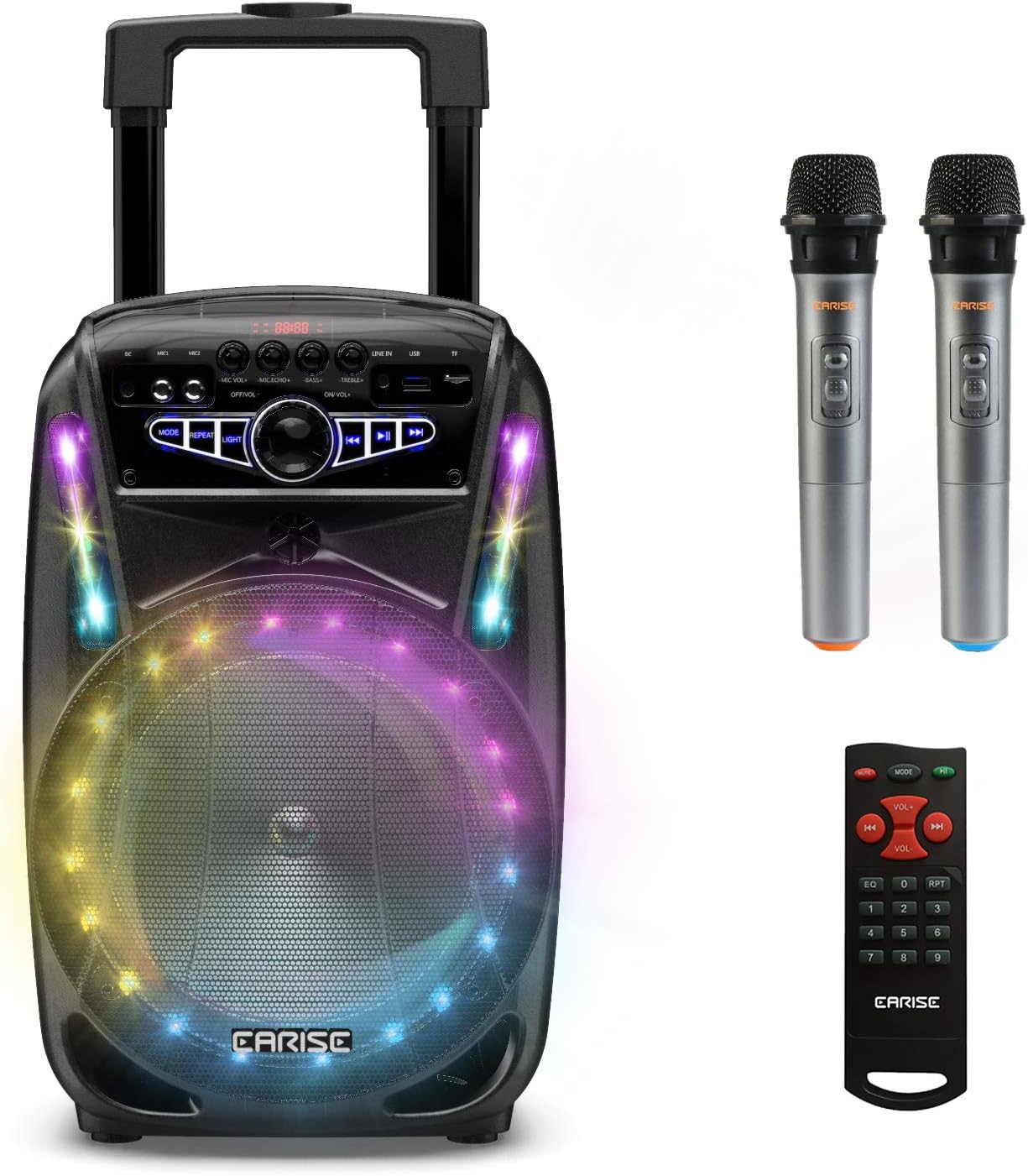
Image: The EARISE M15 Karaoke Machine, a black portable speaker with colorful LED lights on the front, shown with two wireless microphones and a remote control.
Kedu ihe dị na Igbe ahụ
Please check the contents of your package to ensure all items are present and in good condition.
- 1 x M15 Trolley PA Sistemụ
- Igwe okwu ikuku 2 x (Batiri anaghị etinye ya)
- 1 x Njikwa anya
- 1 x Cdọ Ike
- 1 x AUX USB
- Akwụkwọ ntuziaka onye ọrụ 1 x (akwụkwọ a)

Image: A visual representation of the package contents, showing the M15 speaker, two wireless microphones, a remote control, an AUX cable, and a charging cable.
Ntuziaka nhazi
1. Ịchaji Unit
Before first use, fully charge the M15 Karaoke Machine. The built-in 3600mAh 7.4V Lithium rechargeable battery provides portability. A full recharge takes approximately 3 hours.
- Connect the included power cord to the DC Charging Port (6) on the back of the unit.
- Plug the other end of the power cord into a standard AC 100-240V power outlet.
- The charging indicator light will illuminate. Once fully charged, the light may change color or turn off depending on the unit's design.
2. Installing Microphone Batteries
The wireless microphones require batteries (not included). Open the battery compartment of each microphone and insert the required batteries, ensuring correct polarity.
3. Ike izizi
Locate the Power On/Off switch (15) on the control panel. Turn the switch to the "ON" position to power on the unit.
Ntuziaka ọrụ
Ogwe njikwa gafereview
Familiarize yourself with the control panel for optimal operation.

Image: Close-up of the M15's control panel, highlighting various buttons and ports with corresponding numbers for easy identification.
- Ngosipụta ihuenyo: Shows current mode, track number, and other information.
- Olu igwe okwu: Adjusts the volume of connected microphones.
- Echo igwe okwu: Controls the echo effect for microphones.
- Bass: Adjusts the bass level of the audio output.
- Tọọlụ: Adjusts the treble level of the audio output.
- Ọdụ ụgbọ mmiri DC chaja: For connecting the power adapter to charge the unit.
- Mic 1 Port: Ntinye maka igwe okwu waya.
- Mic 2 Port: Input for a second wired microphone.
- Line In Port (AUX): Maka ijikọ ngwaọrụ ọdịyo mpụga site na eriri AUX.
- Oghere USB Flash Drive: Maka ịkpọ ụda files site na draịvụ USB.
- TF/SD Card Slot: Maka ịkpọ ụda files from a TF or SD card.
- Ụdị: Switches between Bluetooth, USB, TF, AUX, and FM Radio modes.
- Tinyegharịa: Repeats the current track or playlist.
- Ìhè: Na-agbanwe ma ọ bụ na-agbanwe ụkpụrụ ọkụ LED.
- Power On/Off, Master Volume: Turns the unit on/off and adjusts the overall volume.
- Gara aga Track: Mafere na egwu gara aga.
- Gwuo/kwụsịtụ: Na-egwu ma ọ bụ kwụsịtụ egwu dị ugbu a.
- Track na-esote: Mafere na egwu na-esote.
1. Njikọ Bluetooth
Connect your smartphone, tablet, or other Bluetooth-enabled device to the M15 for wireless audio streaming.
- Power on the M15 unit.
- Pịa Ụdị button (12) until "Bluetooth" or "BT" appears on the Display Screen (1).
- Enable Bluetooth on your device and search for "EARISE M15" in the list of available devices.
- Select "EARISE M15" to pair. A confirmation sound will indicate successful pairing.
- You can now play audio from your device through the M15.

Image: A person sitting outdoors, connecting their smartphone to the EARISE M15 speaker via Bluetooth, indicated by the Bluetooth logo.
2. Ịkpọghachi kaadị USB/TF
Kpọọ ọdịyo files directly from a USB flash drive or TF/SD card.
- Insert a USB flash drive into the USB Flash Drive Slot (10) or a TF/SD card into the TF/SD Card Slot (11).
- The unit should automatically switch to USB or TF mode and begin playing compatible audio files. Ọ bụrụ na ọ bụghị, pịa Ụdị button (12) to select the correct mode.
- Jiri ihe Egwu gara aga (16), Gwuo/kwụsịtụ (17), na Track na-esote (18) buttons to control playback.
3. ntinye AUX
Connect external audio devices that do not have Bluetooth capability using the AUX cable.
- Connect one end of the included AUX cable to the Line In Port (9) on the M15.
- Connect the other end of the AUX cable to the audio output jack of your external device (e.g., MP3 player, laptop).
- Pịa Ụdị button (12) until "AUX" or "LINE" appears on the Display Screen (1).
- Jikwaa ọkpụkpọ dị na mpụga ngwaọrụ gị.
4. Eji igwe okwu
The M15 supports up to two wireless microphones and two wired microphones simultaneously for karaoke fun.
- Igwe igwe ikuku: Turn on the wireless microphones. They should automatically connect to the M15.
- Igwe okwu waya: Plug wired microphones into Mic 1 Port (7) or Mic 2 Port (8).
- Adjust the Microphone Volume (2) and Microphone Echo (3) knobs to achieve desired sound effects.

Image: A group of people enjoying karaoke, with the EARISE M15 speaker providing sound and multiple microphones in use, demonstrating its multi-user capability.
5. Ikanam ọkụ
Enhance your party atmosphere with the M15's colorful LED disco lights.
- Pịa Ìhè button (14) to toggle the LED lights on/off or to cycle through different light patterns.

Image: The EARISE M15 speaker with its front-facing LED lights glowing in multiple colors, creating a vibrant visual effect.
6. Ime njikwa ojiji
The included remote control provides convenient operation from a distance.
- Gbaa mbọ hụ na njikwa anya nwere batrị na-arụ ọrụ.
- Point the remote control towards the front of the M15 unit.
- Use the buttons on the remote to control volume, mode, track selection, EQ, and other functions.
Nlekọta
Proper maintenance will ensure the longevity and optimal performance of your EARISE M15 Karaoke Machine.
- Nhicha: Use a soft, dry cloth to wipe the exterior of the unit. Do not use abrasive cleaners, waxes, or solvents as they may damage the finish.
- Nlekọta batrị: To prolong battery life, avoid fully discharging the battery frequently. If storing the unit for an extended period, charge it to about 50% every few months.
- Nchekwa: Chekwaa unit ahụ n'ebe dị jụụ, kpọrọ nkụ pụọ na ìhè anyanwụ kpọmkwem, oke okpomọkụ na oke iru mmiri.
- Ijikwa: While the unit is portable with wheels and a handle, avoid dropping or subjecting it to strong impacts.

Image: A person demonstrating the portability of the EARISE M15 by pulling it with its retractable handle and built-in wheels.
Nchọpụta nsogbu
If you encounter issues with your M15, please refer to the following common problems and solutions.
| Nsogbu | Ihe nwere ike ime | Ngwọta |
|---|---|---|
| Enweghị ike / nkeji anaghị agbanye. | Batrị agwụla. Ejikọghị eriri ọkụ nke ọma. | Chajịa unit zuru ezu. Ensure power cord is securely connected to both the unit and the power outlet. |
| Enweghị ụda sitere na ọkà okwu. | Olu dị oke ala. ahọpụtara ọnọdụ ezighi ezi. External device volume is low. | Increase the Master Volume (15). Pịa Ụdị button (12) to select the correct input source (Bluetooth, USB, AUX). Increase volume on the connected external device. |
| Igwe okwu anaghị arụ ọrụ. | Microphone batteries are dead or incorrectly inserted. Microphone volume is too low. Wireless microphone not paired. | Replace microphone batteries, ensuring correct polarity. Increase Microphone Volume (2). Ensure wireless microphones are turned on and within range. |
| Njikọ Bluetooth adaghị. | M15 is not in Bluetooth mode. Device is too far from M15. Agbanyụrụ Bluetooth na ngwaọrụ ahụ. | Pịa Ụdị button (12) to select Bluetooth mode. Move your device closer to the M15. Kwado Bluetooth na ngwaọrụ gị. |
| Kaadị USB/TF adịghị egwu. | ezighi ezi file usoro. Card/drive not inserted correctly. Unit not in USB/TF mode. | Gbaa mbọ hụ na ọdịyo files are in a compatible format (e.g., MP3). Re-insert the USB drive or TF card firmly. Pịa Ụdị button (12) to select USB or TF mode. |
Nkọwapụta
Detailed technical specifications for the EARISE M15 Karaoke Machine.
| Njirimara | Nkọwapụta |
|---|---|
| Nlereanya | M15 |
| Mpụta ike | Ike kachasị nke 400W. |
| R.Frequency | 90Hz-20KHz |
| Batrị Li-ion | 3.7V / 2600mAh (Built-in) |
| Mbanye Unit | 8" 4Ω*1 + 1" tweeter*1 |
| Oke S/N | ≥60dB |
| Ịnye ọkụ | AC 100-240V |
| Akụkụ ngwaahịa (L x W x H) | 27.94 x 25.4 x 40.64 cm (11 x 10.4 x 16.3 inch) |
| Ibu Ibu | 4.08 n'arọ |
| Teknụzụ Njikọta | Bluetooth, USB, AUX |
| Ngwa dakọtara | Laptọọpụ, Smartphone |

Image: A diagram illustrating the physical dimensions of the EARISE M15 speaker, showing its height, width, and depth.
Akwụkwọ ikike na nkwado
For warranty information or technical support, please refer to the contact details provided with your purchase documentation or visit the official EARISE websaịtị. Debe nnata nzụta gị dị ka ihe akaebe nke ịzụrụ ihe maka akwụkwọ ikike ọ bụla.
Ask a question about this manual
Ask about setup, troubleshooting, compatibility, parts, safety, or missing instructions. Manuals+ will review the question and use this page’s manual context to help answer it.