
PowerPac PPFS212B 2-in-1 Dual-Usage Stand Fan Instruction Manual
Model: PPFS212B
1. Ozi nchekwa dị mkpa
Biko gụọ ntuziaka niile nke ọma tupu iji ngwa a ma debe ha maka ntụnye aka n'ọdịnihu. Ọdịda ịgbaso ntuziaka ndị a nwere ike ibute ujo ọkụ eletrik, ọkụ ma ọ bụ mmerụ ahụ dị egwu.
- Gbaa mbọ hụ na voltage indicated on the rating label matches your mains supply voltage.
- Eminyela fan, plọg, ma ọ bụ eriri n'ime mmiri ma ọ bụ mmiri mmiri ndị ọzọ.
- Unplug the fan from the power outlet before cleaning, assembling, or disassembling parts.
- Keep fingers, pencils, or any other objects out of the fan grille when it is running.
- Ejila eriri ma ọ bụ plọg mebiri emebi arụ ọrụ fan. Kpọtụrụ ndị ọrụ ruru eru maka nrụzi.
- This appliance is equipped with thermal fuse protection against overheating. If the fan stops working unexpectedly, unplug it and allow it to cool before attempting to restart.
- Ebughị ngwa a maka ndị mmadụ (gụnyere ụmụaka) nwere ike anụ ahụ, mmetụta uche, ma ọ bụ nke uche, ma ọ bụ enweghị ahụmịhe na ihe ọmụma, ma ọ bụrụ na enyereghị ha nlekọta ma ọ bụ ntụziaka gbasara iji ngwa ahụ site n'aka onye na-ahụ maka nchekwa ha. .
2. Ngwaahịa gafereview
The PowerPac PPFS212B is a versatile 2-in-1 dual-usage stand fan designed for efficient cooling in indoor environments. It features 7 blades for maximum airflow, 3-speed settings, and an oscillation function for wider air distribution. The fan is equipped with thermal fuse protection for enhanced safety.
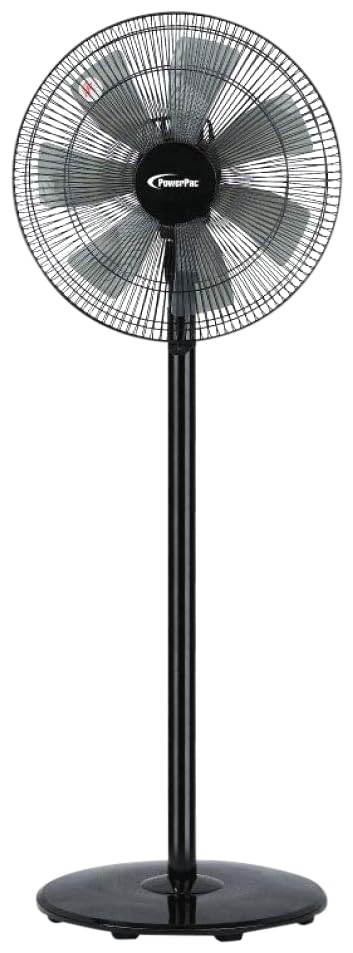
Image: PowerPac PPFS212B 2-in-1 Dual-Usage Stand Fan, showcasing its black finish and stand configuration.
3. Ihe ngwugwu
Please check the package contents upon opening to ensure all parts are present and undamaged:
- 1 x PowerPac PPFS212B Stand Fan (includes fan head, stand pole, and base)
4. Ntuziaka Mgbakọ
Follow these steps to assemble your PowerPac PPFS212B fan:
- Jiri nlezianya wepụ ihe niile dị na nkwakọ ngwaahịa ahụ.
- Attach the stand pole to the fan base. Ensure it is securely fastened according to the markings or locking mechanism.
- Mount the fan head assembly onto the top of the stand pole. Align the connection points and secure it firmly.
- Ensure all screws and fasteners are tightened to prevent wobbling during operation.
- Place the assembled fan on a stable, flat surface.
Image: Illustrative diagram of the PowerPac PPFS212B fan assembly, showing the base, stand, and fan head components.
5. Ntuziaka ọrụ
To operate your PowerPac PPFS212B fan:
- Tinye eriri ọkụ n'ime ebe eletrik kwesịrị ekwesị.
- Gbanyụọ/ Gbanyụọ: Press the 'ON/OFF' button (or corresponding button) on the control panel to turn the fan on or off.
- Ndozi ọsọ ọsọ: Press the 'SPEED' button repeatedly to cycle through the 3 available speed settings (Low, Medium, High).
- Ọrụ Oscillation: Press the 'OSC' button (or corresponding button) to activate or deactivate the oscillation feature, which allows the fan head to sweep from side to side.
- When finished, press the 'ON/OFF' button to turn off the fan and unplug it from the power outlet.
6. Nlekọta na nhicha
Regular cleaning and maintenance will help ensure optimal performance and longevity of your fan:
- Mgbe niile, wepụ fan na ọkụ ọkụ tupu ihicha.
- Jiri nwayọọ, damp cloth to wipe the exterior surfaces of the fan. Do not use abrasive cleaners, solvents, or harsh chemicals.
- To clean the fan blades, carefully remove the front grille (if detachable) according to the product design. Wipe the blades with a soft cloth. Ensure all parts are dry before reassembling.
- Ekwela ka mmiri banye n'ụlọ moto.
- Store the fan in a cool, dry place when not in use for extended periods.
7. Nchọpụta nsogbu
If you encounter issues with your fan, refer to the following table for common problems and solutions:
| Nsogbu | Ihe nwere ike ime | Ngwọta |
|---|---|---|
| Onye ofufe anaghị agbanwuo. | Enweghị ọkụ. Thermal fuse activated. | Lelee ma etinyere plọg ahụ n'ime oghere ahụ nke ọma. Gbaa mbọ hụ na ntinye ọkụ na-arụ ọrụ. Unplug and allow the fan to cool down for 30 minutes before restarting. |
| Ọkụ ikuku adịghị ike ma ọ bụ enweghị ikuku. | Ọsọ ndị fan agbakwaghị oke. Agụba fan ruru unyi. | Mee ka ntọala ọsọ fan dịkwuo mma. Unplug the fan and clean the blades as per maintenance instructions. |
| Fan anaghị eme mkpọtụ. | Ọrụ oscillation agbanyụrụ. | Press the 'OSC' button to activate oscillation. |
| Mkpọtụ na-adịghị ahụkebe n'oge arụ ọrụ. | Akụkụ rụrụ arụ. Ihe mgbochi. | Unplug the fan and check for any loose components or obstructions around the blades or motor. Tighten any loose parts. |
Ọ bụrụ na nsogbu ahụ dịgidere mgbe ị nwara azịza ndị a, biko kpọtụrụ nkwado ndị ahịa.
8. Nkọwapụta
| Njirimara | Nkọwapụta |
|---|---|
| Ụdị | PowerPac |
| Nọmba nlereanya | PPFS212B |
| Ụdị | 2-in-1 Dual-Usage Stand Fan |
| Ọnụọgụ agụba | 7 |
| Ọnụọgụ nke Ọsọ ọsọ | 3 |
| Isi Iyi Ike | Igwe ọkụ eletrik |
| Wattage | 50 watt |
| Usoro njikwa | Pịa bọtịnụ |
| Atụmatụ pụrụ iche | Oscillating, Thermal Fuse Protection |
| Ihe onwunwe | Plastic |
| Ojiji ime ime/n'èzí | Ime ụlọ |
| Agba | Nwa |
9. Akwụkwọ ikike na nkwado
This PowerPac PPFS212B fan comes with a 2-afọ akwụkwọ ikike site na ụbọchị ịzụrụ. Akwụkwọ ikike a na-ekpuchi ntụpọ nrụpụta n'okpuru ọnọdụ ojiji nkịtị.
For warranty claims, technical support, or any inquiries regarding your product, please contact PowerPac customer service. Keep your proof of purchase for warranty validation.