
CHUNGHOP K-1038E
Ntuziaka Onye Ọrụ CHUNGHOP K-1038E Universal Air Conditioner Njikwa Remote
Model: K-1038E
Okwu mmalite
This manual provides detailed instructions for the setup, operation, and maintenance of your CHUNGHOP K-1038E Universal Air Conditioner Remote Control. This remote is designed for broad compatibility with over 1000 air conditioner brands. Please read this manual carefully before use to ensure proper functionality and to maximize the lifespan of your device.
Ngwaahịa gafereview
The CHUNGHOP K-1038E is a versatile remote control for air conditioning units, featuring a simple design with a sliding cover for dust protection and a large LCD screen for easy readability. It includes essential functions such as clock, timer, fast cooling, and fast heating.
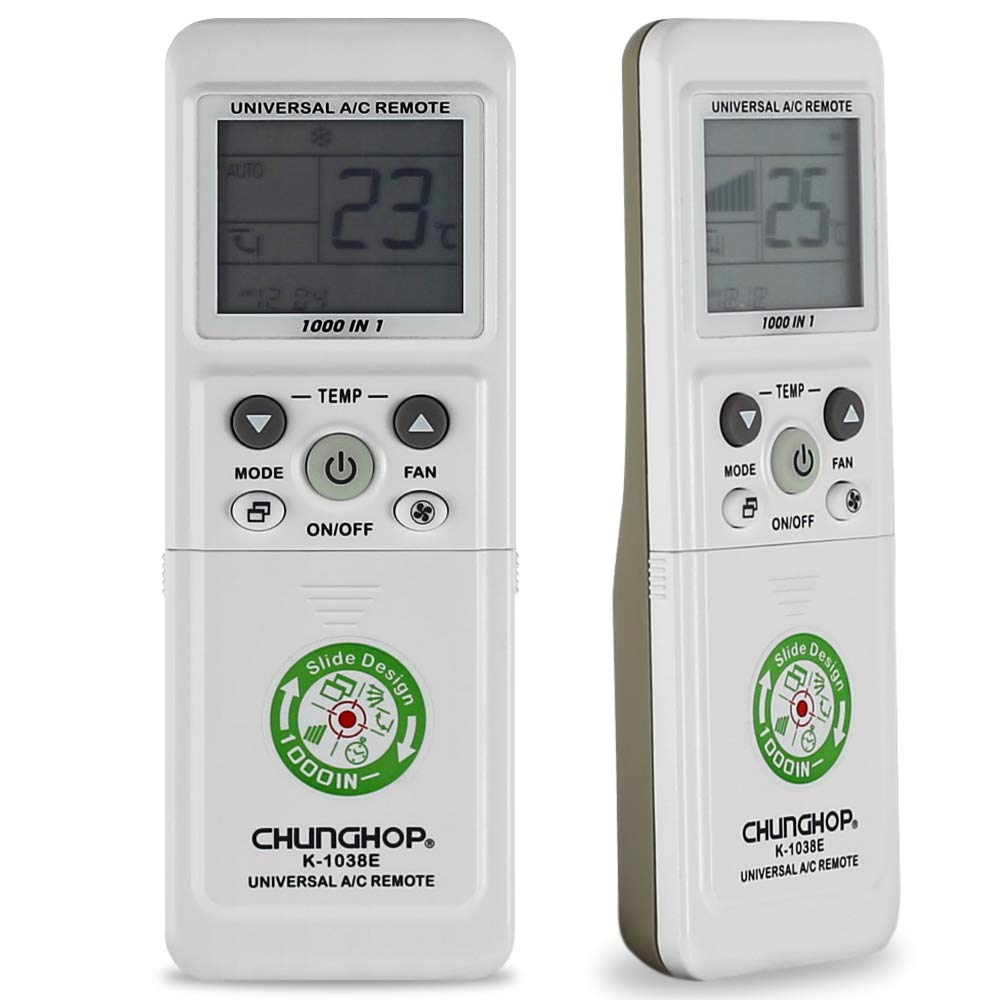
Foto: N'ihu view of the CHUNGHOP K-1038E Universal Air Conditioner Remote Control, showing the LCD display, power button, mode, fan, and temperature controls, along with a sliding cover revealing additional function buttons.
Akụkụ ndị bụ isi:
- Ndakọrịta sara mbara: Compatible with a wide range of air conditioner brands (over 1000).
- Ọrụ ndị dị mkpa: Includes clock, timer (if supported by AC unit), fast cooling, and fast heating.
- Ihe eji eme enyi: Features a sliding cover for protection and a large LCD screen for clear display.
- Ọrụ ebe nchekwa: Built-in memory retains settings during short-term battery replacement.
Melite
1. Ntinye batrị
The remote control requires two AAA batteries (not included). Ensure correct polarity when inserting the batteries.
- Slide open the battery compartment cover located on the back of the remote control.
- Insert two AAA batteries, matching the (+) and (-) terminals as indicated inside the compartment.
- Mechie mkpuchi nke batrị batrị nke ọma.
2. Pairing with Your Air Conditioner
There are several methods to pair the remote control with your air conditioner. It is recommended to try the "Manual Code Input" method first if you know your AC brand's code, or "Automatic Search" for convenience.
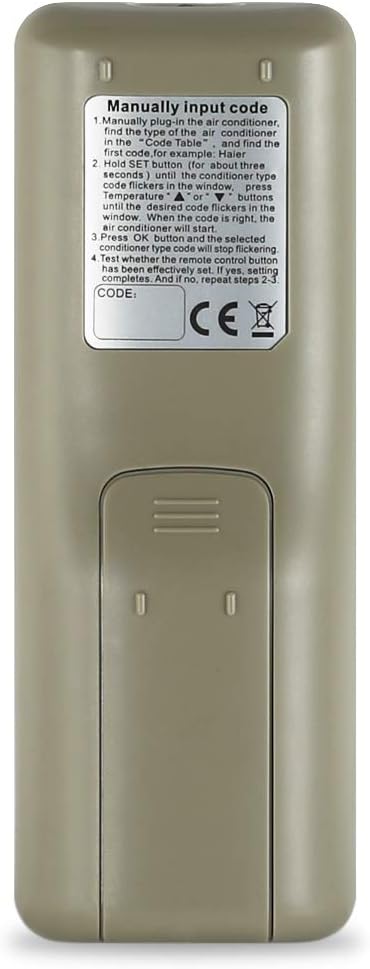
Foto: Azụ view of the CHUNGHOP K-1038E Universal Air Conditioner Remote Control, showing the battery compartment and printed instructions for manual code input.
Method 1: Manual Code Input (Recommended if code is known)
Refer to the code list provided with your remote (or search online for CHUNGHOP K-1038E codes) to find the code for your air conditioner brand.
- Manually plug in the air conditioner.
- Find the type of the air conditioner in the code table. For example, Haier.
- Jide ya SET button (for about three seconds) until the code type code flickers in the window. Press temperature UP or N'ala buttons until the desired code flickers in the window. When the code is right, the air conditioner will start.
- Pịa OK button and the selected conditioner type code will stop flickering.
- Test whether the remote control button has been effectively set. If not, repeat steps 2-3.
Method 2: Automatic Search
- Ensure your air conditioner is powered on.
- Tụgharịa ihe njikwa remote ahụ gaa n'ebe ikuku oyi dị.
- Pịa ma jide SET button for approximately 6 seconds until the code on the LCD screen starts flashing. The remote will begin searching for the correct code automatically.
- Hapụ ya SET button when your air conditioner responds (e.g., turns on, off, or changes mode).
- Pịa OK button to confirm the code. Test all functions to ensure proper operation. If not, repeat the process.
Method 3: Brand Button (If available on your remote model)
Some versions of this remote may have dedicated brand buttons. If present, press and hold the button corresponding to your AC brand until the AC responds, then release.
Method 4: Manual Code Search (Alternative to Automatic Search)
- Ensure your air conditioner is powered on.
- Pịa SET button once. The code on the LCD screen will flash.
- Pịa KWESỊRỊ or Kwụsị ala buttons repeatedly to cycle through the codes one by one.
- Stop pressing when your air conditioner responds.
- Pịa OK button to confirm the code. Test all functions. If not working correctly, continue cycling through codes.
Ntuziaka ọrụ
Once paired, the remote control provides access to various functions of your air conditioner.
Ọrụ bọtịnụ:
- Gbanyụọ/gbanyụọ: Na-agbanye ikuku ntụ oyi ma ọ bụ gbanyụọ.
- Edị: Na-agbagharị site na ụdị ọrụ (dịka ọmụmaatụ, Oyi, Okpomọkụ, Fan, Akọrọ, na Akpaaka).
- TEMP UP/DOWN (▲/▼): Na-edozi ntọala okpomọkụ.
- Fan: Na-agbanwe ọsọ fan (dịka ọmụmaatụ, Auto, Low, Med, High).
- M.SWING: Controls the horizontal swing of the air deflector.
- A.SWING: Na-achịkwa ntụgharị kwụ ọtọ nke ihe na-agbanwe ikuku.
- Elekere: Na-edobe oge dị ugbu a na ngosipụta nke ime ime.
- OGE AGBARA: Sets a timer for the air conditioner to turn on automatically.
- OGE gbanyụọ: Sets a timer for the air conditioner to turn off automatically.
- F.Cool (Fast Cool): Activates the fast cooling function for rapid temperature reduction.
- F.Heat (Fast Heat): Activates the fast heating function for rapid temperature increase.
- WEP :TARA: Used for entering setup/pairing mode and confirming settings.
- Ọ DỊ MMA: Confirms selections or exits certain menus.
Note: Not all functions may be supported by every air conditioner model. The timer function, for example, requires your original air conditioner to have this capability.
Nlekọta
- Nhicha: Jiri akwa dị nro hichaa ihe dịpụrụ adịpụ. Ejila ihe na-ehicha mmiri mmiri ma ọ bụ ihe abrasive.
- Ngbanwe batrị: Replace batteries when the remote's display becomes dim or the remote becomes unresponsive. Always replace both batteries at the same time with new AAA batteries.
- Nchekwa: If the remote will not be used for an extended period, remove the batteries to prevent leakage. Store in a cool, dry place.
- Mkpuchi amị: Keep the sliding cover closed when not in use to protect buttons from dust and accidental presses.
Nchọpụta nsogbu
| Nsogbu | Ihe nwere ike ime | Ngwọta |
|---|---|---|
| Remote anaghị agba ọkụ ma ọ bụ ihe ngosi ahụ efuola. | Ịtinye batrị nwụrụ anwụ ma ọ bụ na-ezighi ezi. | Jiri batrị AAA ọhụrụ dochie batrị ndị ahụ, hụ na ha nwere ike ịhazi polarity nke ọma. |
| Igwe oyi anaghị aza ihe na remote. | Incorrect pairing code; remote not pointed at AC; obstruction; AC receiver issue. | Re-pair the remote using one of the pairing methods. Ensure direct line of sight to AC. Check for obstructions. |
| Only some functions work. | Partial code match; AC unit does not support all functions. | Try another code for your AC brand. Confirm if your AC unit originally supported the function. |
| Remote display shows code flashing continuously. | Remote is in search mode or awaiting confirmation. | Pịa OK button to confirm the code once the AC responds. |
Nkọwapụta
- Nọmba nlereanya: K-1038E
- Akara: CHUNGHOP
- Ngwa dakọtara: Igwe ntụ oyi
- Teknụzụ Njikọta: Infrared
- Isi mmalite ike: Batrị 2 x AAA (anaghị etinye ya)
- Njirimara Pụrụ Iche: Universal compatibility with over 1000 AC brands
- Akụkụ ngwugwu: 3.15 x 2.36 x 0.79 sentimita (ihe dị ka)
- Nke mbụ dị: Ọgọst 1, 2020
Akwụkwọ ikike na nkwado
For warranty information or technical support, please refer to the retailer where the product was purchased or contact CHUNGHOP customer service directly. Please have your model number (K-1038E) and purchase details ready when contacting support.
Manufacturer: CHUNGHOP
Ask a question about this manual
Ask about setup, troubleshooting, compatibility, parts, safety, or missing instructions. Manuals+ will review the question and use this page’s manual context to help answer it.