
1. Okwu mmalite
Thank you for choosing a Simfer appliance. This electric built-in oven is designed to provide reliable performance and ease of use for all your cooking needs. To ensure optimal performance and safety, please follow the instructions carefully. Keep this manual for future reference.
2. Ntuziaka nchekwa dị mkpa
Always adhere to basic safety precautions when using electrical appliances to reduce the risk of fire, electric shock, burns, or injury.
- Nchekwa Eletriki: Ensure the oven is properly grounded. Do not operate with a damaged cord or plug. Disconnect power before servicing.
- Nchekwa ụmụaka: Keep children away from the oven during operation and cooling. The oven surfaces become hot.
- Ebe na-ekpo ọkụ: Use oven mitts when handling hot dishes or oven components. Do not touch heating elements.
- Ikuku ikuku nke ọma: Ensure adequate ventilation around the built-in oven as per installation instructions.
- Ngwa ndị na-ere ọkụ: Echekwala ihe ndị na-ere ọkụ n'ime ma ọ bụ n'akụkụ oven.
- Nhicha: Always allow the oven to cool before cleaning. Use non-abrasive cleaners.
- Nwụnye: Onye ọkachamara ruru eru ga-arụ ọrụ nrụnye ahụ dịka iwu obodo si dị.
3. Ngwaahịa gafereview
Your Simfer Electric Built-in Oven is equipped with various features for versatile cooking. Below is a general view nke ngwa.

Foto 3.1: N'ihu view of the Simfer Electric Built-in Oven, showcasing the control panel, oven door, and handle.
The oven features a robust aluminum handle, push-pull control knobs for a sleek finish, and a triple-layer glass door for improved insulation and safety. An interior light allows for easy monitoring of your cooking progress.
4. Ntuziaka nwụnye
This oven is designed for built-in installation into a kitchen cabinet. Proper installation is crucial for safety and optimal performance.
4.1 Njikọ eletrik
- Gbaa mbọ hụ na ọkụ eletrik dabara na voltage and frequency specified on the oven's rating plate (2300 Watts).
- The oven must be connected to a properly grounded outlet.
- Ejila eriri ndọtị ma ọ bụ ihe nkwụnye ọkụ.
4.2 Mgbakwunye Cabinet
- Prepare the cabinet opening according to the dimensions provided in the specifications section.
- Ensure there is sufficient space for ventilation at the rear and sides of the oven.
- Secure the oven to the cabinet using the provided screws and brackets to prevent tipping.
5. Operating Your Oven
This section details how to use the various functions and controls of your Simfer oven.
5.1 Ogwe njikwa
The oven features push-pull knobs for function selection and temperature control, along with a mechanical timer. To use a knob, push it in, turn to the desired setting, and release.
5.2 Ọrụ oven
Your oven offers 7 cooking functions, including:
- Upper and Lower Heating: Ideal for traditional baking and roasting.
- Convection (Turbo Fan): Distributes heat evenly for faster and more consistent cooking.
- Grill: Maka browning na toasting.
- Ntughari: Gently thaws frozen foods using the fan without heat.
- Chicken Rotisserie: For roasting poultry evenly.

Figure 5.1: Illustration of the convection fan distributing hot air throughout the oven cavity for even cooking.
5.3 Setting the Mechanical Timer
Turn the timer knob to the desired cooking duration. The oven will automatically switch off once the set time has elapsed, indicated by an audible signal.
5.4 Na-ekpo ọkụ
For best results, preheat the oven to the desired temperature before placing food inside. This typically takes 10-15 minutes depending on the selected temperature and function.
6. Nlekọta na nhicha
Ịsacha na idozi ihe mgbe niile ga-eme ka oven gị dị ogologo ma mee ka ọ dị ọcha.
6.1 Nhicha izugbe
- Hụ na oven ahụ dị jụụ ma kwụpụ ya na ọkụ eletrik tupu ị sachaa ya.
- Wipe the exterior surfaces with a soft cloth and mild detergent.
- For the interior, use a damp cloth and a non-abrasive oven cleaner. Avoid spraying cleaner directly onto electrical components.
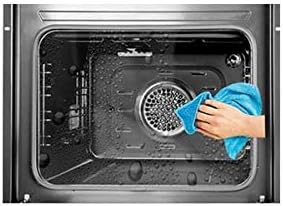
Figure 6.1: Cleaning the oven interior with a soft cloth after use. Ensure the oven is cool.
6.2 Removable Door Glass
The oven features a triple-layer glass door that can be disassembled for thorough cleaning.
- Carefully open the oven door fully.
- Follow the specific instructions in the full manual for releasing the inner glass panels.
- Clean the glass panels with warm soapy water or a glass cleaner.
- Reassemble the glass panels securely before closing the door.

Figure 6.2: The oven door's triple-layer glass can be removed for easy and thorough cleaning.
6.3 Dochie ọkụ oven
If the oven light needs replacement, ensure the oven is cool and unplugged. Unscrew the protective cover, replace the bulb with a suitable high-temperature oven bulb, and reattach the cover.
7. Nchọpụta nsogbu
Tupu ịkpọtụrụ ọrụ ndị ahịa, biko rụtụ aka na tebụl na-esonụ maka okwu nkịtị na ngwọta ha.
| Nsogbu | Ihe nwere ike ime | Ngwọta |
|---|---|---|
| Igwe ọkụ anaghị ekpo ọkụ. | Enweghị ike ọkụ; anaghị agbanyụ oven; anaghị agbanyụ oge. | Check power connection; ensure function and temperature knobs are set; set the mechanical timer. |
| Igwe ọkụ ọkụ anaghị arụ ọrụ. | Igwe ọkụ adịghị mma ma ọ bụ tọgbọrọ chakoo. | Replace the oven bulb (refer to section 6.3). |
| Isi nri na-ezighi ezi. | Incorrect rack position; oven not preheated; too much food. | Use recommended rack positions; preheat oven fully; avoid overcrowding. |
8. Nka na ụzụ nkọwa
Below are the key technical specifications for your Simfer Electric Built-in Oven Model B6006EERF.
| Njirimara | Nkọwapụta |
|---|---|
| Ụdị | Simfer |
| Nọmba nlereanya | B6006EERF |
| Ụdị | Igwe ọkụ arụrụ n'ọkụ eletrik |
| Nha | 60 cm |
| Ike | 64 lita |
| Mpụta ike | 2300 Watt |
| Usoro kpo oku | Okwuchi |
| Ọrụ | 7 (e.g., Upper/Lower Heating, Convection, Grill, Defrost) |
| Ụdị ngụ oge | Mechanical ngụ oge |
| Ụdị ọnụ ụzọ | Triple-layer removable glass |
| Atụmatụ pụrụ iche | Cooling fan, Turbo fan, Push-pull knobs, Aluminum handle, Interior light, Automatic defrost |
| Ibu Ibu | 35 n'arọ |
| Ụdị mmecha | Achachapụrụ |
| Usoro ụzọ | Akụkụ ihu |
9. Akwụkwọ ikike na nkwado ndị ahịa
Your Simfer Electric Built-in Oven Model B6006EERF comes with a 3-afọ akwụkwọ ikike site na ụbọchị ịzụrụ. Akwụkwọ ikike a na-ekpuchi ntụpọ n'ichepụta n'okpuru ojiji ụlọ nkịtị.
For warranty claims, technical assistance, or spare parts, please contact Simfer customer support. Keep your purchase receipt as proof of purchase.
Nkwado ndị ahịa: Please refer to the contact information provided with your purchase documentation or visit the official Simfer websaịtị maka nkọwa nkwado mpaghara.