
Okwu mmalite
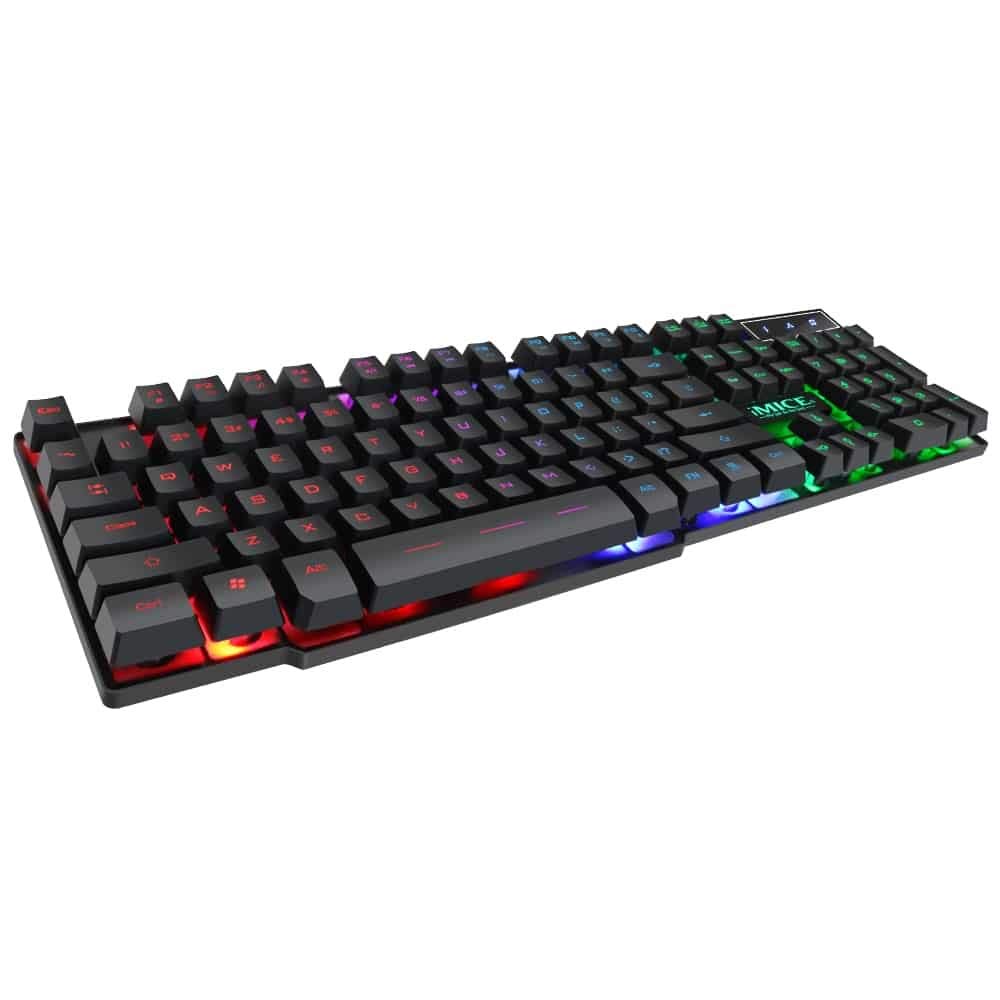
This manual provides instructions for the iMICE AK-600 Backlit USB Wired Gaming Keyboard. It covers setup, operation, maintenance, and troubleshooting to ensure optimal performance and longevity of your device. Please read this manual thoroughly before using the keyboard.
Melite
Kedu ihe dị na Igbe ahụ
The iMICE AK-600 keyboard package includes:
- iMICE AK-600 Backlit USB Wired Gaming Keyboard (with integrated USB cable)
Jikọọ ahụigodo
To connect your iMICE AK-600 keyboard:
- Chọta ọdụ ụgbọ mmiri USB dị na kọmputa gị.
- Plug the integrated USB cable from the keyboard into the USB port.
- The keyboard is plug-and-play and should be automatically recognized by your operating system without requiring additional drivers for basic functionality.
Ntuziaka ọrụ
Ọrụ Izizi nke Igodo
The iMICE AK-600 features a standard 104-button layout, providing all essential keys for typing and gaming.
Njikwa ọkụ azụ
The keyboard is equipped with a three-color backlight system (red, blue, green). The key characters are illuminated for visibility in low-light conditions.
- To change the backlight color or cycle through modes, use the dedicated backlight control key (often labeled with a light bulb icon or similar).
- Pressing the key repeatedly will switch between red, blue, green, and off modes.
Multimedia Igodo
The keyboard includes 12 groups of multimedia function keys, typically accessed by pressing the Fn key in combination with the F1-F12 keys. These provide quick access to functions such as volume control, media playback, and more.
Mgbochi mmụọ
The iMICE AK-600 supports 19-key anti-ghosting. This feature ensures that multiple key presses are registered simultaneously and accurately, preventing input conflicts during fast-paced gaming or typing.
Nlekọta na nlekọta
Proper maintenance will extend the life of your keyboard:
- Nhicha: Regularly wipe the keyboard surface with a soft, dry, lint-free cloth to remove dust and debris. For deeper cleaning, use a slightly damp ákwà nwere ncha dị nro, na-eme ka mmiri ghara ịbanye na ahụigodo ahụ.
- Mmiri mmiri ozuzo: The keyboard features an integrated liquid guide hole design to help with minor spills. However, it is not fully waterproof. In case of a spill, immediately disconnect the keyboard from your computer and allow it to dry completely before reconnecting.
- Zere kemịkalụ siri ike: Do not use abrasive cleaners, solvents, or strong detergents, as these can damage the keyboard's finish and key legends.
- Nlekọta USB: Ensure the USB cable is not excessively bent, twisted, or placed under heavy objects, which could damage the internal wires.
Nchọpụta nsogbu
Ahụigodo Anaghị aza
- Ensure the USB cable is securely connected to both the keyboard and an active USB port on your computer.
- Gbalịa ijikọ ahụigodo na ọdụ ụgbọ USB dị iche na kọmputa gị.
- Malitegharịa ekwentị gị na kọmputa.
- Nwalee kiiboodu na kọmpụta ọzọ iji chọpụta ma okwu a dị na kiiboodu ma ọ bụ ọdụ ụgbọ mmiri/ọnya USB nke kọmpụta.
Ìhè azụ anaghị arụ ọrụ
- Hụ na ejiri ahụigodo ahụ jikọọ nke ọma ma nata ike.
- Press the backlight control key (often labeled with a light bulb icon) to cycle through backlight modes and ensure it is not turned off.
Igodo Ndị A Na-anaghị Edebanye Aha
- Gently clean around the affected keys to remove any dust or debris that might be obstructing the key mechanism.
- Ọ bụrụ na nsogbu ahụ ka dị, kpọtụrụ nkwado ndị ahịa maka enyemaka ọzọ.
Nkọwapụta
| Njirimara | Nkọwa |
|---|---|
| Ụdị | OEM (iMICE) |
| Nlereanya | AK-600 |
| Teknụzụ Njikọta | USB (Ejikere) |
| Nkọwa ahụigodo | Ịgba egwu |
| Njirimara Pụrụ Iche | Backlit (Red, Blue, Green) |
| Ihe onwunwe | Plastic |
| Ngwa gụnyere | Igwe USB agbakwunyere |
| Ngbanwe Ụdị | Atụ aka |
| Ntuzi aka | Ambidextrous |
| Number of Buttons/Keys | 104 |
| Sistemu eji arụ ọrụ dakọtara | Windows (XP/2000/Vista/7/8/10), Android, Linux |
| Ogologo eriri USB | 1.3 mita |
| Ogologo ndụ igodo | Up to 5 million presses |
Akwụkwọ ikike na nkwado
For information regarding product warranty, returns, or technical support, please refer to the retailer's policy where the product was purchased. It is recommended to retain your purchase receipt as proof of purchase for any warranty claims. For direct manufacturer support, please visit the official OEM or iMICE websaịtị.