
ELECDER D19
ELECDER D19 True Wireless Earbuds User Manual
Model: D19 | Brand: ELECDER
1. Okwu mmalite
The ELECDER D19 True Wireless Earbuds are designed to provide a superior audio experience with advanced features such as Bluetooth 5.0 connectivity, noise cancellation, and IPX7 waterproofing. This manual provides comprehensive instructions for setting up, operating, and maintaining your earbuds to ensure optimal performance and longevity.
Akụkụ ndị bụ isi:
- Bluetooth Bluetooth: Fast and stable wireless transmission with CVC8.0 noise cancellation for clear calls.
- Premium Hi-Fi Stereo Audio: APTX audio for lossless transmission, delivering immersive sound with crystal clarity and deep bass.
- Ihe mgbochi mmiri IPX7: Resistant to sweat, water, and rain, ideal for workouts and outdoor activities.
- Nhazi Ergonomic: Lightweight (5g per earbud) with flexible silicone ear-fins and S/M/L ear caps for a secure and comfortable fit.
- Quick Pairing Technology: Automatic power-on and pairing upon removal from the charging case.
- USB Quick Charge & Wireless Charging: Up to 4.5 hours of music on a single charge, with an additional 18 hours from the charging case, supporting both USB and wireless charging.
2. Ngwaahịa gafereview

Figure 2.1: ELECDER D19 True Wireless Earbuds in their charging case. The earbuds are black, sleek, and designed for in-ear use, while the compact charging case is also black with a smooth finish.
Kedu ihe dị na igbe:
- ELECDER D19 True Wireless Earbuds (Left and Right)
- Nchaji case
- Igwe nchaji USB
- Ear Tips (S/M/L sizes)
- Akwụkwọ ntuziaka (akwụkwọ a)
3. Ntuziaka Nhazi
3.1 Ịchaji ntị na akpa
Before first use, fully charge the earbuds and the charging case. The charging case supports both USB cable charging and wireless charging.
- Nchaji USB: Connect the provided USB cable to the charging port on the case and plug the other end into a USB power source (e.g., computer, wall adapter). The indicator light on the case will show charging status.
- Nchaji ikuku: Place the charging case on a compatible wireless charging pad. The indicator light will flash to confirm charging.

Figure 3.1: The ELECDER D19 charging case being charged wirelessly on a charging pad, also showing the Micro USB port for wired charging. This image highlights the dual charging capabilities of the case.
A full charge for the earbuds provides approximately 4.5 hours of music playback, and the charging case provides an additional 18 hours of battery life.
3.2 Jikọọ na ngwaọrụ gị
The ELECDER D19 earbuds feature quick pairing technology for seamless connection.
- Nzọụkwụ 1: Open the charging case and take out both earbuds. They will automatically power on and pair with each other.
- Nzọụkwụ 2: Na ekwentị gị ma ọ bụ ngwaọrụ Bluetooth nyere gị aka, gaa na ntọala Bluetooth.
- Nzọụkwụ 3: Chọọ maka available devices and select "Elecder D19" from the list to connect.
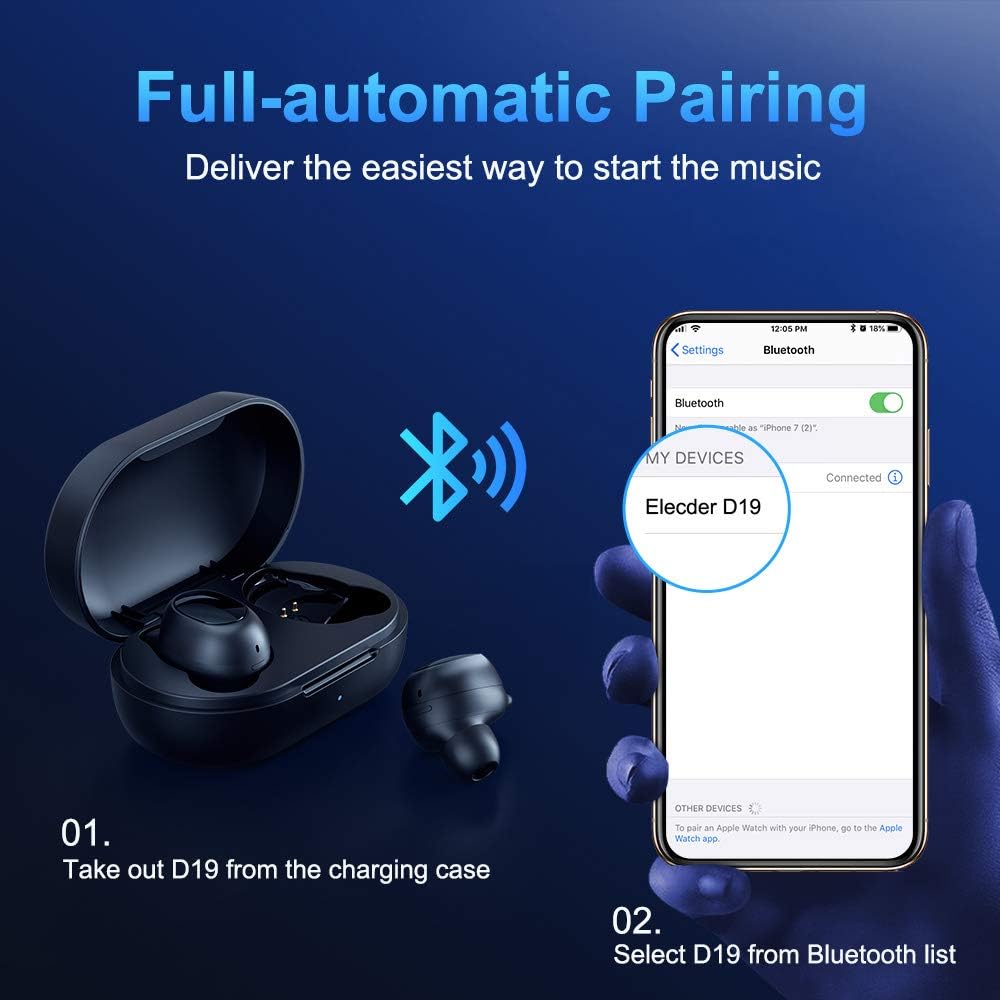
Figure 3.2: A visual guide demonstrating the automatic pairing process. The image shows the earbuds being taken out of the case and then the "Elecder D19" option appearing in a smartphone's Bluetooth settings for connection.
After the initial pairing, the earbuds will automatically connect to the last paired device when taken out of the charging case.

Figure 3.3: An illustration showing the stable Bluetooth connection between the ELECDER D19 earbuds and various smart devices, including smartphones and tablets.
4. Ntuziaka ọrụ
4.1 Yiri ekwe ntị
For optimal sound quality and comfort, choose the ear tips that best fit your ears. The earbuds come with S, M, and L sizes. Insert the earbuds into your ears and gently rotate them to find a secure and comfortable fit. The ergonomic ear-fin design helps ensure stability during movement.
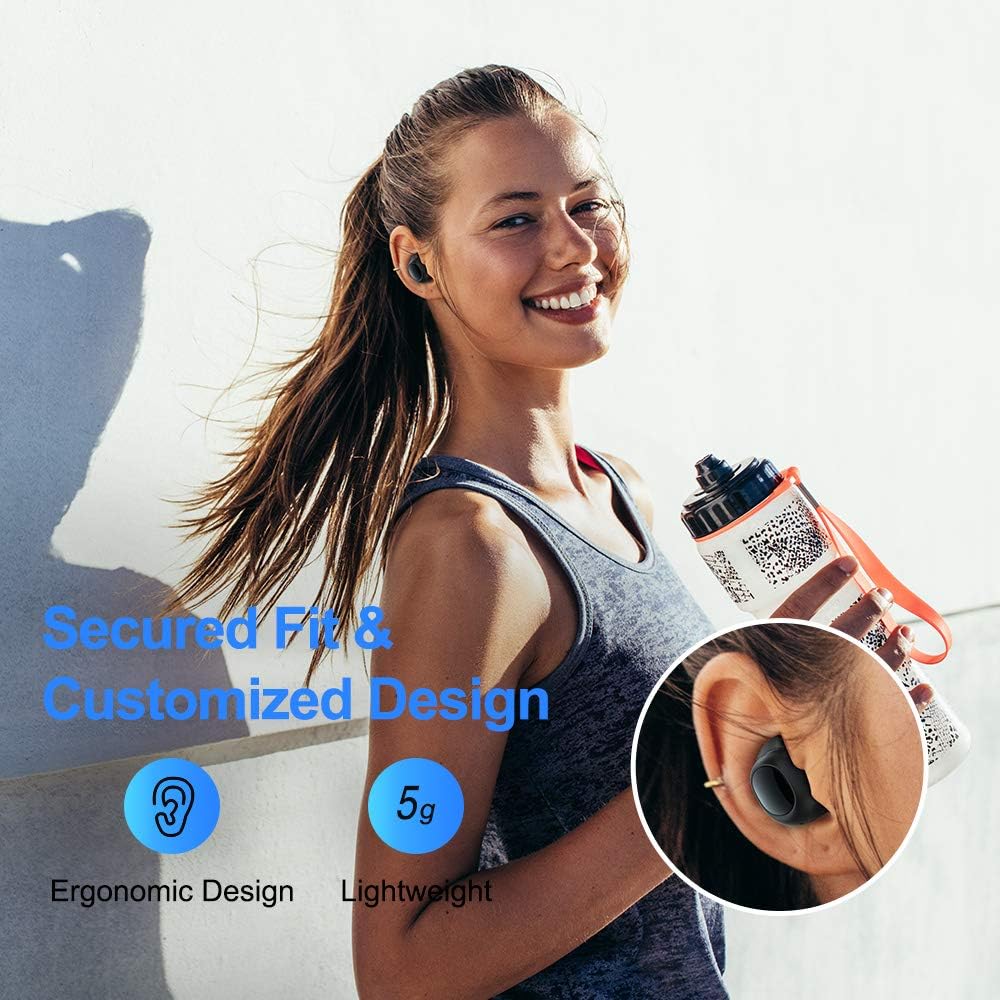
Figure 4.1: A person wearing the ELECDER D19 earbuds during a workout, demonstrating the secure and comfortable fit provided by the ergonomic design and customizable ear tips.
4.2 Njikwa Mgbasa Ozi
The ELECDER D19 earbuds feature physical buttons for media control. Specific button functions may vary slightly based on the device and operating system, but common controls include:
- Gwuo/kwụsịtụ: Single press on either earbud.
- Track na-esote: Double press on the right earbud.
- Gara aga Track: Double press on the left earbud.
- Olu elu: Triple press on the right earbud.
- Olu ala: Triple press on the left earbud.
4.3 Njikwa oku
Manage your calls directly from the earbuds:
- Azịza/Kwụsị Oku: Single press on either earbud.
- Jụ oku: Pịa ma jide otu ntị ntị maka sekọnd 2.
- Mee ka onye enyemaka olu rụọ ọrụ: Press and hold either earbud for 3 seconds (e.g., Siri, Google Assistant).
5. Nlekọta na nlekọta
Proper maintenance ensures the longevity and optimal performance of your ELECDER D19 earbuds.
5.1 Nhicha
- Jiri akwa dị nro, kpọrọ nkụ na-adịghị na-ehicha ntị ntị na chaja mgbe niile.
- Wepu ndụmọdụ ntị wee jiri ncha na mmiri dị nro hichaa ha, wee kpochaa nke ọma tupu itinyeghachi ya.
- Use a cotton swab or small brush to gently clean the charging contacts on both the earbuds and the case.
- Zere iji ihe na-emebi emebi, mmanya na-egbu egbu, ma ọ bụ kemịkalụ ihicha.
5.2 Mgbochi mmiri (IPX7)
The ELECDER D19 earbuds are IPX7 waterproof, meaning they can withstand submersion in up to 1 meter of water for 30 minutes. This makes them suitable for protection against sweat, rain, and accidental splashes.

Figure 5.1: The ELECDER D19 earbuds shown with water droplets, illustrating their IPX7 waterproof rating, which protects them from sweat, rain, and splashes.
Mara: The charging case is not waterproof. Ensure earbuds are dry before placing them back into the charging case.
5.3 Nchekwa
When not in use, store the earbuds in their charging case to protect them and keep them charged. Store the case in a cool, dry place away from extreme temperatures and direct sunlight.
6. Nchọpụta nsogbu
If you encounter issues with your ELECDER D19 earbuds, refer to the following common solutions:
| Nsogbu | Ihe nwere ike ime | Ngwọta |
|---|---|---|
| Igwe ntị anaghị ejikọta ya na ngwaọrụ. | Bluetooth is off on device; earbuds not in pairing mode; previously paired device interfering. | Ensure Bluetooth is enabled. Place earbuds back in case, then take them out to re-enter pairing mode. Forget "Elecder D19" from your device's Bluetooth list and re-pair. |
| Naanị otu earbud na-arụ ọrụ. | Earbuds not paired with each other; low battery on one earbud. | Place both earbuds back into the charging case, close the lid, wait a few seconds, then open and take them out again. Ensure both earbuds are charged. |
| Enweghị ụda ma ọ bụ obere olu. | Device volume too low; ear tips not properly sealed; debris in earbud nozzle. | Increase volume on your device. Adjust earbud position or try different sized ear tips for a better seal. Clean earbud nozzles. |
| Nchaji anaghị akwụ ụgwọ. | Faulty cable/charger; improper placement on wireless charger. | Try a different USB cable and power adapter. Ensure the case is correctly aligned on the wireless charging pad. |
| Njikọ Bluetooth adịghị akwụsi ike. | Interference; distance from device; low earbud battery. | Reduce distance between earbuds and device. Avoid environments with strong Wi-Fi or other Bluetooth signals. Ensure earbuds are fully charged. |
7. Nkọwapụta
Detailed technical specifications for the ELECDER D19 True Wireless Earbuds:
| Njirimara | Nkọwa |
|---|---|
| Aha Nlereanya | ELECDER D19 |
| Teknụzụ Njikọta | Ikuku (Bluetooth 5.0) |
| Oke Bluetooth | 33 ụkwụ |
| Ntinye ntị | Na Ntị |
| Ụdị Ihe | Na Ntị |
| Njikwa mkpọtụ | Active Noise Cancellation (CVC8.0) |
| Igwe okwu | gụnyere |
| Ọkwa Nguzogide mmiri | IPX7 enweghị mmiri |
| Ndụ batrị (Earbuds) | Up to 4.5 hours (music) / 4 hours (calling) |
| Charging Case Additional Playtime | awa 18 |
| Oge Nchaji | Ihe dị ka awa 2 |
| Nchaji Interface | Micro USB, Wireless Charging |
| Ibu Ibu | 1.92 ounces (total) / 5g (each earbud) |
| Akụkụ ngwaahịa | 3.89 x 3.89 x 1.65 sentimita asatọ |
| Ngwa dakọtara | iOS and Android Smartphones |
| Ihe onwunwe | Silikọn (ntị ntị) |
| Agba | Nwa |

Figure 7.1: An infographic detailing the battery life of the ELECDER D19 earbuds and charging case, showing 4 hours for calls, 4.5 hours for music, and a total of 18 hours with the 500mAh charging case.
8. Akwụkwọ ikike na nkwado
ELECDER products are manufactured to high quality standards. For information regarding warranty coverage, technical support, or service inquiries, please refer to the contact information provided with your product packaging or visit the official ELECDER websaịtị.
Maka enyemaka ọzọ, ị nwekwara ike ịkpọtụrụ onye na-ere ahịa ebe ị zụtara ngwaahịa ahụ.
Ask a question about this manual
Ask about setup, troubleshooting, compatibility, parts, safety, or missing instructions. Manuals+ will review the question and use this page’s manual context to help answer it.