
comiso x26M
COMISO Bluetooth Speaker User Manual
Model: X26M
Brand: comiso
Okwu mmalite
Thank you for choosing the COMISO X26M Bluetooth Speaker. This compact and powerful speaker is designed to deliver high-quality 360° HD sound with enhanced bass, making it ideal for various environments, from home to outdoor adventures. Featuring Bluetooth 5.3 for stable connectivity, TWS stereo pairing capability, a built-in microphone for hands-free calls, and IP65 waterproof and dustproof rating, the X26M offers versatility and durability. This manual provides detailed instructions on setting up, operating, and maintaining your speaker to ensure optimal performance.

Image: The COMISO X26M Bluetooth Speaker, black in color, held in a hand, demonstrating its portable size and water-resistant design with visible water droplets.
Ihe ngwugwu
Biko lelee ọdịnaya ngwungwu mgbe ị na-ebupụ igbe iji hụ na ihe niile dị:
- 1 x COMISO X26M Bluetooth Speaker
- 1 x eriri USB
- 1 x Ntuziaka mmalite ngwa ngwa
- 1 x Kaadị ọrụ
- 1 x Hook (detachable)
Atụmatụ igodo
Omnidirectional 360° HD Sound
The X26M speaker delivers balanced, detailed sound in a 360° radius. A built-in amplifier powers the speaker for full sound, offering a rich audio experience and enhanced bass that exceeds expectations for its compact size.

Image: A black COMISO X26M speaker with visual representations of sound waves expanding outwards, highlighting its 360° HD sound capability.
Bluetooth 5.3 & Built-in Microphone
Equipped with the latest Bluetooth 5.3 technology, the speaker ensures lower power consumption, faster transmission, and a more stable signal without delay. The integrated microphone allows for convenient hands-free calling.
Ezi ikuku stereo (TWS) ijikọ
For an immersive audio experience, you can connect two X26M mini portable speakers to create a true stereo sound setup. This feature is easy to operate and enhances the soundstage nke ukwuu.

Image: Two COMISO X26M speakers positioned on either side of a tablet, illustrating their dual pairing capability for stereo sound.
IP65 anaghị egbochi mmiri & uzuzu uzuzu
The speaker boasts an IP65 rating, providing protection against water jets and dust ingress. This makes it suitable for outdoor sports, hiking, or worry-free use in environments like bathrooms and kitchens.
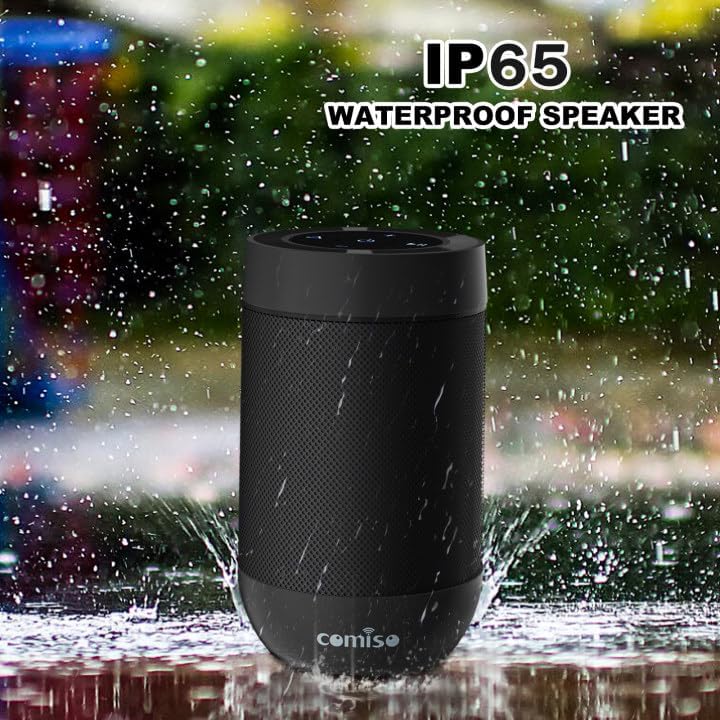
Image: The COMISO X26M speaker shown with water splashing around it, emphasizing its IP65 waterproof feature.
Nkwado kaadị TF
In addition to Bluetooth streaming, the speaker supports TF (Micro SD) cards, allowing you to play music directly from your stored music library.
Ekebere Ultra-Portable
Weighing under 5.5 ounces and measuring 3.2 inches tall with a 2.2-inch diameter, the cylindrical design is ultra-compact. Its pocket-handheld size and detachable hook make it perfect for travel, hiking, or desktop use.

Image: A person riding a bicycle outdoors with the COMISO X26M speaker attached to their backpack, demonstrating its suitability for outdoor activities and portability.
Melite
1. gingchaji Okwu Okwu
Before first use, fully charge the speaker. Connect the provided USB charging cable to the speaker's charging port (located under the silicon cover near the base) and a USB power source (e.g., computer USB port, wall adapter). The charging indicator light will illuminate. A full charge takes approximately 2 hours.
2. Gbanyụọ / gbanyụọ
- Iji gbanye: Pịa ma jide bọtịnụ ike (⏻) for approximately 2-3 seconds until you hear an audible prompt and the indicator light turns on.
- Iji gbanyụọ: Pịa ma jide bọtịnụ ike (⏻) for approximately 2-3 seconds until you hear an audible prompt and the indicator light turns off.
3. Njikọ Bluetooth
- Ensure the speaker is powered on and in Bluetooth pairing mode (the indicator light will typically flash blue rapidly).
- Na ngwaọrụ gị (smartphone, tabletị, kọmpụta), mee ka Bluetooth nwee ike wee chọọ ngwaọrụ dị.
- Select "COMISO X26M" from the list of found devices.
- Once connected, you will hear a confirmation tone, and the indicator light will turn solid blue.
The speaker has a Bluetooth range of up to 10 meters (33 feet) in an open area.
4. True Wireless Stereo (TWS) Pairing (for two X26M speakers)
To achieve a true stereo sound experience, you can pair two COMISO X26M speakers together:
- Ensure both X26M speakers are powered on and not connected to any Bluetooth device.
- On otu of the speakers (this will become the primary speaker), long-press the TWS button (often indicated by a triangle or chain link icon) for approximately 2 seconds. You will hear a "DI~DI" prompt tone, and the light will flash.
- The two speakers will automatically search for and pair with each other. Once successfully paired, you will hear a confirmation tone, and the indicator light on the primary speaker will flash, while the secondary speaker's light will be solid.
- Now, turn on Bluetooth on your device and connect to the primary "COMISO X26M" speaker. Both speakers will play audio in stereo.
The speakers will remember their TWS pairing for future use.
5. TF Card Usage
To play music directly from a TF (Micro SD) card:
- Insert a TF card (with pre-loaded music files) into the TF card slot on the speaker (under the silicon cover).
- The speaker will automatically switch to TF card playback mode.
- Use the speaker's control buttons to play, pause, skip tracks, and adjust volume.
Ntuziaka ọrụ
Button Functions (Refer to speaker top panel for layout)
| Bọtịnụ/Akara ngosi | Ọrụ |
|---|---|
| ⏻ (Bọtịnụ ike) | Press and hold to Power On/Off. |
| + (Mpịakọta Elu) | Obere pịa ka iwelie olu. Pịa ogologo maka egwu ọzọ. |
| - (Mpịakọta ọnụ) | Obere pịa ka ibelata olu. Pịa ogologo maka egwu gara aga. |
| ▶‖ (Kpọọ/Kwụsị) | Short press to Play/Pause music. |
| ⟁ (TWS/Mode Button) | Long press for TWS pairing (when two speakers are present). Short press to switch between Bluetooth and TF Card modes. |
Ịkpọ na ịnata oku
When connected to a smartphone via Bluetooth, the built-in microphone allows for hands-free calling:
- Oku azaa: Pịa obere bọtịnụ Play/Pause (▶‖) when an incoming call rings.
- Oku ngwụcha: Pịa obere bọtịnụ Play/Pause (▶‖) n'oge oku.
- Jụ oku: Long press the Play/Pause button (▶‖) when an incoming call rings.
- Nọmba Ikpeazụ emegharịgharịrị: Pịa bọtịnụ Play/Pause ugboro abụọ (▶‖).
Nlekọta
- Nhicha: Jiri nwayọ hichaa ọkà okwu, damp akwa . Ejila kemịkalụ siri ike ma ọ bụ ihe mkpocha abrasive.
- Nchekwa: Debe igwe okwu n'ebe dị jụụ ma kpọọ nkụ, ebe okpomọkụ na anwụ na-anaghị apụta oke mgbe a naghị eji ya ruo ogologo oge.
- Nlekọta batrị: Iji mee ka batrị dị ogologo, zere ịgbapụta batrị ahụ mgbe niile. Chajie igwe okwu mgbe niile, ọbụlagodi na ọ naghị adị na ya mgbe niile.
- Nguzogide mmiri: While IP65 rated, avoid submerging the speaker in water. Ensure the silicon cover for charging port and TF card slot is securely closed to maintain water resistance.
Nchọpụta nsogbu
| Nsogbu | Ngwọta enwere ike |
|---|---|
| Ọkà okwu anaghị agbanwuo. | Ensure the speaker is charged. Connect it to a power source and try again. |
| Enweghị ike ijikọ na ngwaọrụ Bluetooth. |
|
| Enweghị ụda ma ọ bụ obere olu. |
|
| Njikota TWS ada ada. |
|
| Poor sound quality / distortion. |
|
Nkọwapụta
| Njirimara | Nkọwa |
|---|---|
| Aha Nlereanya | X26M |
| Ụdị | comiso |
| Teknụzụ Njikọta | Bluetooth 5.3 |
| Ụdị Ọkà Okwu | Ọkà okwu dị n'èzí enwere ike ibugharị |
| Ọnọdụ mmepụta ọdịyo | Stereo (with TWS pairing) |
| Ike Nwepu kacha elu | 8 Watts (total for TWS pair, 5W per speaker) |
| Ọkwa Nguzogide mmiri | IP65 (Water Resistant & Dustproof) |
| Ndụ batrị | Ruo awa 12 |
| Oge Nchaji | Ihe dị ka awa 2 |
| Oke Bluetooth | 10 Mita (33 ụkwụ) |
| Igwe okwu arụnyere n'ime ya | Ee |
| Nkwado kaadị TF | Ee |
| Akụkụ ngwaahịa | 4"D x 2"W x 2"H (approx. 3.2 inches tall, 2.2 inches diameter) |
| Ibu Ibu | 4.2 ounces |
Akwụkwọ ikike na nkwado
The COMISO X26M Bluetooth Speaker comes with a Limited Warranty. For specific warranty terms and conditions, please refer to the included Service Card or visit the official COMISO website. If you encounter any issues or require technical assistance, please contact COMISO customer support through their official channels or the retailer from whom you purchased the product.
Maka enyemaka ọzọ, ị nwere ike ịga na COMISO Store on Amazon.
Ask a question about this manual
Ask about setup, troubleshooting, compatibility, parts, safety, or missing instructions. Manuals+ will review the question and use this page’s manual context to help answer it.