
Mesko MS-3160
Mesko Precision Kitchen Scale MS-3160 User Manual
Nlereanya: MS-3160
1. Okwu mmalite
Thank you for choosing the Mesko Precision Kitchen Scale MS-3160. This digital scale is designed for accurate weighing of various items, offering high precision for both kitchen use and other applications requiring fine measurements. Please read this manual carefully before use to ensure proper operation and to maximize the lifespan of your device.
2. Ntuziaka nchekwa
- Do not overload the scale beyond its maximum capacity of 500 grams. Overloading can damage the sensor.
- Keep the scale away from water and moisture. It is not waterproof.
- Avoid extreme temperatures and sudden temperature changes.
- Do not drop or subject the scale to strong impacts.
- Jiri nwayọ hichaa ọnụ ọgụgụ, damp akwa . Ejila ihe nhicha abrasive ma ọ bụ imikpu n'ime mmiri.
- Store the scale in a clean, dry place when not in use.
- Debe ebe ụmụaka na-apụghị iru.
3. Ihe ngwugwu
- Mesko Precision Kitchen Scale MS-3160
- Akwụkwọ ntuziaka onye ọrụ
Cheta na: A naghị etinye batrị na batrị, a ga-azụrịrị ya iche.
4. Ngwaahịa gafereview
Familiarize yourself with the components of your Mesko Precision Kitchen Scale.
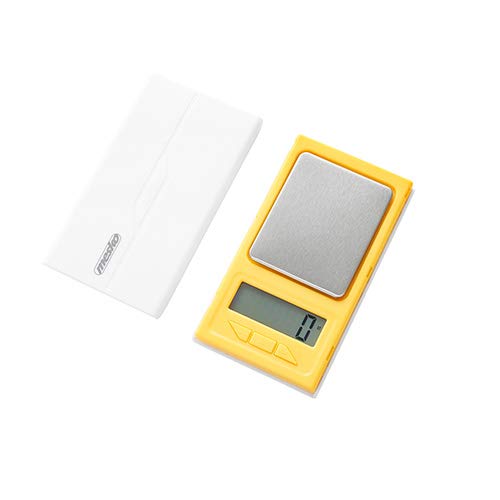
Figure 1: Mesko Precision Kitchen Scale MS-3160 with a gold ring on the weighing platform, displaying '1.2'.

Figure 2: Close-up of the LCD display showing '1.2 ct', indicating 1.2 carats.
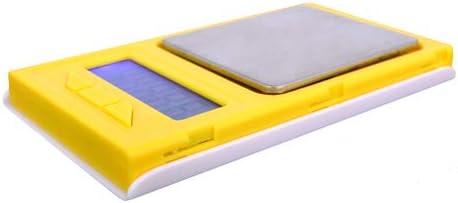
Foto 3: Akụkụ view of the Mesko MS-3160 scale, illustrating its compact and lightweight design.
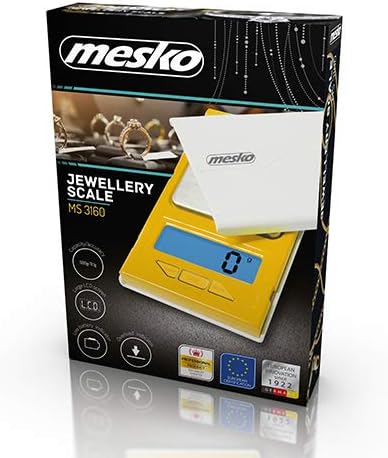
Figure 4: Product packaging for the Mesko MS-3160, highlighting its features as a jewelry scale.
5. Nhazi
5.1 Ntinye batrị
- Chọta ebe batrị dị n'okpuru ọnụ ọgụgụ.
- Mepee mkpuchi nke batrị batrị.
- Insert the required batteries (e.g., AAA, specific type not provided in data, assume common type) according to the polarity indicators (+/-).
- Mechie mkpuchi nke batrị batrị nke ọma.
5.2 Ntinye mbu
- Place the scale on a hard, flat, and stable surface to ensure accurate readings.
- Avoid placing the scale near sources of vibration, drafts, or extreme temperature fluctuations.
6. Ntuziaka ọrụ
6.1 Gbanyụọ / gbanyụọ
- Iji gbanye nha ahụ, pịa bọtịnụ [Gbanye/ Gbanyụọ] button. The display will show '0.0' or '0.00' when ready.
- Iji gbanyụọ nha ahụ, pịa ma jide ya [Gbanye/ Gbanyụọ] button for a few seconds, or it will automatically shut off after a period of inactivity (auto-off function).
6.2 Changing Weight Units
- With the scale on and displaying '0.0', press the [UNIT] button to cycle through the available weight units: grams (g), carats (ct), pennyweights (dwt), troy ounces (ozt), ounces (oz), and grains (gn).
- Select the desired unit before placing items on the platform.
6.3 Tare arụ ọrụ
Ọrụ tare na-enye gị ohere iwepụ ibu nke akpa, yabụ naanị ihe dị n'ime ya ka ị ga-atụ.
- Debe akpa efu n'elu ikpo okwu na-atụ. Ngosipụta ga-egosi ibu ya.
- Pịa [TARE] button. The display will reset to '0.0'.
- Add the items you wish to weigh into the container. The display will show the net weight of the items.
- To clear the tare, remove all items from the platform and press [TARE] again, or turn the scale off and on.
6.4 Ihe Ndị A Na-atụ
- Turn on the scale and ensure it displays '0.0' in your desired unit.
- Carefully place the item(s) to be weighed onto the center of the weighing platform.
- Wait for the display to stabilize. The stable weight will be shown.
6.5 Hold Function (Delay Function)
This function allows the display to hold the weight reading even after the item is removed, useful for unstable items or when the display is hard to read during weighing.
- While weighing an item, if the scale has a hold function, it may activate automatically or require a button press (refer to specific button labels on your device if available).
- The display will typically show a 'HOLD' indicator or similar icon.
7. Nlekọta
7.1 Nhicha
- Wipe the scale surface with a soft, slightly damp akwa .
- Do not use chemical cleaning agents, abrasive materials, or immerse the scale in water.
- Gbaa mbọ hụ na ọnụ ọgụgụ ahụ akpọnwụwo kpamkpam tupu nchekwa ma ọ bụ ojiji ọzọ.
7.2 Nchekwa
- Chekwaa ọnụ ọgụgụ ahụ n'ebe dị jụụ, kpọrọ nkụ, pụọ na ìhè anyanwụ kpọmkwem na oke okpomọkụ.
- If the scale will not be used for an extended period, remove the batteries to prevent leakage and potential damage.
8. Nchọpụta nsogbu
If you encounter issues with your scale, refer to the following common problems and solutions:
| Nsogbu | Ihe nwere ike ime | Ngwọta |
|---|---|---|
| Ihe ngosi na-egosi 'Lo' | Ike batrị dị ala. | Dochie batrị ndị ọhụrụ. |
| Display shows 'O-Ld' or 'EEEE' | Overload. The item on the platform exceeds the maximum capacity. | Remove the item immediately. Do not exceed 500 grams. |
| Ọgụgụ na-ezighi ezi | Unstable surface, drafts, or scale not tared correctly. | Place the scale on a flat, stable surface. Avoid drafts. Perform tare function before weighing. |
| Ọkwa anaghị agbanye | Batteries incorrectly installed or depleted. | Lelee polarity batrị. Dochie batrị ma ọ dị mkpa. |
9. Nkọwapụta
| Njirimara | Nkọwa |
|---|---|
| Ụdị | Mesko |
| Nọmba nlereanya | MS-3160 (Internal: 49132374) |
| Ike kacha | 500 grams |
| Izi ezi | 0.1 grams |
| Nkeji ibu | g / ct / dwt / ozt / oz / gn |
| Ụdị ngosi | LCD |
| Atụmatụ pụrụ iche | Tare Function, Hold Function, Overload Indicator, Lightweight |
| Ihe onwunwe | Plastic |
| Agba | Odo |
| Akụkụ ngwaahịa | 16 x 11 x 3 cm |
| Ibu ngwaahịa | 110 g |
10. Akwụkwọ ikike na nkwado
Mesko products are designed for reliability and performance. For information regarding warranty coverage, technical support, or service, please refer to the warranty card included with your purchase or visit the official Mesko websaịtị. Biko dowe akwụkwọ ikike ịzụrụ ihe ọ bụla.
Ask a question about this manual
Ask about setup, troubleshooting, compatibility, parts, safety, or missing instructions. Manuals+ will review the question and use this page’s manual context to help answer it.