
ROIDMI S2
ROIDMI S2 Cordless Vacuum Cleaner User Manual
Model: S2 | Brand: ROIDMI
Okwu mmalite
This manual provides detailed instructions for the safe and efficient use of your ROIDMI S2 Cordless Vacuum Cleaner. Please read this manual thoroughly before operating the appliance and retain it for future reference.
Ntuziaka nchekwa
- Hụ na ihe nkwụnye ike ahụ dakọtara na vol mpaghara gịtage.
- Do not use the vacuum cleaner to pick up liquids, burning objects, or sharp objects.
- Debe ntutu isi, uwe na-adịghị mma, mkpịsị aka na akụkụ ahụ niile pụọ na oghere na akụkụ ndị na-akpụ akpụ.
- Do not operate the vacuum cleaner if it is damaged or malfunctioning.
- Ezubere ngwa a maka ndị nwere ike anụ ahụ, mmetụta uche ma ọ bụ nke uche, ma ọ bụ enweghị ahụmịhe na ihe ọmụma, ma ọ bụrụ na enyereghị ha nlekọta ma ọ bụ ntụziaka gbasara iji ngwa ahụ site n'aka onye na-ahụ maka nchekwa ha.
- Ekwesịrị ilekọta ụmụaka ka ha hụ na ha ejighi ngwa eji egwu egwu egwu.
Ihe ngwugwu
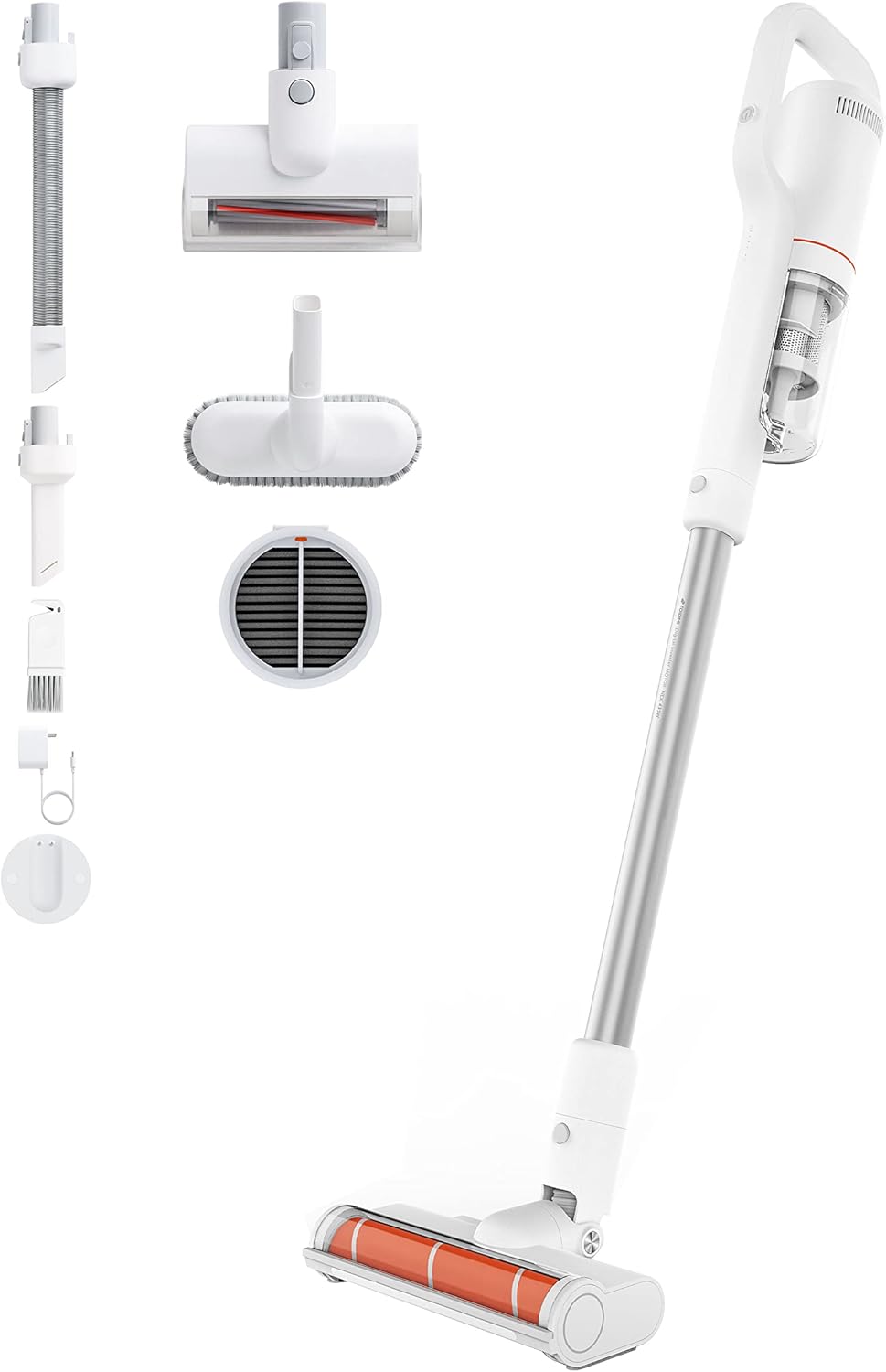
Image: All components included with the ROIDMI S2 Cordless Vacuum Cleaner, laid out on a white background. This includes the main vacuum unit, extension wand, floor brush, various nozzles, and the magnetic wall mount.
Chọpụta na ihe niile dị na ọ dị mma:
- ROIDMI S2 Cordless Vacuum Cleaner (Main Unit)
- Ọhịa ala Eletriki
- Metal Connecting Tube (Extension Wand)
- Ahịhịa matraasi
- Ahịhịa ọtụtụ ọrụ
- Nozzle dị larịị
- Dust Filter (pre-installed or spare)
- Ihe nkwụnye ọkụ
- Magnetic Wall Charging Station
- Ịkwanye kposara
- Akwụkwọ ntuziaka onye ọrụ
Melite
1. Mgbakọ
- Tinye mkpanaka ndọtị ahụ: Insert the metal connecting tube into the main vacuum unit until it clicks securely.
- Tinye ahịhịa ala: Connect the electric floor brush to the other end of the extension wand. Ensure it clicks into place.
- Alternative Attachments: For handheld use, attach the mattress brush, multi-function brush, or flat nozzle directly to the main unit.
2. Ịchaji batrị
Before first use, fully charge the vacuum cleaner. The battery takes approximately 2.5 hours to fully charge.

Image: Close-up of the ROIDMI S2 main unit magnetically attaching to its wall-mounted charging station. Blue indicator lights are visible, signifying charging status.
- Install Wall Charging Station: Choose a suitable location on a wall near a power outlet. Use the provided screws to securely mount the magnetic charging station.
- Njikọ Ike: Plug the power adapter into the charging station and then into a wall outlet.
- Charge Vacuum: Place the vacuum cleaner onto the magnetic charging station. The indicator lights on the vacuum will show the charging status.
Ntuziaka ọrụ
1. Gbanyụọ / gbanyụọ na nhọrọ ọnọdụ
Press the power button to turn the vacuum cleaner on. Press it again to cycle through different suction modes (Standard, Max). Press and hold to turn off.
2. Using the Floor Brush

Image: The ROIDMI S2 cordless vacuum in use, showing the motorized floor brush with its automatic LED sensor light illuminating the area in front of it. The brush is designed for various floor types.
- The electric floor brush is suitable for hard floors, laminate, parquet, and carpets.
- The automatic LED sensor light illuminates dark areas, improving visibility during cleaning.
- The 270° flexible design allows for easy maneuverability around furniture and into tight spaces.
3. Iji Mgbakwunye

Image: A collage of four images demonstrating the versatility of the ROIDMI S2. Top left shows the vacuum standing upright against a wall. Top right shows the flat nozzle cleaning between sofa cushions. Bottom left shows the multi-function brush cleaning a laptop keyboard. Bottom right shows the main unit with the mattress brush cleaning a bed.
- Mattress Brush: Ideal for cleaning upholstery, mattresses, and pet hair.
- Multi-function Brush: Use for delicate surfaces, keyboards, and car interiors.
- Nozzle dị larịị: Zuru oke maka oghere dị warara, nkuku, na ebe siri ike iru.
4. Battery Runtime
- Standard Mode: Up to 60 minutes.
- Max Mode: Up to 10 minutes.
5. ROIDMI Cleaner App

Image: A smartphone screen displaying the ROIDMI Cleaner App interface. The app shows information such as current electricity percentage, battery starting time, and filter remaining life, providing smart control and monitoring of the vacuum cleaner.
The ROIDMI Cleaner App provides additional features such as battery status, filter condition, and cleaning statistics. Download the app from your device's app store and follow the in-app instructions to connect your S2 vacuum cleaner.
Nlekọta
1. Ịwụpụ ihe mkpofu uzuzu
Empty the dust bin regularly to maintain optimal suction performance. Press the release button to detach the dust bin from the main unit, then open the lid and empty the contents.
2. Na-ehicha ihe nzacha

Foto: Ihe gbawara view of the ROIDMI S2's multi-stage filtration system, showing individual components like the HEPA filter, dust filter, and isolation filter. This illustrates the layers of filtration for effective dust capture.
- The multi-filter system (HEPA, dust filter, isolation) should be cleaned periodically.
- Remove the filters from the dust bin. Tap them gently to remove loose dust.
- Rinse washable filters under cold running water. Ensure they are completely dry before reassembling.
- Replace filters if they are heavily soiled or damaged.
3. Na-ehicha akwụkwọ mpịakọta ahịhịa
Regularly check the brush roll for tangled hair or debris. Remove the brush roll from the floor head (refer to the diagram in the full manual for specific instructions) and use scissors or a cleaning tool to remove any obstructions. Reinsert the brush roll securely.
4. Nchacha izugbe
Jiri nwayọ hichaa mpụta nke ihe na-ehicha agụụ, damp akwa . Ejila ncha siri ike ma ọ bụ ihe mgbaze.
Nchọpụta nsogbu
| Nsogbu | Ihe nwere ike ime | Ngwọta |
|---|---|---|
| Vacuum anaghị agbanye. | Batrị agwụla. | Chajie batrị zuru oke. |
| Ebelata ike mmiri. | Dust bin is full; Filters are clogged; Brush roll is obstructed. | Empty dust bin; Clean or replace filters; Remove obstructions from brush roll. |
| Mpempe akwụkwọ ahịhịa anaghị agbagharị. | Obstruction in brush roll; Brush roll not properly installed. | Remove obstructions; Ensure brush roll is securely installed. |
| Ume ikuku kwụsịrị na mberede. | Battery is low; Overheating protection activated. | Charge the battery; Allow the vacuum to cool down for at least 30 minutes. |
Nkọwapụta
| Ụdị | ROIDMI |
| Nọmba nlereanya | S2 (XCQ12RM) |
| Ike | 425 Watt |
| Ike imi | 23,500 Pa (135 AW) |
| Voltage | 100 volts |
| Ụdị batrị | Lithium-ion (2500 mAh) |
| Oge ịgba ọsọ | Up to 60 minutes (Standard Mode) |
| Oge Nchaji | Ihe ruru. awa 2.5 |
| Ọkwa mkpọtụ | 72 decibel |
| Ibu (Isi) | 1.5 kilogram |
| Akụkụ (L x W x H) | 119.1 x 25.9 x 15.8 cm |
| Ụdị nzacha | Multi-filter (HEPA, Dust, Isolation) |
| Atụmatụ pụrụ iche | Automatic LED Sensor Light, Magnetic Wireless Charging, ROIDMI Cleaner App Connectivity |
Akwụkwọ ikike na nkwado
For warranty information and customer support, please refer to the warranty card included in your product packaging or visit the official ROIDMI websaịtị. Debe nnata nzụta gị ka ihe akaebe nke ịzụrụ.
Akụrụngwa dị n'ịntanetị: For further assistance, FAQs, and product registration, please visit: www.roidmi.com
Ask a question about this manual
Ask about setup, troubleshooting, compatibility, parts, safety, or missing instructions. Manuals+ will review the question and use this page’s manual context to help answer it.