
Maxcom MM471
Maxcom MM471 Senior Portable Phone User Manual
1. Okwu mmalite
This manual provides detailed instructions for the safe and efficient use of your Maxcom MM471 Senior Portable Phone. Designed with ease of use in mind, this device features large characters, big buttons, and an ergonomic design, making it ideal for seniors. Please read this manual thoroughly before operating your phone.

Foto 1: N'ihu view of the Maxcom MM471 Senior Portable Phone.
2. Nhazi
Ihe ngwugwu 2.1
Gbaa mbọ hụ na ihe niile dị na ngwugwu:
- Maxcom MM471 Senior Portable Phone
- Batrị
- Nchaji nkwụnye
- Akwụkwọ ntuziaka onye ọrụ
2.2 Ịtinye kaadị SIM na batrị
The Maxcom MM471 supports dual SIM cards. Follow these steps to install your SIM card(s) and battery:
- Turn off the phone and disconnect it from any power source.
- Jiri nlezianya wepụ mkpuchi azụ nke ekwentị.
- Fanye SIM kaadị (s) gị n'ime oghere (s) ahapụtara ka kọntaktsị ọla edo chere ihu ala.
- Tinye batrị ahụ, hụ na kọntaktị ndị ahụ dabara nke ọma.
- Dochie mkpuchi azụ ruo mgbe ọ pịrị na-echekwara n'ime ebe.

Ọgụgụ 2: Azụ view with battery and SIM card area.
2.3 Ịchaji batrị
Before first use, fully charge the phone's battery:
- Connect the charging adapter to the phone's charging port or place the phone in its charging dock.
- Tinye nkwụnye ọkụ n'ime oghere ọkụ.
- Ihe ngosi batrị dị na ihuenyo ga-egosi ọnọdụ chajị.
- Ozugbo chajachara, kwụpụ chaja.
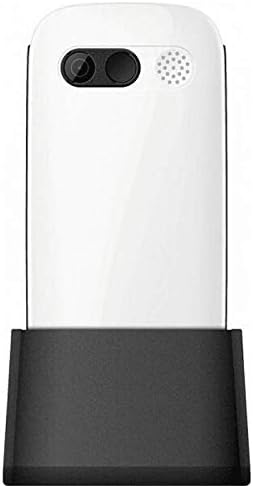
Figure 3: Phone in charging dock.
3. Ntuziaka ọrụ
3.1 Gbanyụọ/ gbanyụọ
- Iji gbanye: Pịa ma jide Oku ike/ Ọgwụgwụ bọtịnụ ruo mgbe ihuenyo ọkụ.
- Iji gbanyụọ: Pịa ma jide Oku ike/ Ọgwụgwụ button until the power-off options appear, then select 'Power Off'.
3.2 Ịkpọ oku
- Site na ihuenyo mbụ, jiri igodo ahụ tinye nọmba ekwentị ahụ.
- Pịa Kpọọ bọtịnụ (bọtịnụ akwụkwọ ndụ akwụkwọ ndụ) iji malite oku ahụ.
- Ka ịkwụsị oku a, pịa Oku ike/ Ọgwụgwụ button (red button).
3.3 Receiving Calls
- When a call comes in, the phone will ring and display the caller's number or name.
- Pịa Kpọọ button (green button) to answer.
- Iji jụ oku a, pịa Oku ike/ Ọgwụgwụ button (red button).
3.4 Sending and Receiving Messages
- Navigate to the 'Messages' menu from the main screen.
- Select 'New Message' to compose a text message.
- Enter the recipient's number and your message.
- Pịa 'Send'.
- Received messages will appear in your 'Inbox'.
3.5 Ijikwa kọntaktị
The phonebook can store up to 300 names.
- Go to the 'Contacts' or 'Phonebook' menu.
- Select 'Add New Contact' to save a new number.
- Enter the name and phone number, then save.
- To call a contact, select their name from the list and press the Kpọọ bọtịnụ.
3.6 Iji Bluetooth
To connect to Bluetooth devices:
- Gaa na 'Ntọala'> 'Bluetooth'.
- Gbanye Bluetooth 'Gbanye'.
- Họrọ 'Chọọ maka devices' to find available Bluetooth accessories.
- Select the desired device and pair them.
3.7 Iji ọkụ ọkụ
The phone includes a built-in flashlight for convenience.
- To turn on the flashlight, locate the dedicated flashlight button (if available) or access it through the 'Tools' menu.
- Press the button or select the option again to turn it off.
4. Nlekọta na nlekọta
To ensure the longevity and optimal performance of your Maxcom MM471 phone, follow these maintenance guidelines:
- Nhicha: Jiri ákwà dị nro ma kpọọ nkụ hichaa elu ekwentị gị. Zere ihe nhicha mmiri ma ọ bụ ihe ndị na-eme ka ọ dị nro.
- Okpomọkụ: Do not expose the phone to extreme temperatures (hot or cold) or direct sunlight for extended periods.
- Mmiri: Keep the phone dry. Do not immerse it in water or expose it to high humidity.
- Nchekwa: When not in use for a long time, store the phone in a cool, dry place with the battery partially charged.
- Mmetụta: Zere idobe ekwentị ma ọ bụ tinye ya na mmetụta siri ike.
5. Nchọpụta nsogbu
If you encounter issues with your phone, refer to the table below for common problems and solutions:
| Nsogbu | Ihe nwere ike ime | Ngwọta |
|---|---|---|
| Ekwentị anaghị agbanwuo | Akwụsịla batrị ma ọ bụ tinyeghị ya nke ọma. | Chajịa batrị. Gbaa mbọ hụ na etinyere batrị nke ọma. |
| Enweghị ike ịkpọ ma ọ bụ nata oku | No network signal, SIM card not inserted, or SIM card faulty. | Check network coverage. Reinsert SIM card(s). Contact your service provider. |
| Ogo oku na-adịghị mma | Weak network signal, interference. | Move to an area with better signal. Avoid obstructions. |
| Batrị na-agbapụ ngwa ngwa | Excessive usage, background applications, old battery. | Belata nchapụta ihuenyo. Mechie ngwa ejighi ya. Tụlee iji dochie batrị ma ọ bụrụ na ọ mere ochie. |
| Ahụigodo anaghị anabata | Software glitch, physical damage. | Restart the phone. If the problem persists, contact support. |
6. Nka na ụzụ nkọwa
Key technical details of the Maxcom MM471 Senior Portable Phone:
- Ụdị: MM471
- Akara: Maxcom
- Agba: Ọcha
- Njikọta: Bluetooth
- Nkwado SIM: SIM abụọ
- Ikike akwụkwọ ekwentị: Aha 300
- Oge okwu: Ruo awa iri abụọ
- Ihuenyo: Bọtịnụ anụ ahụ
- Atụmatụ pụrụ iche: Large characters, Big buttons, Ergonomic design, Speaker, Flashlight
7. Akwụkwọ ikike na Ozi Nkwado
For detailed warranty information, please refer to the warranty card included with your product or visit the official Maxcom website. For technical support or service inquiries, please contact your retailer or the manufacturer's customer service department.
Ask a question about this manual
Ask about setup, troubleshooting, compatibility, parts, safety, or missing instructions. Manuals+ will review the question and use this page’s manual context to help answer it.