
1. Okwu mmalite
Thank you for choosing the EDM KOMA TOOLS 08773 125W Fast Charger. This manual provides essential information for the safe and efficient operation, maintenance, and troubleshooting of your charger. Please read this manual thoroughly before first use and keep it for future reference.
2. Ntuziaka nchekwa
Na-edebe nchekwa nchekwa mgbe niile mgbe ị na-eji ngwa eletrik iji belata ihe egwu nke ọkụ, ujo eletrik na mmerụ ahụ nkeonwe.
- Gụọ ntuziaka niile: Tupu iji chaja, gụọ ntuziaka niile na akara ịdọ aka ná ntị na chaja, batrị na ngwaahịa site na iji batrị.
- Ime ụlọ jiri naanị: This charger is designed for indoor use only. Do not expose it to rain or wet conditions.
- Ikuku ikuku nke ọma: Gbaa mbọ hụ na ikuku ikuku zuru oke mgbe ị na-ebugharị. Ekpuchila chaja.
- Jiri ezigbo voltage: Connect the charger to a power supply with the correct voltage as indicated on the charger label.
- Avoid charging damaged batteries: Do not attempt to charge damaged or non-rechargeable batteries.
- Kpupu mgbe ejighị ya: Disconnect the charger from the power outlet when not in use or before cleaning.
- Debe ụmụaka: Ezubere ngwa a maka iji ndị mmadụ (gụnyere ụmụaka) nwere ike anụ ahụ, mmetụta uche ma ọ bụ nke uche, ma ọ bụ enweghị ahụmịhe na ihe ọmụma, ma ọ bụrụ na enyereghị ha nlekọta ma ọ bụ ntụziaka gbasara iji ngwa ahụ site n'aka onye na-ahụ maka nchekwa ha.
- Agbanwela: Never attempt to open or modify the charger. Refer all servicing to qualified service personnel.
3. Ihe ngwugwu
Hụ na ihe niile dị mgbe ị meghere ngwugwu ahụ:
- 1 x EDM KOMA TOOLS 08773 125W Fast Charger

Image: The EDM KOMA TOOLS 08773 Fast Charger shown in its retail packaging, indicating the product as it appears when purchased.
4. Akụrụngwa Ngwaahịa
The EDM KOMA TOOLS 08773 is a high-performance fast charger designed for 20V Li-Ion batteries, offering efficient and quick charging capabilities.
- Mpụta ike dị elu: 125W charging power for rapid battery replenishment.
- Fast Charging Times: Charges 2.0Ah batteries in approximately 30 minutes and 4.0Ah batteries in approximately 60 minutes.
- 20V Li-Ion Technology: Specifically designed for KOMA TOOLS 20V Lithium-Ion battery series.
- ndakọrịta: Compatible with various KOMA TOOLS 20V Li-Ion battery models, including 08770, 08772, 08773, 08771, and 08774.
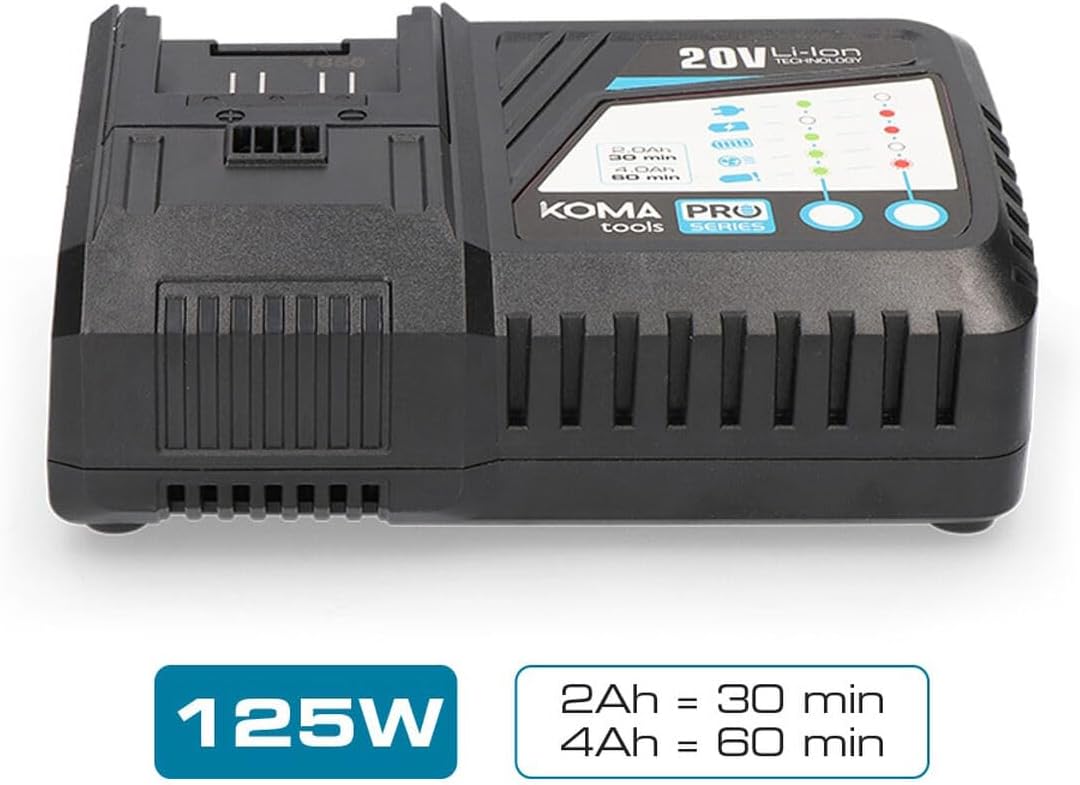
Image: The EDM KOMA TOOLS 08773 Fast Charger, highlighting its 125W power and approximate charging times for 2Ah (30 min) and 4Ah (60 min) batteries.

Image: A diagram illustrating the compatibility of the KOMA TOOLS 08773 charger with various 20V Li-Ion battery models (08770, 08772, 08773, 08771/08774) and their respective charging durations.
5. Nhazi
Follow these steps to set up your fast charger:
- Ịkwapu: Jiri nlezianya wepụ chaja na nkwakọ ngwaahịa ya.
- Nkwanye: Place the charger on a stable, flat, and dry surface in a well-ventilated area. Ensure there is sufficient space around the charger for heat dissipation.
- Njikọ ike: Plug the charger's power cord into a standard electrical outlet (100-240V AC, 50/60Hz). The charger is designed to operate within this voltage oke.
6. Ntuziaka ọrụ
To charge a KOMA TOOLS 20V Li-Ion battery:
- Fanye batrị: Align the battery with the charging slot on the charger. Slide the battery firmly into the slot until it clicks into place.
- Ngosipụta chaja: The charger features LED indicators to show the charging status. Refer to the diagram on the charger for specific indicator meanings (e.g., charging, fully charged, error). Typically, a blinking light indicates charging, and a solid light indicates a full charge.
- Oge nchaji: Charging times vary depending on the battery capacity. For example, a 2.0Ah battery will charge in approximately 30 minutes, and a 4.0Ah battery in approximately 60 minutes.
- Wepu batrị: Once the battery is fully charged (indicated by the LED), press the battery release button (if present) and slide the battery out of the charger.
- Kpupu chaja: For energy saving and safety, unplug the charger from the power outlet when not in use.
7. Nlekọta
Mmezi kwesịrị ekwesị na-eme ka chaja gị dị ogologo ndụ ma rụọ ọrụ nke ọma.
- Nhicha: Disconnect the charger from the power supply before cleaning. Use a soft, dry cloth to wipe the exterior of the charger. Do not use abrasive cleaners or solvents.
- Nchekwa: Store the charger in a clean, dry place, away from direct sunlight, moisture, and extreme temperatures.
- Nyochaa: Periodically inspect the charger and its power cord for any signs of damage. If any damage is found, discontinue use and contact customer support.
8. Nchọpụta nsogbu
Ọ bụrụ na ị hụ nsogbu na chaja gị, lee nsogbu na ngwọta ndị a na-ahụkarị:
| Nsogbu | Ihe nwere ike ime | Ngwọta |
|---|---|---|
| Chaja anaghị arụ ọrụ | No power from outlet; loose connection; damaged cord. | Check power outlet with another device; ensure cord is securely plugged in; inspect cord for damage. |
| Batrị anaghị achaji | Battery not properly inserted; battery is faulty; charger is faulty; battery too hot/cold. | Re-insert battery firmly; try charging a different battery; allow battery to reach room temperature. |
| Charging indicator shows error | Battery fault; charger fault; extreme battery temperature. | Remove and re-insert battery; allow battery to cool down or warm up; if error persists, battery or charger may be faulty. |
Ọ bụrụ na nsogbu ahụ dịgidere mgbe ị nwara azịza ndị a, biko kpọtụrụ nkwado ndị ahịa.
9. Nkọwapụta
| Nkọwapụta | Uru |
|---|---|
| Nọmba nlereanya | 8773 |
| Mpụta ike | 125 W |
| Ntinye Voltage | 100-240V AC, 50/60Hz (Standard) |
| Mmepụta Voltage (for battery) | 20V DC (Nominal for Li-Ion batteries) |
| Ụdị batrị dakọtara | 20V Li-Ion (KOMA TOOLS PRO Series) |
| Approx. Charging Time (2.0Ah) | 30 nkeji |
| Approx. Charging Time (4.0Ah) | 60 nkeji |
| Akụkụ ngwaahịa | 3.94 x 0.79 x 1.06 sentimita asatọ |
| Ibu Ibu | 1.72 pound (0.78 Kilogram) |
| Asambodo | CE |
| Onye nrụpụta | KOMA TOOLS |
10. Akwụkwọ ikike na nkwado
For warranty information, technical support, or service inquiries, please refer to the warranty card included with your product or contact your retailer. Keep your purchase receipt as proof of purchase.