
Okwu mmalite
Thank you for choosing the ZZLWAN Bluetooth Karaoke Microphone. This versatile device combines a microphone, Bluetooth speaker, and loudspeaker into one portable unit, perfect for various occasions. Designed for both kids and adults, it features dynamic LED lights and advanced audio technology for a clear and enjoyable singing experience. Please read this manual thoroughly to ensure proper use and maintenance.
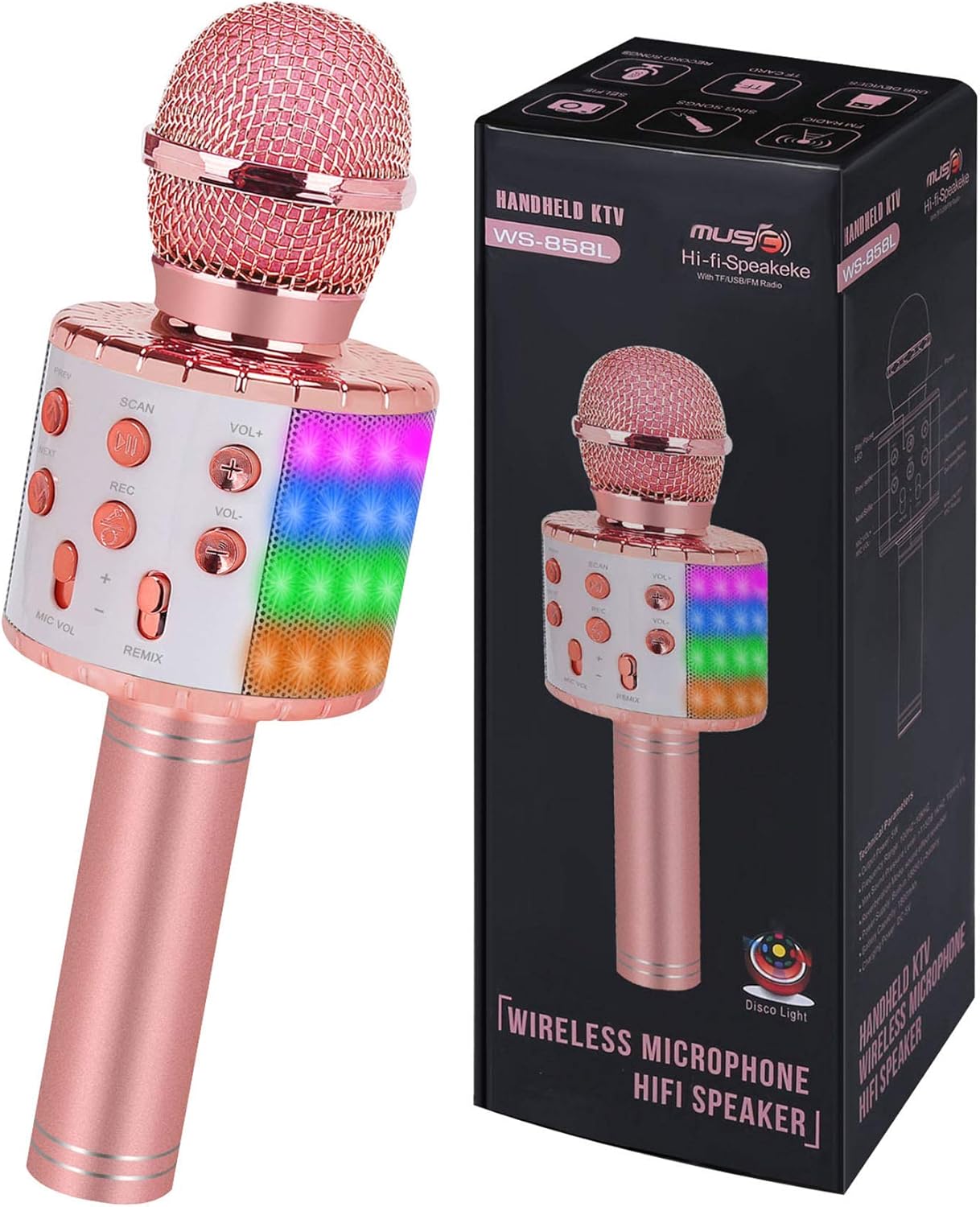
Image: The ZZLWAN Bluetooth Karaoke Microphone, showcasing its elegant champagne color and integrated LED lights.
Ozi nchekwa
The ZZLWAN Bluetooth Karaoke Microphone is constructed from durable aluminum alloy material designed to withstand falls and impacts. It features a UL Certified battery to ensure user safety during charging and operation. This wireless microphone also meets US Official CPC toy safety standards, guaranteeing it is harmless for users of all ages. Always supervise young children during use.
Melite
1. Ịchaji igwe okwu
Before first use, fully charge the microphone using the provided charging cable. The charging port is located at the bottom of the microphone handle. A full charge ensures optimal performance and battery life.

Image: Close-up of the microphone's base, highlighting the charging port and other connectivity options.
2. Ịgbanye / gbanyụọ
Press and hold the power button (usually located on the control panel) for a few seconds to turn the microphone on or off. You will hear an audible prompt indicating the power status.
3. Njikọ Bluetooth
- Turn on the microphone. It will automatically enter Bluetooth pairing mode, indicated by a voice prompt.
- Kwado Bluetooth na ama ma ọ bụ mbadamba gị.
- Chọọ maka "NBT-HT-C3" or "ZZLWAN Microphone" in your device's Bluetooth list.
- Select the microphone to connect. A successful connection will be confirmed by a voice prompt.

Image: The microphone demonstrating its wide compatibility with smartphones, tablets, and other Bluetooth-enabled devices.
Ntuziaka ọrụ
Ogwe njikwa gafereview

Foto: Zuru ezu view of the microphone's control panel, showing various buttons for playback, volume, and recording.
- Bọtịnụ ike: Pịa ma jide ka ịgbanwuo/ gbanyụọ.
- PREV/ỌZỌ: Short press to switch to the previous or next song.
- SCAN/LED: Short press to scan for FM radio (if supported). Long press to turn LED lights on/off.
- Nyocha: Short press to record your singing (requires a compatible app or storage).
- VOL +/-: Adjusts the music volume.
- MIC VOL+/-: Adjusts the microphone's voice volume.
- REMIX: Adjusts the echo/reverb effect.
Njirimara igodo & ojiji
- Ojiji ọtụtụ ọrụ: This device functions as a wireless microphone, a portable Bluetooth speaker, and a loudspeaker. Connect it to your smartphone or tablet to play music and sing along.
- Powerful Sound Quality: Equipped with advanced audio technology and multi-layer noise reduction, the microphone delivers clear sound. The built-in 360° Hi-Fi speaker provides rich echo and reverberation effects for an immersive karaoke experience.

Image: An illustration highlighting the microphone's 360-degree Hi-Fi speaker for powerful sound output.
- Ọkụ ọkụ ọkụ ọkụ: The microphone features colorful LED lights that can synchronize with your music and singing, creating a vibrant atmosphere. Long press the "SCAN/LED" button to toggle these lights on or off.

Image: The microphone displaying its dynamic LED lights, enhancing the singing experience.
- Ọrụ ndekọ: Use the REC button to record your performances. This feature typically requires a compatible karaoke or recording application on your connected device.
Nlekọta
- Nhicha: Wipe the microphone with a soft, dry cloth. Do not use abrasive cleaners or immerse the device in water.
- Nchekwa: Debe igwe okwu ahụ n'ebe dị jụụ ma kpọọ nkụ, ebe anwụ na-anaghị apụta kpọmkwem na oke okpomọkụ.
- Nlekọta batrị: Iji mee ka batrị dị ogologo, zere ịgbapụta batrị ahụ mgbe niile. Chajie ya mgbe niile, ọbụlagodi na ọ naghị eji ya ruo ogologo oge.
Nchọpụta nsogbu
| Nsogbu | Ngwọta |
|---|---|
| Microphone won't turn on. | Gbaa mbọ hụ na agbagoro batrị. Jikọọ na isi iyi ike wee nwaa ọzọ. |
| Enweghị ike ijikọ site na Bluetooth. | Make sure the microphone is in pairing mode. Turn off and on your device's Bluetooth. Ensure no other devices are connected to the microphone. |
| Enweghị ụda sitere na igwe okwu. | Check microphone volume (MIC VOL) and music volume (VOL+/-). Ensure the microphone is properly connected to your device. |
| Ụda agbagọ ma ọ bụ edoghị anya. | Adjust the MIC VOL and REMIX (echo) settings. Ensure you are not too close to the microphone or speaking too loudly. Check for interference from other electronic devices. |
| Ọkụ LED anaghị arụ ọrụ. | Long press the SCAN/LED button to toggle the lights. Ensure the microphone has sufficient battery power. |
Nkọwapụta
| Njirimara | Nkọwa |
|---|---|
| Akụkụ ngwaahịa | 3.31 x 3.46 x 9.76 sentimita asatọ |
| Ibu Ibu | 12.9 ounces |
| Nọmba nlereanya | NBT-HT-C3 |
| Ụdị | ZZLWAN |
| Batrị | 1 batrị lithium ion achọrọ (gụnyere) |
| Afọ akwadoro | Afọ 3 na karịa |
| Ngwa gụnyere | Igwe okwu |
| Eji akwadoro | Maka smartphones ma ọ bụ mbadamba |
| Mba onye si | China |
Akwụkwọ ikike na nkwado
For warranty information or technical support, please refer to the product packaging or contact ZZLWAN customer service directly. Keep your purchase receipt as proof of purchase for any warranty claims.