
Avant AV7730
Avant Portable Evaporative Air Cooler User Manual
Ụdị: AV7730
Okwu mmalite
Thank you for choosing the Avant Portable Evaporative Air Cooler. This manual provides important information regarding the safe operation, installation, maintenance, and troubleshooting of your new appliance. Please read this manual thoroughly before use and keep it for future reference.
This evaporative air cooler is designed to provide cooling, humidification, and air purification, offering a comfortable environment in your home or office.
Ntuziaka nchekwa
- Always place the unit on a stable, level surface to prevent water spillage.
- Ejila ngwa, eriri, ma ọ bụ nkwụnye n'ime mmiri ma ọ bụ ihe mmiri ndị ọzọ.
- Gbaa mbọ hụ na ọkọnọ ike dabara na voltage specified on the rating label (230V).
- Kwupuo unit na ebe ọkụ tupu ihicha, meju, ma ọ bụ ịrụ ọrụ ọ bụla.
- Debe ngwa ahụ ka ụmụaka na anụ ụlọ ghara iru.
- Akwụsịla ụzọ mbata ma ọ bụ ụzọ ikuku.
- Ejila ngwa ma ọ bụrụ na eriri ọkụ ma ọ bụ plọg mebiri emebi.
- Maka naanị ime ụlọ.
Ngwaahịa gafereview
Familiarize yourself with the components of your Avant Portable Evaporative Air Cooler.

Foto 1: N'ihu view of the Avant Portable Evaporative Air Cooler, showing the air outlet and water level indicator.

Foto 2: N'ihu zuru ezu view highlighting the Avant logo and air grille.

Ọgụgụ 3: N'azụ view of the unit, showing the removable filter panel and water tank access.
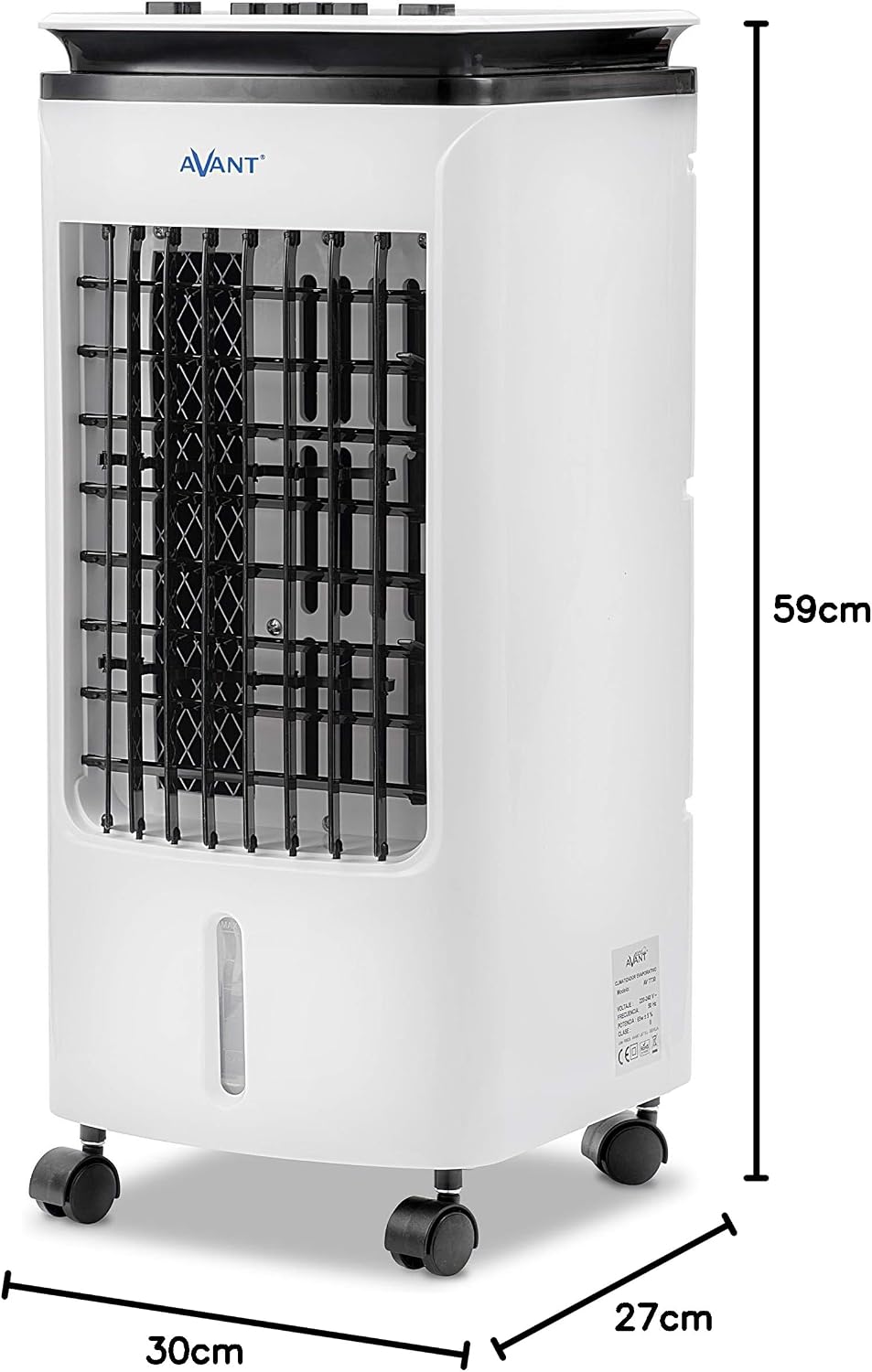
Figure 4: Product dimensions: 59cm height, 30cm width, 27cm depth.
Melite
1. Iwepu ngwongwo
Carefully remove the air cooler from its packaging. Retain the packaging materials for future storage or transport if needed. Check for any signs of damage. If the unit is damaged, do not operate it and contact customer support.
2. Ntinye
Place the air cooler on a firm, level surface. Ensure there is adequate space around the unit for proper airflow. The unit is equipped with wheels for easy mobility.

Ọgụgụ 5: Ọpụample of proper placement in a room, ensuring clear space for air circulation.
3. Na-ejuputa tank mmiri
The unit has a 4-liter water tank. For cooling and humidification, fill the tank with clean water. You can add ice packs (included) to the water tank for enhanced cooling effect.
- Locate the water tank access at the rear of the unit.
- Carefully pour water into the tank, ensuring not to exceed the "MAX" fill line.
- The water tank is integrated and not removable for filling. Use a pitcher or similar container to pour water.

Figure 6: Image collage demonstrating how to access the filter, fill the water tank, and view ogwe njikwa.
4. Njikọ ike
Tinye eriri ọkụ n'ime oghere eletrik ọkọlọtọ (230V AC).
Ntuziaka ọrụ
Ogwe njikwa
The control panel is located on the top of the unit.

Ọgụgụ 7: Zuru ezu view nke bọtịnụ njikwa njikwa.
- Cooler ON/OFF: Press to activate or deactivate the evaporative cooling function. When activated, water is pumped from the tank to moisten the cooling pad, providing a cooler airflow. Note: "No water use is prohibited" indicates a safety feature or warning related to operating the cooler function without water. Ensure sufficient water in the tank before activating.
- Speed (Low, Mid, High): Press the respective button to select the desired fan speed.
- Ala: For quiet operation and gentle airflow.
- etiti: For moderate cooling and airflow.
- Elu: For maximum cooling and airflow.
- Swing ON/OFF: Press to activate or deactivate the automatic oscillation of the vertical louvers, distributing air across a wider area.
Ụdị arụ ọrụ
The unit functions as a fan, a cooler (humidifier), and an air purifier.

Figure 8: The Avant Air Cooler offers 3-in-1 functionality: cooling, humidifying, and purifying the air.
- Fan Ọnọdụ: The unit operates as a standard fan, circulating air without humidification. Select your desired fan speed.
- Cooler Mode (Evaporative Cooling & Humidification): Activate the "Cooler" function. This mode uses water evaporation to cool and humidify the air. Ensure the water tank is filled.
- Nsacha ikuku: The unit's filter system helps to purify the air by trapping dust and other particles.
Nlekọta
Ndozi mgbe niile na-eme ka arụmọrụ kacha mma ma na-agbatị ndụ nke ihe mkpuchi ikuku gị. Wepụ ihe mkpuchi ahụ mgbe niile tupu ị sachaa ya.
1. Na-ehicha mmiri mmiri
To prevent mold and mildew growth, clean the water tank regularly, especially if the unit is not used for extended periods. The water tank is integrated and cannot be fully removed, requiring careful cleaning.
- Kwụpụ unit ahụ.
- Drain any remaining water from the tank. The unit must be tilted or carefully moved to a drain for complete emptying.
- Wipe the inside of the tank with a soft cloth and a mild detergent solution.
- Rinse thoroughly with clean water, ensuring no detergent residue remains.
- Allow the tank to air dry completely before refilling or storing the unit.
2. Cleaning the Cooling Pad/Filter
The cooling pad (evaporative filter) should be cleaned periodically to maintain efficiency.

Figure 9: The cooling pad is accessible from the rear panel for cleaning or replacement.
- Kwụpụ unit ahụ.
- Open the rear panel to access the cooling pad.
- Carefully remove the cooling pad.
- Sachaa ihe mkpuchi oyi ahụ n'ime mmiri na-agba agba iji wepụ uzuzu na ihe ndị dị n'ime ala. Maka ihe ndị siri ike, tinye mmiri dị nro (dịka ọmụmaatụ, mmanya vaịn na mmiri) ruo nkeji iri atọ, wee sachaa ya nke ọma.
- Allow the cooling pad to air dry completely before reinserting it into the unit.
- Close the rear panel securely.
3. Mpụga ihicha
Jiri nwayọ hichaa mpụta nke otu ahụ, damp akwa . Ejila ihe nchacha abrasive ma ọ bụ ihe mgbaze.
4. Nchekwa
If storing the unit for an extended period, ensure the water tank and cooling pad are completely dry. Store the unit in a cool, dry place, preferably in its original packaging.
Nchọpụta nsogbu
Tupu ịkpọtụrụ nkwado ndị ahịa, biko rụtụ aka na ntuziaka nchọpụta nsogbu ndị a maka okwu nkịtị.
| Nsogbu | Ihe nwere ike ime | Ngwọta |
|---|---|---|
| Unit anaghị agbanwuo. | Enweghị ọkụ. | Lelee ma ọ bụrụ na etinyere eriri ọkụ na ebe nchekwa na-arụ ọrụ. |
| Enweghị ikuku oyi/mmiri mmiri. | Water tank is empty or low. Cooler function not activated. Cooling pad is dry or clogged. | Fill the water tank. Press the "Cooler" button. Clean or replace the cooling pad. |
| Ikuku ikuku adịghị ike. | Air inlet/outlet blocked. Fan speed set too low. | Ensure nothing is obstructing the air vents. Increase fan speed. |
| Isi na-adịghị mma. | Stagnant water in tank. Dirty cooling pad. | Drain and clean the water tank thoroughly. Clean the cooling pad. Use fresh water. |
| Ngalaba na-eme mkpọtụ. | Unit not on a level surface. Internal components vibrating. | Ensure the unit is on a flat, stable surface. If noise persists, contact customer support. |
Nkọwapụta
| Nọmba nlereanya | AV7730 |
| Akụkụ (H x W x D) | 59 x 30 x 27 cm |
| Ibu | 5.09 n'arọ |
| Oriri ike | 65 W |
| Voltage | 230V AC |
| Ike tank mmiri | 4 lita |
| Mpaghara mkpuchi akwadoro | Ruo 20 square mita |
| Agba | Ọcha |
| Ngwa gụnyere | Ụkwụ |
Akwụkwọ ikike na nkwado
For warranty information, please refer to the documentation provided at the time of purchase. If you encounter any issues not covered in this manual or require further assistance, please contact Avant customer support.
You can find contact details on the official Avant websaịtị ma ọ bụ site na onye na-ere ahịa gị.
Ask a question about this manual
Ask about setup, troubleshooting, compatibility, parts, safety, or missing instructions. Manuals+ will review the question and use this page’s manual context to help answer it.