
Prtukyt Prtukyt 8S
Prtukyt 8S Wireless Bluetooth Headset User Manual
Model: Prtukyt 8S (PT-1088)
1. Okwu mmalite
Thank you for choosing the Prtukyt 8S Wireless Bluetooth Headset. This manual provides detailed instructions on how to set up, operate, and maintain your new headset. Please read this manual carefully before use to ensure optimal performance and longevity of your device.
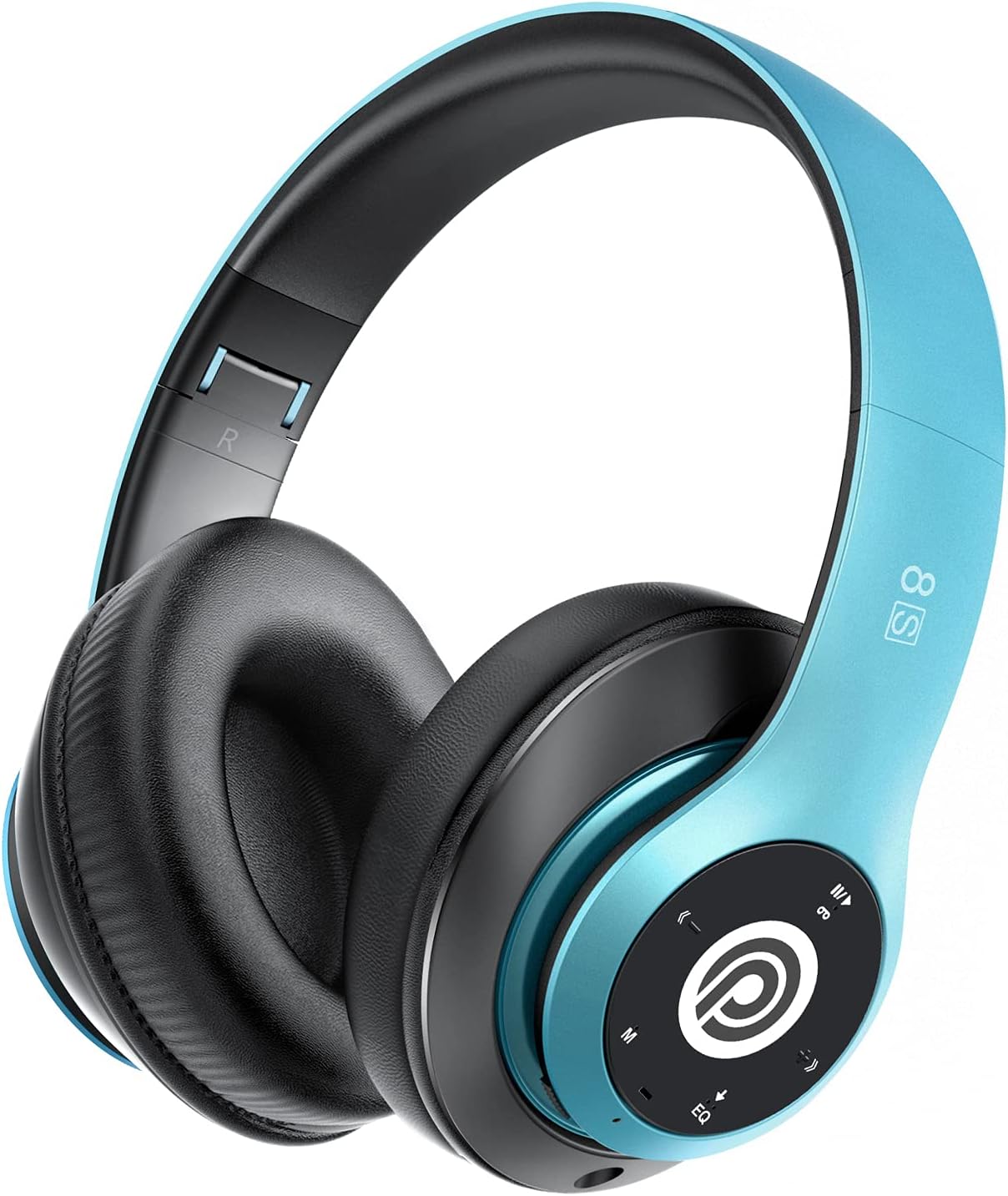
Image: The Prtukyt 8S Wireless Bluetooth Headset in blue, showcasing its sleek design and comfortable earcups.
2. Ozi nchekwa
To ensure safe and proper use, please observe the following guidelines:
- Do not expose the headset to extreme temperatures, humidity, or corrosive substances.
- Zere idobe ma ọ bụ idobe ekweisi na mmetụta siri ike.
- Do not disassemble or modify the headset. This will void the warranty and may cause damage.
- Keep the headset away from water and liquids as it is not waterproof.
- Ige ntị ogologo oge n'olu dị elu nwere ike ibute mmebi ntị. Gbanwee olu ka ọ dị n'ogo dị ala.
- Tụfuo ngwaahịa ahụ na batrị ya n'ụzọ kwesịrị ekwesị dịka iwu obodo si dị.
3. Ihe ngwugwu
Biko lelee ngwungwu maka ihe ndị a:
- 1 x Prtukyt 8S Wireless Bluetooth Headset
- 1 x eriri ọdịyo (Jack 3.5mm)
- 1 x eriri USB
- 1 x Akwụkwọ ntuziaka onye ọrụ
4. Ngwaahịa gafereview
Familiarize yourself with the various parts and controls of your Prtukyt 8S headset.
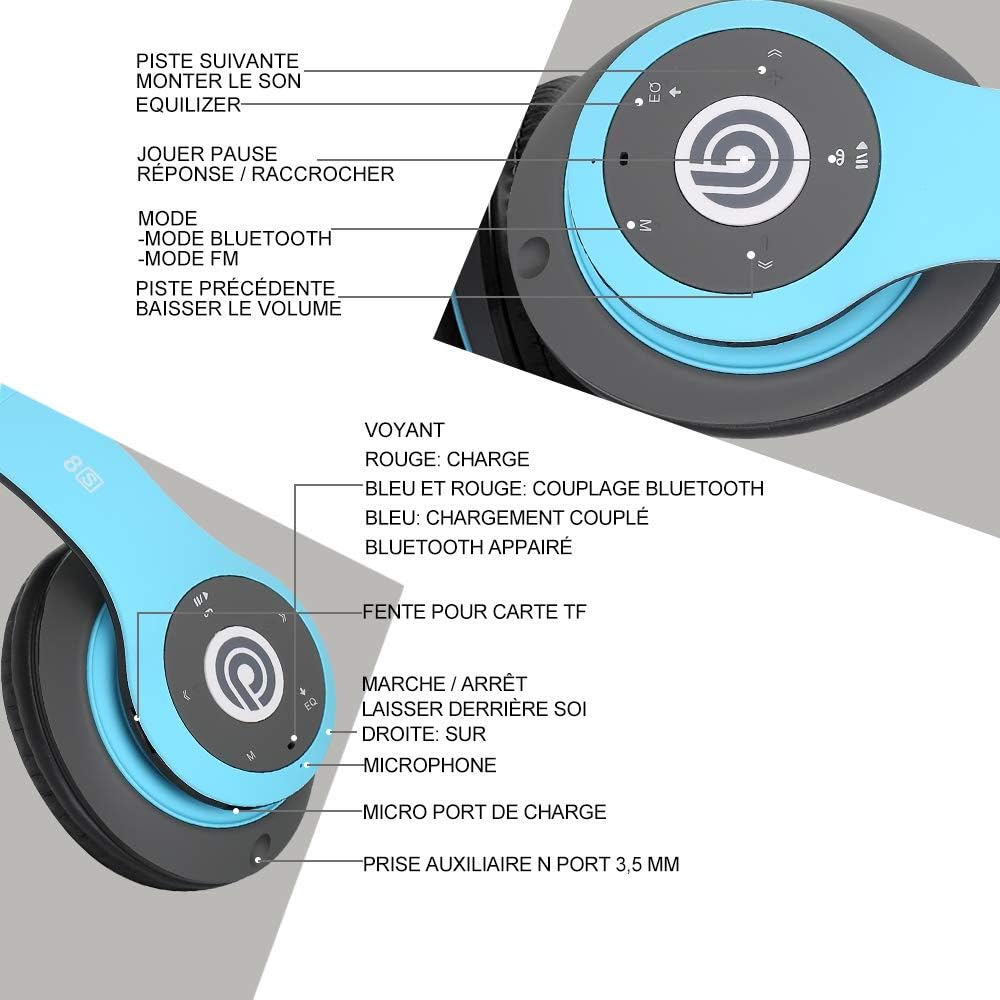
Foto: Zuru ezu view of the Prtukyt 8S headset's control panel and ports, including buttons, indicator light, TF card slot, microphone, charging port, and 3.5mm AUX port.
Control Panel & Ports:
- 1. Next Track / Volume Up: Pịa obere oge maka egwu na-esote, pịa ogologo oge iji bulie olu.
- 2. EQ Button: Press to cycle through equalizer sound effects.
- 3. Play / Pause / Answer / Hang Up: Multi-function button for music and calls.
- 4. Mode Button (M): Short press to switch between Bluetooth, FM Radio, and TF Card modes.
- 5. Previous Track / Volume Down: Pịa obere oge maka egwu gara aga, pịa ogologo oge iji belata olu.
- 6. Ìhè ihe ngosi: Shows charging status, Bluetooth pairing, and connection status.
- 7. TF Card Slot: Insert a Micro SD/TF card for direct music playback.
- 8. Power On/Off Switch: Gbanye ka ịgbanwuo ma ọ bụ gbanyụọ ekweisi.
- 9. Igwe okwu: Maka oku na-enweghị aka.
- 10. Micro USB ọdụ ụgbọ mmiri: Connect the USB charging cable here.
- 11. 3.5mm AUX Port: Maka njikọ waya na ngwaọrụ ọdịyo.
Atụmatụ imewe:
- Nhazi a na-agbanwe agbanwe: The headset features a unique foldable design for easy portability and storage, saving space.

Image: The Prtukyt 8S headset demonstrating its multi-angle rotation and adjustable headband for ultimate comfort.
- Comfortable Earcups: Super soft foam earcups and an adjustable headband ensure a comfortable fit for extended listening sessions.
- Ọdịda Ntụkwasị Obi Dị Elu: Equipped with powerful 57mm stereo drivers and Bluetooth 5.0 chip for deep bass and clear sound.

Foto: Ihe dị n'ime view highlighting the large aperture drivers and Bluetooth 5.0 chip for powerful performance.
5. Nhazi
5.1 Nchaji izizi
Before first use, fully charge the headset. Connect the USB charging cable to the Micro USB charging port on the headset and the other end to a USB power adapter (not included) or a computer's USB port.
- The indicator light will be Uhie n'oge ịchaji.
- The indicator light will turn Acha anụnụ anụnụ mgbe chaja zuru ezu.
- Ụgwọ zuru ezu na-ewekarị awa 2-3.
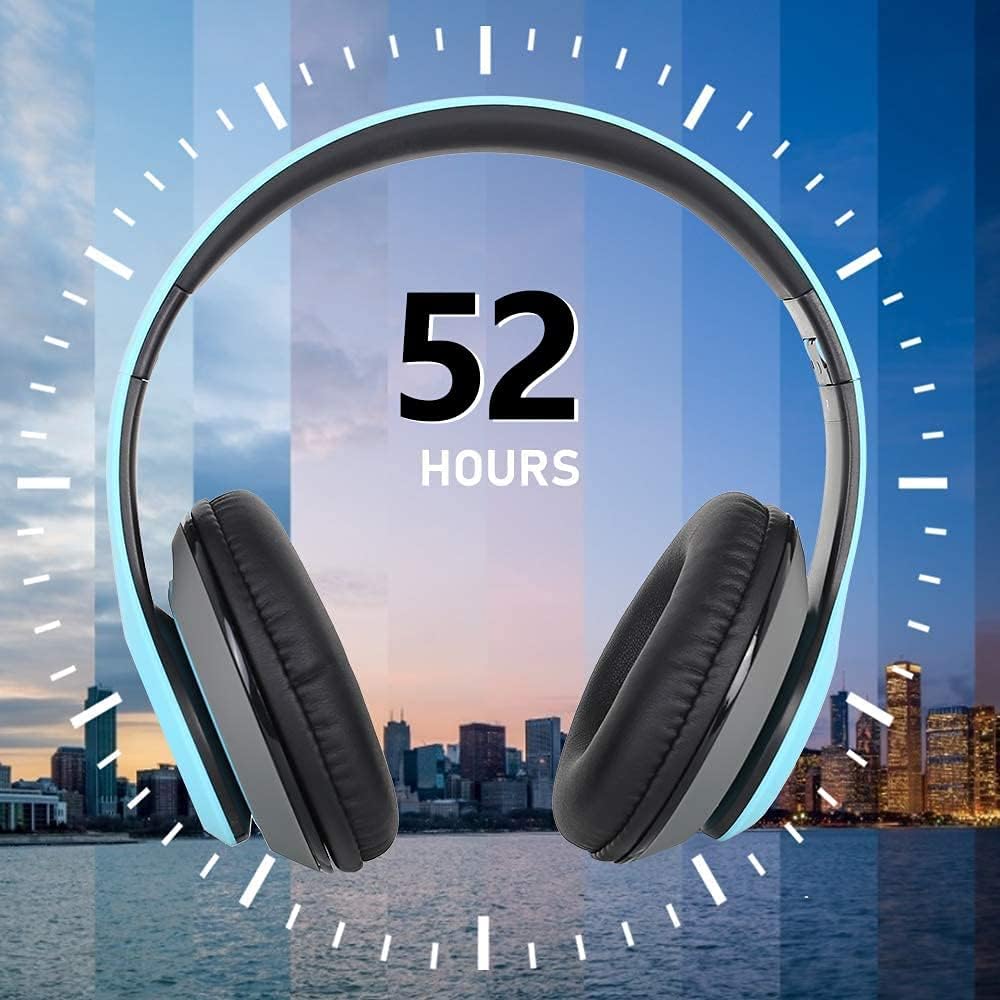
Image: The Prtukyt 8S headset illustrating its impressive 52-hour battery life on a single charge.
6. Ntuziaka ọrụ
6.1 Gbanyụọ ma ọ bụ gbanyụọ
- Ike Na: Slide the Power On/Off switch to the "ON" position. The indicator light will flash blue, indicating it's ready for pairing or connecting.
- Gbanyụọ: Slide the Power On/Off switch to the "OFF" position. The indicator light will turn off.
6.2 Njikọ Bluetooth
- Gbaa mbọ hụ na agbanyụrụ ekweisi.
- Slide the Power On/Off switch to the "ON" position. The headset will enter pairing mode, and the indicator light will flash Acha anụnụ anụnụ na Uhie ọzọ.
- Enable Bluetooth on your device (smartphone, tablet, PC, etc.).
- Chọọ maka "Prtukyt 8S" or "PT-1088" in the list of available Bluetooth devices.
- Select "Prtukyt 8S" to connect. Once successfully paired, the indicator light will flash Acha anụnụ anụnụ nwayọọ nwayọọ.
- Ọ bụrụ na a kpaliri maka paswọọdụ, tinye "0000".
Note: The headset will automatically attempt to reconnect to the last paired device when powered on.
6.3 Music Playback (Bluetooth Mode)
- Gwuo/kwụsịtụ: Mkpirisi pịa Gwuo/kwụsịtụ bọtịnụ.
- Track na-esote: Mkpirisi pịa Sochie ọzọ / Mpịakọta Elu bọtịnụ.
- Gara aga Track: Mkpirisi pịa Egwu gara aga / ụda ala bọtịnụ.
- Olu elu: Pịa ogologo Sochie ọzọ / Mpịakọta Elu bọtịnụ.
- Olu ala: Pịa ogologo Egwu gara aga / ụda ala bọtịnụ.
6.4 Ọrụ oku
- Oku azaa: Mkpirisi pịa Kpọọ/kwụsịtụ/zaa/Kwụsị bọtịnụ mgbe oku mbata na-ada.
- Oku ngwụcha: Mkpirisi pịa Kpọọ/kwụsịtụ/zaa/Kwụsị bọtịnụ n'oge oku.
- Jụ oku: Pịa ogologo Kpọọ/kwụsịtụ/zaa/Kwụsị bọtịnụ mgbe oku mbata na-ada.
- Nọmba Ikpeazụ emegharịgharịrị: Pịa ugboro abụọ Kpọọ/kwụsịtụ/zaa/Kwụsị bọtịnụ.
Ọnọdụ redio FM 6.5
- Gbanwuo ekweisi.
- Mkpirisi pịa Ụdị (M) button to switch to FM Radio mode. You will hear a voice prompt indicating the mode change.
- Mkpirisi pịa Gwuo/kwụsịtụ bọtịnụ ka inyocha na-akpaghị aka ma chekwaa ọdụ FM dị.
- Jiri ihe Track na-esote na Egwu gara aga bọtịnụ ka ịnyagharịa n'etiti ọdụ ndị echekwara.
6.6 TF Card Mode
- Insert a Micro SD/TF card (with MP3 audio files) into the TF Card Slot.
- Turn on the headset. It should automatically switch to TF Card mode and begin playing music. If not, short press the Ụdị (M) button to select TF Card mode.
- Jiri ihe Gwuo/kwụsịtụ, Track na-esote, Egwu gara aga, and volume buttons as in Bluetooth mode.
6.7 EQ ọrụ
The headset features an equalizer function to customize your listening experience.
- Mkpirisi pịa EQ button to cycle through different equalizer presets (e.g., Pop, Rock, Jazz, Classic, Bass, Normal).
6.8 Wired Mode (AUX)
You can use the headset with non-Bluetooth devices via the included 3.5mm audio cable.
- Connect one end of the 3.5mm audio cable to the 3.5mm AUX Port on the headset.
- Connect the other end to the audio output jack of your device (e.g., computer, MP3 player).
- In wired mode, the headset's buttons (except volume control on some devices) will not function. Control playback and volume directly from your connected device.
7. Nlekọta
- Clean the headset regularly with a soft, dry cloth. Do not use abrasive cleaners or solvents.
- Store the headset in a cool, dry place when not in use. The foldable design helps save space.
- Zere ka anwụ na-acha kpọmkwem ma ọ bụ okpomọkụ dị oke elu ghara ịpụta ìhè ruo ogologo oge.
- Do not expose the headset to water or moisture.
8. Nchọpụta nsogbu
| Nsogbu | Ihe nwere ike ime | Ngwọta |
|---|---|---|
| Headset won't turn on. | Batrị dị obere ma ọ bụ nwụrụ anwụ. | Chajie ekweisi ahụ nke ọma. |
| Enweghị ike ijikọ na ngwaọrụ Bluetooth. | Bluetooth is off on device; headset not in pairing mode; too far from device. | Ensure Bluetooth is enabled on your device. Put headset in pairing mode (flashing blue/red). Keep devices within 10 meters. Clear previous pairings on your device. |
| Enweghị ụda ma ọ bụ obere olu. | Volume too low on headset or device; incorrect mode selected; loose cable in wired mode. | Increase volume on both headset and connected device. Ensure correct mode (Bluetooth, FM, TF, AUX) is selected. Check 3.5mm cable connection. |
| Nnabata redio FM adịghị mma. | Mgbaàmà na-adịghị ike; nnyonye anya gburugburu ebe obibi. | Try moving to a different location. The audio cable can act as an antenna; ensure it's connected if using FM. |
| Kaadị TF anaghị egwu egwu. | Etinyeghị kaadị nke ọma; akwadoghị file usoro; kaadị mebiri emebi. | Reinsert TF card firmly. Ensure music files are in MP3 format. Try a different TF card. |
9. Nkọwapụta
| Aha Nlereanya | Prtukyt 8S |
| Nọmba nlereanya | NJ-1088 |
| Teknụzụ Njikọta | Wireless (Bluetooth 5.0), Wired (3.5mm Jack) |
| Oke ugboro ugboro | 20 Hz - 20,000 Hz |
| Nha ọkwọ ụgbọ ala | 57mm Stereo Drivers |
| Atụmatụ | Integrated Microphone, FM Radio, TF Card Playback, EQ Function, Foldable Design |
| Ndụ batrị (ihe dị ka) | Up to 52 hours (Music/Talk time) |
| Nchaji ọdụ ụgbọ mmiri | Micro USB |
| Mmiri Nguzogide | Ọ bụghị ihe mgbochi mmiri |
| Agba | Acha anụnụ anụnụ |
10. Akwụkwọ ikike & Nkwado
Prtukyt is committed to providing an excellent customer experience. If you encounter any quality issues with your product, please contact us immediately. Our customer support team is ready to assist you with any questions or concerns regarding your Prtukyt 8S Wireless Bluetooth Headset.
For support, please refer to the contact information provided on your purchase platform or the official Prtukyt websaịtị.
Ask a question about this manual
Ask about setup, troubleshooting, compatibility, parts, safety, or missing instructions. Manuals+ will review the question and use this page’s manual context to help answer it.