
1. Okwu mmalite
This manual provides essential instructions for the safe and effective operation of your Vastar Industrial Endoscope Inspection Camera. Please read this manual thoroughly before use and retain it for future reference. This device is designed for non-destructive inspection in hard-to-reach areas, offering clear visual feedback on its integrated display.
2. Ngwaahịa gafereview
2.1 Akụkụ
- Main Endoscope Unit with 4.3-inch LCD Screen
- Flexible Camera Probe (5m/16.4ft) with 6 Adjustable LED Lights
- Igwe nchaji USB
- Accessory Kit (Hook, Magnet, Mirror)
- Akwụkwọ ntuziaka onye ọrụ
2.2 Atụmatụ
- Ngosipụta: 4.3-inch Full-Color IPS HD LCD Screen
- Mkpebi: Supports 1920x1080P for images and videos
- Dayameta igwefoto: 5.5mm ultra-thin lens
- Ọnụọgụ enweghị mmiri: IP67 for camera probe and lens
- Ọkụ: Ọkụ ọkụ 6 na-agbanwe agbanwe na igwefoto nyocha
- Batrị: 3000mAh rechargeable battery, providing 5-7 hours of working time
- USB: Rigid yet flexible cable for easy maneuverability
- Nchekwa: Supports Micro SD card (not included) for photo and video recording
- Ogologo oge: Silicone design for anti-collision and drop resistance

Figure 1: Vastar Industrial Endoscope main unit, flexible probe, and included accessories.

Figure 2: Detailed specifications of the endoscope's cable, lens, resolution, and waterproof rating.
3. Nhazi
3.1 Ịchaji ngwaọrụ
Before first use, fully charge the endoscope unit using the provided USB charging cable. Connect the micro USB end to the device's charging port (usually at the bottom) and the USB-A end to a compatible power adapter (not included).
3.2 Inserting Micro SD Card
To save photos and videos, a Micro SD card (FAT32 format, not included) is required. Locate the Micro SD card slot on the side of the device and insert the card until it clicks into place. Ensure the device is powered off before inserting or removing the card.
3.3 Na-agbakwunye Ngwa
The endoscope comes with a hook, magnet, and mirror attachment. These can be screwed onto the tip of the camera probe for specific tasks, such as retrieving dropped items or viewing at an angle.

Figure 3: Included accessories: hook, magnet, and mirror, which attach to the camera probe.
4. Ntuziaka ọrụ
4.1 Gbanyụọ/ gbanyụọ
Press and hold the power button (usually located on the side or front panel) for a few seconds to turn the device on. The LCD screen will illuminate. To power off, press and hold the power button again.
4.2 Basic Arụmọrụ
Once powered on, the camera feed will display on the 4.3-inch LCD screen. Use the navigation buttons (up, down, left, right, OK) to interact with the menu and settings.
4.3 Ịse foto na ịdekọ vidiyo
- Were foto: Short press the photo key (usually indicated by a camera icon).
- Dekọọ vidiyo: Long press the photo key to start recording. Long press again to stop recording.
All captured media will be saved to the inserted Micro SD card.
4.4 Adjusting LED Lights
The camera probe features 6 adjustable LED lights. Use the scroll wheel or dedicated buttons on the side of the main unit to increase or decrease the brightness of these lights. This helps illuminate dark inspection areas.
4.5 Language and Resolution Settings
Access the device's menu to adjust various settings, including:
- Mkpebi: Select desired image/video resolution (e.g., 1920x1080, 1280x720, 640x480).
- Asụsụ: Họrọ asụsụ ọkacha mmasị gị maka interface ahụ.
- Icha ọkụ: Gbanwee nchapụta ihuenyo.
- Tụgharịa: Rotate the image on the screen.
- Usoro: Hazie kaadị Micro SD.
- Nhazi oge: Tọọ ụbọchị na oge.
Video 1: Demonstrates basic operation, including inserting an SD card, taking photos, recording videos, and navigating language and resolution settings.
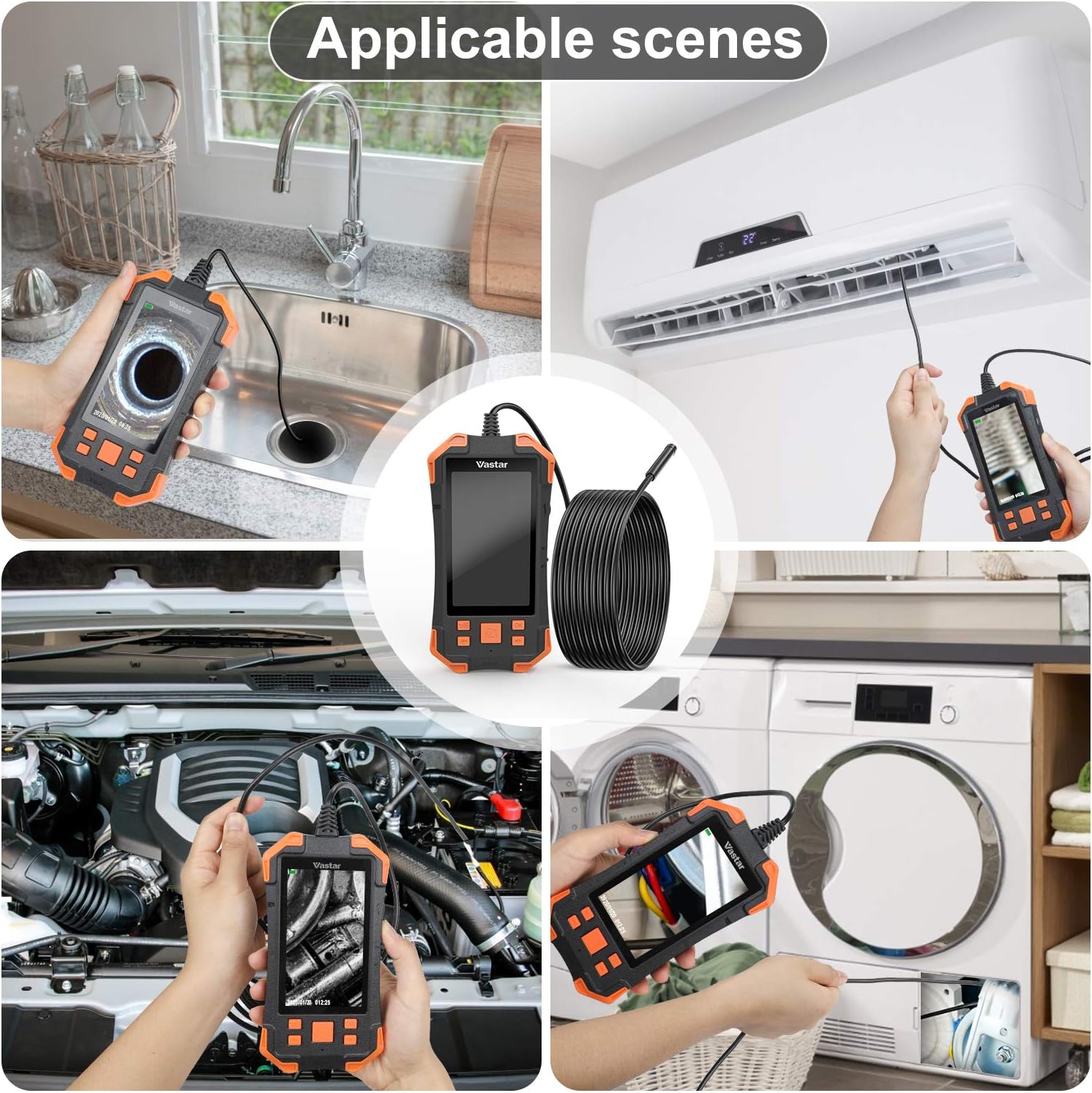
Ọgụgụ 4: Ọpụamples of practical applications for the Vastar Industrial Endoscope, such as inspecting plumbing, HVAC systems, and automotive components.
5. Nlekọta
- Na-ehicha oghere: Use a soft, dry cloth to gently clean the camera lens. For stubborn dirt, a slightly damp cloth can be used, ensuring no liquid enters the main unit.
- Nlekọta batrị: Iji mee ka batrị dị ogologo, zere ịgbapụ ngwa ahụ mgbe niile. Chajie ya mgbe niile, ọbụlagodi na ọ naghị eji ya ruo ogologo oge.
- Nchekwa: Store the endoscope in a cool, dry place away from direct sunlight and extreme temperatures. Ensure the camera probe is coiled neatly to prevent damage.
- Nyocha mmiri anaghị egbochi mmiri: While the camera probe is IP67 waterproof, the main unit is not. Avoid submerging the main unit in water.
6. Nchọpụta nsogbu
- Enweghị ike: Ensure the device is fully charged. Check the USB charging cable and adapter.
- Onyonyo na-adịghị ahụkebe: The optimal focal area is 1.5 cm to 5 cm from the object. Adjust the distance. Ensure the lens is clean. Adjust LED brightness to avoid overexposure.
- Cannot Save Photos/Videos: Ensure a Micro SD card is inserted and formatted correctly (FAT32). Check for sufficient storage space.
- Screen Pixelation: The screen resolution is 480*272P, while the camera can capture higher resolutions. Adjust camera resolution in settings for optimal viewing ma ọ bụ ndekọ.
- Igwe ọkụ LED anaghị arụ ọrụ: Check the brightness adjustment wheel/buttons.
7. Nkọwapụta
| Njirimara | Nkọwapụta |
|---|---|
| Ngosipụta | 4.3-inch IPS HD LCD Screen (480*272P) |
| Mkpebi ịse vidiyo | 1080p (1920x1080), 1280x720, 640x480 |
| Dayameta igwefoto | 5.5mm |
| Ogologo eriri USB | 5 mita (16.4 ụkwụ) |
| Waterproof Rating (Probe) | IP67 |
| Ọkụ ọkụ LED | 6 Igwe ọkụ na-agbanwe agbanwe |
| Ike batrị | 3000mAh nwere ike ịchaji |
| Oge ọrụ | 5-7 awa |
| Best Focal Area | 1.5 cm - 5 cm |
| Ụdị mgbasa ozi | Micro SD Card (FAT32 format) |
| Ibu Ibu | 1.23 pound |
| Akụkụ ngwugwu | 9.06 x 5.04 x 2.52 sentimita asatọ |
8. Akwụkwọ ikike & Nkwado
For warranty information and customer support, please refer to the documentation included with your product or contact Vastar customer service directly. Keep your purchase receipt for warranty claims.