
Okwu mmalite
This manual provides essential information for the safe and efficient operation of your Domo DO157A Tower Fan. Please read these instructions carefully before use and retain them for future reference.
The Domo DO157A is a versatile appliance combining the functions of an air cooler, fan, and humidifier, designed to enhance your indoor comfort.

Foto: N'ihu view of the Domo DO157A Tower Fan.
Ozi nchekwa
Na-edebe nchekwa nchekwa mgbe niile mgbe ị na-eji ngwa eletrik iji belata ihe egwu nke ọkụ, ujo eletrik na mmerụ ahụ nkeonwe.
- Gbaa mbọ hụ na voltage gosiri na ngwa ngwa kwekọrọ na mains mpaghara gị voltage tupu ejikọta.
- Ejila ngwa, plọg, ma ọ bụ eriri n'ime mmiri ma ọ bụ mmiri mmiri ndị ọzọ.
- Unplug from the outlet when not in use, before cleaning, or before moving the appliance.
- Debe ngwa ngwa ka ụmụaka ghara iru.
- Ejila ngwa ọ bụla nwere eriri ma ọ bụ plọg mebiri emebi rụọ ọrụ, ma ọ bụ mgbe ngwa ahụ dara ma ọ bụ mebie n'ụzọ ọ bụla.
- Refer to the official safety document for detailed safety guidelines: Ozi nchekwa (PDF).
Ngwa ngwaahịa
Familiarize yourself with the main parts of your Domo DO157A Tower Fan:
- Main Unit (Tower Fan)
- 7-liter mmiri tank
- Washable Filter System (Honeycomb Cooling Membrane)
- Njikwa anya
- Coolpack (for enhanced cooling)
- Ogwe njikwa nwere ngosi LED
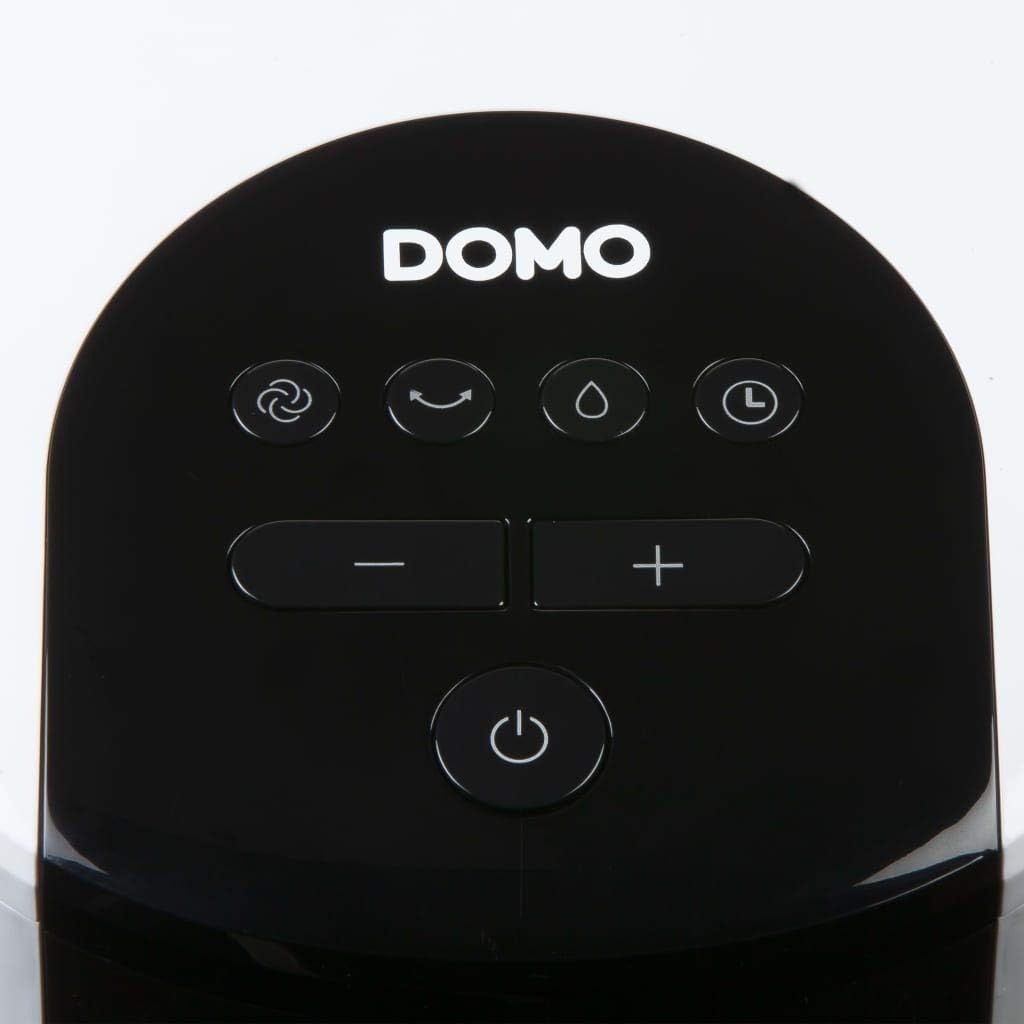
Foto: View of the tower fan with the filter system removed, showing the honeycomb cooling membrane.
Melite
- Iwepu: Carefully remove the appliance from its packaging. Retain packaging for storage or disposal.
- Nkwanye: Place the tower fan on a firm, level surface. Ensure there is adequate space around the unit for proper airflow.
- Na-ejuputa tank mmiri:
- Dọpụta tank mmiri ahụ site n'azụ ala nke ngwaọrụ ahụ.
- Fill the 7-liter water tank with clean, cold water. For enhanced cooling, place the included Coolpack (after freezing) into the water tank.
- Ensure the water level does not exceed the maximum fill line.
- Slide the water tank back into the unit until it clicks into place.
- Njikọ ike: Tinye eriri ọkụ n'ime oghere eletrik kwesịrị ekwesị (230V).
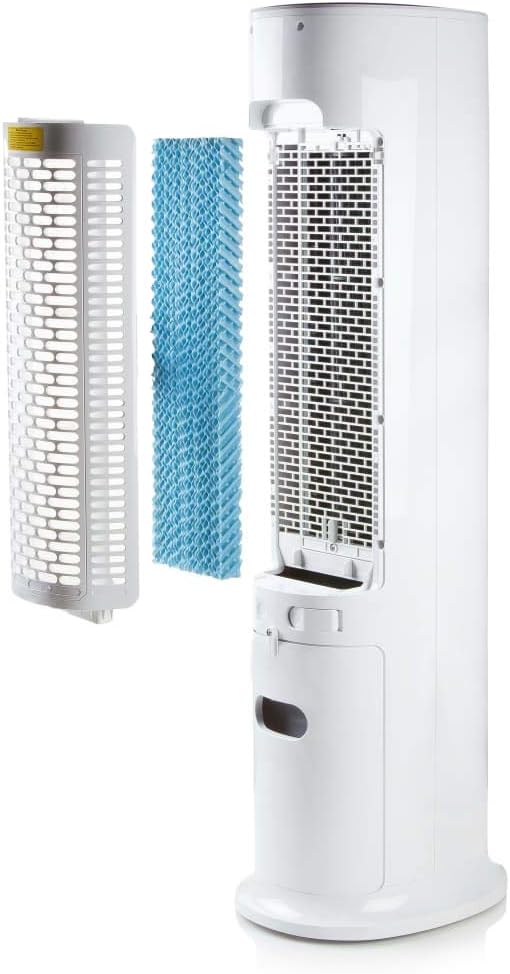
Image: Demonstrating the process of filling the water tank of the tower fan.
Ntuziaka ọrụ
The Domo DO157A can be operated using the control panel on top of the unit or the included remote control.
Ogwe njikwa na ọrụ njikwa anya

Foto: nso nso view of the control panel on the top of the tower fan.
- bọtịnụ ike (⏻): Gbanyụọ otu ahụ ma ọ bụ gbanyụọ.
- Bọtịnụ ọnọdụ (☺): Cycles through 3 ventilation modes:
- Nkịtị: Ọkụ ikuku na-aga n'ihu na ọsọ ahọpụtara.
- Okike: Na-eme ka ikuku dị n'okike jiri ọsọ ọsọ nke fan dị iche iche.
- Ụra: Reduces fan speed and noise for quiet operation during sleep.
- Speed Buttons (- / +): Na-agbanwe ọsọ fan (ọkwa 4).
- Bọtịnụ ihe na-eme ka oyi na mmiri dị jụụ (💧): Activates or deactivates the air cooling and humidifying function. This function requires water in the tank.
- Bọtịnụ ihe eji agụ oge (⏱): Sets the operating timer for up to 10 hours. Each press adds 1 hour.
- Bọtịnụ Oscillation (↻): Activates or deactivates the oscillation function, allowing the fan to rotate and distribute air over a wider area.
Ọrụ izizi
- Press the Power button to turn on the unit. The default mode is usually Normal.
- Use the Speed buttons to select your desired fan speed (1-4).
- To activate cooling/humidifying, press the Cooling/Humidifier button. Ensure the water tank is filled.
- Select a ventilation mode (Normal, Natural, Sleep) using the Mode button.
- Press the Oscillation button for wider air distribution.
- Set the timer if desired using the Timer button.

Image: The tower fan operating in a living room, illustrating the airflow direction.
Nlekọta
Ndozi mgbe niile na-eme ka arụ ọrụ kacha mma ma gbasaa ogologo ndụ nke ngwa gị.
Na-ehicha Mpụga
- Kwupuo unit ahụ mgbe niile tupu ihicha ya.
- Jiri nwayọ hichaa elu mpụta, damp akwa . Ejila ihe nchacha abrasive ma ọ bụ ihe mgbaze.
- Gbaa mbọ hụ na ọ nweghị mmiri na-abanye n'ime akụrụngwa.
Ichacha tank mmiri
- Wepu tank mmiri na nkeji.
- Wụpụ mmiri ọ bụla fọdụrụ.
- Clean the tank with mild soap and water. Rinse thoroughly.
- Hapụ tankị ahụ ka ọ kpọọ nkụ kpamkpam tupu etinye ya ọzọ.
- Clean the water tank regularly, especially if using the humidifying function frequently, to prevent mold or mildew buildup.
Na-ehicha Sistemụ Filter
- The high-quality filter system is washable.
- Carefully remove the filter (honeycomb cooling membrane) from the unit as shown in the "Product Components" section.
- Sachaa nzacha n'okpuru mmiri na-asọ asọ iji wepụ uzuzu na irighiri ihe.
- Kwe ka nzacha ahụ kpoo kpamkpam tupu itinyeghachi ya na nkeji.
- Regular cleaning of the filter is recommended, especially for allergy sufferers, to maintain hygiene and efficiency.
Nchọpụta nsogbu
If you encounter issues with your Domo DO157A, refer to the following common problems and solutions:
| Nsogbu | Ihe nwere ike ime | Ngwọta |
|---|---|---|
| Unit anaghị agbanwuo. | Enweghị ọkụ. | Lelee ma ọ bụrụ na etinyere eriri ọkụ na ebe nchekwa na-arụ ọrụ. |
| Enweghị mmetụta jụrụ oyi. | Water tank is empty or cooling function is not activated. | Fill the water tank. Press the Cooling/Humidifier button to activate the function. Ensure Coolpack is frozen and placed in the tank if desired. |
| Ikuku ikuku adịghị ike. | Fan speed is too low; air filter is dirty. | Increase the fan speed. Clean the air filter as per maintenance instructions. |
| Isi na-adịghị mma. | Stagnant water in the tank or dirty filter. | Empty and clean the water tank. Clean the filter. Use fresh water. |
Nkọwapụta
| Njirimara | Nkọwa |
|---|---|
| Ụdị | Domo |
| Aha Aha / Nọmba | DO157A |
| Ụdị | Tower Fan, Air Cooler, Humidifier |
| Ihe onwunwe | Plastic |
| Ụdị nkwụnye | Ntighari |
| Agba | Ọcha |
| Ike ikuku | 294.29 Cubic Feet per Minute (500 m³/h) |
| Ụdị njikwa | Remote Control, On-unit Control Panel |
| Ike tank mmiri | 7 lita |
| Mpaghara ala akwadoro | 25 square mita |
| Ibu ngwaahịa | 11.2 kilogram |
| Wattage | 65 W |
| Ọkwa mkpọtụ | 40 decibel |
| Ọnụọgụ nke Ọsọ ọsọ | 4 |
| Voltage | 230 volts |
| Akụkụ (D x W x H) | 34 cm x 26 cm x 106.5 cm |
| Ngụ oge | Ruo awa iri abụọ |
| Ụdị ikuku | Nkịtị, eke, ụra |
| Atụmatụ pụrụ iche | Sleep mode, Washable filter system, Oscillation, Coolpack included |
Akwụkwọ ikike na nkwado
For warranty information, please refer to the documentation provided with your purchase or contact Domo customer support. Keep your proof of purchase for warranty claims.
If you require further assistance or have questions not covered in this manual, please contact Domo customer service through their official website or the contact details provided with your product.