
GLIDiC TW-5000s
GLIDiC Sound Air TW-5000s True Wireless Earbuds Instruction Manual
Model: TW-5000s
1. Okwu mmalite
Daalụ maka ịzụrụasing the GLIDiC Sound Air TW-5000s True Wireless Earbuds. This manual provides essential information for the safe and effective use of your device. Please read it thoroughly before use and retain it for future reference.
2. Ozi nchekwa
- Do not expose the earbuds or charging case to extreme temperatures, direct sunlight, or high humidity.
- Avoid dropping, impacting, or disassembling the device. This may cause damage and void the warranty.
- Keep the device away from water and liquids. While sweatproof, immersion can cause damage.
- Jiri naanị eriri nchaji enyere ma ọ bụ ihe dabara adabara.
- Ige ntị ogologo oge n'olu dị elu nwere ike ibute mmebi ntị. Gbanwee olu ka ọ dị mma.
- Be aware of your surroundings when using earbuds, especially in traffic or hazardous environments.
3. Ihe ngwugwu
Chọpụta na ihe niile dị na ngwugwu gị:
- GLIDiC Sound Air TW-5000s True Wireless Earbuds (Left and Right)
- Nchaji case
- Eriri Nchaji USB (Ụdị A ruo Micro-USB)
- Ọtụtụ nha ndụmọdụ ndụmọdụ ntị (S, M, L)
- Akwụkwọ ntuziaka (akwụkwọ a)
4. Ngwaahịa gafereview
Familiarize yourself with the components of your GLIDiC Sound Air TW-5000s earbuds and charging case.

Figure 4.1: GLIDiC Sound Air TW-5000s Earbuds and Charging Case. The image displays the black charging case with the GLIDiC logo on top, positioned next to the two black earbuds.
Ihe Ndị Dị na Ntị Eti
- Bọtịnụ multifunction: Located on the outer surface of each earbud, used for playback control, call management, and voice assistant activation.
- Ihe ngosi LED: Provides status information (pairing, charging, power).
- Igwe okwu: For voice calls and voice assistant commands.
- Kọntaktị na-akwụ ụgwọ: Located on the underside of each earbud, for charging within the case.
- Ntị Ntị: Silicone tip for in-ear comfort and sound isolation.
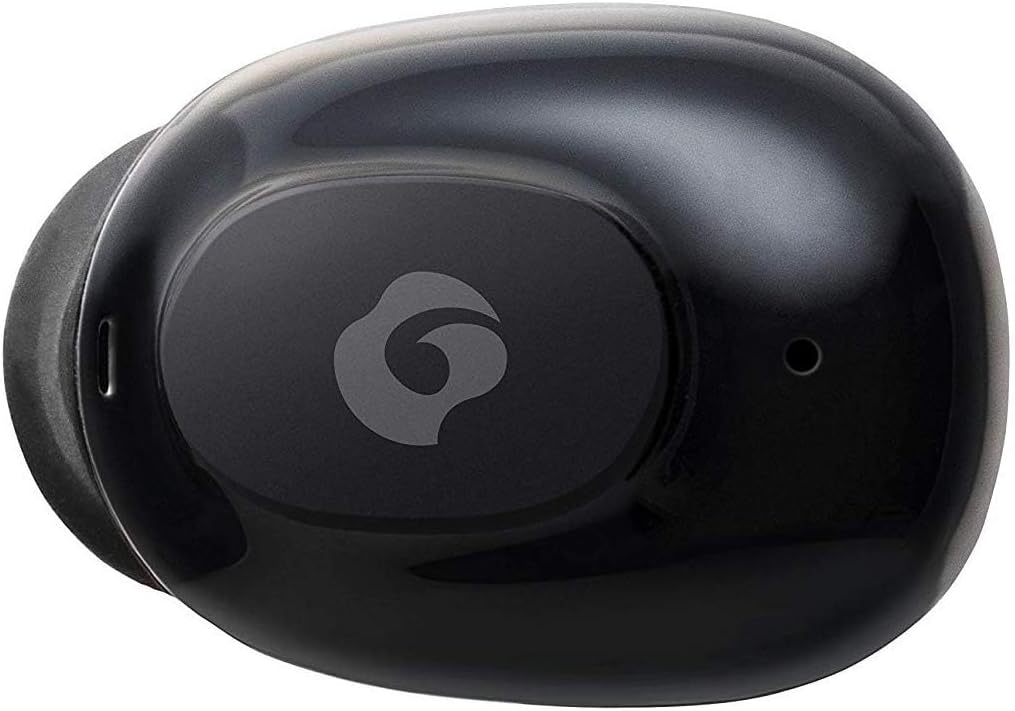
Ọgụgụ 4.2: nso nso view of a single GLIDiC earbud, highlighting the multifunction button with the GLIDiC logo and the microphone opening.
Charging Case Components
- Ọdụ ụgbọ mmiri na-ebufe: Internal contacts for earbuds, external port for case charging.
- Ihe ngosi ika LED: Shows charging status of the case.
- Ihe mkpuchi: Protects earbuds and secures them during charging.
5. Nhazi
5.1 Nchaji izizi
- Place both earbuds into the charging case. Ensure they are correctly seated, and the LED indicators on the earbuds illuminate.
- Connect the USB charging cable to the charging port on the case and plug the other end into a USB power source (e.g., computer, wall adapter).
- The case LED indicator will show charging status. Allow approximately 2 hours for a full charge of both earbuds and the case.
- Once fully charged, disconnect the charging cable. The earbuds offer up to 60 days of standby time when stored in the fully charged case.
5.2 Ijikọ na ngwaọrụ Bluetooth
- Gbaa mbọ hụ na ebubo na ekwe ntị.
- Mepee igbe nchaji. Igwe ntị ga-abanye na ọnọdụ njikọta na-akpaghị aka, ihe ngosi LED ha ga-enwu.
- Na ngwaọrụ Bluetooth gị (ama, mbadamba, wdg), gaa na ntọala Bluetooth.
- Chọọ maka available devices. Select "GLIDiC TW-5000s" from the list.
- Once connected, the earbud LED indicators will stop flashing and may show a solid light or turn off, depending on the model. A voice prompt may also confirm the connection.
- If pairing fails, place the earbuds back in the case, close the lid, wait a few seconds, and then repeat the steps.
6. Ntuziaka ọrụ
6.1 Gbanyụọ ma ọ bụ gbanyụọ
- Ike Na: Open the charging case, or press and hold the multifunction button on each earbud for approximately 3 seconds.
- Gbanyụọ: Place the earbuds back into the charging case and close the lid, or press and hold the multifunction button on each earbud for approximately 5 seconds.
6.2 Nghaghachi egwu
- Gwuo/kwụsịtụ: Press the multifunction button once on either earbud.
- Track na-esote: Double-press the multifunction button on the right earbud.
- Gara aga Track: Double-press the multifunction button on the left earbud.
- Olu elu: Triple-press the multifunction button on the right earbud.
- Olu ala: Triple-press the multifunction button on the left earbud.
6.3 Njikwa oku
- Azịza/Kwụsị Oku: Press the multifunction button once on either earbud.
- Jụ oku: Press and hold the multifunction button on either earbud for approximately 2 seconds.
6.4 Onye enyemaka olu
- Mee ka onye enyemaka olu rụọ ọrụ: Press and hold the multifunction button on either earbud for approximately 2 seconds (when not on a call).
6.5 Multi-Communication Mode
The GLIDiC Sound Air TW-5000s features a multi-communication mode that allows select ambient sounds to be heard without compromising audio quality. This enhances user awareness and safety.
- Activate/Deactivate Multi-Communication Mode: Consult the specific instructions provided with your device, as activation methods can vary. Typically, this involves a specific press sequence on the multifunction button or an option within a companion app if available.
7. Nlekọta
7.1 Nhicha
- Jiri akwa dị nro, kpọrọ nkụ, hichaa akpa ntị na ihe nchaji.
- Ejila ihe mkpocha abrasive, mmanya, ma ọ bụ ihe mgbaze kemịkal.
- Gently remove ear tips and clean them with mild soap and water if necessary. Ensure they are completely dry before reattaching.
- Use a dry cotton swab to carefully clean the charging contacts on both the earbuds and the case.
7.2 Nchekwa
- Mgbe ị naghị eji ya, debe ekweisi ntị n'ime akpa chaja ha iji chebe ha ma hụ na ha na-achaji.
- Chekwaa ngwaọrụ ahụ n'ebe dị jụụ, kpọrọ nkụ, pụọ na ìhè anyanwụ kpọmkwem na oke okpomọkụ.
8. Nchọpụta nsogbu
If you encounter issues with your GLIDiC Sound Air TW-5000s, refer to the following common problems and solutions:
| Nsogbu | Ngwọta enwere ike |
|---|---|
| Eti ntị anaghị agba ọkụ. | Ensure earbuds are charged. Place them in the charging case and connect the case to a power source. |
| Earbuds do not pair with device. |
|
| Naanị otu ntị nwere ụda. |
|
| Nchaji anaghị akwụ ụgwọ. |
|
| Sound quality is poor or intermittent. |
|
9. Nkọwapụta
| Njirimara | Nkọwa |
|---|---|
| Aha Nlereanya | TW-5000 |
| Teknụzụ Njikọta | Ikuku (Bluetooth) |
| Oke Bluetooth | 10 mita |
| Oke ugboro ugboro | 20 Hz - 20,000 Hz |
| Battery Life (Carrying Case Standby) | Ruo ụbọchị 60 |
| Ọkwa Nguzogide mmiri | Mmiri anaghị agbaze (Ọsụsọ) |
| Ụdị njikwa | Media Control, Touch, Voice |
| Atụmatụ pụrụ iche | Microphone Included, Noise Cancellation, Multi-communication mode |
| Ihe onwunwe | Plastic, TPE, and Silicone |
| Nha (Earbud) | 0.98 x 0.67 x 0.91 sentimita (ihe dị ka) |
| Ibu Ibu | 9.6 ounces (total package weight) |
| UPC | 811559030024 |
10. Akwụkwọ ikike na nkwado
GLIDiC products are designed for reliability and performance. For specific warranty details, please refer to the warranty card included with your purchase or visit the official GLIDiC website. If you require technical support or have questions not covered in this manual, please contact GLIDiC customer service through their official channels.
Biko dowe ihe akaebe nke ịzụrụ ihe maka akwụkwọ ikike.
Ask a question about this manual
Ask about setup, troubleshooting, compatibility, parts, safety, or missing instructions. Manuals+ will review the question and use this page’s manual context to help answer it.