
1. Okwu mmalite
Daalụ maka ịzụrụasing the SMSL SA300 Bluetooth 5.0 Class D Digital Amponye ndu. Nke a amplifier is designed to deliver high-fidelity audio performance with versatile connectivity options. Please read this manual thoroughly before using the product to ensure proper operation and to maximize your listening experience.

Figure 1: SMSL SA300 Digital Ampna -emegharị ihe
2. Akụrụngwa Ngwaahịa
- Bluetooth 5.0 dị elu: Features Bluetooth 5.0 for stable wireless audio streaming up to 10 meters (unobstructed), supporting Apt-X for high-quality sound with low power loss.
- Ịrụ ọrụ dị elu Amponye nrụpụta IC: Equipped with the new Infineon "MA12070" amplifier IC, offering excellent energy efficiency (92% conversion) and optimizing power loss during music playback for superior audio performance.
- Mmepụta dị ike: Delivers 80W x 2 into 4Ω or 40W x 2 into 8Ω, providing ample power for various speaker setups.
- Nkwado ọdịyo USB: Compatible with USB audio up to 32bit/384kHz playback. No drivers required for most operating systems (Windows 10, Mac OSX 10.6+, Linux, Android OTG, iOS with Apple Lightning-USB camera kit). Note: Not compatible with Windows 7 or 8.
- Mmepụta Subwoofer: Includes a dedicated super bass signal output terminal for connecting an active subwoofer, enabling a 2.1ch sound system for enhanced low-frequency response.
- Njikwa ụda: Features EQ adjustment, bass, and treble correction functions for personalized sound tuning.
- Njikwa ọdịmma dị mma: Full-function remote control for easy operation from a distance.

The SA300 is equipped with the new Infineon MA12070 amplifier IC, ensuring high energy efficiency and superior audio performance.

Adjust bass and treble levels to customize your audio experience to your preference.

Control all amplifier functions conveniently with the included remote control.
3. Ihe ngwugwu
The SMSL SA300 package includes the following items:
- 1x SMSL SA300 Digital Ampna -emegharị ihe
- 1x njikwa anya
- 1x Bluetooth Antenna
- 1x USB-Micro USB Cable
- 1x AC Adapter (DC 24V)
- 1 x eriri ọkụ
- 1x Simple Instruction Manual (Chinese and English only)
4. Ngwaahịa gafereview (Diagrams)
Familiarize yourself with the various components and connections of your SA300 ampna -emegharị ihe.

Ọgụgụ 2: Nhazi akụkụ ihu na azụ
- Ngosipụta
- Mgbanwe ọkụ
- Nhọrọ Ụdị ntinye
- Control akpu
- Gold-plated Banana Plug Compatible Terminals (Speakers)
- Analog Input Terminals (RCA)
- Super Bass Signal Output Terminal (SW OUT)
- Antenna Bluetooth
- Ntinye ike (DC 24V)
- Ọnụ ntinye USB
5. Ntọala na Njikọ
5.1. Njikọ Ọkà Okwu
Connect your passive speakers to the gold-plated banana plug compatible terminals on the rear panel. Ensure correct polarity (red for positive, black for negative) for each speaker.

Figure 3: Speaker and Power Connections
5.2. Audio Source Njikọ
The SA300 offers multiple ways to connect your audio sources:
- Bluetooth: Attach the Bluetooth antenna to the rear panel. Enable Bluetooth on your device (e.g., smartphone, tablet) and select "SMSL SA300" from the list of available devices to pair.
- USB Audio: Connect your PC, mobile phone, Android TV, or game console to the USB input terminal on the rear panel using the provided USB-Micro USB cable.
- RCA Analog Input: Connect audio sources like CD players or DACs to the RCA analog input terminals (R/L) on the rear panel.
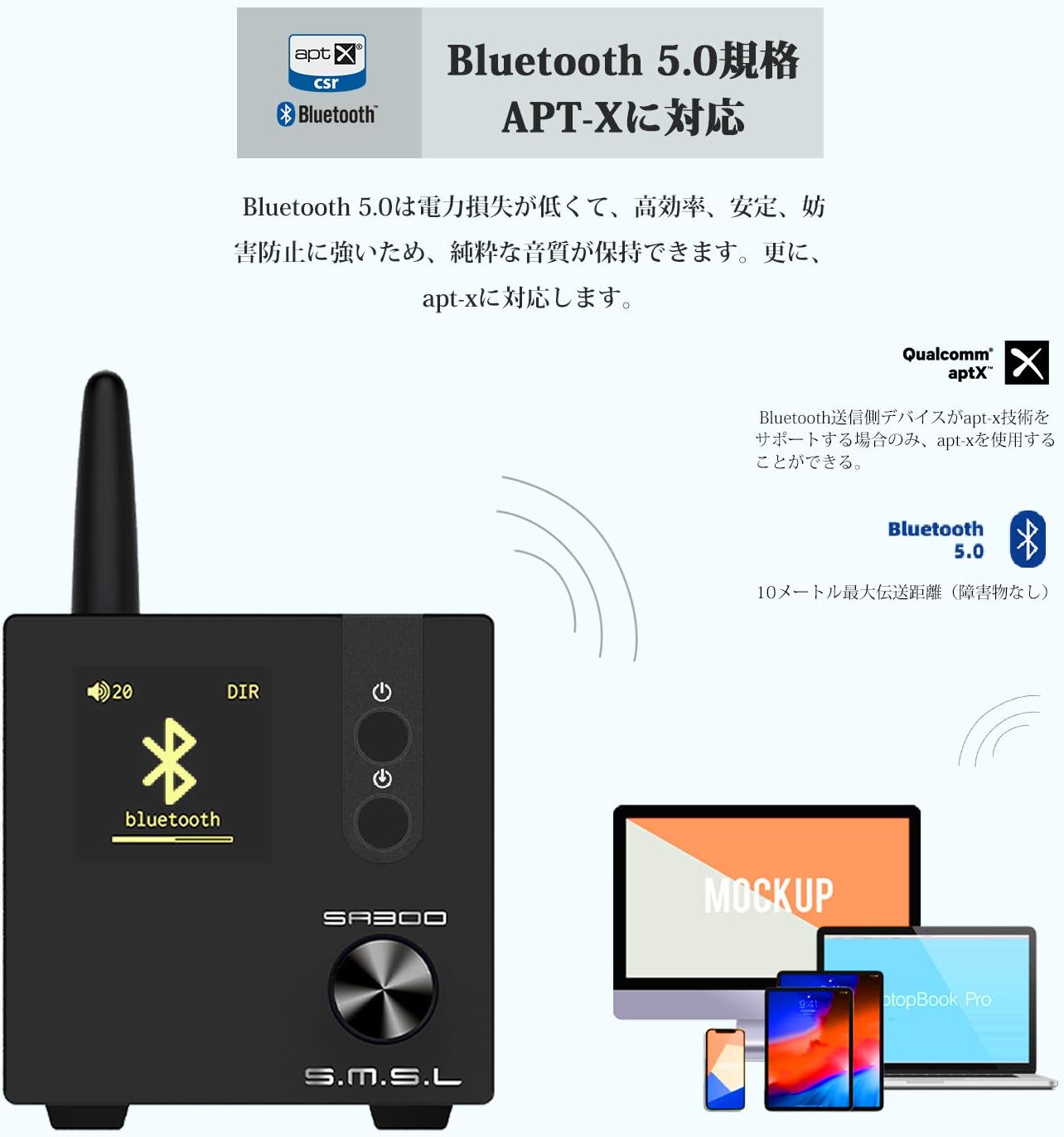
Ọgụgụ 4: Bluetooth 5.0 Njikọta
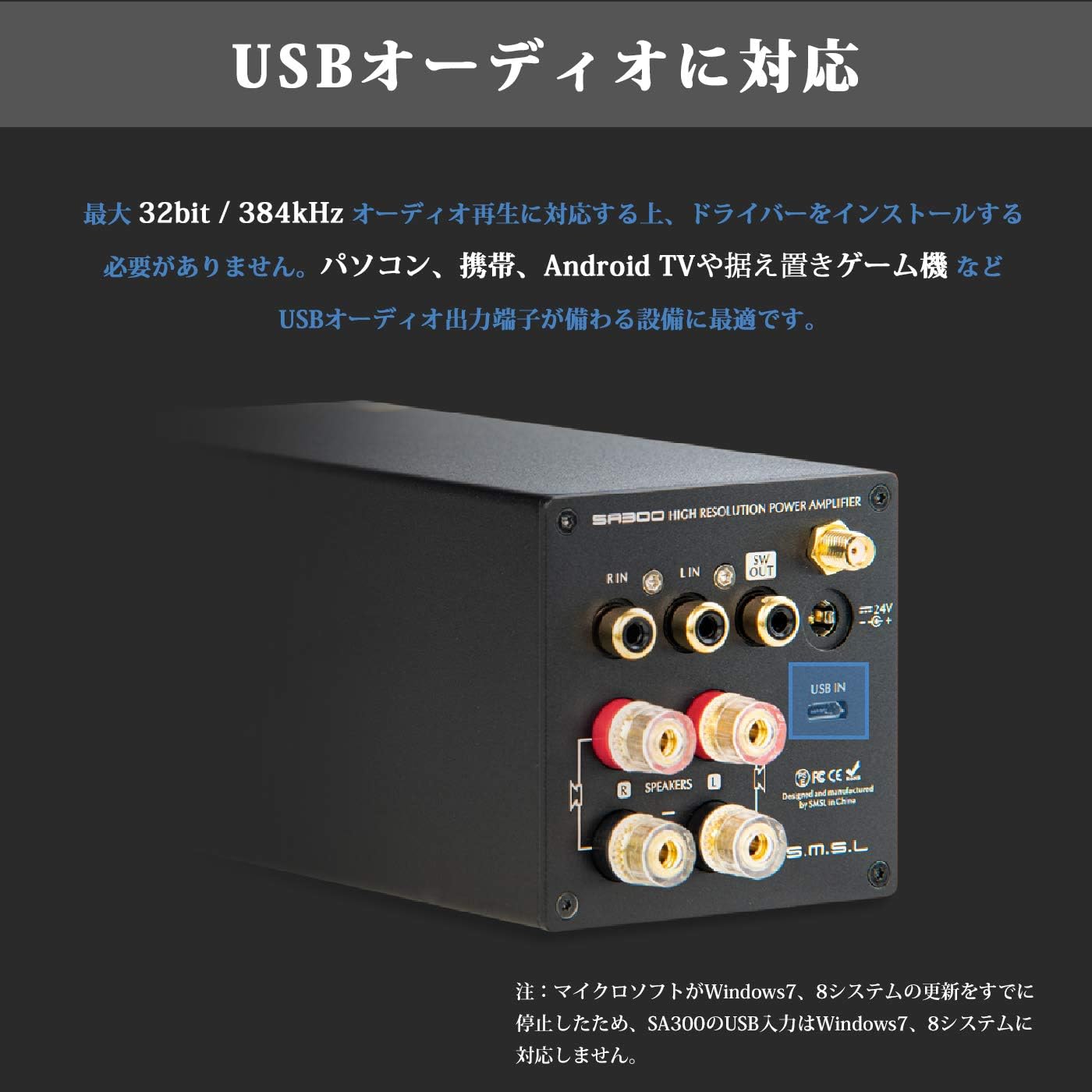
Figure 5: USB Audio Input
5.3. Njikọ Subwoofer
For enhanced bass, connect an active subwoofer to the "SW OUT" terminal on the rear panel. This allows you to create a 2.1ch sound system.
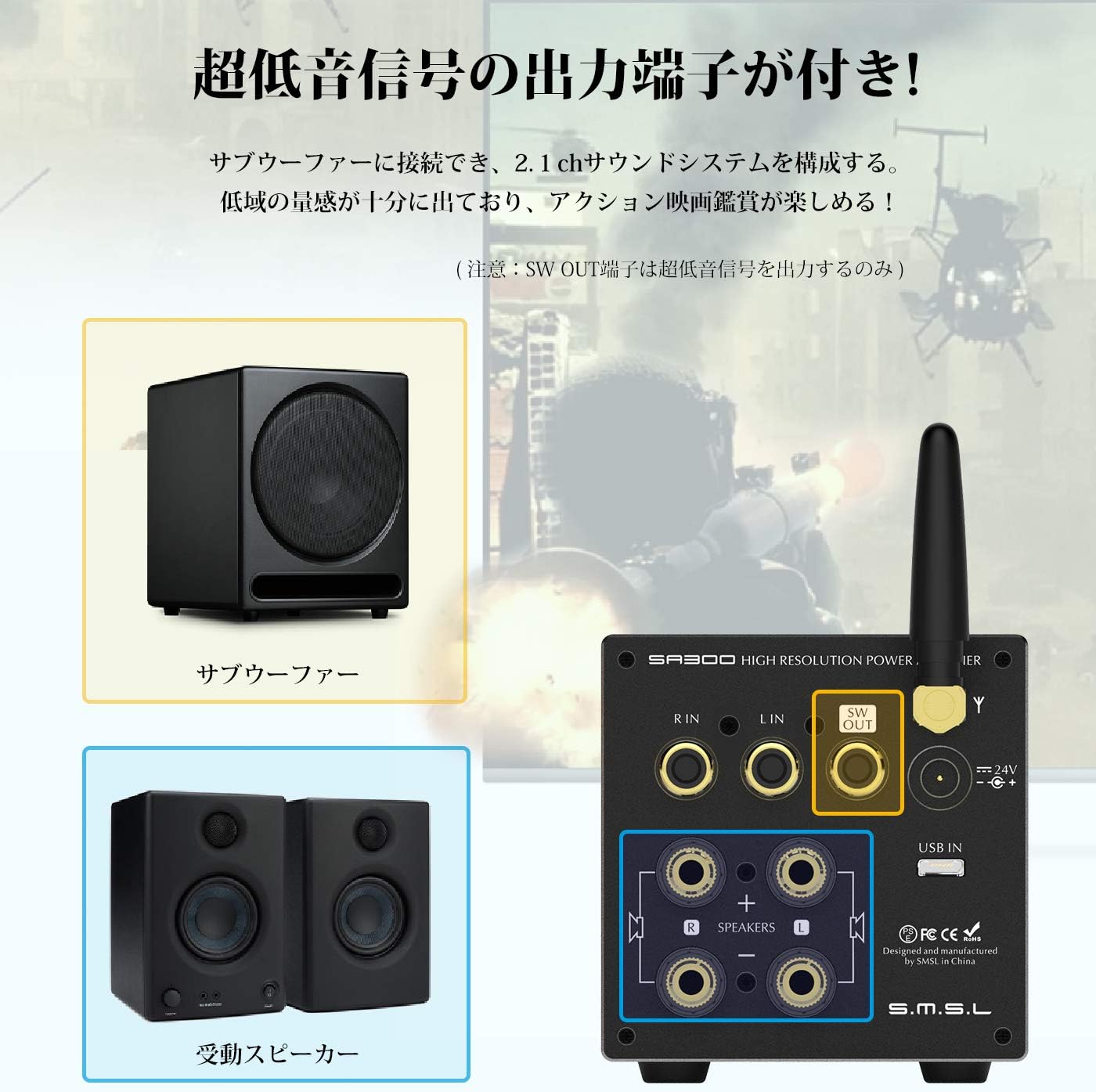
Figure 6: Subwoofer Output Connection
6. Ntuziaka ọrụ
6.1. Gbanyụọ / gbanyụọ
Press and hold the Power Switch (2) on the front panel to turn the unit on or off. The display will illuminate when powered on.
6.2. Nhọrọ Ntinye
Short press the Input Mode Selection button (3) on the front panel to cycle through available input sources (Bluetooth, USB, RCA).
6.3. Volume and Tone Control
Rotate the Control Knob (4) to adjust the volume. Short press the Control Knob to cycle through various settings such as Volume, EQ, Bass, Treble, Gain, and Brightness. Once a setting is selected, rotate the knob to adjust its value.
6.4. Ime njikwa ojiji
The included remote control provides convenient access to all amplifier functions, including power, input selection, volume, mute, and tone adjustments.
7. Nkọwapụta
| Oke | Uru |
|---|---|
| Ike mmepụta | 80W + 80W (4Ω), 40W + 40W (8Ω) |
| THD+N | 0.008% |
| Oke mgbama-na- mkpọtụ (S/N) | 90dB |
| Nkewa Channel | 88dB |
| Dijitalụ Amponye nrụpụta IC | MA12070 |
| Max USB SampỌnụ ego | 32bit / 384kHz |
| Ụdị Bluetooth | BT5.0 (Apt-X compatible) |
| EQ Quantity | 8 |
| Ogologo ngbanwe Treble | ± 10dB |
| Oke mmezi Bass | ± 10dB |
| Supported OS (USB) | Windows 10, Mac OSX 10.6+, Linux, Android (OTG), iOS (Apple Lightning-USB camera kit) |
| Ntinye ntinye | Stereo RCA (gold-plated), Micro USB, Bluetooth |
| Ọnụ ahịa mmepụta | 2ch Stereo Speaker Output (banana plug compatible, gold-plated), Super Bass Signal Output |
| Oriri ike | 35W (normal volume) |
| Ike njikere | <0.5W |
| Akụkụ (HxWxD) | 70mm × 70mm × 188mm |
| Ibu ngwaahịa | 0.8 n'arọ |
8. Nchọpụta nsogbu
- Enweghị ụda:
- Gbaa mbọ hụ na amplifier is powered on and the volume is not muted or set too low.
- Check all cable connections (power, speakers, audio source) for secure fit and correct polarity.
- Hụ na ahọpụtara isi iyi ntinye ziri ezi na ampna -emegharị ihe.
- Ọ bụrụ na ị na-eji Bluetooth, hụ na ejikọtara ngwaọrụ na nke ọma.
- Ụda agbagọ:
- Belata olu na ma abụọ ahụ amplifier na isi iyi ọdịyo.
- Lelee ndakọrịta nke impedance ọkà okwu na ampna -emegharị ihe.
- Ensure audio cables are not damaged or poorly connected.
- Okwu njikọ Bluetooth:
- Ensure the Bluetooth antenna is securely attached.
- Move the audio source closer to the amplifier to reduce interference.
- Clear the Bluetooth pairing history on your device and re-pair.
9. Nlekọta
- Debe ihe amplifier in a dry, well-ventilated area away from direct sunlight, heat sources, and moisture.
- Jiri ákwà dị nro ma kpọọ nkụ hichaa ihe dị n'ime ya. Ejila ihe nhicha mmiri ma ọ bụ ihe na-eme ka ọ dị ka aerosol.
- Zere idobe ihe ndị dị arọ n'elu ampna -emegharị ihe.
10. Akwụkwọ ikike na nkwado
This product comes with a standard manufacturer's warranty. For specific warranty terms and conditions, please refer to the warranty card included in your package or contact your retailer. For technical support, product inquiries, or service requests, please visit the official S.M.S.L websaịtị ma ọ bụ kpọtụrụ ndị ahịa ha ọrụ.
11. Ozi nchekwa
- Emeghela ya ampihe mgbapụta casing. There are no user-serviceable parts inside. Opening the casing ga-emebi akwụkwọ ikike.
- Use only the provided power adapter. Using an incompatible power supply may damage the unit and pose a safety risk.
- Debe ihe ahụ ka ọ ghara ịbanye na mmiri ma ọ bụ mmiri ndị ọzọ.
- Gbaa mbọ hụ na ikuku ikuku dị mma iji gbochie ikpo oke ọkụ. Akwụsịla oghere ikuku.
- Zere ikpughe akụkụ ahụ na oke okpomọkụ ma ọ bụ iru mmiri.